SettingsManagerLib
- By
A simple, easy-to-set-up config mod using YACL and Mod Menu to create simple or complex config menus
wildbeast42 | SettingsManagerLib
Create a server, get 25% off your first month

A simple settings manager library, which implements YACL to easily generate config screens for Mod Menu.
NOTE: This mod does nothing by itself. It is a library for other mods.
Features:
- Easy and quick setup
- Easy implementation
- Easy access to settings
- Built-in config file generation to save settings between client restarts
- Built-in chroma manager to sync chroma features across files
- Supports nearly all YACL fields
Setup:
Add the mod as a dependency:
in build.gradle
repositories {
    maven { url = "https://api.modrinth.com/maven" }
    maven {
        name = "Terraformers"
        url = "https://maven.terraformersmc.com/"
    }
}

dependencies {
    modImplementation("maven.modrinth:settingsmanagerlib:${project.modmenu_version}")
    modImplementation("com.terraformersmc:modmenu:${project.modmenu_version}")
}
in gradle.properties
settingsmanagerlib_version=LATEST_VERSION_NUMBER (e.g. 1.0.0)
modmenu_version=LATEST_VERSION_NUMBER (e.g. 15.0.0)
in fabric.mod.json
"entrypoints": {
"modmenu": [ "com.example.mod.ModMenuAPI" ]
}
Then create a new class ModMenuAPI
public class ModMenuAPI implements ModMenuApi {
     @Override
     public ConfigScreenFactory<?> getModConfigScreenFactory() {
            return parentScreen -> ExampleModClient.settings.getConfig(parentScreen);
     }
}
Set up the mod:
in ExampleModClient
public static Settings settings;

@Override
public void onInitializeClient() {
     settings = new Settings().setup("Example Mod", "examplemod");
     settings.loadFromFile();
}
To add a setting:
Note: supports Strings, Booleans, Integers, Floats, Colors, and custom Enums.
<details> <summary>Standard Strings/Integers/Floats</summary>
in ExampleModClient
@Override
public void onInitializeClient() {
     settings.add(String settingId, String page, String group, String/int/float defaultValue, String settingName, String description)

     settings.add("guiName", "Visual Settings", "Overlay", "Default Gui Name", "Gui Scale", "This text will appear as a tooltip when you click on the option.");
}
</details>
<details> <summary>Integer/Float Sliders</summary>
in ExampleModClient
@Override
public void onInitializeClient() {
     settings.addSlider(String settingId, String page, String group, int/float defaultValue, String settingName, String description, int/float min, int/float max, int/float step)

     settings.add("guiScale", "Visual Settings", "Overlay", 1.0f, "Gui Scale", "This text will appear as a tooltip when you click on the option.", 0.5f, 5.0f, 0.1f);
}
</details>
<details> <summary>Booleans</summary>
in ExampleModClient
@Override
public void onInitializeClient() {
     settings.addSlider(String settingId, String page, String group, boolean defaultValue, String settingName, String description, BooleanFormat valueFormat)

     settings.add("doRenderGui", "Visual Settings", "Overlay", true, "Render Gui", "This text will appear as a tooltip when you click on the option.", BooleanFormat.ONOFF);
}
BooleanFormat - the displayed value of the boolean:
BooleanFormat.ONOFF- "On" or "Off"BooleanFormat.TRUEFALSE- "True" or "False"BooleanFormat.YESNO- "Yes" or "No"BooleanFormat.TICKBOX- A box that is either checked or unchecked </details>
<details> <summary>Colors</summary>
in ExampleModClient
@Override
public void onInitializeClient() {
     settings.addColor(String settingId, String page, String group, int defaultValue, String settingName, String description)

     settings.addColor("guiBackgroundColor", "Visual Settings", "Overlay", net.minecraft.util.Colors.GRAY, "Gui Background Color", "This text will appear as a tooltip when you click on the option.");
}
</details>
<details> <summary>Custom Enum</summary> Custom Enums are not currently supported </details>
Note that the value of settings automatically persist after restarting the client, however, you still need to add them to the config menu, which can be accomplished by creating the config menu inside onInitializeClient()
Accessing Values:
Getting The Value of a Setting:
To get the value of a setting, use the following where typeInstance is a value with the same type as the value of the setting you are getting. Refer to below for example implementations.
ExampleModClient.settings.get("settingId", typeInstance);

ExampleModClient.settings.get("doRenderGui", true); //to return a boolean
ExampleModClient.settings.get("guiBackgroundColor", net.minecraft.util.Colors.GRAY); //to return a color
ExampleModClient.settings.get("guiScale", 1.0f); //to return a float
ExampleModClient.settings.get("guiName", "Default Gui Name"); //to return a string
ExampleModClient.settings.get("guiSliderMin", 1); //to return an integer
Setting the Value of a Setting:
By default, the value of a setting is set to its default value, unless the user changes it. To manually set the value of a setting, use the following.
ExampleModClient.settings.set("settingId", newValue);

ExampleModClient.settings.set("doRenderGui", false); //example with a boolean
Pages/Groups:
Settings are organized by pages and groups. Refer to the image below for an example. The page is the bar at the top, and you can open one page at a time. A group is a collapsible collection of settings. You can have unlimited groups and unlimited settings on each page. Each setting must have a page, but does not require a group. To create a setting without a group as shown in the image below, set the group to "" or "none". 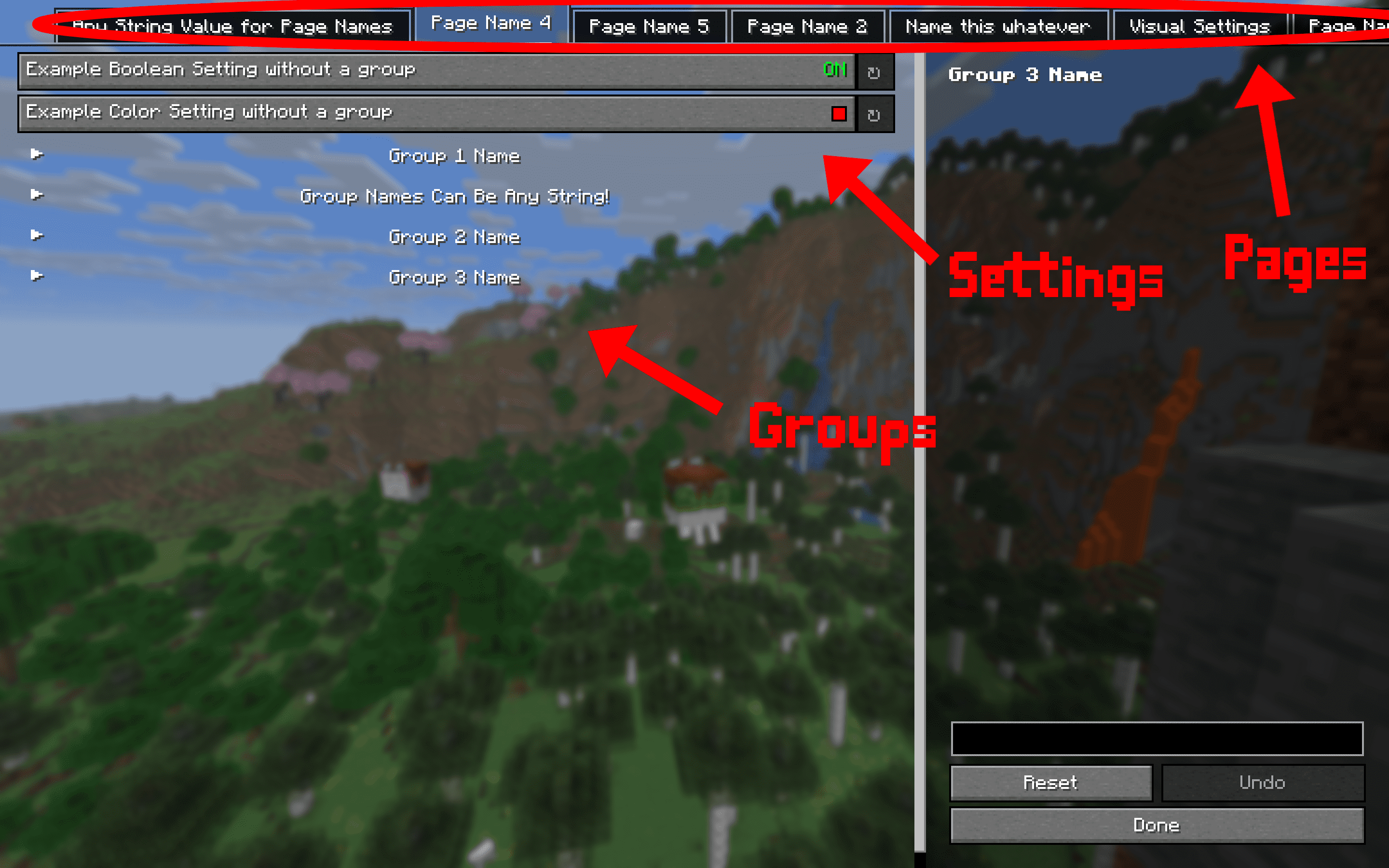
Dependencies:
This mod requires multiple other mods in order to function. They will all automatically be installed with this one, so no need to manually download them.
- YACL
- Mod Menu
- Fabric API
SettingsManagerLib Team