Set Anger
- By
Adds commands and selector helpers for forcing mobs to target selected living entities.
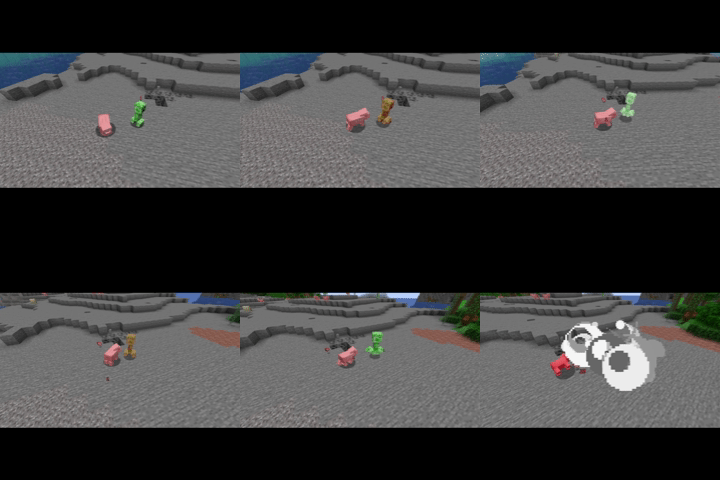
Set Anger Showcase.gif

Showcase of damage to targeting.gif
Description
Set Anger
A server-side NeoForge mod for Minecraft 1.21.1 that adds command support for forcing mobs to target selected living entities.
The main command is:
/setanger <subjects> <targets>The shorthand alias is:
/sa <subjects> <targets>Examples:
/setanger @e[type=zombie,limit=1,sort=nearest] @s
/sa @e[type=chicken,distance=..16] @p
/setanger @e[hostile=true,distance=..32] @a[limit=1,sort=nearest]
subjects must select mobs. targets must select living entities such as players, mobs, or animals. Both arguments can select more than one entity. When multiple targets are selected, each subject uses the nearest selected living target in the same dimension.
To clear a forced target:
/setanger clear <subjects>Example:
/setanger clear @e[type=zombie,distance=..32]To reload the Set Anger server config without restarting:
/setanger reloadconfig
/sa reloadconfig
The reload command reports Reloaded Set Anger configuration. on success. Set Anger only uses the server's config/set_anger.toml; world serverconfig copies are ignored.
What It Does
- Calls the mob targeting API directly, similar in spirit to setting
AngryAt, but works beyond vanilla neutral mobs. - Keeps the forced target active each server tick while the target is alive and in the same dimension.
- Adds a simple melee attack goal to passive pathfinding mobs that do not already have one, so mobs such as chickens can move toward and attack their forced target.
- Adds a default
generic.attack_damagevalue of1.0to mob types where NeoForge exposes the attribute builder, and the generic attack goal also has a guarded 1 damage fallback for passive mobs that still lack the attribute. - Uses vanilla persistent entity data to remember the forced target UUID across saves while both entities still exist.
- Uses server-side checks and command errors instead of crashing when a selector picks an invalid subject or target.
Mob Disposition Selector Options
This mod adds:
@e[hostile=true]
@e[hostile=false]
@e[neutral=true]
@e[neutral=false]
@e[passive=true]
@e[passive=false]
@e[angryatplayer=true]
@e[angryatplayer=false]
These options classify mobs by their normal behavior, not by their current anger state.
hostile=truematches mobs that normally target players, such as zombies and skeletons.neutral=truematches mobs that are normally neutral but can become angry when provoked, such as wolves, bees, endermen, and zombified piglins.passive=truematches mobs that are normally non-hostile and do not retaliate, such as pigs, cows, and chickens.
This means a wolf remains neutral=true whether or not it is currently angry. An angered wolf does not become hostile=true just because it currently has a target.
angryatplayer=true is different: it is a live-state filter. It matches mobs whose current target is an alive, non-creative, non-spectator player. This includes mobs targeting players because of vanilla AI, this mod's /setanger, or another mod's AI changes.
The options can be combined with normal selector filters:
@e[hostile=true,type=!minecraft:creeper,distance=..24]
@e[neutral=true,distance=..16]
@e[passive=true,type=minecraft:chicken]
@e[angryatplayer=true,distance=..32]
Classification order is:
- Server config
hostile - Server config
neutral - Server config
passive - Entity types in
#set_anger:hostile - Entity types in
#set_anger:neutral - Entity types in
#set_anger:passive - Entities implementing Minecraft's
NeutralMobinterface - Other mobs whose entity type category is
monster - Other mobs as passive
Entity Category Config
Set Anger creates a server config:
config/set_anger.tomlThis is in the normal NeoForge config folder for the running server. The config lets server owners classify entities without making a datapack. If the file is missing or has not loaded yet, Set Anger uses safe defaults and recreates the file from the config spec. If an older config/set_anger-server.toml exists and config/set_anger.toml does not, Set Anger copies the old file once during startup or reload.
Example:
debug = false

[relations]
updateAttackerOnBlockedDamage = true
enableExecuteOnVictim = true

[entity_categories]
hostile = ["minecraft:zombie", "examplehostiles:*"]
neutral = ["minecraft:wolf", "retaliationmod:*"]
passive = ["exampleanimals:gentle_cow"]
Entries can be:
- Exact entity ids:
minecraft:zombie - Mod id wildcards:
examplemod:*
Config entries override datapack tags and built-in heuristics. If the same entity matches more than one config list, hostile wins, then neutral, then passive.
The relation options are:
updateAttackerOnBlockedDamage: when true, blocked shield damage updates the defender's recent attacker so vanillaexecute on attackercan work from advancement reward functions even if the damage was fully blocked.enableExecuteOnVictim: when true, Set Anger'sexecute on victimrelation resolves to the source entity's recent victim. When false, the command relation remains in the command tree but resolves to no entity, so the setting can be changed with/setanger reloadconfig.
The root debug option controls command success feedback for non-reload Set Anger commands:
debug = false: default. Commands stay quiet on success, which avoids noisy datapack skill output and latest.log entries.debug = true: command success feedback is sent to the command source only. It is not broadcast to all operators.
The tags are empty by default and are intended for datapacks and modpacks. They make modded entity support explicit without hard-coding another mod's classes. For example, a datapack can classify a modded mob as neutral:
{
  "replace": false,
  "values": [
    "examplemod:retaliating_deer"
  ]
}
Put that file at:
data/set_anger/tags/entity_type/neutral.jsonFor mods that change AI at runtime, such as Enhanced AI's animal retaliation features, these selectors do not inspect or modify another mod's goals. They only classify the entity type for command selection. If a modpack wants animals changed by another mod to count as neutral or hostile for commands, add those entity types to the appropriate set_anger tag.
For runtime AI behavior, use angryatplayer=true. That selector looks at the mob's current target and therefore can match mobs made aggressive by vanilla, Set Anger, or other AI mods.
Multiplayer Safety
Set Anger is server-authoritative.
- Commands and selectors run on the server command parser.
- Forced target UUIDs are stored per entity, not globally per player.
- Each mob independently chooses the nearest selected target in its own dimension.
- Cross-dimension targeting is rejected.
angryatplayer=truereads the mob's current target and does not mutate AI state.- Client-only classes are not used by command or targeting logic.
The mod does keep a static selector registration flag, but that only prevents duplicate selector registration during mod loading. Runtime anger state is stored on the relevant mob entity.
Note: this is parsed on the server. A client without the mod may not autocomplete or locally understand the custom selector option, but the server command parser accepts it.
Advancement Reward Helpers
Minecraft 1.21.1 already includes:
execute on attacker run ...For advancement reward functions where the command source is the hurt player, such as minecraft:entity_hurt_player, that can reference the entity that attacked the player. Set Anger refreshes this relation when shield damage is blocked as well, unless updateAttackerOnBlockedDamage is disabled.
This mod also adds, unless enableExecuteOnVictim is disabled:
execute on victim run ...victim resolves to the current command source's most recent hurt or killed living target. This is useful in reward functions for triggers such as minecraft:player_hurt_entity and minecraft:player_killed_entity.
Examples:
execute on attacker run damage @s 2 player_skills:bonus_damage
execute on victim run effect give @s minecraft:glowing 3 0 true
These relations depend on Minecraft's recent combat tracking. If there is no recent attacker or victim, the execute on ... branch simply has no entity to run as.
Set Anger also adds inverse target helpers:
execute on targeting run ...
execute on targeting_near <max_blocks> run ...
These execute the rest of the command chain as every loaded mob whose current AI target is the current command source entity. targeting_near keeps only mobs within the given number of blocks. To use a selected entity, switch the command source first with vanilla execute as.
Examples:
execute on targeting run effect give @s minecraft:glowing 2 0 true
execute on targeting_near 8 run effect give @s minecraft:glowing 2 0 true
execute as @a run execute on targeting_near 16 run damage @s 2 minecraft:generic
This uses the mob's live getTarget() value, so it works with vanilla AI, /setanger, and other mods that set the mob's normal AI target.
Scaled Skill Commands
Set Anger also adds server-side commands for datapacks that need to use a live attribute or score value directly in an effect. These commands require permission level 2 and work well inside advancement reward functions.
Direct health and hunger commands:
heal <targets> add <amount>
heal <targets> multiply_current <factor>
heal <targets> multiply_total <factor>
hunger <targets> add <amount>
hunger <targets> multiply_current <factor>
hunger <targets> multiply_total <factor>
Examples:
heal @s add 10
heal @s add -10
heal @s multiply_current 0.5
heal @s multiply_total 0.5
heal @s multiply_current -0.25
hunger @s add 6
hunger @s multiply_current -0.25
hunger @s multiply_total 0.5
For heal, positive values heal and negative values deal generic damage. multiply_current uses the entity's current health as the base, so an entity at 6 health with heal @s multiply_current 0.5 gains 3 health. multiply_total uses the entity's current maximum health as the base, so an entity at 6 health with 20 maximum health and heal @s multiply_total 0.5 gains 10 health. Healing is still capped by the entity's current maximum health.
For hunger, positive values increase food level and negative values decrease it. multiply_current uses the player's current food level as the base. multiply_total uses the vanilla food cap of 20 as the base. If the selected entity does not have health or hunger, the command fails with a clear command error instead of crashing the server.
Attribute source form:
scaledamage <targets> from <source> attribute <attribute> scale <multiplier>
scaledamage <targets> from <source> attribute <attribute> scale <multiplier> damage_type same
scaledamage <targets> from <source> attribute <attribute> scale <multiplier> damage_type <damage_type>
scaledamage <targets> from <source> attribute <attribute> scale <multiplier> damage_type <damage_type> by <attacker>
scaleheal add <targets> from <source> attribute <attribute> scale <multiplier>
scalehunger add <targets> from <source> attribute <attribute> scale <multiplier>
scalemana add <targets> from <source> attribute <attribute> scale <multiplier>
Score source form:
scaledamage <targets> from score <score_holder> <objective> scale <multiplier>
scaledamage <targets> from score <score_holder> <objective> scale <multiplier> damage_type same
scaledamage <targets> from score <score_holder> <objective> scale <multiplier> damage_type <damage_type>
scaledamage <targets> from score <score_holder> <objective> scale <multiplier> damage_type <damage_type> by <attacker>
scaleheal add <targets> from score <score_holder> <objective> scale <multiplier>
scalehunger add <targets> from score <score_holder> <objective> scale <multiplier>
scalemana add <targets> from score <score_holder> <objective> scale <multiplier>
Examples:
execute on victim run scaledamage @s from @p[limit=1,sort=nearest] attribute minecraft:generic.attack_damage scale 2
scaleheal add @s from @s attribute minecraft:generic.max_health scale 0.25
scalehunger add @s from score @s stamina_bonus scale -1
If a score holder does not have a value for the selected objective, Set Anger treats the value as 0.
When damage_type is omitted, or when damage_type same is used, scaledamage reuses the recent damage source from the selected target first, then from the command source entity. This is intended for advancement reward functions such as player_hurt_entity, where execute on victim run scaledamage @s ... can keep the original melee, projectile, or modded damage type.
Attribute ids are resolved when the command runs. If the attribute id is unknown, or if the selected living source does not have that attribute, the command fails with a clear command error instead of crashing the server.
scalemana is optional. If Iron's Spells 'n Spellbooks is not installed, the command stays registered but fails with a clear message instead of crashing. When available, it delegates to that mod's mana add @s <amount> command as each selected target.
To apply a computed attribute modifier:
scaleattribute <targets> <attribute> set_modifier <modifier_id> from <source> attribute <source_attribute> scale <multiplier> duration <duration>
scaleattribute <targets> <attribute> set_modifier <modifier_id> from <source> attribute <source_attribute> scale <multiplier> operation <operation> duration <duration>
scaleattribute <targets> <attribute> set_modifier <modifier_id> value <amount> duration <duration>
scaleattribute <targets> <attribute> set_modifier <modifier_id> value <amount> operation <operation> duration <duration>
Score sources work here too by replacing from <source> attribute <source_attribute> with from score <score_holder> <objective>.
Operations:
addition: adds the computed value directly to the attribute value.multiply_base: addsbase attribute value * computed value.multiply_total: multiplies the final attribute value by1 + computed value.
Durations:
infinite: the permanent modifier remains until another command removes or replaces it.untildeath: the modifier is removed when the entity dies.- Timed values such as
200t,30s,5m, or1h.
Use stable modifier ids. Reusing the same <modifier_id> on the same attribute replaces the previous modifier instead of stacking duplicate copies.
Example:
scaleattribute @s minecraft:generic.attack_speed set_modifier player_skills:spell_power_increase from @s attribute irons_spellbooks:spell_power scale 0.01 operation multiply_total duration 30s
scaleattribute @s minecraft:generic.attack_speed set_modifier player_skills:increased_attack_speed value 0.5 operation multiply_total duration 30s
scaleattribute @s minecraft:generic.attack_speed set_modifier player_skills:reduced_attack_speed value -0.5 operation multiply_total duration 30s
For generic function macros, use scalevalue:
scalevalue <macro_name> from <source> attribute <attribute> scale <multiplier> run function <function>
scalevalue <macro_name> from score <score_holder> <objective> scale <multiplier> run function <function>
The macro value is passed as a formatted number string. For example:
scalevalue damage_to_do from @s attribute minecraft:generic.attack_damage scale 2 run function example:deal_scaled_damageThen example:deal_scaled_damage can contain:
$execute on victim run damage @s $(damage_to_do) minecraft:genericServer-Side Use
Set Anger is intended to run on the server. The mod metadata uses IGNORE_SERVER_VERSION so vanilla clients do not need the jar for normal multiplayer use.
License
MIT
Set Anger Team