ServerPresets
- By
Pin preset servers to the top of your multiplayer list. Locked from editing, deletion, and reordering.
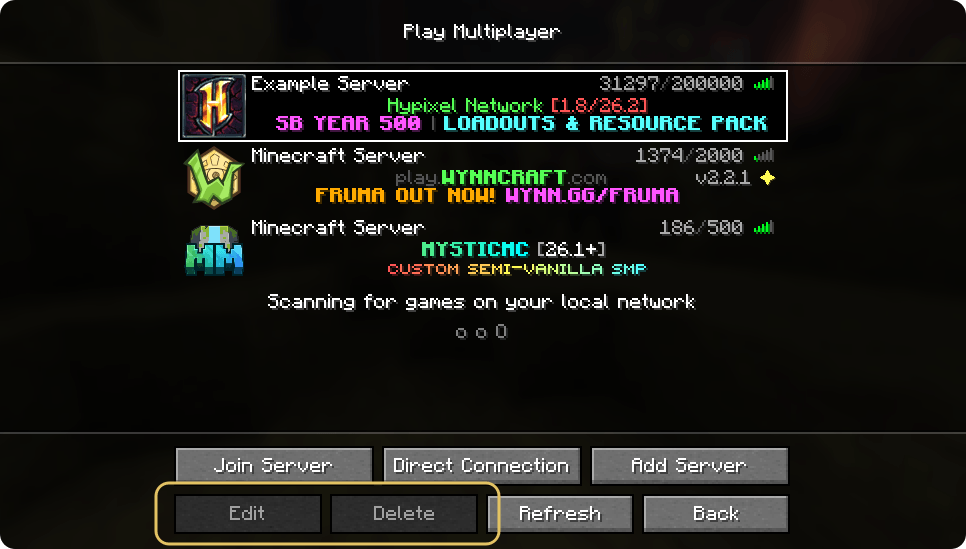
Cannot be deleted, edited, or reordered.
Description
ServerPresets
A Minecraft Fabric mod that pins preset servers to the top of your multiplayer server list. These servers are locked and cannot be edited, deleted, or moved by players.
Features
- Load preset servers from a configuration file
- Preset servers are always pinned to the top of the server list
- Preset servers cannot be edited, deleted, or moved
- Automatic deduplication: duplicate servers with the same IP are removed
- Players can freely manage their own servers (but cannot move them above preset servers)
- Configure server resource pack policy (Prompt/Enabled/Disabled)
- Load preset servers from a remote URL (HTTP/HTTPS), with automatic merging of local and remote lists
Usage
- Launch the game with the mod installed
- The mod will automatically create
config/serverpresets.json - Edit the configuration file to add your preset servers
- Restart the game to see the preset servers at the top of your multiplayer list
Configuration
Configuration file location: config/serverpresets.json
Example Configuration
{
  "presetServers": [
    {
      "name": "Example Server 1",
      "ip": "mc.example.com",
      "resourcePackPolicy": "PROMPT"
    },
    {
      "name": "Example Server 2",
      "ip": "play.example.net:25565",
      "resourcePackPolicy": "ENABLED"
    }
  ]
}
Configuration Fields
name: Server display nameip: Server address (can include port)resourcePackPolicy: Server resource pack behaviorPROMPT: Ask the player (default)ENABLED: Always accept resource packsDISABLED: Always decline resource packs
Remote Server List
Preset servers can also be loaded from a remote URL, which is useful for managing the server list across multiple clients from a single source.
Enabling Remote Loading
Add the remoteUrl and enableRemote fields to config/serverpresets.json:
{
  "presetServers": [
    {
      "name": "Local Server",
      "ip": "localhost",
      "resourcePackPolicy": "PROMPT"
    }
  ],
  "remoteUrl": "https://example.com/servers.json",
  "enableRemote": true
}remoteUrl: The URL of the remote server list (HTTP or HTTPS). Leave empty to disable.enableRemote: Set to true to enable remote loading, false to disable (default).
Remote JSON Format
The remote URL must return JSON in the following format:
{
  "servers": [
    {
      "name": "Remote Server 1",
      "ip": "play.example.net",
      "resourcePackPolicy": "ENABLED"
    },
    {
      "name": "Remote Server 2",
      "ip": "mc.example.com",
      "resourcePackPolicy": "PROMPT"
    }
  ]
}
The ServerPresets Team