Scriptorium
- By
Build fantasy libraries, armories and workshops with matching furniture, real item displays, secret bookcase doors and six original collections.
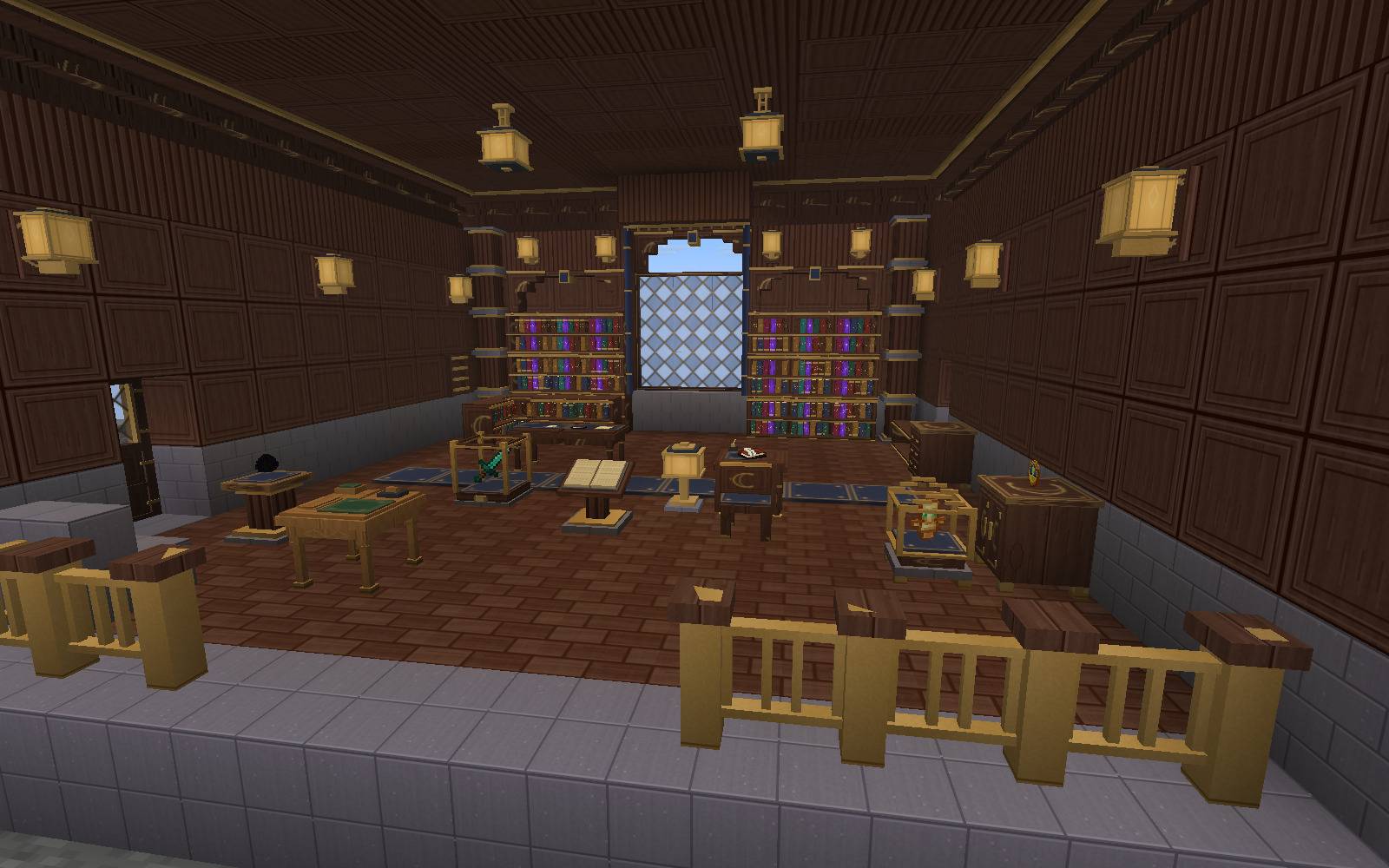
A complete fantasy library built with matching floors, carved panels, warm lighting, bookcases and real item displays. Actual Minecraft gameplay, without shaders.
Description
Scriptorium: Living Interiors
Turn your adventures into a home worth exploring.
Build complete fantasy libraries, armories, apothecaries, kitchens and workshops with furniture that stores and displays your real books, weapons, equipment and discoveries.
A complete room, a matching collection
Scriptorium includes 409 interior blocks, with 38 furniture families and 30 architectural families in six original finishes, plus the finishing atelier. Choose oak, walnut, ivory, ebony, verdigris or crimson, then combine matching floors, wall panels, carved doors, arches, columns, curtains, stained windows, lights and furniture.
Models and textures are original. Scriptorium is independent of Chipped and BiblioCraft and does not require either mod.
Furniture you actually use
- Libraries: connected straight and corner bookcases show real stored books. Point at an individual book to see its title or author and retrieve that exact item. Filled shelves provide enchanting power, and lecterns let you read your own journals.
- Secret passages: two-block bookcase doors open by hand or redstone while keeping their twelve books.
- Collections and armories: glass cases, pedestals, reliquaries and wall racks display recoverable items. Armor mannequins show real equipped armor, and equipment wardrobes swap armor, hotbar and offhand together.
- Apothecaries: potion shelves show real potion colors, botanical cabinets provide storage, and alchemy desks brew three potions using native recipes, fuel and timing.
- Workshops and kitchens: native crafting, smithing, repair, weaving, stonecutting, cartography, enchanting, furnace and smoker operations in matching furniture.
- Map rooms: wall frames display the terrain and markers of your actual explored maps.
- Everyday details: usable seats, connected display tables, hanging lanterns, manual and redstone lighting, and curtains that open together.
Personalize and organize
Use the finishing atelier to preview a larger, rotating model before changing its finish. Its searchable catalog includes categories, recipes, ingredients and output counts. Convert batches of empty pieces, paying one honeycomb for each piece.
Search inside furniture by item name, book title, author or enchantment. Rename furniture to label a collection. Hoppers move items through storage slots while preserving the pieces on display.
Displayed items keep their names, durability, enchantments and components. Books keep their title, author and pages. Storage furniture retains its contents when moved or refinished. Stoves, alchemy desks and lecterns drop their contents separately, following native Minecraft behavior.
Getting started
- Craft the finishing atelier using oak planks, iron ingots and a honeycomb. Recipes unlock through the vanilla recipe book.
- Craft furniture in oak, then use the atelier to select another finish.
- Point at a display space and use an item to insert one unit. Use an empty hand to retrieve the pointed item; sneak and use to open the furniture inventory.
- Open the atelier catalog to browse all 69 families and their recipes.
Workstations require their corresponding vanilla station in the recipe, preserving survival progression.
Installation
Minecraft Java 26.3 · Java 25 · Fabric or NeoForge
- Fabric: Fabric Loader 0.19.5 or newer, plus Fabric API 0.162.0+26.3 or newer for Minecraft 26.3. Download the Fabric edition.
- NeoForge: NeoForge 26.3.0.23-beta. Download the NeoForge edition.
Place the matching Scriptorium JAR in the mods folder on both server and clients. Fabric API is a separate required dependency for the Fabric edition. Install one Scriptorium JAR per instance. No additional content mods are required. When updating, replace the previous Scriptorium JAR; existing Scriptorium block IDs are retained.
Current version: 0.4.0 beta. Tested with 54 native functional tests on NeoForge and 55 on Fabric, 59 reviewed in-game captures per edition, saved-world reopening in a separate Minecraft process, and a bounded scene containing 1,000 bookcases and 12,000 stored books. Long play sessions and individual modpack combinations still need validation.
Español
Convertí tus aventuras en una casa que valga la pena recorrer.
Scriptorium agrega 409 piezas coordinadas en seis colecciones: roble, nogal, marfil, ébano, verdín y caoba. Construí bibliotecas, armerías, boticas, cocinas y talleres con muebles que guardan y exhiben tus objetos reales.
Uní estanterías rectas y esquineras, seleccioná libros con la mira, abrí bibliotecas secretas y mostrá armas, armaduras, pociones, trofeos y mapas explorados. Usá estaciones nativas de trabajo, alquimia y cocina, sentate en las sillas y controlá luces y cortinas.
El atelier ofrece modelos ampliados que podés girar, recetas, categorías y conversión por lotes. El buscador de cada mueble encuentra nombres, títulos, autores y encantamientos. Los objetos conservan sus propiedades y los muebles de almacenamiento mantienen su contenido al moverlos o cambiarles el acabado.
Fabricá primero en roble y usá panales en el atelier para cambiar de colección. Mano vacía retira el objeto apuntado; agacharse y usar abre el inventario. Requiere Minecraft Java 26.3 y Java 25, tanto en cliente como en servidor. Elegí la edición para tu cargador: Fabric Loader 0.19.5 o posterior con Fabric API 0.162.0+26.3 o posterior para Minecraft 26.3, o NeoForge 26.3.0.23-beta. Instalá un solo JAR de Scriptorium por instancia; Fabric API se instala aparte en Fabric.
Created by Kayle666. Copyright 2026 Kayle666. All Rights Reserved.
Support my projects ❤️
I create Minecraft mods and have independent games in development. Some of my mods aim to bring back the spirit of beloved classics left behind on older Minecraft versions, reimagining their ideas with my own identity.
If you enjoy my work, consider supporting it. Every contribution helps me create new content, fix bugs, keep my mods updated, and continue developing my games.
Choose whichever option works best for you:
Support is entirely optional. My Minecraft mods remain free to download and enjoy. Thank you for playing and supporting my projects!
Scriptorium Team