Saro's Easy Lang Switcher
- By
Switch the in-game language instantly with a hotkey. Set up multiple toggles between your favorite languages and swap in one keypress. Client-side only.
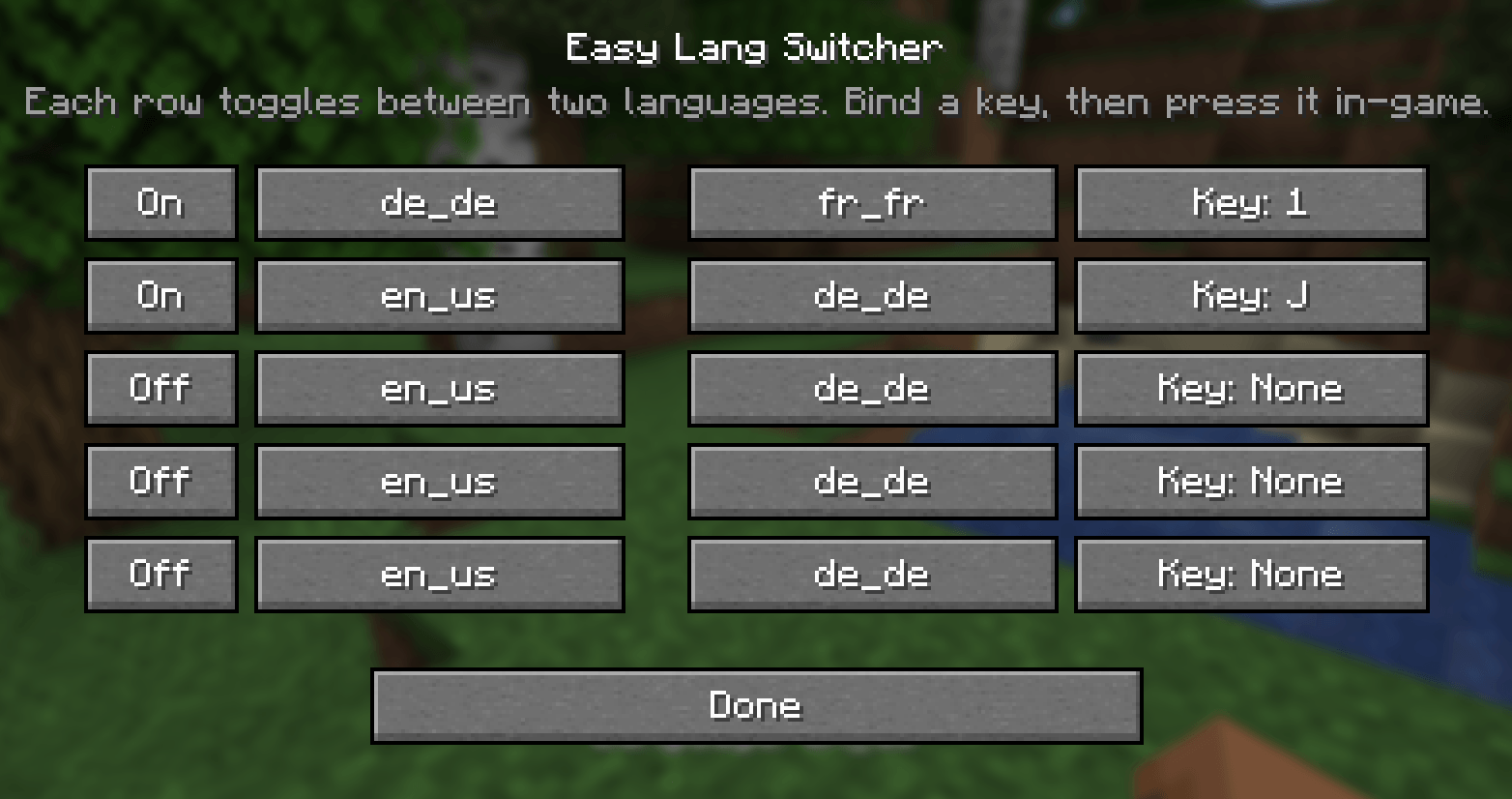
Ingame

Description
Saro's Easy Lang Switcher is a lightweight, client-side mod that lets you switch the in-game language instantly with a hotkey. Set up one or more toggles between your favorite languages and swap in a single keypress — no more digging through the options menu every time!

Instant Language Toggle 🌐
- Press a key and the game language flips instantly (e.g. German ⇄ English) — the resource packs reload on the spot.
Multiple Toggle Slots 🎚️
- Set up several independent hotkeys, each switching between its own pair of languages.
Searchable Language Picker 🔍
- Choose from every installed language through a search menu — just start typing to filter, no endless clicking.
Simple Config GUI 🖥️
- Open it with the G key or the "Lang Switcher" button in the Options screen. Pick your languages and bind your keys all in one place.
Client-Side Only 💻
- Install it only on your client. Works on any server — vanilla, modded, singleplayer or multiplayer — without the server needing the mod.
Settings Saved 💾
- Your toggles and hotkeys are stored in a config file and persist across restarts.

- Hotkey-driven language switching with instant resource reload
- Multiple independent toggle slots, each with its own key and language pair
- Search-as-you-type language picker covering every installed language
- Config GUI via the G key or the Options screen button
- Client-side only — no server install required
- Settings persist across restarts
- Forge, NeoForge and Fabric

- Install Forge, NeoForge or Fabric for your Minecraft version.
- (Fabric only) also add Fabric API.
- Drop the Saros Easy Lang Switcher
.jarinto yourmodsfolder. - Launch the game.
How to use it
- Open the menu — press G in-game, or click the Lang Switcher button in the Options screen.
- Enable a slot — flip a row to On.
- Pick two languages — click a language button, then type to search and select the language you want (do the same for the second one).
- Bind a key — click the Key: … button and press the key you want to use.
- Switch! — close the menu and press your key in-game. The language flips instantly, and again to switch back.
Tip: give one slot German ⇄ English, another French ⇄ English — each on its own key.


Do I need it on the server? No — it's client-side only. You can use it on any server, vanilla or modded.
Which languages can I pick? Every language installed in your game, including ones added by resource packs. The picker has a search box, so just type the name.
Can I have more than one toggle? Yes — set up as many slots as you like, each with its own key and its own pair of languages.
How do I open the settings? Press G in-game, or use the Lang Switcher button in the Options screen.
Are my settings saved? Yes — your slots and hotkeys are written to a config file and restored on the next start.
Currently Supported
- 1.20.1 — Forge, Fabric
- 1.21.1 — Forge, NeoForge, Fabric
- 26.2 — Forge, NeoForge, Fabric
Port wishes welcome

Join our community on Discord to give feedback and suggestions or report any bugs you find!
The Saro's Easy Lang Switcher Team


Owner