Salt's Inventory Compatibility
- By
Adds optional mod integrations to Salt's Inventory Update, including AE2, Tom's Storage, Sophisticated storage and recipe browsers.
Salt's Inventory Compatibility
Salt's Inventory Compatibility brings supported modded inventories and recipe browsers into the movable window system provided by Salt's Inventory Update. Use storage terminals, backpacks and other supported interfaces alongside your player inventory and other open containers.
Requires Salt's Inventory Update Core. Compatibility 0.1.3 requires Core 0.1.6 for the same Minecraft version and loader. The optional Controlify companion 0.1.2 uses the same Core release.
Install third-party mods separately with their own dependencies. Only the integrations for installed supported mods activate; you do not need every listed mod.
Applied Energistics 2
Open supported AE2 terminals, pattern interfaces, crafting status screens and machine interfaces as desktop windows. Keep native settings and navigation, follow crafting CPU updates, and use separate toolbox companion windows where available.
AE2 interfaces retain the artwork and features of the installed AE2 release. Older releases keep their own design rather than being made to look like newer versions.
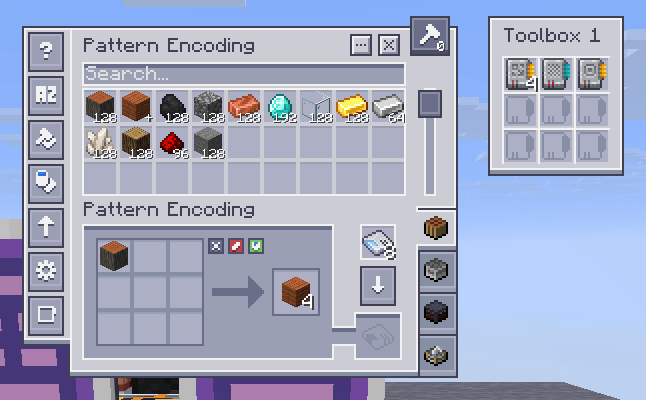
AE2 pattern encoding terminal with a separate toolbox companion, shown on Minecraft 26.3 NeoForge.
The reviewed AE2 adapters support:
- Minecraft 1.20.1, Fabric and Forge: AE2 15.4.11.
- Minecraft 1.21.1, NeoForge: AE2 19.2.18.
- Minecraft 26.1.2, NeoForge: AE2 26.1.13-beta.
- Minecraft 26.2, NeoForge: AE2 26.2.1-alpha.
- Minecraft 26.3, NeoForge: AE2 26.3.1-alpha.
AE2 integration is not currently provided for the other extension targets. Check the matching release notes before using a different upstream AE2 version.
Tom's Simple Storage
Adds desktop support for storage and crafting terminals, inventory configuration, filters, links, level emitters and filing cabinets. Supported terminals keep storage search, item access and crafting within the window system.
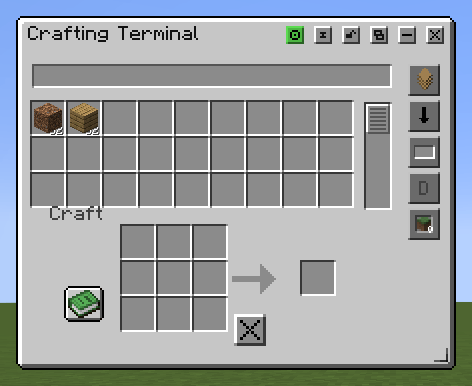
Tom's Simple Storage crafting terminal, shown on Minecraft 1.21.1 Fabric.
Sophisticated Backpacks and Storage
Use supported Sophisticated Backpacks and Sophisticated Storage interfaces as desktop windows, including their inventory controls, upgrade panels and settings navigation. This integration uses Sophisticated Core and supports the available Forge and NeoForge editions, plus the maintained Fabric ports on Minecraft 1.20.1 and 1.21.1.
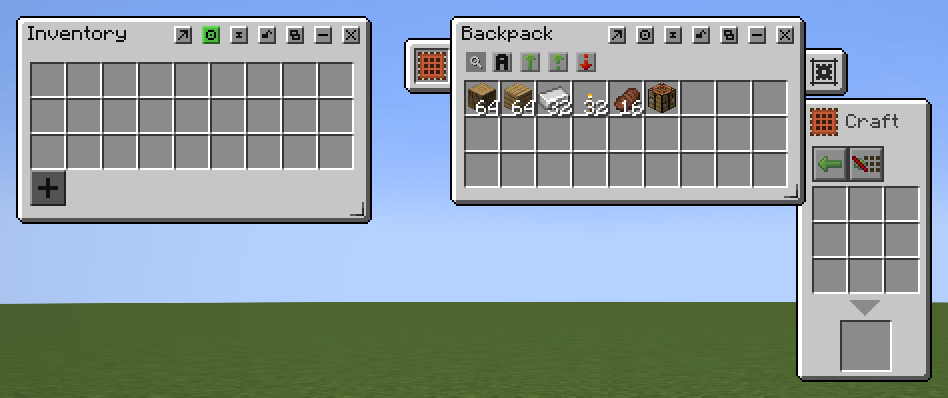
Sophisticated Backpack with its crafting upgrade panel and the separate player inventory, shown on Minecraft 1.21.1 NeoForge.
On Fabric 1.20.1 and 1.21.1, install the matching unofficial Fabric ports of Sophisticated Core, Backpacks and Storage. Other Fabric targets follow upstream availability.
JEI, REI and EMI
Connect supported versions of Just Enough Items, Roughly Enough Items and EMI to Salt's recipe browser window. Search items, view recipes and uses, save bookmarks and request ingredient transfers into compatible open crafting windows.
Open the recipe browser with its configurable keybinding, H by default. Available categories, ingredients and transfer behavior depend on the installed provider and the destination inventory.
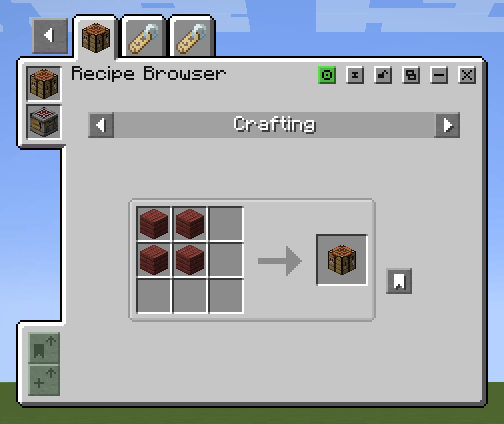
A crafting recipe in the desktop recipe browser using JEI, shown on Minecraft 1.21.1 Fabric.
JEI and REI integrations are included across the supported build matrix where compatible provider releases are available. EMI integration is provided on Minecraft 1.20.1 Fabric/Forge and 1.21.1 Fabric/NeoForge.
Trinkets
On 1.20.1 Fabric (Trinkets 3.7.2) and 1.21.1 Fabric (Trinkets 3.10.0), native accessory groups attach to Character. Hover panels support multiple accessory slots with native icons, tooltips, item rules and synchronized transfers. Panels render above the player preview and other slots. Character always exposes the real offhand while Trinkets is active, even when the HUD also shows it; both views share the same stack.
Curios
Supported on 1.20.1 Forge and 1.21.1, 1.21.11, 26.1.2, 26.2 and 26.3 NeoForge. Character's Curios button or the configured Curios inventory shortcut opens an equal-width accessory panel above Character, separated by a small gap.
The accessory panel and Character move together and remain inside the screen. All slots are shown when space allows; larger collections scroll. Native equipment, cosmetic slots, the cosmetic tab, visibility buttons, icons, tooltips and item rules follow the installed Curios release. Live slot-capacity changes preserve held items.
Raised
With Raised 6.0.2 installed, detached hotbar and offhand rendering and interactions follow horizontal/vertical HUD offsets and live configuration changes. Available across the supported Minecraft/loader targets.
Installation
- Install the Minecraft version and mod loader required by your chosen release.
- Install the matching Salt's Inventory Update Core JAR and its required dependencies, including Fabric API on Fabric.
- Install Salt's Inventory Compatibility for the same Minecraft version and loader, using the Core version required by the extension release.
- Install the supported third-party mods you want to use, together with their own required dependencies.
For example, Minecraft 1.21.1 Fabric with Compatibility 0.1.3 needs Core 0.1.6: salts_inventory_update-1.21.1-Fabric-0.1.6.jar and salts_inventory_compat-1.21.1-Fabric-0.1.3.jar.
For supported container integrations in multiplayer, install matching Core and Compatibility versions on both the client and server. Recipe-browser mods belong on the client; follow each third-party mod's own installation requirements for its other dependencies.
Minecraft and Loader Availability
| Minecraft | Extension builds |
|---|---|
| 1.20.1 | Fabric, Forge |
| 1.21.1 | Fabric, NeoForge |
| 1.21.11 | Fabric, NeoForge |
| 26.1.2 | Fabric, NeoForge |
| 26.2 | Fabric, NeoForge |
| 26.3 | Fabric, NeoForge |
An extension build does not mean every integration is available on that target. Support also depends on the third-party mod's loader, version and interface compatibility. Unsupported screens retain their ordinary interface where no eligible desktop integration is available.
License
The packaged license declaration is MIT AND LGPL-3.0-or-later. Original Salt code is covered by the MIT license; adapted AE2 desktop material is covered by LGPL-3.0-or-later. The JARs include the corresponding license and attribution notices.
Support
If an integration behaves incorrectly, report the Minecraft version, loader, Core and Compatibility versions, affected third-party mod version, and steps to reproduce it. Include a screenshot for interface problems and a log for crashes or loading errors.
Development disclosure
Project-page copy was prepared and edited with AI assistance. Code was separated from the core jar with assistance of AI.
Project links
Report issues | View source | Visit wiki | Join Discord server | Donate on PayPal
Current release: Compatibility 0.1.3
Project Everything compatibility Adds dedicated windows for the reviewed mod containers across their supported Minecraft versions and loaders. This includes the Let's Do workstations, Exposure, Botania, Supplementaries, AE2 add-ons, and the other reviewed inventory screens. See the version and loader matrix for the full list and exact upstream versions. Preserves Create's native artwork and controls with SIU controls integrated into its header. Covers Create, Create Fabric, Create Big Cannons, and Steam 'n' Rails on the supported builds. Adds tailored layouts for Modern Industrialization, Tech Reborn, Ad Astra and its Giselle Addon, Powah!, Simple Storage Network, Kibe, Enchanted Witchcraft, Zenith Renewed, Quark, The Aether, and Mine Cells. Preserves native gauges, slots, settings, and actions. Completes the Tech Reborn upgrade tray borders and includes its newer Nuclear Reactor. Adds the Bumblezone, Bountiful, Trading Post, Tom's Trading Network, Traveler's Backpack, Universal Graves, Accessories, Immersive Aircraft, Alex's Mobs, Cataclysm, and Prominent Base layouts. Keeps accessory panels mutually exclusive, joins Quark's backpack to Inventory, and keeps aircraft side panels attached to their parent. Adds compact native layouts for the food, workstation, and storage integrations including Better Archeology, Farmer's Delight, Alloy Forgery, Alloyed, Iron Chests: Restocked, Animal Feeding Trough, Inmis, Nether Chested, Brick & Mortar, Oxidized, and Chipped. Includes the Simply Swords Runic Forge and gear workstation tab and preview fixes. Books, teleport selection, and other reviewed non-inventory screens keep their native presentation. Existing integrations Adds and refines Applied Botanics, Wireless Terminals, Extended AE, MEGA Cells, and ME Requester layouts. Preserves vintage and modern AE2 artwork on their respective builds, restores full slot edges and side trays, and keeps native upper-right tabs and buttons in place. AE2 window management now uses the shared SIU control artwork. Restores Tom's Simple Storage's native terminal, filter, emitter, configurator, and link controls. Repairs filing cabinet alignment and scrollbar placement, and fixes storage synchronization when Polymer is installed. Restores proper Camera, Decoration Table, Mythic Mounts, Pigment Shifter, Lunch Basket, and Sack windows. Repairs Sophisticated Storage slot grids and clipped Bind Spells rows. Removes the redundant third-party inventory-sort button in SIU windows. Fixes native state and item ownership across Gallery, Bountiful, Traveler's Backpack, AE2, and other reviewed sessions. Corrects older Forge menu, startup, and mixin compatibility. Known upstream limitations and exact dependency pins are documented in the compatibility guide.
Requires Core 0.1.6 for the same Minecraft version and loader. Fabric also requires Fabric API. Install the upstream mods you use and their own dependencies separately.
Salt's Inventory Compatibility Team