RVE Textures
Mix textures, models and sounds from all your resource packs in-game, without creating an extra resource pack.
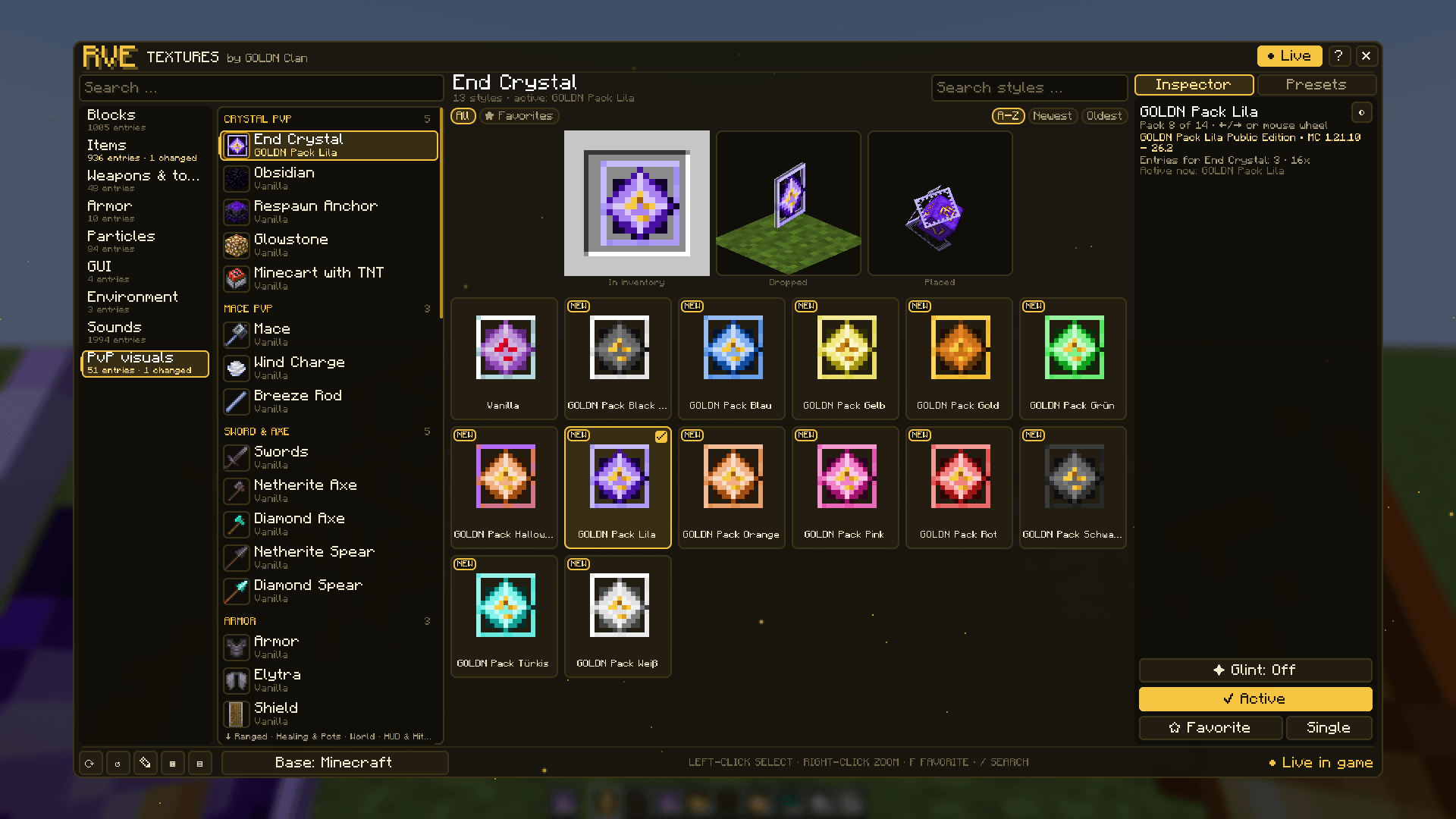
Rounded gold design. On the left the PvP list sorted by mode, in the middle the preview and the pack cards, on the right the details.
Description
Like the crystal from one resource pack, the totem from another and the swords from a third? RVE Textures builds your own mix from all the packs in your resourcepacks folder, right inside the game. Pick a whole style with one click or choose every texture, model, blockstate and sound yourself. Your choice shows up immediately, and no extra resource pack is created.
Features
- One entry per item: every item, block, particle and sound has its own entry (swords and armor are one entry each for all materials), sorted into categories (Blocks, Items, Weapons & tools, Armor, Particles, GUI, Environment, Sounds, PvP visuals) with a search field. Pick an entry, click a pack's card, done.
- Pin what you use: pin entries to the top of the list and drag them into your own order.
- Preview before you choose: each item is shown in the inventory, dropped on the ground and placed (or in an item frame); the armor set also on a turning player model. Animated textures play. Arrow keys or the mouse wheel step through the packs, and a switch adds the enchantment glint.
- Sounds you can hear: every sound has a play button that plays the file straight from the shown pack, even if that pack is not active, with its own preview volume.
- Live in the game: textures with the same resolution are swapped instantly in the loaded texture atlas. Bigger changes (other resolution, animations, models, sounds) reload once when you close the mixer.
- No extra pack: nothing appears in the resource pack list and
options.txtstays untouched. Your source packs only have to be in theresourcepacksfolder; they don't even need to be enabled. - Custom sky: choose the sky of a pack that ships an OptiFine-format sky and the mod draws it itself (layers, fading with the time of day, rotation with the sun, hidden in rain). No extra sky mod needed. It switches itself off when FabricSkyboxes, Nuit or OptiFabric is installed.
- Color and opacity per collection: hue, saturation, brightness and opacity for every texture of a collection, live in the game (purple fire, a see-through shield and more). Opacity only applies to what you hold yourself (main hand and offhand, first person and F5), including special items such as shields and tridents; placed blocks, other players and your inventory stay opaque.
- PvP visuals: a block outline in your own color and opacity, and a lower fire overlay.
- Kill effects: when you kill a player, an effect plays where they fell: Gold dissolve, Lightning strike, Ice shatter, Void portal, or one of three animated 3D effects (Custom Lightning, Soul Ascent, Shard Burst). The speed is adjustable from 50 % to 200 %, and you can add your own effects made in Blockbench. Purely visual and only on your screen; nothing is sent to the server. Each one has a looping live preview, and the kill sound has its own switch and volume.
- Capes: 10 RVE capes (Gold, Wood, Amethyst, Diamond, Emerald, Lapis, Redstone, Cherry, Netherite, Quartz) or your own cape image from
config/texturemixer/capes. The cape view shows it on a turning player model, from behind and as elytra. - Cape sync (optional, off by default): switch it on and everyone with RVE Textures sees your RVE cape, and you see theirs. Your own cape images are never uploaded and stay visible only to you.
- Share codes: copy your whole mix (colors included) as a short
RVE-MIX:text and paste a friend's code. No internet needed. - 3D models stay 3D: packs with their own 3D item models keep them in the game, because the model and its textures are taken along.
- Detail mixer: every texture, model, blockstate and sound event, with search, categories and one tile per pack. Rules for whole folders or categories and a base pack are available too.
- Compare: up to four variants side by side, pixel-perfect with zoom.
- Presets, favorites, search: save mixes under a name, star styles with F, search with /, right-click a card for a big preview. Packs changed in the last 7 days get a NEW badge.
- Your look: 10 color themes (Gold, Wood, Amethyst, Diamond, Emerald, Lapis, Redstone, Cherry, Netherite, Quartz) or your own accent color, background dimming, opacity, window size and an animated background (embers, snow, stars, Halloween).
- Reset: one click and everything is back to normal. Your presets are kept.
How to open it
- Options → Resource Packs → RVE Textures (button in the top left corner), or
- bind a key under Options → Controls → Key Binds → RVE → Open Texture Mixer. It is unbound by default, so it never overrides one of your keys.
Good to know
- Client-side only. Servers don't need it; it only changes what your own game loads.
- Requires Fabric Loader 0.19 or newer and Fabric API.
- One file per Minecraft version (1.21.4 to 26.3). Download the one that matches your game.
- No internet access unless you switch on cape sync. The mod reads your resource packs and writes its own files to
config/texturemixer/. Only the optional cape sync goes online, and only to the RVE cape server (goldnclan.de). It sends your player ID, your name and the number of your RVE cape. Sign-in works like joining a Minecraft server: your login goes only to Mojang, never to the cape server. Switching cape sync off removes your cape from the server. - Mixed are textures (including
.mcmeta), models, blockstates and sounds. Shaders, fonts and language files are not mixed. - Want to paint your own textures? The RVE Texture Mixer Addon adds a pixel editor.
About the textures
The textures still belong to the creators of the packs you own. The mod only combines them locally in your game and never creates a pack that could be passed on. Please respect each pack's license, for example when you share screenshots or videos.
Credits
Made by RVE (GOLDN Clan). The code was written with heavy AI assistance (Claude by Anthropic); idea, design direction and testing by RVE. License: MIT.
Deutsch
Mit dem RVE Textures stellst du dir aus allen Packs in deinem resourcepacks-Ordner deinen eigenen Mix zusammen, direkt im Spiel. Ganze Styles wählst du mit einem Klick, zum Beispiel das Crystal aus dem einen Pack und das Totem aus dem anderen. Du kannst aber auch jede Textur, jedes Modell, jeden Blockstate und jeden Sound einzeln wählen. Alles ist sofort im Spiel, und es wird kein zusätzliches Texturepack erstellt.
- Jedes Item, jeder Block, jeder Partikel und jeder Sound als eigener Eintrag (Schwerter und Rüstung je ein Eintrag für alle Materialien), in Kategorien mit Suche; Einträge lassen sich anpinnen und sortieren
- Vorschau im Inventar, gedroppt und platziert, Rüstung am Spielermodell, mit Glint-Schalter; Sounds direkt anhören und zwischen Packs vergleichen
- Eigener Himmel ohne Zusatz-Mod, Farbe und Deckkraft pro Kollektion, PvP-Optik (Umrandung, tieferes Feuer), Kill-Effekte (Gold-Zerfall, Blitzschlag, Eis-Splitter, Void-Portal und drei animierte 3D-Effekte, Tempo einstellbar; nur du siehst sie), 10 RVE-Capes oder eigenes Cape mit Vorschau als Elytra, Cape-Sync (freiwillig, standardmäßig aus: andere mit der Mod sehen dein RVE-Cape), Mix als Code teilen
- Detail-Mixer, Vergleich (bis zu 4 Varianten mit Zoom), Presets und Favoriten, Aussehen anpassen und Reset
- Öffnen über Optionen → Ressourcenpakete → RVE Textures oder eine eigene Taste (Steuerung → RVE)
- Läuft nur im Client und braucht Fabric Loader 0.19+ und Fabric API. Kein Internetzugriff, außer du schaltest den Cape-Sync ein (dann nur zum RVE-Cape-Server; dein Login bleibt bei Mojang). Für jede Minecraft-Version von 1.21.4 bis 26.3 gibt es eine eigene Datei.
RVE Textures Team