


Rick's Pocket Dimensions
- By
Rick's Pocket Dimensions
A whole world inside a block. Place it, look into it, step inside, and build without limits.
Pocket Dimensions adds a block that holds its own private room. The room has real terrain, open sky, and space to build all the way up to the top of the world. You can also watch it from outside: every pocket block is a live window into its room, so your farms, machines and builds stay in view while you stand in your base.
---
✨ Features
🌍 A real world in every block
- Each Pocket Dimension Block opens a new room of real generated terrain (grass, dirt, stone, ores and caves) made from your world's seed.
- The room is open to the sky, so you can build all the way up to the top of the world.
- Right-click the block to step inside. To leave, right-click a wall with an empty hand.
- If you break the block, it remembers its room. The item says "Holds pocket room #N", and placing it again takes you back to the same room.
🧱 Rooms that grow with you
- Place pocket blocks side by side to join their rooms into one bigger room. Two blocks make a 2-wide room, a 3x3 square makes a 3x3 room, and L-shapes work too.
- Rooms can grow up to 256 x 256 blocks. You can change the limit in the config.
- Place a pocket block underneath another one to dig the room downward. Each block adds 16 more layers of real underground (stone, deepslate, ores, caves, water and lava), all the way down to bedrock.
- If you break a lower block, its layers close off and are saved, so you can't farm the same ores over and over.
- Sand and gravel settle when the room is made, so nothing floats.
🪟 Live view from outside
- Each pocket block shows a 3D view of its room, shrunk into the block like a tiny diorama.
- When you join blocks, their views merge into one seamless window.
- Machines and mobs move in the view in real time. Modded machines show too: for example Create Trians
- Room walls are hidden in the view, so you only see your build. The walls only show when you're inside.
🖱️ Reach in through the view
- Left-click a block in the view to mine it, with normal mining speed and break cracks.
- Right-click with a block in your hand to place it inside the room.
- Drops land inside the pocket, not at your feet, and your tool wears down as normal.
- The block you're pointing at gets the normal Minecraft outline, so you always know what you're about to break.
- Sneak to break or build on the pocket block itself instead.
🔧 The Pocket Tool
Craft the Pocket Tool, then sneak + right-click a pocket block to open its view settings:
- View height: grows the window upward out of the top of the block, so tall builds and towers show at full height. Press Fit to size it to your tallest build automatically.
- Entities: show or hide mobs and other entities in the view.
- Live view: turn it off to freeze the view exactly as it is.
- Zoom: magnify the view up to 8x. Right-click anything in the view with the tool to zoom in on that spot.
- Zoom on/off: switch back to the full view without losing your zoom spot.
- Click through view: turn mining and placing through the view on or off.
Settings are saved per room, so every block of a joined room shows the same view.
⚡ Smooth performance
- Terrain for new rooms is generated ahead of time, so placing pocket blocks doesn't lag.
- Frozen views and hidden entities send no data, which keeps big rooms light.
---
🛠️ Crafting
Pocket Dimension Block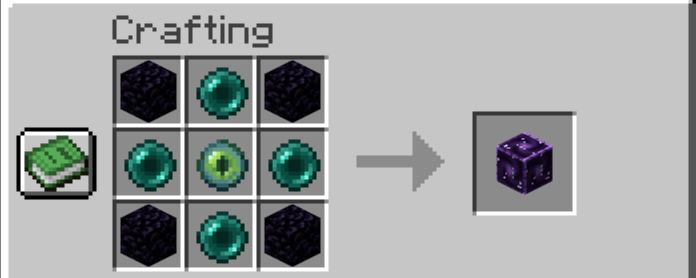
Pocket Tool
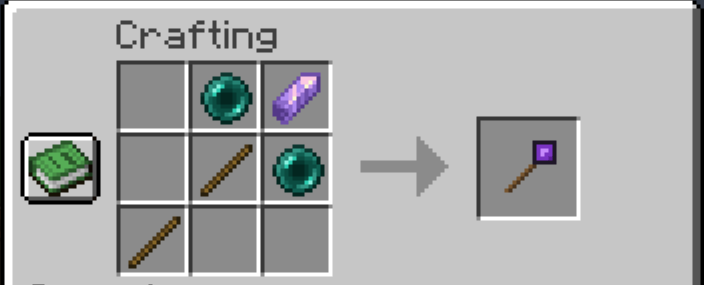
---
⚙️ Config
config/pocketdim-common.toml
- maxRoomSize: the largest a room can grow, from 16 to 256 blocks across (default 256).
---
📋 Requirements
- Minecraft 1.20.1
- Forge 47.x
- Needed on both the client and the server.
---
❓ FAQ
Where does the room's terrain come from?
Each room gets its own patch of real land, made from your world's seed in a hidden dimension. It does not copy or remove the chunk where you place the block.
Can I make a room bigger later?
Yes. Place another pocket block next to it to grow it sideways, or under it to dig it deeper.
What happens when a room is full size?
The new block gets a room of its own, and a message tells you so.
Can I use doors or chests through the view?
Not yet. Through the view you can mine and place blocks. Step inside to use everything else.
Known Bugs:
Enity rendering can be glichy ie Create Trians/ or any other modded enity.
Rick's Pocket Dimensions Team
