RetroChat
- By
en-settings.png
settings-all-settings.jpg
en-settings-window-res.png
Description
RetroChat
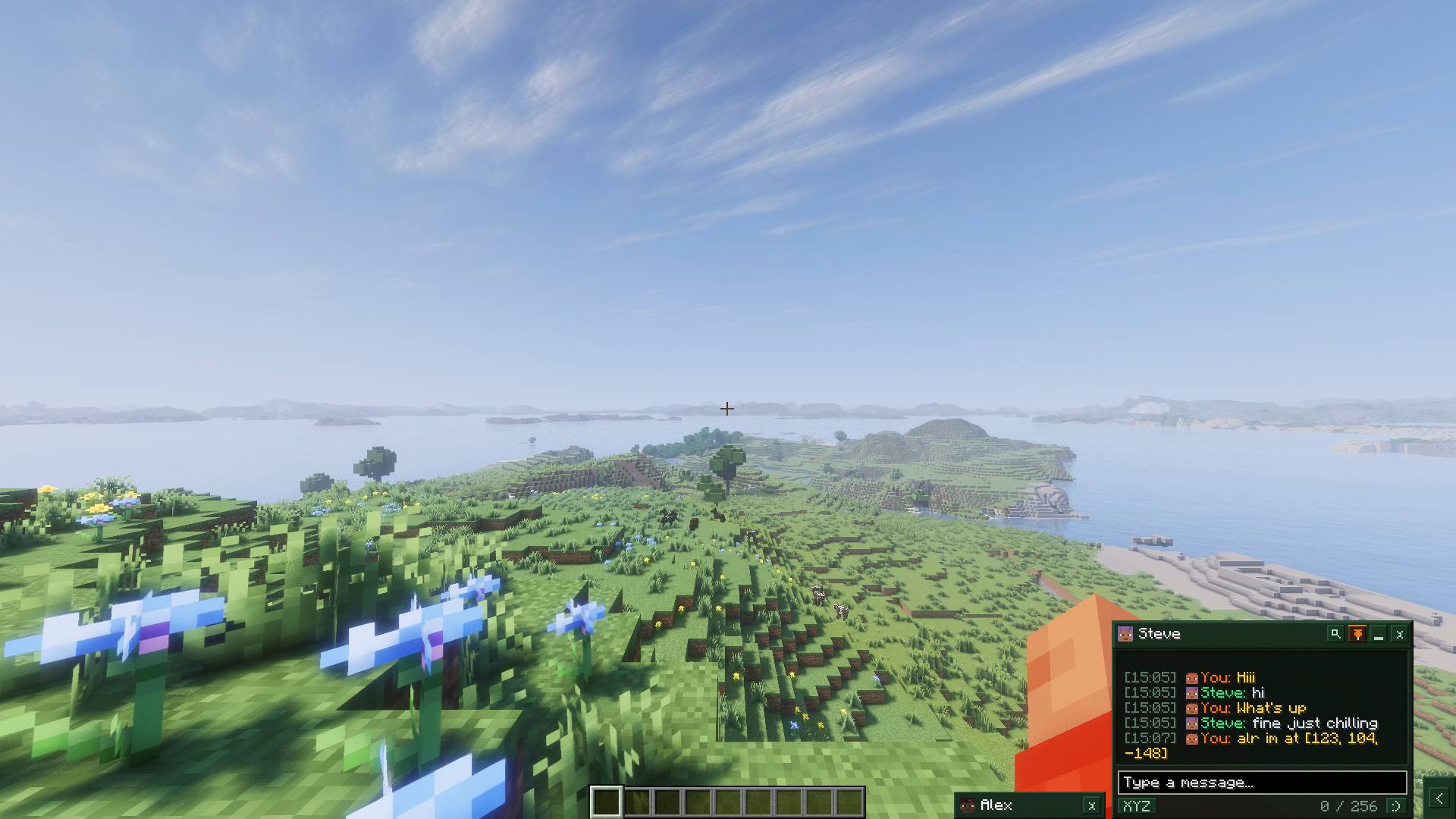
RetroChat brings retro, 2010s Facebook-style instant direct messaging windows and a collapsible player sidebar to Minecraft with an authentic vanilla look and feel!
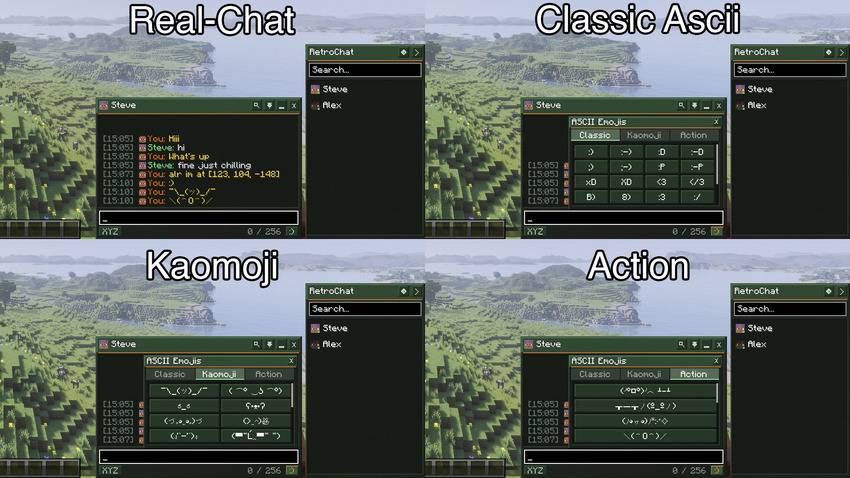
It intercepts vanilla private messages (/msg, /tell, /w) at the client packet level, giving you dedicated conversation windows, unread badges, sound notifications, and a rich retro ASCII emoji picker without requiring any server-side plugins or mods.
SUPPORTED VERSIONS & BRANCHES
Minecraft 26.3
Fabric: Supported
Forge: Supported
NeoForge: Supported
Branches: fabric-26.3 / forge-26.3 / neoforge-26.3
Minecraft 26.2
Fabric: Supported
Forge: Supported
NeoForge: Supported
Branches: fabric-26.2 / forge-26.2 / neoforge-26.2
Minecraft 26.1
Fabric: Supported
Forge: Supported
NeoForge: Supported
Branches: fabric-26.1 / forge-26.1 / neoforge-26.1
Minecraft 1.21.4
Fabric: Supported
Forge: Supported
NeoForge: Supported
Branches: fabric-1.21.4 / forge-1.21.4 / neoforge-1.21.4
Minecraft 1.21.3
Fabric: Supported
Forge: Supported
NeoForge: Supported
Branches: fabric-1.21.3 / forge-1.21.3 / neoforge-1.21.3
Minecraft 1.21.1
Fabric: Supported
Forge: Supported
NeoForge: Supported
Branches: fabric-1.21.1 / forge-1.21.1 / neoforge-1.21.1
Minecraft 1.20.1
Fabric: Supported
Forge: Supported
NeoForge: Not supported
Branches: fabric-1.20.1 / forge-1.20.1
FEATURES
Mod Master Switch:
- Full master toggle in settings (RetroChat Mod: ON / OFF).
- When disabled, direct messages (/msg, /tell, /w) completely bypass the mod and function exactly like vanilla Minecraft chat.
Fast Coordinates Sharing ([XYZ]):
- Located on the bottom bar next to the character counter.
- Automatically formats and inserts your current block coordinates [X, Y, Z] into the message input field.
In-Chat Message Search (Ctrl+F):
- Header search icon button or Ctrl+F shortcut opens an inline message search bar.
- Filters matching chat messages in real time with an empty results indicator.
Retro ASCII Emoji Picker ([:)]):
- Integrated directly to the right of the character counter at the bottom of every chat window.
- 56 Handcrafted Emoticons across 3 categories.
Classic:
:) :-) :D :-D ;-) :P xD XD <3 </3 B) 8) :3 :/ :( :'( :O *_* -_- >_< \o/
Kaomoji:
¯\_(ツ)_/¯
( ͡° ͜ʖ ͡°)
ಠ_ಠ
ʕ•ᴥ•ʔ
(づ。◕‿◕。)づ
(>‿◠)✌
(ง'̀-'́)ง
(▀̿Ĺ̯▀̿ ̿)
(•‿•)
(•_•)
(¬_¬)
(。◕‿◕。)
(⊙_⊙)
(•ω•)
(T_T)
ಥ_ಥ
(°ロ°)
(=^・^=)
Action / Fun:
(╯°□°)╯︵ ┻━┻
┬─┬ノ(º_ºノ)
(ノ◕ヮ◕)ノ*:・゚✧
\(^O^)/
(づ ̄ ³ ̄)づ
(ノಠ益ಠ)ノ
¯\(°_o)/¯
(*^▽^*)
ლ(ಠ益ಠლ)
ᕙ(⇀‸↼‶)ᕗ
- Beveled retro popup box with scroll support, click sound feedback, and instant insertion into text.
Dockable & Minimized Chat Windows:
- Distinct conversation window for each active player chat.
- Pin windows to keep them visible while playing.
- Minimize windows into compact tabs docked along the bottom bar.
- Live unread notification counter badges with subtle flashing on new messages.
- Middle-click on minimized tabs to quickly close them.
- Optional Compact Tabs mode in settings for minimal screen footprint.
Player Sidebar:
- Fast-access sidebar on the right side of the screen.
- Real-time search filter and online/offline status indicators.
- Collapses into a subtle side chevron tab when not in use.
Per-Server UI State Persistence:
- Automatically remembers your sidebar state (open vs collapsed) and window states (open vs minimized) per server and in singleplayer.
- Everything stays right where you left it across sessions.
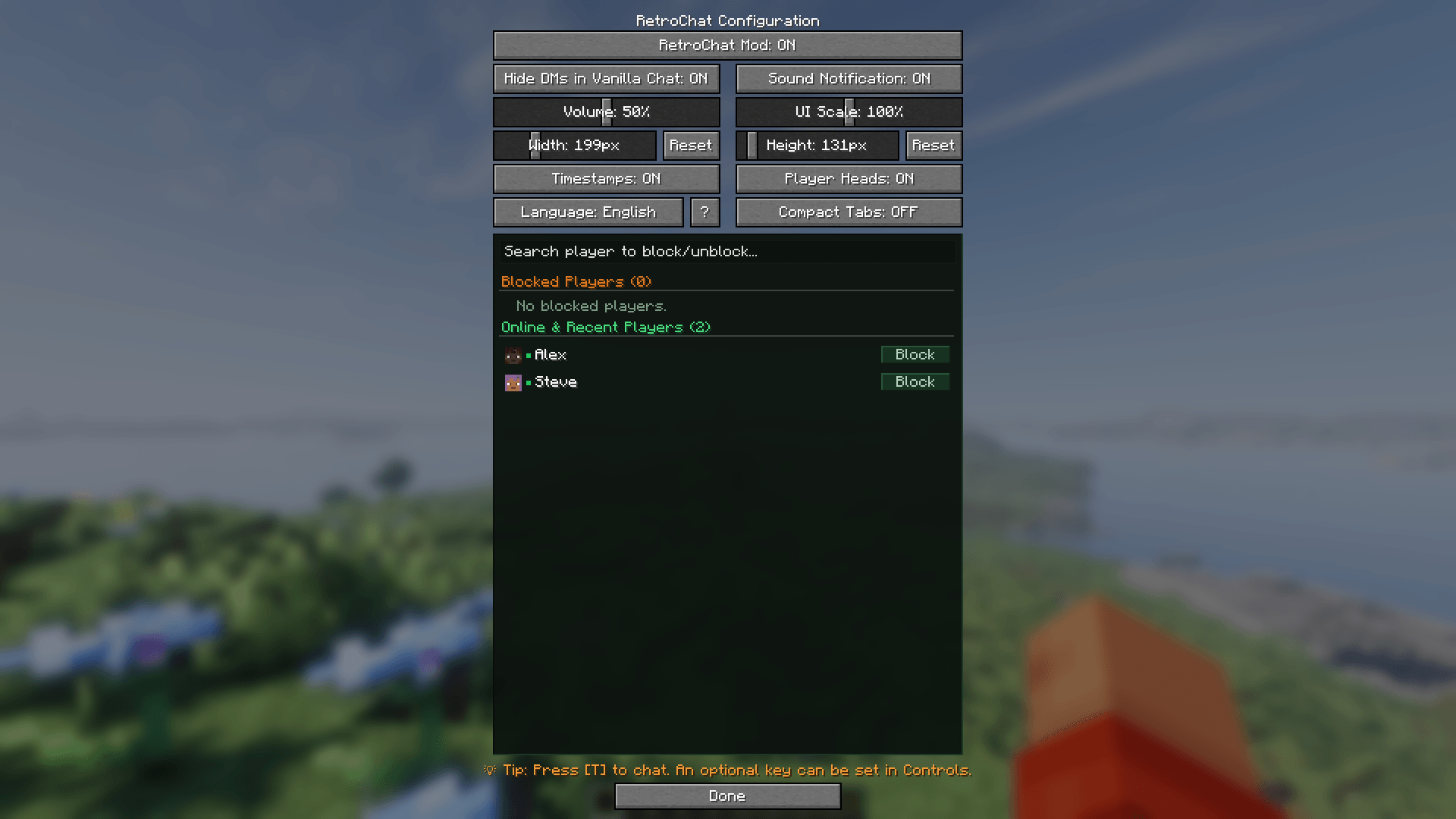
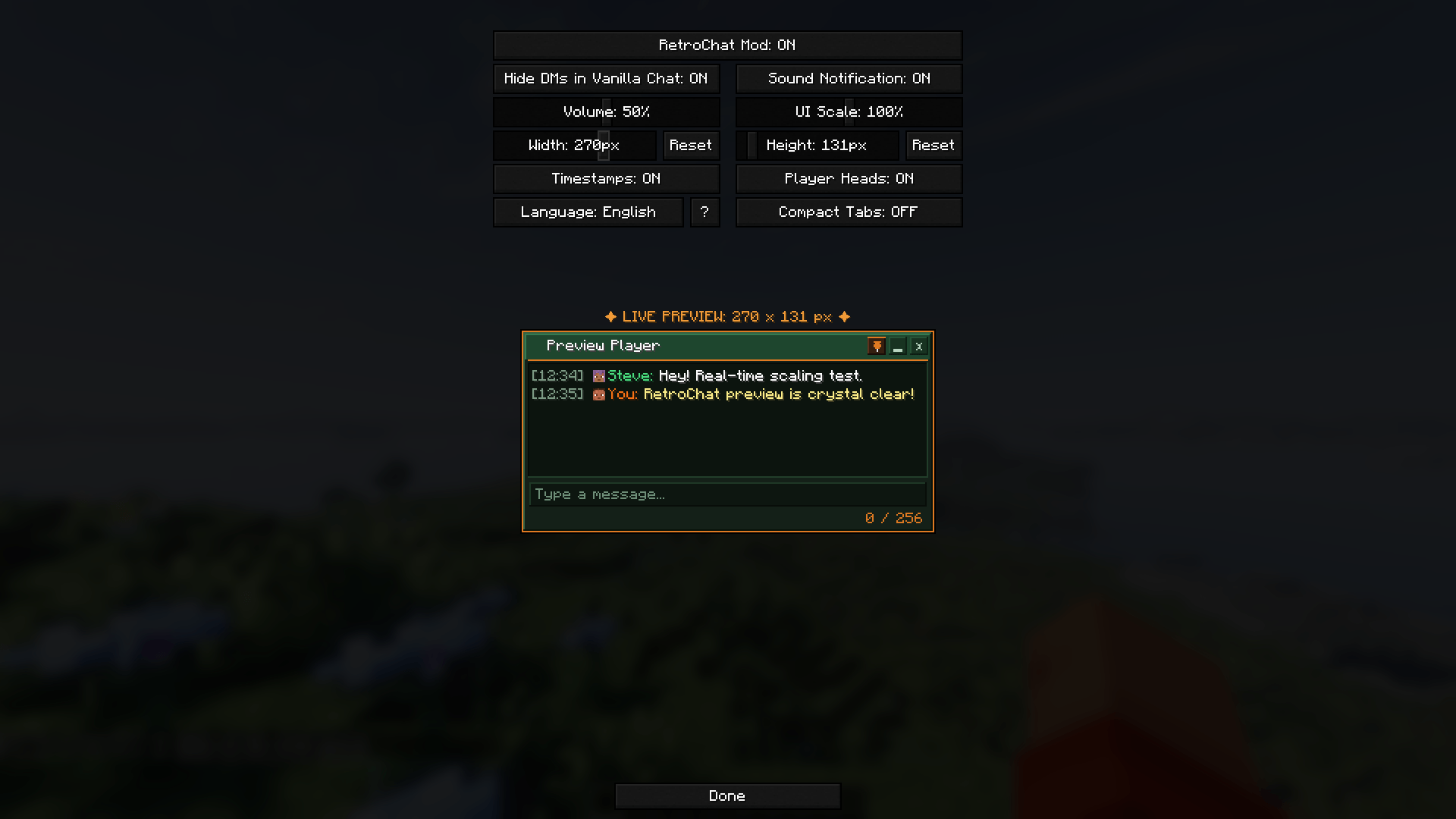
Config Screen & Mod Menu Integration:
- Accessible in-game via ModMenu (Fabric) and the Mods Screen (Forge / NeoForge).
- Master mod toggle button and hide DMs in vanilla chat toggle.
- Customize GUI scaling (50% to 150%) and window dimensions with live preview.
- Player blocklist (case-insensitive blocking with instant suppression).
- Toggle sound alerts, player head avatars, message timestamps, and compact tabs.
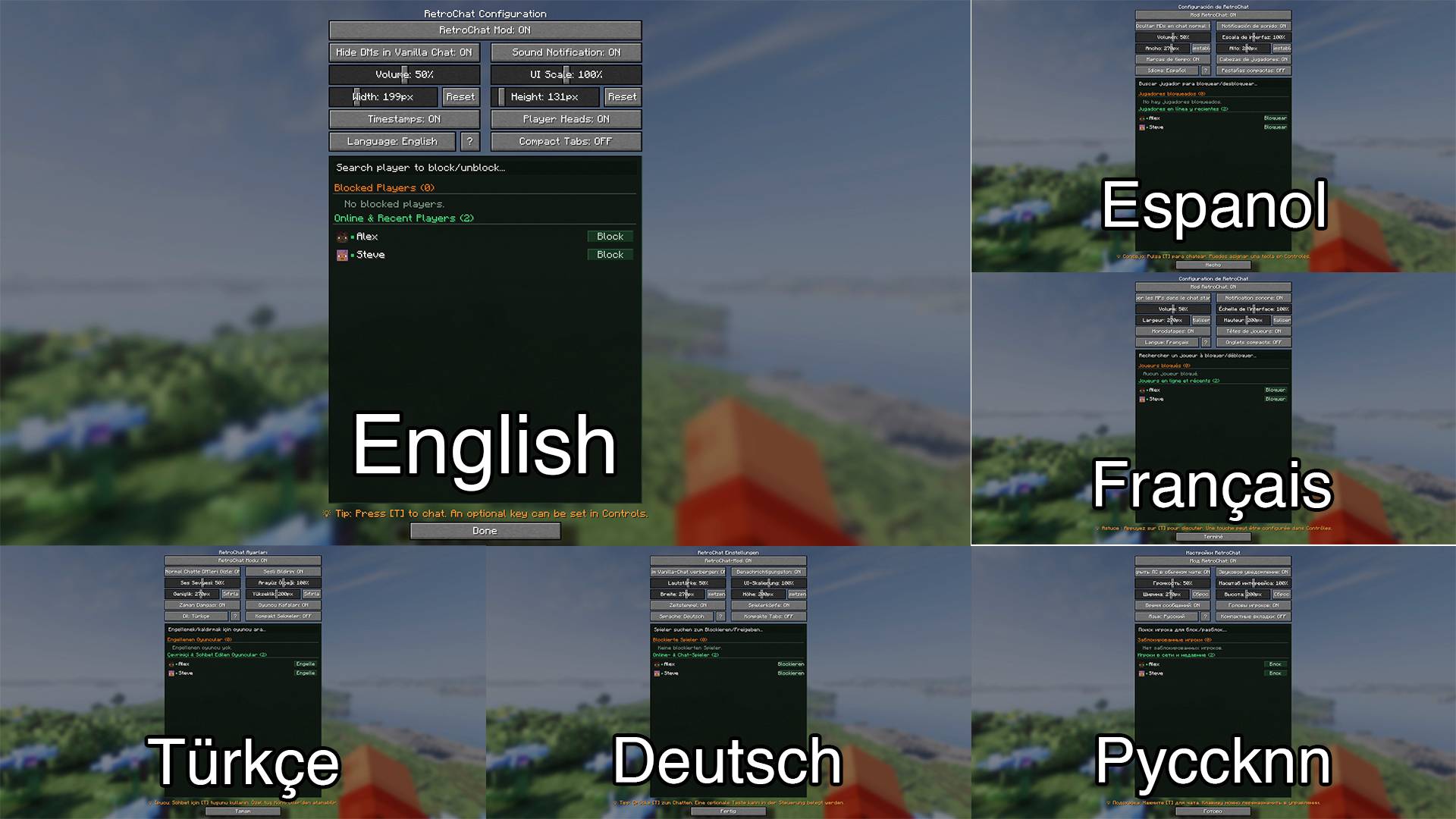
Multi-Language Support:
- Built-in support for 6 languages: English, Turkish, German, Russian, Spanish, and French.
- Custom translations can easily be added or modified via JSON files in the config folder.
100% Client-Side:
- Works on any vanilla, Paper, Purpur, or Spigot multiplayer server.
CONTROLS
T (Vanilla Chat): Open chat and interact with RetroChat windows, emoji picker, and sidebar.
Ctrl + F: Toggle in-chat message search filter.
Middle Click: Close minimized chat tab.
Escape: Close emoji picker, search bar, unfocus chat, or close active overlay.
Enter: Send message in focused conversation window.
Custom Key: Dedicated overlay toggle key can be configured in Options -> Controls -> Key Binds.
MULTI-LANGUAGE SUPPORT
English: English
Turkish: Türkçe
German: Deutsch
Russian: Русский
Spanish: Español
French: Français
Custom translations can also be added or modified through JSON language files.
BUILDING FROM SOURCE
To compile the mod from source using the Gradle wrapper:
./gradlew build
Compiled JARs will be output to:
Playable Mods: build/libs/mods/
Sources: build/libs/sources/
AUTHOR & CONTACT
Developer: tikhi
Discord: .tikhi
GitHub: https://github.com/tikh1
Repository: https://github.com/tikh1/RetroChat
LICENSE
This project is licensed under the MIT License.
RetroChat Team