Resources Trees
- By
Resources Trees provide you a new way to generate resources such as iron, gold, and diamond.
Screenshot 2025-09-27 230523.png
Screenshot 2025-09-27 230423.png
Screenshot 2025-09-27 230314.png
Get 25% Off Your First Server!
Create a server, get 25% off your first month

Description
🌳 ResourcesTrees
Grow your resources — no mining required.
ResourcesTrees adds resource-producing trees to Minecraft. Plant specialized saplings, tend your farm, and harvest valuable materials — from iron and diamonds to mob drops, essences, and more. Every combination of a resource type and a tree shape generates its own unique sapling, leaves, and leaf fragments.
⚡ Features
- 🌱 47+ Resource Types — Iron, diamond, netherite, coal, gold, sculk, mob essences, dyes, and many more.
- 🌲 8 Tree Shapes — Oak, Spruce, Birch, Jungle, Acacia, Dark Oak, Cherry, and Pale Oak. Each resource type grows as every tree shape.
- 🛠 Fully Config-Driven — Add your own custom resource types and tree types by dropping JSON files into the config folder. No datapacks or coding required.
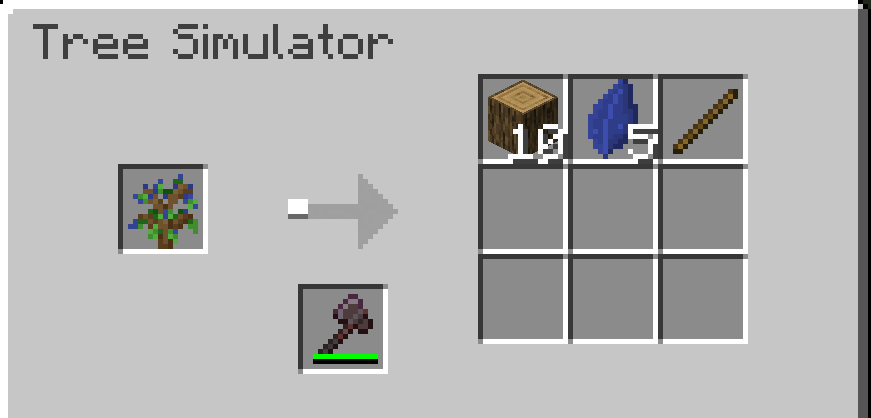
- 🪓 Tree Simulator — Automate resource production without planting trees in the world. Insert a sapling and an axe, and let it run.
- 🧩 Plugin API — Mod developers can register custom resource types and tree types in code via the
IResourcesTreesPlugininterface. - 🌍 Seamless Integration — Works in vanilla survival, modpacks, and skyblock-style worlds.
📖 How It Works
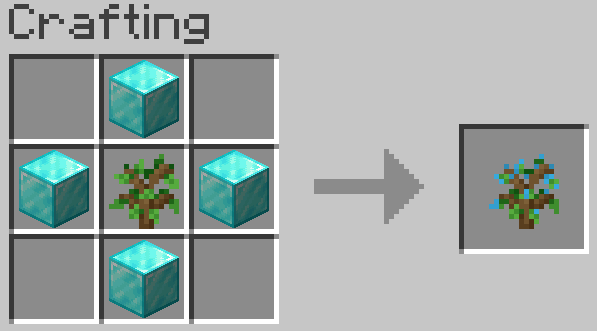
- Craft a resource sapling — surround a vanilla sapling with the resource material in a
+pattern at a crafting table. - Plant it on grass or dirt, just like a normal sapling.
- Let it grow — it uses the vanilla tree structure for its tree type.
- Break the leaves to collect Leaf Fragments and occasionally a new sapling.
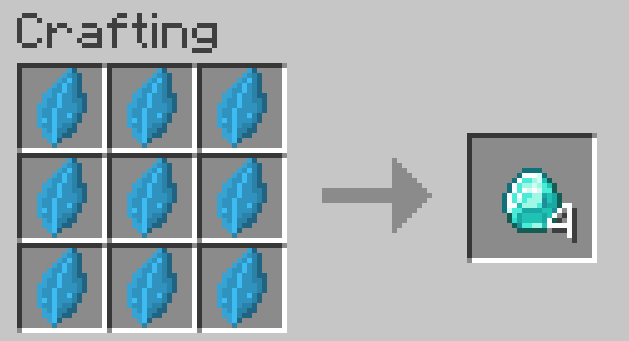
- Craft leaf fragments back into raw resources using shaped recipes.
- (Optional) Use the Tree Simulator to automate the whole process with no trees needed.
🪓 Tree Simulator
The Tree Simulator block automates resource production. Place a resource sapling in the input slot and an axe in the axe slot — it will produce resources on a timer. The axe type determines the speed multiplier:
| Axe | Speed Multiplier |
|---|---|
| Wooden | 1× |
| Stone | 2× |
| Iron | 3× |
| Diamond | 4× |
| Netherite | 5× |
| Golden | 6× |
Axe speed values are fully configurable in config/resourcestrees/axe.json.
🧩 For Modpack Makers — Custom Types
Drop JSON files into your config folder to register new resource types or tree types — no code required.
config/resourcestrees/resources_type/ruby.json
{
  "name": "ruby",
  "material": "minecraft:redstone",
  "color": -3342336,
  "saplingDropChance": 0.1,
  "leafDropChance": 0.2,
  "treeSimulatorTicks": 1400
}
config/resourcestrees/tree_type/oak.json
{
  "name": "oak",
  "treeGrowerName": "oak",
  "saplingTexture": "minecraft:block/oak_sapling",
  "leavesTexture": "minecraft:block/oak_leaves",
  "originalSapling": "minecraft:oak_sapling",
  "originalLeaves": "minecraft:oak_leaves",
  "log": "minecraft:oak_log"
}
🔧 For Mod Developers — Plugin API
Implement IResourcesTreesPlugin and register it via ServiceLoader to add resource types and tree types in code.
public class MyPlugin implements IResourcesTreesPlugin {
    @Override
    public void registerResourcesType(IResourcesTypeRegistry registry) {
        registry.register(new ResourcesType.Builder("ruby", Items.REDSTONE, 0xFFCC0000)
                .saplingDropChance(0.1f)
                .leafDropChance(0.2f)
                .treeSimulatorTicks(1400));
    }
}
⚠️ The Plugin API is experimental. Use config files for stability.
🔗 Links
- 📚 Wiki: resourcestrees.coolerpromc.com
- 🐛 Issues & Suggestions: GitHub Issues
- 💻 Source Code: GitHub Repository
- 💬 Community & Support: Discord
Resources Trees Team


Owner