


Replace
- By
Mass Fill + New Z Menu – Select an area, fill or break it in bulk. All processed on the server, no lag. Clean interface and new integrated Z menu.
8f4c642ff4614020b3ee986a34bd7884ff5a600d_350.jpg
0abffeb5050232957bc6ba99d8514bc60b963b12_350.jpg
0568a71d0a220a8a705a57f68b2e2302f07f1553_350.jpg
Description
Auto Replace

Select a region · mass-break · mass-fill — server-side, so blocks stay gone.
AutoReplace is a lightweight Fabric utility for Minecraft 26.2. Select a box like Litematica and break or fill the entire area in one action. Breaks and fills are executed on the server, so nothing reverts in singleplayer or multiplayer.
📋 Features
- Area selection — right-click two corners (cyan outline, Litematica-style)
- Mass break — break one block inside the selection → matching blocks in the box break server-side
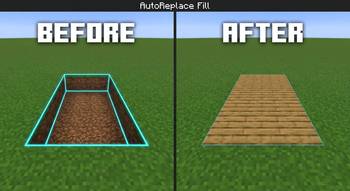
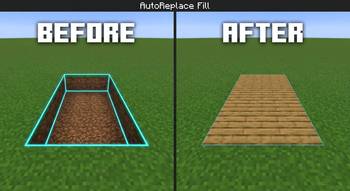
- Mass fill — pick a block from your hand or the world and fill the selection automatically
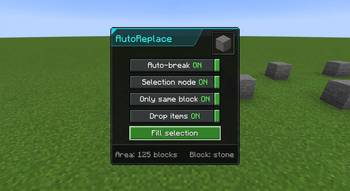
- Simple Z menu — clean panel with toggles, tooltips, and a fill block preview
- Server authority — no ghost blocks / no "blocks come back" failure
- Paper plugin (optional) — same-network support for Paper/Spigot multiplayer servers
- Safety caps — max 4096 blocks per action, range checks, unbreakable blocks ignored
🎮 How to Use
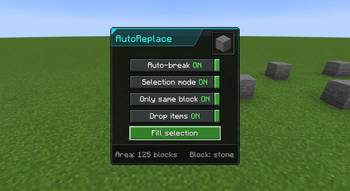
- Press Z to open the menu
- Enable Selection mode
- Right-click the first corner, then right-click the second corner
- Choose what you want:
🔨 Break
- Turn Auto-break on
- Mine one block inside the selection
- The server breaks the rest (same block type if "Same block only" is on)
🧱 Fill
- Hold a block → Use held block or Pick from world and right-click a block
- With Fill on select enabled, the selection fills automatically
- Or press ▶ Fill selection
⚙️ Menu Options
| Option | Description |
|---|---|
| Auto-break | Mass-break when you mine a block inside the selection |
| Selection mode | Right-click two corners to set the box |
| Same block only | Only break blocks matching the one you mined |
| Drop items | Survival drops (Creative never drops) |
| Use held block | Set fill material from the item you're holding |
| Pick from world | Right-click a world block to set fill material |
| Fill on select | Auto-fill after picking a block |
| Replace blocks | Fill existing blocks (not just air) |
| ▶ Fill selection | Place the chosen block throughout the area |
📦 Requirements
| Item | Specification |
|---|---|
| Minecraft | 26.2 |
| Loader | Fabric |
| Dependency | Fabric API |
| Java | 25+ (game requirement) |
🎮 Singleplayer
Only the mod + Fabric API in your mods folder.
🌐 Multiplayer (Paper / Spigot)
- Players install the mod + Fabric API on the client
- Put AutoReplacePlugin in the server
pluginsfolder - Restart the server
Without the plugin on Paper, mass break/fill will not persist.
⌨️ Controls
| Key | Action |
|---|---|
| Z | Open / close menu (rebindable in Controls → AutoReplace) |
⚠️ Notes
- Adventure / Spectator modes cannot break or fill
- Unbreakable blocks (e.g. bedrock) are ignored
- Survival fill consumes items from inventory; Creative does not
- Large selections are capped at 4096 blocks per action
🖼️ Gallery (optional screenshots)
- Cyan selection box in the world
- Z menu panel with toggles
- Before / after mass break
- Before / after mass fill
📄 License
CC0-1.0 (public domain dedication) — free to use, modify, and redistribute.
👏 Credits
Developed Black_br 26.2 with server-side networking so selections actually stay.
The Replace Team
