


Relics Debugger
- By
A lightweight developer, packmaker, and player diagnostic suite for Relics and Curios on NeoForge 1.21.1.
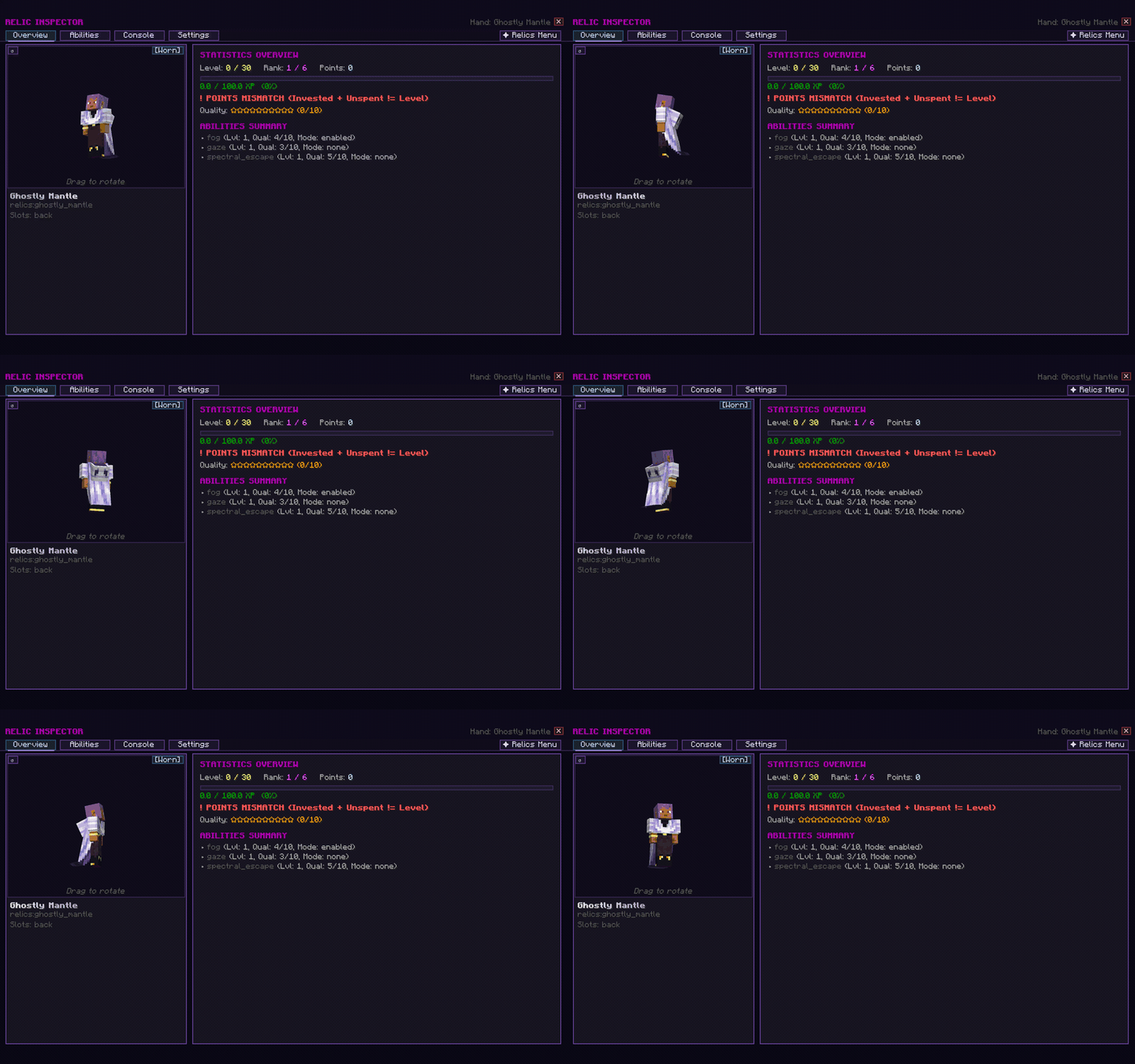
A developer and packmaker diagnostic suite for the Relics mod and Curios API ecosystem on NeoForge 1.21.1.
Whether you are designing a modpack, developing custom Relics addons, balancing progression curves, or troubleshooting ability mechanics, Relics Debugger provides real-time telemetry, inventory scanning, live data inspection, and an interactive 3D visual inspector screen.
Features at a Glance
- Universal Relic Telemetry: Intercepts and monitors core Relics API events (
RelicExperienceChangeEvent,RelicLevelChangeEvent) in real time across base Relics and all third-party addon mods. - Interactive 3D Inspector GUI: Press [K] to open the developer dashboard featuring 3D item rendering, leveling progression curves, ability constellations, and live NBT data views.
- Curios & Inventory Scanning: Scan bearers, inspect active Curios accessory slots, and identify equipped relics across players with pinpoint accuracy.
- Live Attribute & Level Tweaking: Modify experience points, set levels, adjust ranks, award ability points, or reset relic states directly via in-game commands or GUI buttons.
- Granular Notification Toggles: Independently enable or mute chat notifications, server console broadcasts, desync alerts, milestone pings, and event logs.
- Zero Overhead: Fully event-driven design that stays dormant until triggered, ensuring zero performance penalty on servers or clients.
The Relic Inspector GUI
Press [K] (configurable in Controls) while holding or wearing a relic to open the Relic Inspector:
- 3D Viewport: Real-time rendering of the selected relic item.
- Abilities & Constellations: Visualizes ability star nodes, unlocked tiers, and active ability templates.
- Live Stat Readout: Inspect base values, current multipliers, and active cooldown states.
- Developer Quick Actions: Buttons to add XP, level up, award leveling points, cycle ability modes, or reset data instantly.
- Curios Matrix: Live overview of all equipped Curios slots with one-click slot inspection.
In-Game Commands
Base command: /relicsdebugger (Aliases: /relicdebug, /rdebug)
Inspection & Diagnostics
/relicsdebugger status- Displays current tracking modes, active listeners, and logging configuration./relicsdebugger gui- Prompts and opens the Relic Inspector GUI./relicsdebugger inspect hand- Dumps complete data, stats, and leveling info for the item in your main hand./relicsdebugger inspect offhand- Inspects the offhand item./relicsdebugger inspect curios <slot>- Inspects the relic equipped in a specific Curios slot./relicsdebugger scan [player]- Scans the target player's inventory and Curios slots, listing all equipped relics.
Progression & Testing (Requires Permission Level 2)
/relicsdebugger addxp <amount> [ability] [source]- Grants relic experience to the held item./relicsdebugger setlevel <level>- Sets the relic level directly./relicsdebugger addlevel <delta>- Adds or subtracts levels./relicsdebugger setrank <rank>- Adjusts the relic rank./relicsdebugger setpoints <points>- Sets available leveling ability points./relicsdebugger cyclemode <ability>- Cycles the active mode of a multi-mode ability./relicsdebugger reset- Resets the relic back to its baseline default data./relicsdebugger clearstats- Clears recorded debug statistics.
Event & Output Toggles (Requires Permission Level 2)
/relicsdebugger toggle <option>- Toggles individual notification channels:chat- In-game player chat messages.broadcast- Server-wide broadcast notifications.log- Console and server log file output.xp- Real-time experience gain alerts.levels- Level-up and rank change notifications.points- Ability points allocation alerts.modes- Ability mode toggle events.curios- Curios equip and unequip tracking.milestones- Max level and research milestone alerts.desync- Client/server state desync detection.all- Master toggle for all notifications.
Controls & Keybinds
| Action | Default Keybind | Description |
|---|---|---|
| Open Relic Inspector | [K] |
Opens the developer GUI for the currently held or equipped relic |
Configuration
Settings are saved in config/relics_debugger-common.toml and synchronize across server and client:
- Default notification states (chat, console, broadcast).
- Telemetry filters and verbosity thresholds.
- Curios integration hooks and sync intervals.
Requirements
- Minecraft:
1.21.1 - NeoForge:
21.1.235or higher - Java:
21 - Relics:
0.12.0or higher - Curios API: Compatible and supported
Author & Credits
- Developed by eldodoron
- Special thanks to SSKirillSS for the Relics mod and its extensible API.
Relics Debugger Team




![DodoSpyglass [Spyglass Curios Compat] project image](https://media.forgecdn.net/avatars/thumbnails/1822/109/256/256/639151155146173893.png)