Recipe Linkage
- By
A data-driven research table mod where players solve item-linkage puzzles to unlock AStages progression in modpacks.
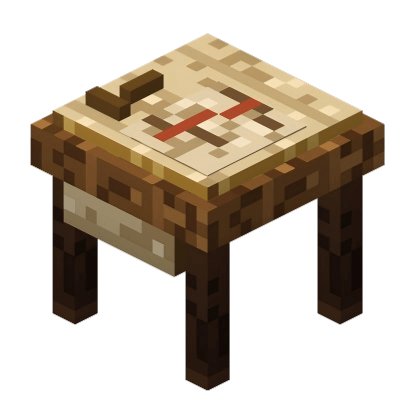 Recipe Linkage is a data-driven research table mod for Minecraft NeoForge 1.21.1, with Forge 1.20.1 support.
It is made for modpacks that want recipes, machines, or progression steps to feel like discoveries instead of simple quest rewards. Pack authors define research samples through datapacks, then players solve material-linkage puzzles on a dedicated research table to unlock configured progression stages.
What Does It Add?
- A new Recipe Research Table block
- Reusable Research Samples with persistent graph progress
- Icon-based research graphs built from item relationships
- Material submission puzzles with visible targets
- AStages progression rewards for completed research
- Optional JEI and Sophisticated Backpacks quality-of-life support
How Research Works
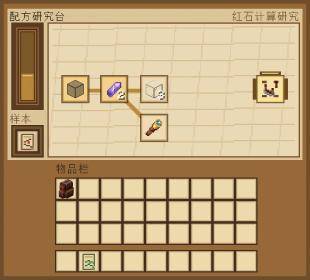
Players insert a bound research sample into the table. The sample generates a fixed research graph and keeps that graph forever.
The target is visible, but the route must be opened by submitting related materials. Available nodes show item icons and required counts, so the puzzle is about choosing an efficient path through the graph instead of guessing a written riddle.
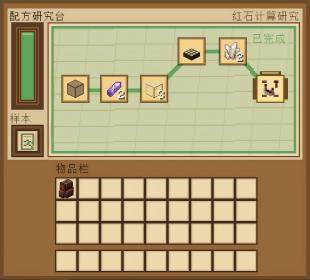
The final target node does not consume an item. Research is complete once the reached path connects to the target.
Completed samples can be right-clicked to claim their configured stage. Server configs can control whether stages are awarded automatically on completion and whether claimed samples are consumed.
Designed For Modpacks
Recipe Linkage does not ship built-in research content. Every research is loaded from datapacks, so pack authors decide exactly what each sample represents.
Research nodes can use:
- A specific item
- An item tag
- A required count; omitted
countdefaults to1, whilecount: 0checks possession without consuming the item - Optional custom-data matching
- Optional fixed coordinates, or automatic graph layout
- Weighted edges for randomized route generation
- Localized research titles through Minecraft text components
This makes it useful for gated recipes, themed technology chains, magic discoveries, chapter milestones, or any progression where materials should hint at their own relationships.
Progression And QoL Integrations
- AStages: the progression output for completed research.
- JEI: hover a research node and use JEI lookup for the required material.
- Sophisticated Backpacks: material submissions can pull matching items from carried backpacks when enabled.
AStages gives completed samples their progression result. JEI and Sophisticated Backpacks are optional quality-of-life integrations.
Important Notes
- Research samples are not consumed by the table.
- Removing a sample does not reset its graph.
- Submitted materials are not refunded.
- Generated routes do not reroll after the sample is created.
- The base mod provides no default research samples; packs must provide them through datapacks, quests, loot, commands, KubeJS, or another delivery system.
For Pack Authors
Configuration
Pack and server owners can tune behavior in config/recipe_linkage-common.toml:
autoAwardStageOnCompletion: defaulttrue, grants the configured stage when research is completed.consumeCompletedSampleOnClaim: defaultfalse, controls whether right-click claiming consumes a completed sample.revealCompletedGraph: defaultfalse, controls whether completed research reveals the full generated graph.enableSophisticatedBackpackMaterials: defaulttrue, allows material submissions to pull from carried Sophisticated Backpacks.
Datapack Path
Research JSON files are loaded from:
data/<namespace>/recipe_linkage/researches/<path>.jsonLoaded research definitions also appear as ready-to-use bound samples in the Recipe Linkage creative tab. For command-based delivery, NeoForge 1.21.1 uses minecraft:custom_data:
/give @p recipe_linkage:research_sample[minecraft:custom_data={RecipeLinkage:{Research:"modpack:basic_optics"}}]Forge 1.20.1 uses legacy item NBT:
/give @p recipe_linkage:research_sample{RecipeLinkage:{Research:"modpack:basic_optics"}}AStages + KubeJS Recipe Gate Example
This example binds the redstone comparator recipe to the same target_stage: "basic_optics" used by the research JSON. Recipe Linkage grants that AStages stage when the research is completed; the AStages KubeJS API makes the recipe require that stage.
Place this script in kubejs/server_scripts/recipe_linkage_stages.js:
// Requires: AStages, KubeJS
AStages.addRestrictionForRecipe(
  'recipe_linkage:basic_optics_comparator',
  'basic_optics',
  'minecraft:crafting',
  'minecraft:comparator'
)
If you use the full example below with target_stage: "redstone_lens", replace basic_optics with redstone_lens.
Minimal Auto-Layout Example
This example omits all x and y fields. Recipe Linkage will automatically place the graph with the start side on the left and the target on the right.
Save as data/modpack/recipe_linkage/researches/basic_optics.json:
{
  "target_stage": "basic_optics",
  "target": "comparator",
  "min_distance_to_target": 3,
  "nodes": [
    { "id": "sand", "tag": "minecraft:sand", "count": 8 },
    { "id": "glass", "item": "minecraft:glass", "count": 3 },
    { "id": "redstone", "item": "minecraft:redstone", "count": 4 },
    { "id": "quartz", "item": "minecraft:quartz", "count": 2 },
    { "id": "comparator", "item": "minecraft:comparator" }
  ],
  "edges": [
    { "from": "sand", "to": "glass" },
    { "from": "glass", "to": "redstone" },
    { "from": "redstone", "to": "quartz" },
    { "from": "quartz", "to": "comparator" }
  ]
}
If initial_nodes is omitted, the mod chooses a valid initial node when the sample graph is generated. If chance is omitted on an edge, it defaults to 1.0.
Fully Customized Example
This example uses a localized title, fixed coordinates, multiple initial nodes, tag input, custom-data input, and weighted edges.
Save as data/modpack/recipe_linkage/researches/redstone_lens.json:
{
  "title": {
    "translate": "research.modpack.redstone_lens",
    "fallback": "Redstone Lens"
  },
  "target_stage": "redstone_lens",
  "target": "comparator",
  "min_distance_to_target": 4,
  "generation_attempts": 96,
  "initial_nodes": ["sand", "copper"],
  "nodes": [
    { "id": "sand", "tag": "minecraft:sand", "count": 8, "x": 5, "y": 58 },
    { "id": "copper", "item": "minecraft:copper_ingot", "count": 3, "x": 8, "y": 78 },
    { "id": "glass", "item": "minecraft:glass", "count": 3, "x": 25, "y": 52 },
    { "id": "redstone", "item": "minecraft:redstone", "count": 4, "x": 42, "y": 30 },
    { "id": "quartz", "item": "minecraft:quartz", "count": 2, "x": 55, "y": 42 },
    { "id": "note", "item": "minecraft:paper", "count": 1, "nbt": "{\"recipe_linkage_note\":\"optics\"}", "x": 32, "y": 80 },
    { "id": "spyglass", "item": "minecraft:spyglass", "count": 1, "x": 60, "y": 72 },
    { "id": "daylight_detector", "item": "minecraft:daylight_detector", "count": 1, "x": 76, "y": 56 },
    { "id": "comparator", "item": "minecraft:comparator", "count": 1, "x": 94, "y": 50 }
  ],
  "edges": [
    { "from": "sand", "to": "glass", "chance": 1.0 },
    { "from": "glass", "to": "redstone", "chance": 0.85 },
    { "from": "redstone", "to": "quartz", "chance": 0.9 },
    { "from": "quartz", "to": "comparator", "chance": 0.8 },
    { "from": "glass", "to": "note", "chance": 0.65 },
    { "from": "note", "to": "spyglass", "chance": 0.75 },
    { "from": "copper", "to": "spyglass", "chance": 0.9 },
    { "from": "spyglass", "to": "daylight_detector", "chance": 0.8 },
    { "from": "daylight_detector", "to": "comparator", "chance": 0.7 },
    { "from": "redstone", "to": "daylight_detector", "chance": 0.55 }
  ]
}
Add the title translation in a resource pack or KubeJS assets, for example assets/modpack/lang/en_us.json:
{
  "research.modpack.redstone_lens": "Redstone Lens"
}
See the included datapack format documentation and vanilla example datapack for the full reference.
The Recipe Linkage Team


Owner