Pin recipes beside your inventory, click them to fill the grid, and get a full recipe book for the brewing stand.
Minecraft 1.21.1 · Fabric and NeoForge
Features
Pinned recipes
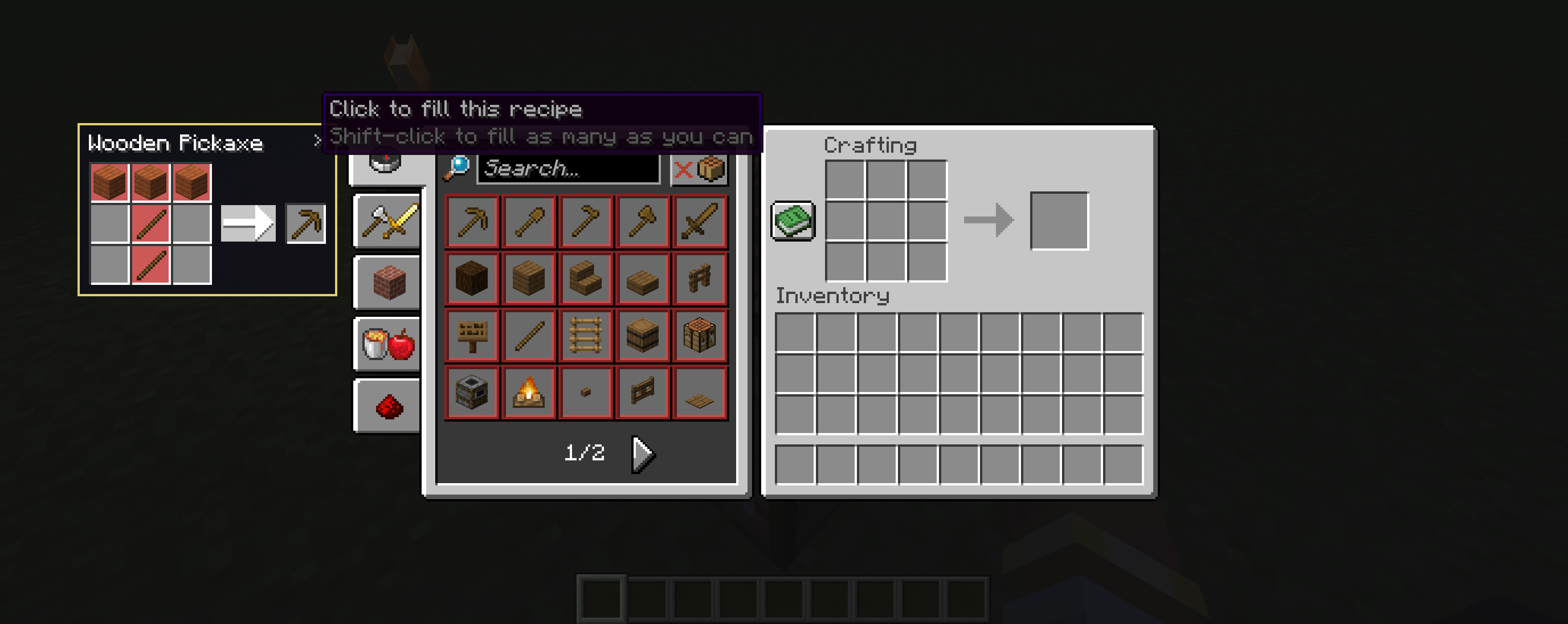
- Pin any recipe. Hover a recipe in the vanilla recipe book and press B. Press B again to unpin it, or click the x on the pin.
- Only shows up in menus. Pins appear beside the inventory, crafting table, furnace, blast furnace, smoker and brewing stand. They never show on the in-game HUD.
- Shows what's missing. Ingredients you don't have are tinted red.
- Click to fill. Clicking a pin in a station that can make it fills the recipe in, the same as clicking it in the recipe book. Shift-click fills as many as you can. Missing items show as a ghost recipe. If a pin belongs to a different station, or needs a 3x3 grid, the tooltip tells you where to make it.
- Look up missing ingredients. Click a red ingredient on a pin, or a ghost item in the crafting grid, to pin that ingredient's recipe too. For slots like "any planks" it picks the kind you already have.
- Shows your selection. The recipe you clicked in the vanilla recipe book gets a gold outline, the same as in the brewing book.
- Up to 4 pins at once. Pinning a 5th drops the oldest.
- Pins are saved to
config/codex.json, so they stay after a restart. - On small screens the pins switch to a narrower layout, and they hide while the recipe book needs the space.
Brewing stand recipe book
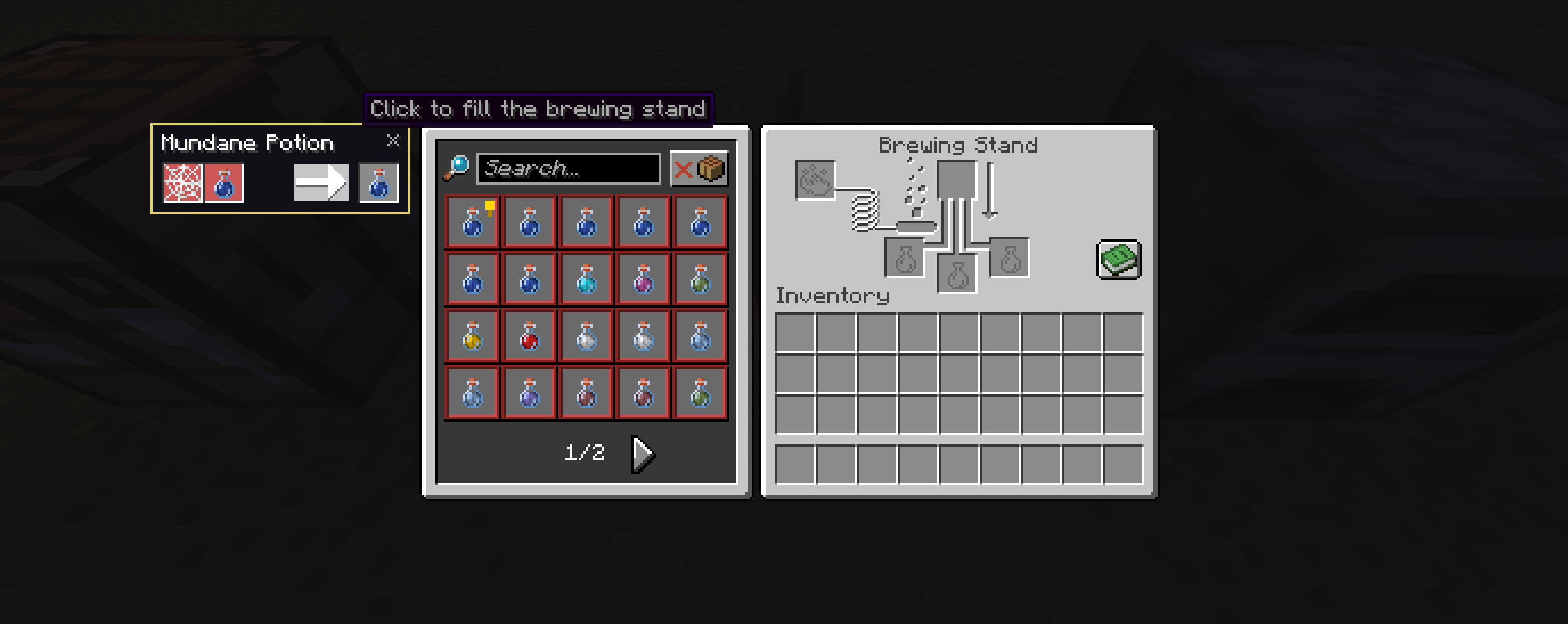
- Click the green book button on the brewing stand to open a recipe book styled like the vanilla one.
- It lists every brewing recipe you've unlocked. That includes potions, their Long and II versions, splash and lingering conversions, and recipes added by other mods.
- Ingredients that all brew the same thing share one entry. For example, vanilla has 12 ways to make a Mundane Potion from a Water Bottle, and they show as a single recipe that cycles through its ingredients.
- Hover a recipe to see its base bottle, ingredient and effects. Recipes you have the items for get a grey background, and the rest get a red one.
- Search by name, and use the toggle next to the search bar to show all recipes or only the ones you can brew right now.
- Click a recipe to move its bottles and ingredient into the stand. Anything you're missing shows as a ghost item. Hover a ghost to see its name, or click it to look up how to brew it. For example, clicking a ghost Awkward Potion switches the stand to Water Bottle + Nether Wart.
- Press B on a brewing recipe to pin it, the same as a crafting recipe.
Potion Scrolls
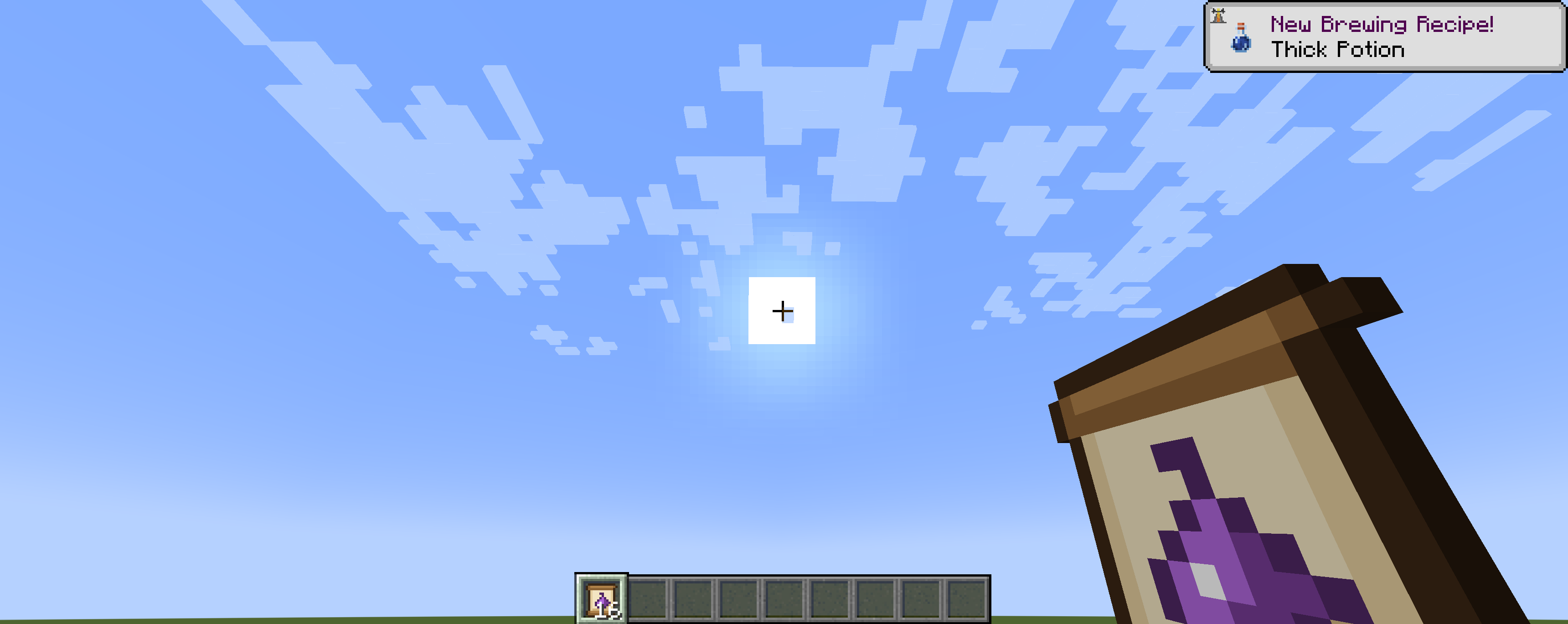
- Crafting: craft a scroll from paper + nether wart + glass bottle (shapeless). The recipe unlocks when you pick up nether wart.
- Witch drops: witches killed by a player drop one 25% of the time, plus 10% per level of Looting (55% with Looting III).
- Using one: a scroll teaches you a random brewing recipe you don't know yet, and a New Brewing Recipe! toast shows the potion.
- Using a stack: sneak while using to read the whole stack at once. You learn one recipe per scroll and get a single summary toast. Once you know every recipe, the leftover scrolls stay in your hand.
- No restrictions: unlocks only fill the book. You can still brew anything without unlocking it, just like vanilla's recipe book.
- Saving: unlocks are saved per player and kept through death.
- Master Alchemist: learning every brewing recipe earns a challenge advancement, listed after "Local Brewery" in the Nether tab.
- Operator commands: use
/brewbook unlockalland/brewbook resetfor testing.
Controls
| Action | Default |
|---|---|
| Pin or unpin the hovered recipe | B (rebind in Options → Controls → Key Binds → Codex; a mouse button works too) |
| Fill a pinned recipe | Click the pin |
| Fill as many as you can | Shift-click the pin |
| Pin a missing ingredient's recipe | Click the red slot or ghost item |
| Read a whole stack of scrolls | Sneak + use |
Installation
- Install Fabric Loader with Fabric API, or NeoForge 21.1.
- Put the matching jar in your
modsfolder.
The mod adds an item, so it needs to be installed on both the server and every client.
Source and issues
The source code is on GitHub under the MIT license.
Recipe Codex Team

Owner