


reanimated-26.1.2+1.3.0.jar
- Uploader
 pycodder
Curse Maven Snippet
What's new
ReAnimated 1.3.0 — Animation Studio, and everything animates together
The big one. Instead of only picking one of my presets, you can now build the animation yourself — with sliders, ready-made starting points and a live preview. And the thing that bugged people most is fixed: button text no longer lags behind its button.
🇬🇧 English
🎬 Animation Studio
A new Animation Studio... button in the ReAnimated settings. It's the editor made for tinkering:
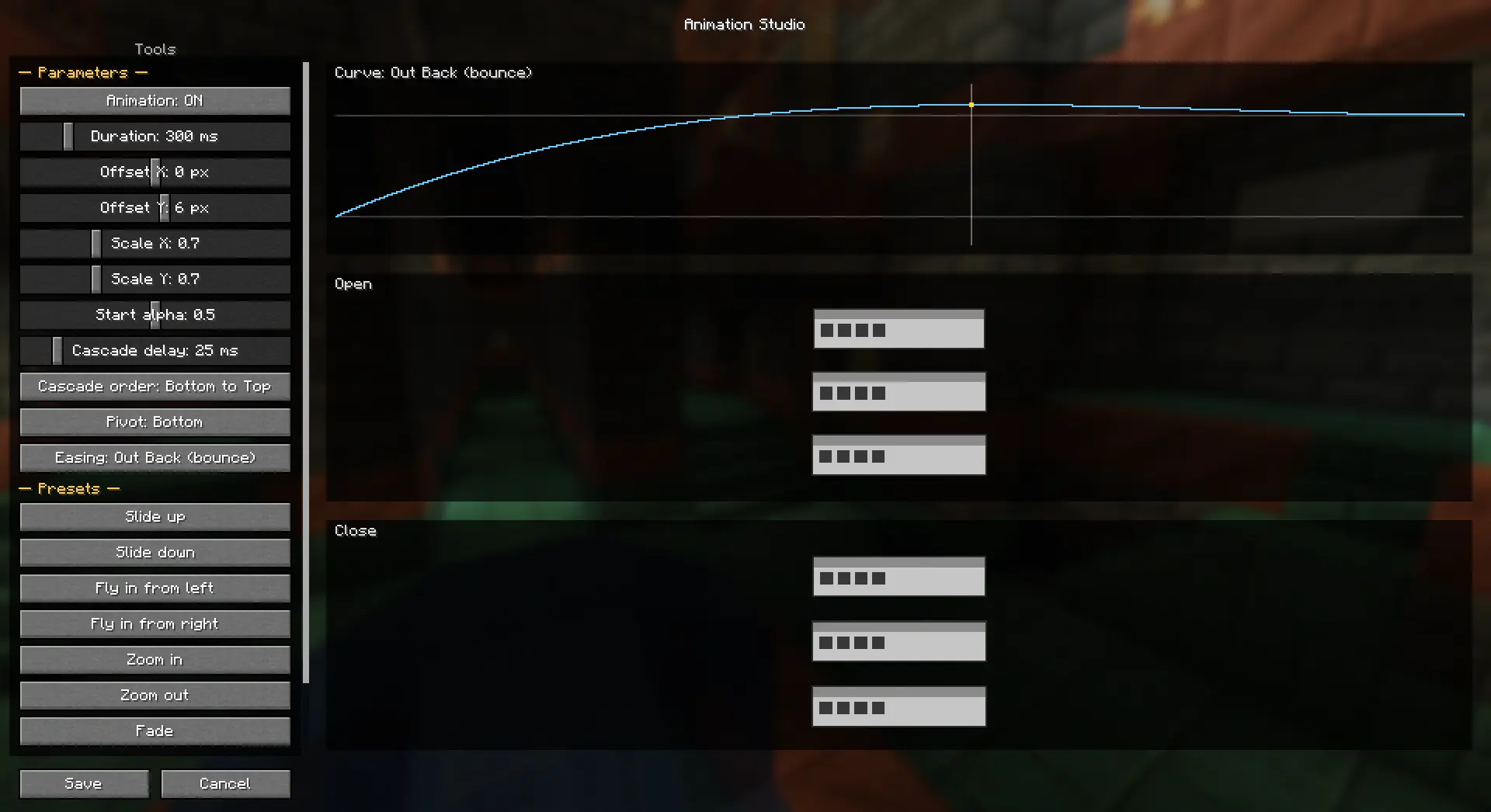
- Live sliders instead of typing numbers — grab one and the preview reacts instantly.
- Ready-made presets, one click each: Slide up / Slide down, Fly in from left / right, Zoom in / Zoom out, Fade, Pop. Good starting points you then tweak.
- A visual easing curve — a graph of the selected curve with a marker running along it, so you can see the timing instead of guessing from its name.
- Two previews at once — one shows how the UI opens, the other how it closes, both looping side by side. The preview elements are little UI panels, so they read like actual windows.
🎛 Profile Editor
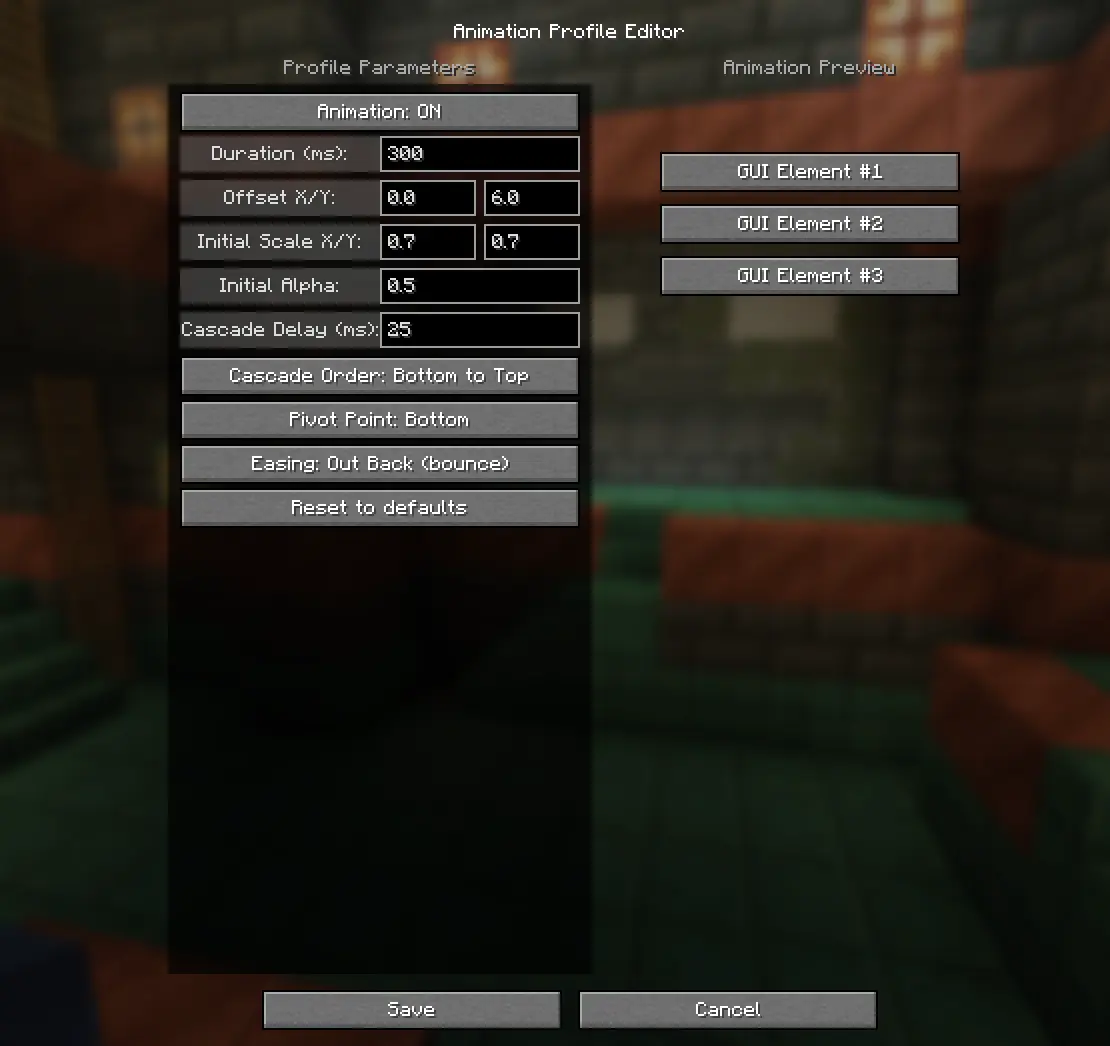
The other editor is still here: every parameter on the left, a live preview on the right. Both editors drive the same animation, so use whichever you prefer.
What you can dial in: duration, offset X/Y, initial scale X/Y, initial alpha, cascade delay, cascade order (bottom-to-top / top-to-bottom / simultaneous), pivot point and easing. Nothing is written to your config until you hit Save — Cancel and Escape throw the edits away.
🧩 Presets and the editor work together
Previously, switching the editor ON took over completely and the preset picker stopped doing anything. Now they're two separate layers that stack:
- Presets animate the whole screen — the panel slides or scales in as one piece. This is your "UI animation".
- The Studio / profile animates the buttons on top — the per-button fade and cascade. This is your "button animation".
So you can slide the whole menu in and have the buttons cascade over it, at the same time. Changing a preset while the editor is on now works as you'd expect.
✅ Button text stays glued to its button
The headline fix. When buttons animated — cascaded in, faded, scaled on hover — the text used to stay solid or lag behind while the frame moved and faded without it. It turned out Minecraft draws button text in a way that quietly ignored the fade. ReAnimated now fades the text the same way it fades the frame, so text and frame animate as one.
📏 Long labels and the inventory character stay in place
A related sync fix. Anything Minecraft clips while drawing — a long button label that scrolls, or the player model in your inventory — used to be cut off by a clip box that stayed put while the content animated, so it looked like it was lagging. The clip now follows the animation.
🖼 List frames are left alone
The server list, world list, resource packs, the options list — those frames don't move, fade or cascade, and they don't take a step in the stagger either. Their scrolling and clipping are computed in screen coordinates, so animating them made the frame come apart from itself. Everything around them animates as usual.
Known limitations
- Screen titles and text fields don't fade — the mod can't fade a screen as a whole without taking the blurred background down with it.
- The text fix covers real buttons. Sliders draw their label through a different path; if you spot one that doesn't fade in step, tell me and I'll cover it.
- Presets animate the screen, the profile animates buttons — so containers (chests and the like), which have no button widgets, animate via the preset.
- The separator lines above and below a list still move with the screen; only the frame itself is frozen.
🇷🇺 Русский
🎬 Студия анимаций
В настройках ReAnimated появилась кнопка «Студия анимаций...» — редактор, заточенный под возню:
- Живые ползунки вместо ввода чисел: тянешь — превью откликается сразу.
- Готовые пресеты в один клик: Выезд снизу / сверху, Влёт слева / справа, Приближение / Отдаление, Проявление, Хлопок. Хорошая отправная точка, дальше подкручиваешь.
- Визуальная кривая easing — график выбранной кривой с бегущим маркером: видно сам тайминг, а не только название.
- Два превью сразу — как UI открывается и как закрывается, рядом, оба зациклены. Элементы превью — мини UI-панели, читаются как настоящие окна.
🎛 Редактор профиля
Второй редактор на месте: слева все параметры, справа живое превью. Оба правят одну и ту же анимацию — пользуйся любым.
Что настраивается: длительность, смещение X/Y, начальный масштаб X/Y, начальная прозрачность, задержка каскада, порядок каскада (снизу вверх / сверху вниз / одновременно), точка масштаба и траектория. В конфиг ничего не пишется, пока не нажмёшь Сохранить — Отмена и Escape выбрасывают правки.
🧩 Пресеты и эдитор работают вместе
Раньше включение эдитора забирало всё себе, и селектор пресета переставал что-либо делать. Теперь это два отдельных слоя, которые складываются:
- Пресеты анимируют весь экран — панель выезжает или масштабируется единым куском. Это «анимация UI».
- Студия / профиль анимирует кнопки поверх — покнопочный фейд и каскад. Это «анимация кнопок».
Так можно выезжать всем меню и каскадить кнопки поверх — одновременно. Переключение пресета при включённом эдиторе теперь работает как ожидаешь.
✅ Текст кнопки держится за кнопку
Главный фикс. При анимации кнопок — каскад, фейд, увеличение под курсором — текст оставался сплошным или отставал, пока рамка ехала и гасла без него. Оказалось, Minecraft рисует текст кнопки так, что прозрачность тихо игнорировалась. Теперь мод гасит текст тем же путём, что и рамку, — текст и рамка анимируются как одно целое.
📏 Длинные лейблы и персонаж в инвентаре не разъезжаются
Смежный фикс синхрона. Всё, что Minecraft обрезает при отрисовке — длинный прокручиваемый лейбл кнопки или модель игрока в инвентаре — раньше резалось неподвижной областью обрезки, пока контент ехал, и выглядело как отставание. Теперь обрезка едет вместе с анимацией.
🖼 Фреймы списков не трогаются
Список серверов, миров, ресурспаков, список опций — эти фреймы не двигаются, не растворяются, не каскадируются и даже шага в каскаде не занимают. Их прокрутка и обрезка считаются в экранных координатах, поэтому при анимации фрейм разъезжался сам с собой. Всё вокруг анимируется как обычно.
Известные ограничения
- Заголовки экранов и текстовые поля не растворяются — мод не может фейдить экран целиком, не утащив за собой размытый фон.
- Фикс текста покрывает настоящие кнопки. Ползунки рисуют лейбл иначе; если заметишь такой, что не гаснет в такт, скажи — добавлю.
- Пресеты анимируют экран, профиль — кнопки, поэтому контейнеры (сундуки и т.п.), где нет виджетов-кнопок, анимируются пресетом.
- Линии-разделители над и под списком всё ещё едут вместе с экраном; заморожен только сам фрейм.
Загрузчики и версии / Loaders & versions
- Fabric / Quilt, Minecraft 1.21.1 – 1.21.11, 26.1, 26.2 (нужен Fabric API). / Fabric / Quilt, Minecraft 1.21.1 – 1.21.11, 26.1, 26.2 (requires Fabric API).
- Версия мода —
<версия Minecraft>+1.3.0, например1.21.1+1.3.0. / Mod version is<Minecraft version>+1.3.0, e.g.1.21.1+1.3.0. - Настройки в
config/reanimated.json, профиль — в полеprofile. Конфиг от 1.2 подхватывается как есть. / Settings live inconfig/reanimated.json, the profile in theprofilefield. Your 1.2 config carries over as-is.
mod by @pycodder — https://modrinth.com/user/pycodder
This mod has no additional files