Description
📓 QuickNoteMax
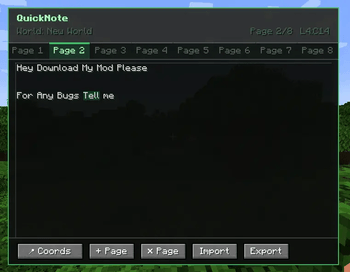
Never lose your coords again. QuickNoteMax is a lightweight client-side mod that adds an in-game notepad — press N and start writing.
✨ Features
- Multi-page notepad — create as many pages as you need
- 📍 Coords button — inserts your current X Y Z with one click
- Saved per world — notes are separate for each world and server
- Export to .txt — saves a file to your Desktop, path shown in chat
- Import from .txt — reimport a previously exported file
- Real multiline editor — use Enter for new lines, arrow keys, Home/End
- Keyboard shortcuts — Ctrl+A, Ctrl+C, Ctrl+V, Shift+arrows
- Client-side only — works on any server, no server install needed
- The game does not pause when the notepad is open
🎮 How to use
| Action | Result |
|---|---|
Press N |
Open QuickNote |
Enter |
New line |
📍 Coords button |
Insert current coordinates |
+ Page |
Add a new page |
✕ Page |
Delete current page |
Export |
Save .txt to Desktop + chat confirmation |
Import |
Load latest quicknote .txt from Desktop |
Ctrl+A |
Select all |
Ctrl+C / V |
Copy / Paste |
💾 Where are notes saved?
.minecraft/quicknote/<world_name>/notes.json
Each world and server has its own separate notes file.
QuickNoteMax Team