





QuickAlias is a client-side utility modification designed to optimize command interaction efficiency within Minecraft. It features a comprehensive visual alias editor, hierarchical command menus, dynamic variable parsing, and a quick access command panel.
This mod aims to resolve the tediousness associated with manual entry of repetitive command strings. Users can construct customized command hierarchies and access them seamlessly via standard chat auto-completion or the convenient visual overlay panel.

✨ Key Features
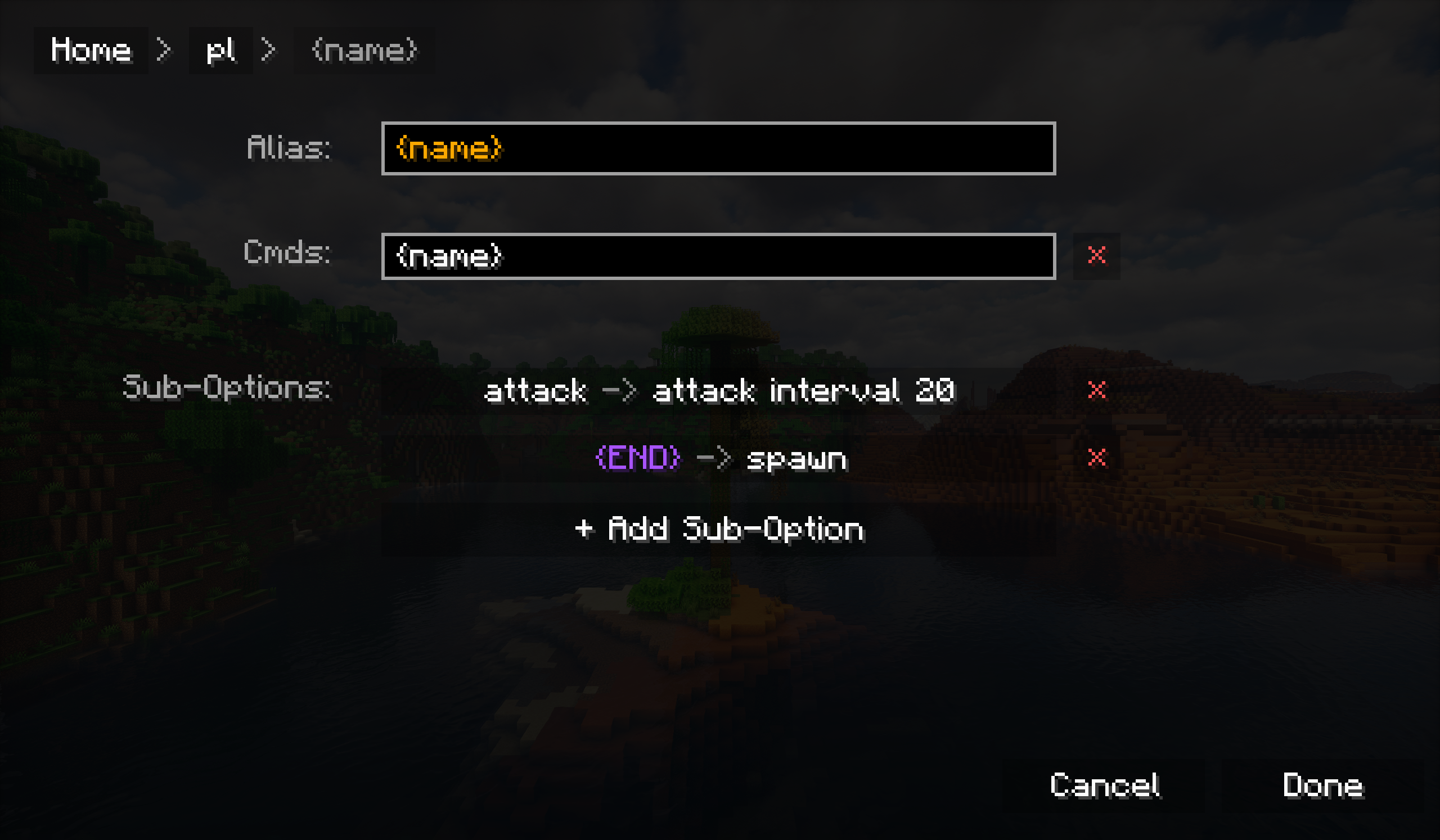
- 🎨 Integrated Visual Editor: Eliminates the need for manual JSON configuration. Efficiently create, edit, reorganize, or import alias configurations directly through the in-game GUI (accessible via the chat interface settings).
- 🌳 Hierarchical Command Structures: Supports the creation of nested menu systems. For example, define a root alias
Warp, and cascade sub-options such asHome,Hub, andMiningunder it. - 🚀 Macro Functionality: Allows binding multiple commands to a single alias identifier. A single trigger can execute a predefined sequence of operations in order.
- 🧩 Dynamic Variable System:
- System Constants: Automatically resolves contextual values including current coordinates (
{X},{Y},{Z}), player ID ({ID}), and dimension info ({DIM}). - Custom Arguments: Supports defining dynamic aliases such as
/invite {player}. The system intelligently captures user input and dynamically replaces the corresponding variables in the command.
- System Constants: Automatically resolves contextual values including current coordinates (
- ⌨️ Native Integration:
- Auto-Completion: Custom aliases seamlessly integrate into the game's chat suggestion system, providing an interaction experience consistent with vanilla commands.
- Smart Suggestions: Variables named
{id}automatically prompt online player names, while{dim}suggests dimension IDs.
- 🖥️ Overlay Navigation: The chat interface integrates a shortcut entry (the
/icon), which summons a visual alias navigation menu, enabling command execution without typing.
📖 Usage Guide
1. Creating a Basic Alias
- Open the Chat interface.
- Click the Settings (⚙) icon to enter the QuickAlias configuration panel.
- Click the
+button to create a new root alias. - Alias Name: Enter the trigger keyword (e.g.,
home). - Command: Enter the command content to be executed (e.g.,
/tp <x> <y> <z>). - Save the settings. You can now call this alias via
/homein the chat bar.
2. Using Variables (Arguments)
To create an alias that accepts dynamic arguments (such as a player name):
- Create a root alias, for example,
hi. - Add a Sub-Option to it.
- Name the sub-option
{id}(Curly braces indicate this node is a variable). - In the
{id}node's command list, enter:hello {id}. - Execution: Enter
/hi Stevein the chat bar, and the system will executehello Steve(text without a slash "/" will be sent as a chat message).
3. Built-in Placeholders
The following placeholders can be used in any command configuration:
{X},{Y},{Z}- Current coordinate values (retains one decimal place).{ID}- Current player name.{DIM}- Registered resource name of the current dimension.
📥 Installation
- Installation: Simply place the
.jarfile into themodsfolder in your game directory. - Compatibility: This is a client-side only mod; it functions on multiplayer servers without requiring server-side installation.
QuickAlias (快捷别名)
QuickAlias 是一款致力于优化 Minecraft 指令交互体验的客户端模组。提供可视化别名编辑器、层级化指令菜单、动态变量解析及快捷指令面板。
本模组旨在解决繁琐的手动指令输入痛点。可构建自定义的指令层级体系,并通过原生的聊天栏自动补全功能或便捷的可视化面板进行调用。
✨ 核心特性
- 🎨 集成化图形编辑器: 彻底摒弃繁琐的 JSON 配置文件编辑流程。可直接通过游戏内 GUI(聊天界面设置入口)高效地创建、编辑、重组或导入别名配置。
- 🌳 树状指令结构: 支持构建嵌套式菜单系统。例如,定义一个根别名
传送,并在其下级联家、大厅及矿区等子选项。 - 🚀 宏指令支持: 允许将 多条指令 绑定至单一别名。仅需一次触发,即可按序执行预设的一系列操作逻辑。
- 🧩 动态变量系统:
- 系统常量: 支持在指令中自动解析当前坐标 (
{X},{Y},{Z})、玩家 ID ({ID}) 及维度信息 ({DIM})。 - 自定义参数: 支持定义如
/invite {player}的动态别名。系统将智能捕获用户输入的参数,并动态替换指令中的对应变量。
- 系统常量: 支持在指令中自动解析当前坐标 (
- ⌨️ 原生级集成:
- 自动补全: 自定义别名将无缝集成至游戏聊天栏的智能提示系统中,提供与原版指令一致的交互体验。
- 智能建议: 命名为
{id}的变量将自动补全在线玩家名称,{dim}则自动补全维度 ID。
- 🖥️ 快捷覆盖层: 聊天界面集成了快捷入口(
/图标),可唤出可视化的别名导航菜单,实现免输入的指令执行。
📖 使用指南
1. 创建基础别名
- 打开聊天界面。
- 点击 设置 (⚙) 图标进入 QuickAlias 配置面板。
- 点击
+按钮创建新的根别名。 - 别名名称: 输入触发关键词(例如:
home)。 - 命令: 输入需执行的指令内容(例如:
/tp <x> <y> <z>)。 - 保存设置。此时即可在聊天栏通过
/home调用该别名。
2. 使用变量(参数)
若需创建一个接收动态参数(如玩家名称)的别名:
- 创建一个根别名,例如
hi。 - 为其添加一个 子选项 (Sub-Option)。
- 将子选项命名为
{id}(花括号标识该节点为变量)。 - 在
{id}节点的命令列表中,输入:hello {id}。 - 执行: 在聊天栏输入
/hi Steve,系统将执行hello Steve(没有“/”将作为消息发送)。
3. 内置占位符
以下占位符可用于任何指令配置中:
{X},{Y},{Z}- 当前坐标值(保留一位小数)。{ID}- 当前玩家名称。{DIM}- 当前维度的注册资源名。
📥 安装说明
- 安装方式: 将
.jar文件放入游戏目录下的mods文件夹即可。 - 兼容性: 本模组为纯客户端模组,在多人服务器中使用无需服务端安装。
The QuickAlias Team
