how it looks.png
how it can look.png
2026-11-02_18.51.43.png
Description
📖 Quest Journal
Build your own quest system, create progression paths, hunt bosses, play together and track your objectives directly in-game.
Quest Journal adds a fully customizable Quest Book directly accessible from a new inventory tab.
Create your own quest categories, objectives and rewards, build progression chains, complete quests with friends and track up to 3 quests at once directly on your HUD.
Whether you are creating a small survival experience or an entire modpack progression system, Quest Journal gives you the tools to build it your way.
✨ What is Quest Journal?
Quest Journal adds a dedicated quest interface designed to feel like part of Minecraft rather than a separate external menu.
From the journal, players can:
📜 Browse and complete quests
🎁 Earn and claim custom rewards
🔒 Progress through quest chains
🟢 Complete Always Active quests
👥 Create and join parties
📌 Track up to 3 quests simultaneously
🔎 Search through quests
✅ Review completed quests
🗂️ Browse custom quest categories
🧭 Locate supported boss structures
🗺️ Automatically create JourneyMap waypoints
Everything can be customized through the mod's configuration file.
📖 Default Quest Journal
Quest Journal works immediately after installation.
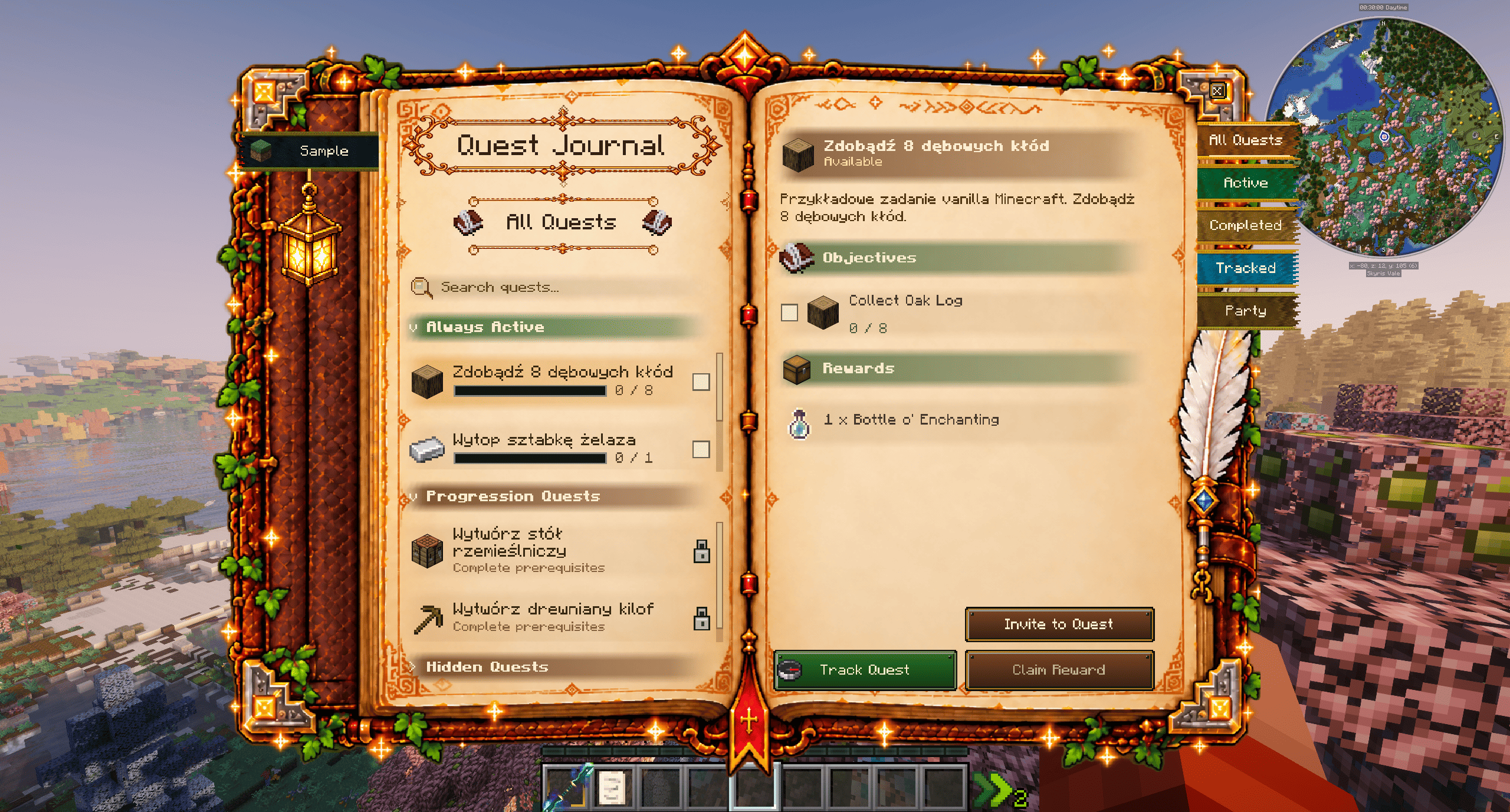
If you have not configured your own quest system yet, the mod creates a small Sample category containing example quests.
This lets you explore the interface and understand how the system works before creating your own progression.
[SCREENSHOT — HOW IT LOOKS]
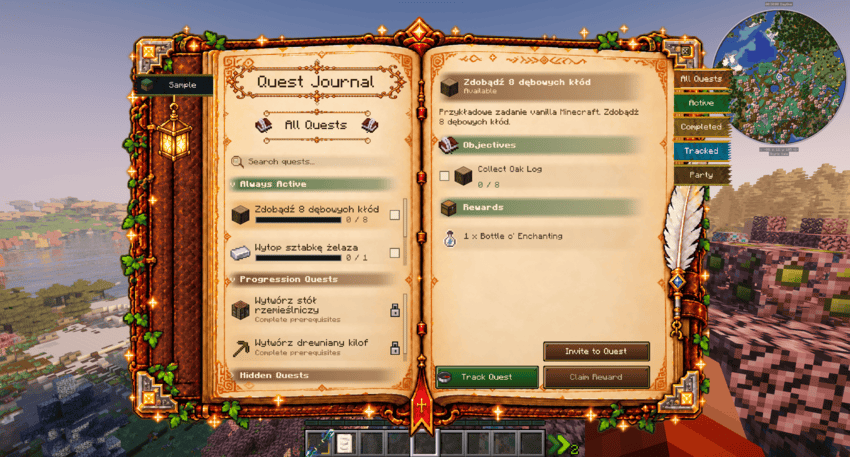
An unconfigured Quest Journal using the automatically generated Sample category.
🎨 Create Your Own Quest Journal
Quest Journal is designed around customization.
You can create your own categories and use them to organize completely different types of content.
For example:
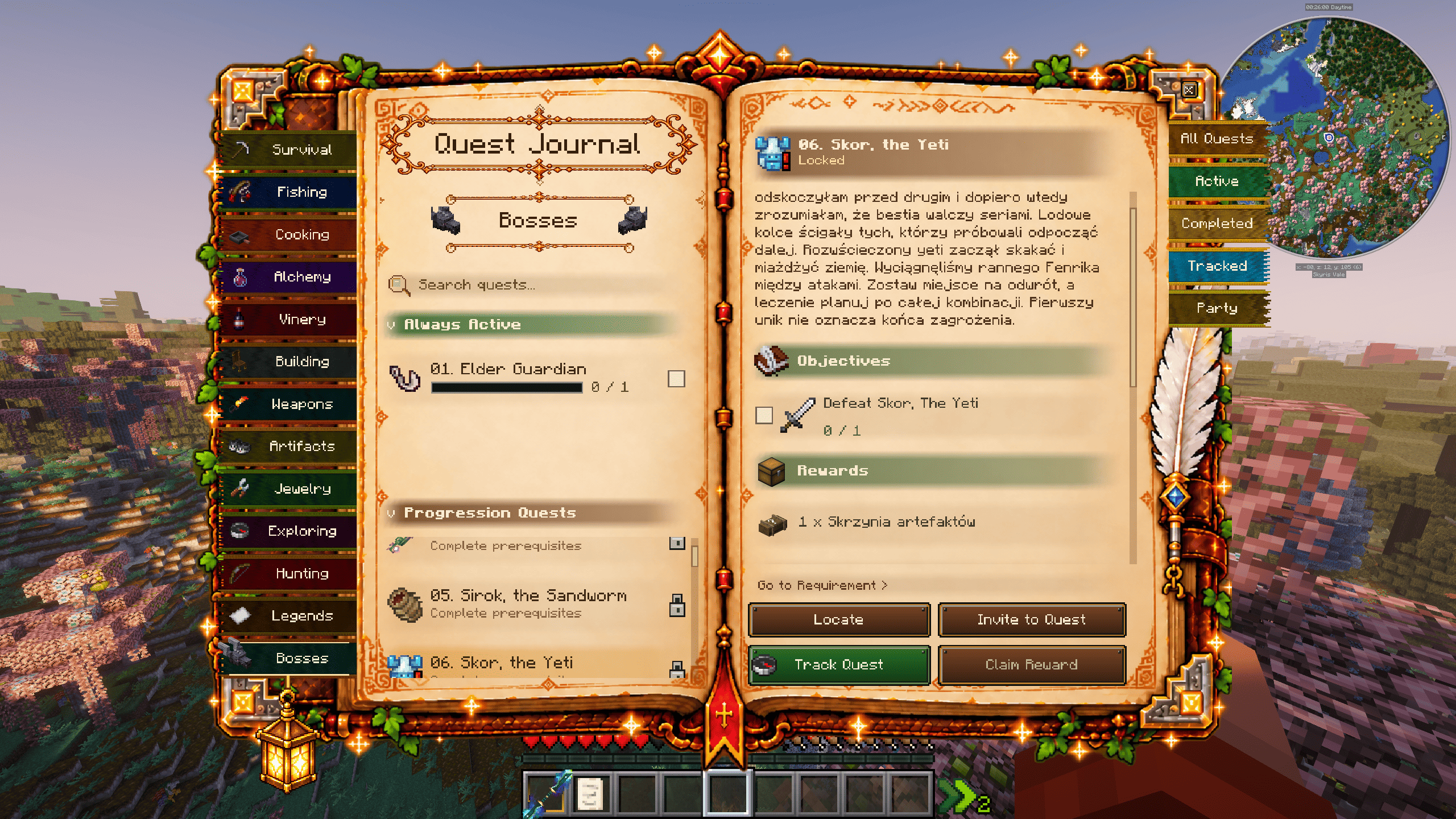
Survival • Fishing • Cooking • Alchemy • Vinery • Building • Weapons • Artifacts • Jewelry • Exploring • Hunting • Legends • Bosses
You decide how your journal is structured.
[SCREENSHOT — HOW IT CAN LOOK]
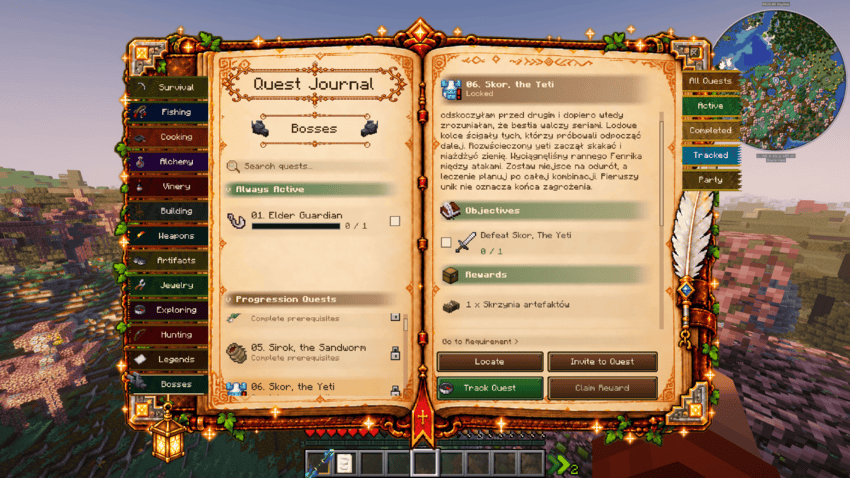
An example of a heavily configured Quest Journal with multiple categories and custom progression.
Your journal can remain simple or become the central progression system of an entire modpack.
🟢 Always Active Quests
Always Active quests are available from the moment they appear in the journal.
They do not require another quest to be completed first.
They work especially well for:
- Item collections
- Fishing objectives
- Cooking
- Exploration
- Weapon collections
- Artifact hunting
- Optional side quests
- Long-term objectives
Players are free to complete them whenever they want.
🔒 Progression Quests
Progression Quests use prerequisites.
A quest can remain locked until another quest has been completed.
This allows you to create progression paths such as:
Crafting Table → Furnace → Iron Equipment → Advanced Equipment
or:
Basic Weapon → Runic Weapon → Unique Weapon
Locked quests are displayed directly in the journal, making it easy for players to understand what they need to complete next.
🎁 Custom Quest Rewards
Quests can provide custom rewards when completed.
Rewards can be used for things such as:
- Items
- Experience
- Equipment
- Loot containers
- Modded items
- Rare rewards
- Progression items
Completed objectives and rewards are displayed directly on the quest page.
👥 Party System
Questing does not have to be a solo experience.
Quest Journal includes a built-in Party system that allows players to work together.
- Players can:
- Create a party
- Invite other players
- Join a party
- View party members
- Manage party membership
- Complete supported quests together
The interface also indicates whether a quest is currently being completed:
Solo
or
In Party
This makes multiplayer progression much easier to understand and manage.
📌 Track Up To 3 Quests
You can track up to 3 quests simultaneously.
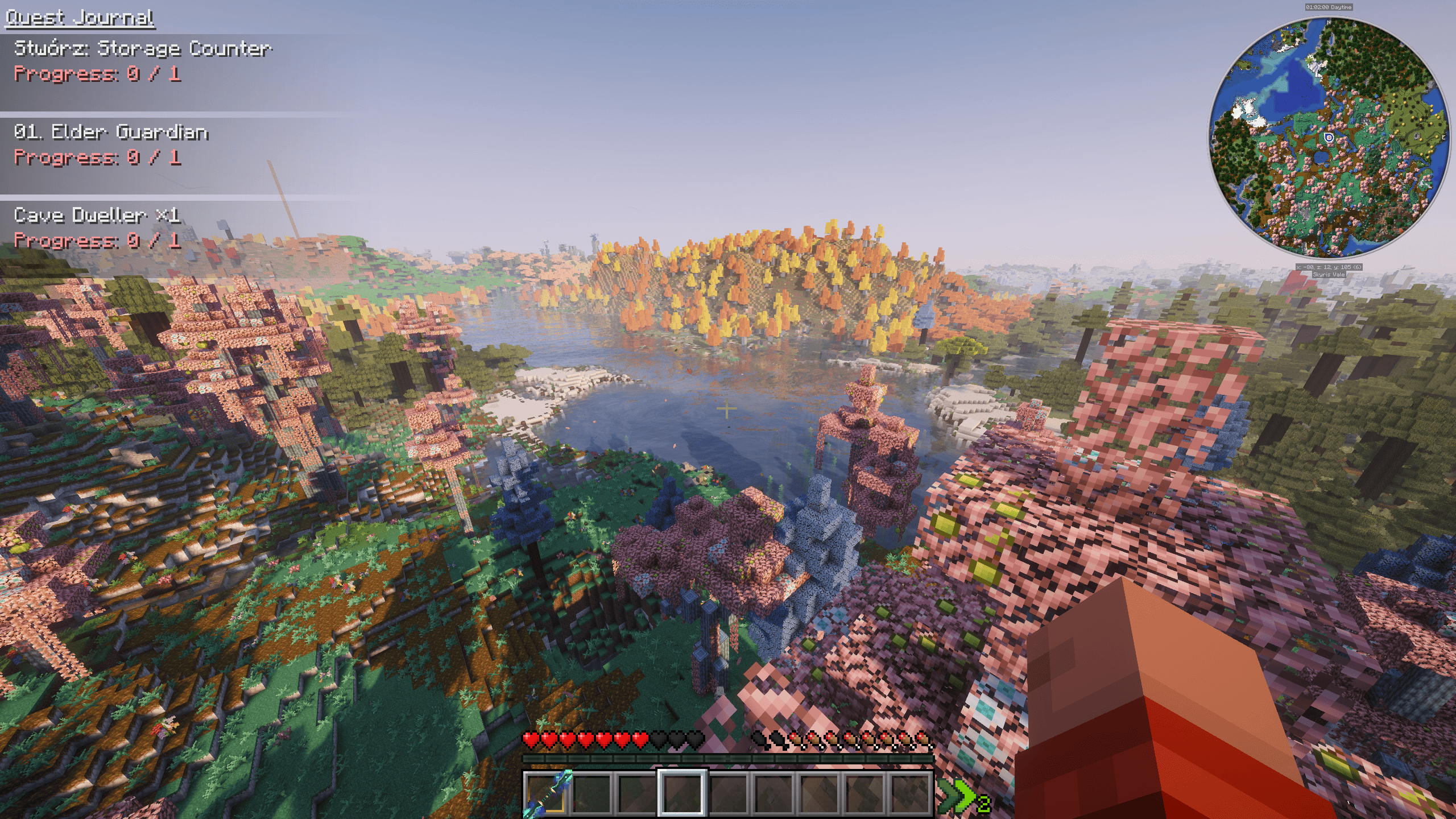
Tracked objectives appear directly on your HUD, so you do not need to constantly reopen the Quest Journal while exploring or completing objectives.
[SCREENSHOT — QUEST TRACKER]
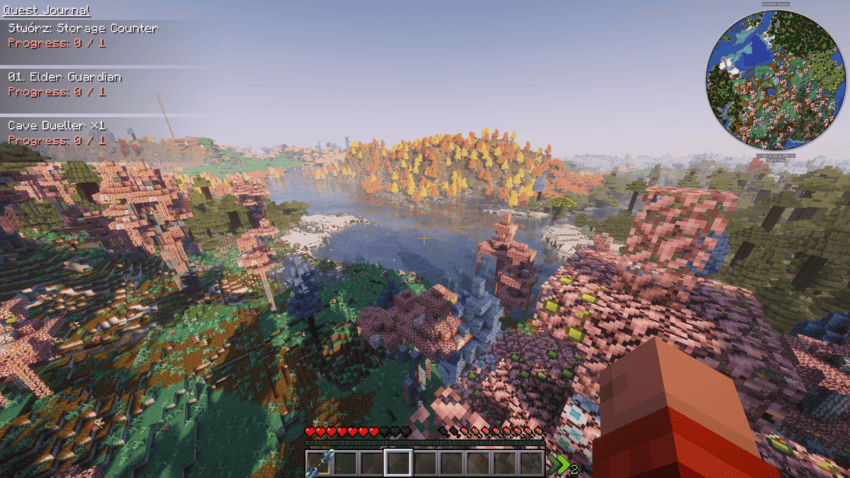
The tracker displays:
- Quest name
- Current objective
- Current progress
- Required amount
Tracked quests can also be managed from the dedicated Tracked tab.
✅ Completed Quests
Finished quests are moved into the Completed section.
Here you can:
- Review quests you have already completed
- Check previous objectives
- Claim rewards that have not yet been collected
Your completed progression therefore remains accessible instead of disappearing from the journal.
📚 All Quests
The All Quests section combines quests from every configured category.
This is especially useful for larger modpacks where quests may be spread across many different tabs.
Instead of searching through each individual category, you can browse everything from one place.
🔎 Quest Search
Quest Journal includes a built-in search system.
Simply search for the quest you are looking for instead of manually browsing every category.
This becomes particularly useful in large configurations containing dozens or hundreds of quests.
🗂️ Custom Categories
Create your own quest categories and organize your journal however you want.
Each category can contain its own:
- Quests
- Always Active objectives
- Progression chains
- Quest icons
- Rewards
- Prerequisites
- Bosses
- Collections
This makes Quest Journal suitable for both small custom adventures and large modpacks.
⚔️ Boss Quests
Quest Journal includes additional functionality specifically designed for boss progression.
When a category is named:
Bosses
supported quests can gain access to the Locate system when the appropriate integration mods are installed.
This allows a boss quest to become part of the exploration itself:
Discover Quest → Locate Structure → Travel to Boss → Defeat Boss → Claim Reward
🧭 Explorer's Compass Integration
Explorer's Compass is an optional integration.
When Explorer's Compass is installed, supported quests inside the Bosses category can display a:
Locate
button.
Pressing it allows Quest Journal to search for the structure associated with that boss.
Instead of forcing players to manually search thousands of blocks for a specific structure, the Quest Journal can guide them toward their objective.
🗺️ JourneyMap Integration
If both:
Explorer's Compass + JourneyMap
are installed, the Locate system becomes even more useful.
When a supported boss structure is found, Quest Journal automatically creates a JourneyMap waypoint at its location.
The player can then immediately see the destination on the map and navigate toward it.
Without JourneyMap
JourneyMap is not required.
If you have Explorer's Compass but not JourneyMap, the structure can still be located.
Instead of creating a waypoint, Quest Journal sends the discovered:
X / Y / Z coordinates
directly in chat.
⚙️ Configuration
Quest Journal is configured through:
config/vvequestbook/questbook.cfg
The configuration file allows you to create and customize your own quest system.
You can configure:
- Quest categories
- Category icons
- Quest names
- Quest descriptions
- Objectives
- Prerequisites
- Always Active quests
- Progression quests
- Rewards
- Boss quests
- Structure locating information
- Quest progression
The journal is configuration-driven, meaning completely different modpacks can build completely different experiences using the same mod.
🧩 Built For Modpacks
Quest Journal was created with custom modpacks in mind.
It does not force you into one predefined progression system.
Instead, it provides the framework for you to build your own.
Create progression based around:
⚔️ Combat
🧭 Exploration
🎣 Fishing
🍳 Cooking
⚗️ Alchemy
🏗️ Building
💎 Collecting
👑 Bosses
📜 Adventure
🎁 Rewards
or combine them into one complete progression system.
⭐ Features
✔️ Quest Journal accessible directly from the inventory
✔️ Fully customizable quest categories
✔️ Always Active quests
✔️ Progression quests with prerequisites
✔️ Custom objectives
✔️ Custom rewards
✔️ Solo quest progression
✔️ Party quest progression
✔️ Party management
✔️ Track up to 3 quests simultaneously
✔️ HUD quest tracker
✔️ Quest search
✔️ Completed quest history
✔️ Unclaimed reward management
✔️ All Quests overview
✔️ Boss quest support
✔️ Explorer's Compass integration
✔️ JourneyMap integration
✔️ Automatic JourneyMap waypoints
✔️ Coordinate fallback without JourneyMap
✔️ Configuration-based progression
✔️ Designed for modpacks
🔌 Optional Integrations
Explorer's Compass
Enables structure locating functionality for supported Boss quests if you have explorer's compass in your inventory.
JourneyMap
When used together with Explorer's Compass, automatically creates a waypoint at the located boss structure.
Neither integration is required for the core Quest Journal functionality.
📁 Configuration File
config/vvequestbook/questbook.cfg
Configure the journal, create your own progression and turn your Minecraft world into a complete quest-driven adventure.
💬 Modpack Usage
Quest Journal is designed to be used in custom modpacks.
Feel free to build your own progression around it and create completely unique quest configurations for your pack.
Quest Journal Team