PVZ Kill VFX
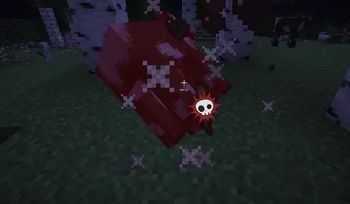
Kills should feel good. With PVZ Kill VFX, every time you kill an entity or a player, a cartoon skull burst pops up right where it died, holds for a moment and fades out in one second. You also hear a kill sound, just for you.
Client-side only. You don't need to install anything on the server, and nobody else sees or hears it. It works in singleplayer, on vanilla servers and on modded servers.
Features
- Skull burst on every kill. It pops in, holds and fades out over one second, anchored to the spot where the mob or player died.
- Scales with distance. Kills far away get a small burst, close kills get a bigger one. Tall mobs get a slightly bigger one too.
- Kill sound. It plays only for you, at the same volume wherever the kill happened.
- Counts what you kill. Melee, arrows, tridents and anything else that gets credited to you. It also counts if the target dies from fire or poison within 5 seconds of your hit.
- Works on mobs and players. Any living entity.
- Tiny and light. No config, no commands, no dependencies besides Fabric API on Fabric.
Supported Versions
| Loader |
Versions |
| Fabric |
1.20.1, 1.20.4, 1.21.1, 1.21.4, 1.21.5, 1.21.8, 1.21.11, 26.2, 26.3 |
| NeoForge |
1.20.1, 1.20.4, 1.21.1, 1.21.4, 1.21.5, 1.21.8, 1.21.11, 26.2, 26.3 |
| Forge |
1.20.1, 1.20.4 |
Fabric needs Fabric API. Forge and NeoForge need nothing extra.
Notes
- The burst is drawn over the screen at the position where the target died, so it shows on top of blocks in between.
- Deaths you did not cause (for example, someone else's kill or a mob falling on its own) don't trigger it.
- Your sound volume follows the Master volume slider in Minecraft's sound settings.
Install
- Pick the jar that matches your Minecraft version and loader.
- Drop it in your
mods folder.
- Go kill something.