PolyCraft (Fix Recipe Conflicts)
- By
A Polymorph alternative for modern Minecraft. One set of ingredients, multiple results, you pick what you get.





In a big modpack, a lot of mods add recipes that use the same ingredients. Normally the game picks one recipe and the rest can never be crafted. PolyCraft keeps all of them and lets you choose the result you want, at the station you are already standing at.
How it works
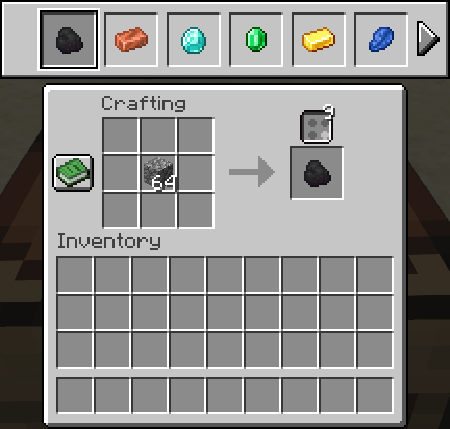
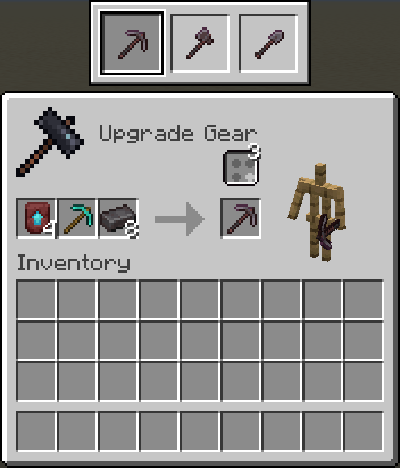
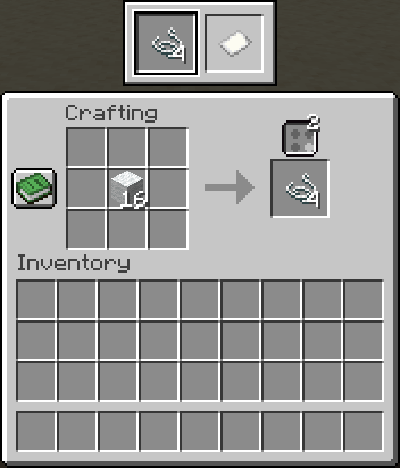
Put items in a station. If they could make more than one thing, a small button appears above the result slot, with a number showing how many choices you have.
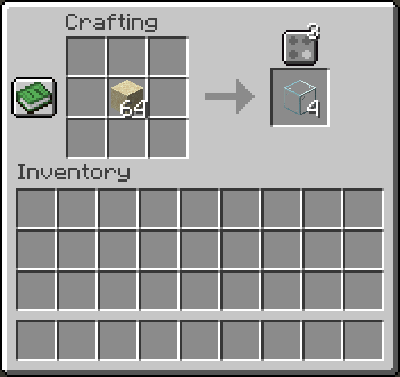
Click the button to open a row of every possible result, then click the one you want.
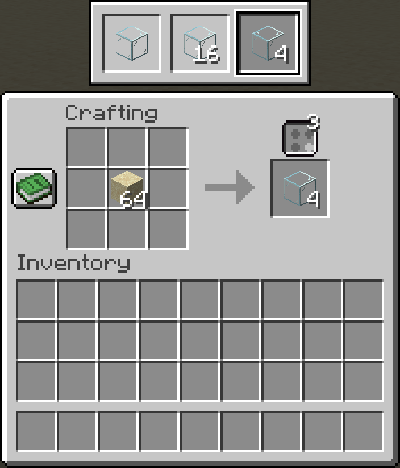
You only choose once. PolyCraft remembers your pick for each recipe conflict and saves it with the world, so the same items give you the same result next time.
Some items are in a lot of recipes. When the options don't fit on screen, the list gets scroll arrows.
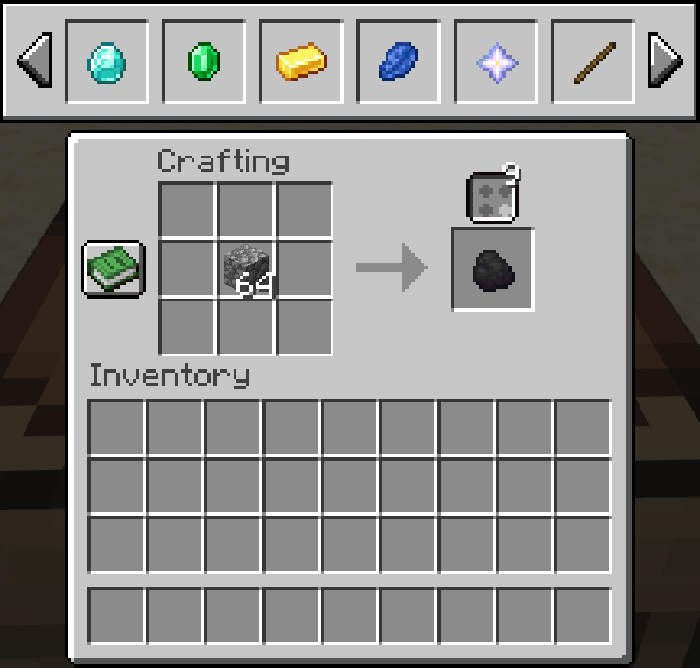
Screenshots use PolyCraft's demo datapack, which adds deliberately silly recipes so there is something to choose between.
Where it works
PolyCraft adds the button to the stations you already use.
| Station | |
|---|---|
| Crafting table | ✔ |
| Your 2x2 inventory grid | ✔ |
| Furnace, blast furnace, smoker | ✔ |
| Smithing table | ✔ |
| Crafter | ✔ |
| Campfire | Uses the pack's default (there is no screen to put a button on) |
| Stonecutter | Left alone, since it already lets you choose |
Recipes placed from the recipe book count as choosing that recipe.
Smithing table
Furnaces, blast furnaces and smokers
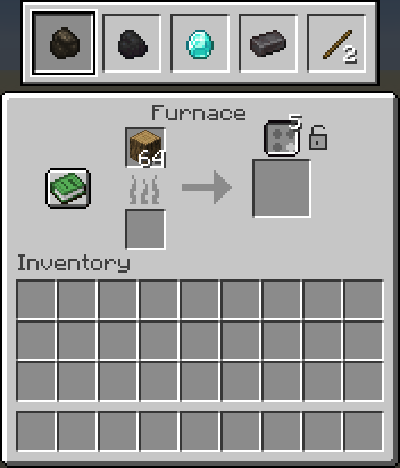
Changed your mind mid-cook? Switch recipes and the current cook becomes the new result. The time already spent carries over, and you lose no fuel or ingredients.
Pin a recipe to a block
Automation shouldn't depend on who opened the GUI last. Furnaces, blast furnaces, smokers and Crafters have a small lock beside the button. Click it to pin the current recipe to that block.
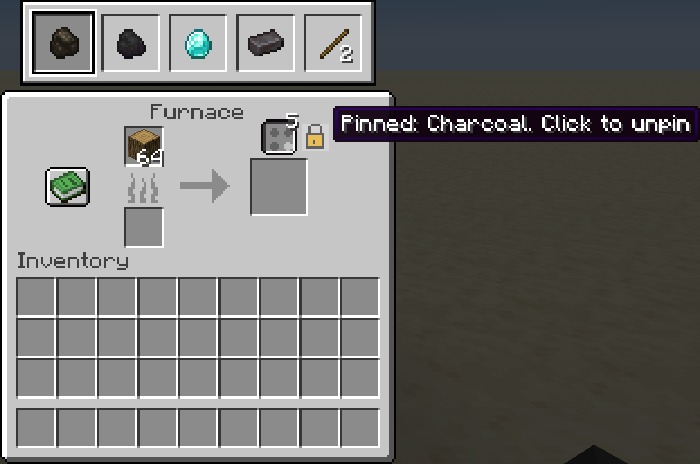
A pinned block always uses its pinned recipe, even when another player with a different choice opens it. Set up your hopper-fed furnaces and redstone-fired Crafters once and leave them alone.
Good to know
- PolyCraft removes and rewrites nothing. Every recipe still exists, so JEI, REI and EMI still show all of them.
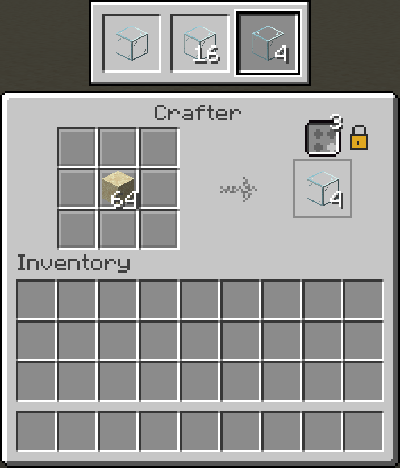
- Different amounts count as a choice. If a pack adds a recipe that gives 4 glass where vanilla gives 1, you can pick either. Identical copies of the same result are not treated as a conflict.
- Other mods' recipes work as long as they use the standard recipe lookup.
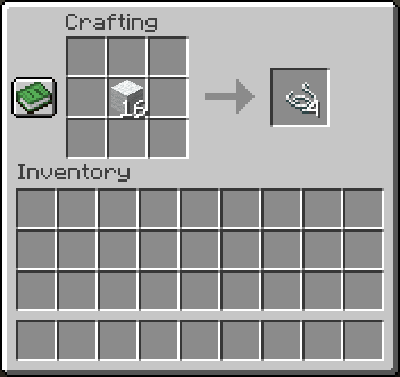
- Overlap detection is optional. Turn on Detect overlapping inputs and PolyCraft also treats recipes that the same items can satisfy as a conflict, even when their ingredient lists differ (a tag in one recipe, a specific item in another).
| Off | On |
|---|---|
 |
 |
For modpack makers
PolyCraft works with no setup. When you want to decide the defaults yourself, you have the controls below.
PolyCraft picks the default in this order: the block's pin, then the choice of the player using it, then your
defaults, then whatever the game would normally pick. Set defaults in config/polycraft/rules.json (created the first time
the game runs), or ship the same file in a datapack at data/<namespace>/polycraft/rules/<name>.json:
{
  "priority": ["minecraft:oak_planks", "othermod:planks_x4"],
  "exclude": ["badmod:duplicate_recipe"],
  "groups": {
    "<group key or recipe id>": { "default": "mod:recipe_id" }
  }
}priority: recipes to prefer everywhere, best first.exclude: recipes never offered as a choice.groups: a default for one conflict. Use a group key from the export, or a recipe id to cover any conflict that includes it.
Edit the config file, then run /polycraft reload. Datapack rules reload with /reload.
/polycraft conflicts [mod] lists what PolyCraft found, and /polycraft export writes everything
to config/polycraft/conflicts.json with the group keys ready to copy into your rules.
Commands:
| Command | Who |
|---|---|
/polycraft conflicts [mod] |
Everyone |
/polycraft reset |
Everyone (forgets your own choices) |
/polycraft export |
Operators |
/polycraft reload |
Operators |
/polycraft reset <player> |
Operators |
Settings (config screen, or config/polycraft.json5)
| Setting | Default | What it does |
|---|---|---|
| Detect overlapping inputs | off | Also count recipes the same items can satisfy as a conflict |
| Enabled / disabled recipe types | empty | Limit PolyCraft to some recipe types, or leave some out. Entries are a type id or modid:* |
| Visible options | 6 | How many results show before the list gets scroll arrows |
| Show choice count | on | The number on the button |
| Remember choices | on | Save each player's choices with the world |
| Debug logging | off | Extra detail in the game log |
The repository includes a demo datapack with 40 conflicting recipes across every station, handy for trying the mod or testing a pack.
Requirements
- Minecraft 26.2
- Fabric or NeoForge
- Architectury API, YACL and chimeric-lib
- Fabric API (Fabric only)
- Needed on both the client and the server
Compatibility
PolyCraft is not compatible with Polymorph or Polymorph+, including Polymorph's unofficial ports. They do the same job in the same places, and the game will refuse to start if both are installed.
Known limitations
- Recipe viewers (JEI, REI, EMI) are not integrated yet. Picking a recipe from one is not treated as a choice.
/polycraft conflictsandexportonly look at the recipe types the game ships with. Conflicts at a station, including other mods' recipes that use the standard lookup, are found from the items actually in it.- Other mods' custom crafting stations need their own button, and there is no add-on API yet.
Issues and suggestions
Found a bug or have an idea? Please use the GitHub issue tracker.
Credits
Obviously this mod would not be possible if not for the people at Mojang making an awesome game. Thanks also go to the developers of the Fabric and NeoForge mod loaders and the Architectury API.
Thanks also to the creators of Polymorph, Polymorph+, and similar mods, whose earlier work on choosing between conflicting recipes inspired this one. (PolyCraft uses no code or assets from any other mod.)
License
This mod is released under the MIT license. The full text of the license can be found here.
PolyCraft (Fix Recipe Conflicts) Team

Owner