Pocketwild
- By
Twelve tiny wildlife species for cozy Minecraft gardens. Client-only Fabric, with a field journal.
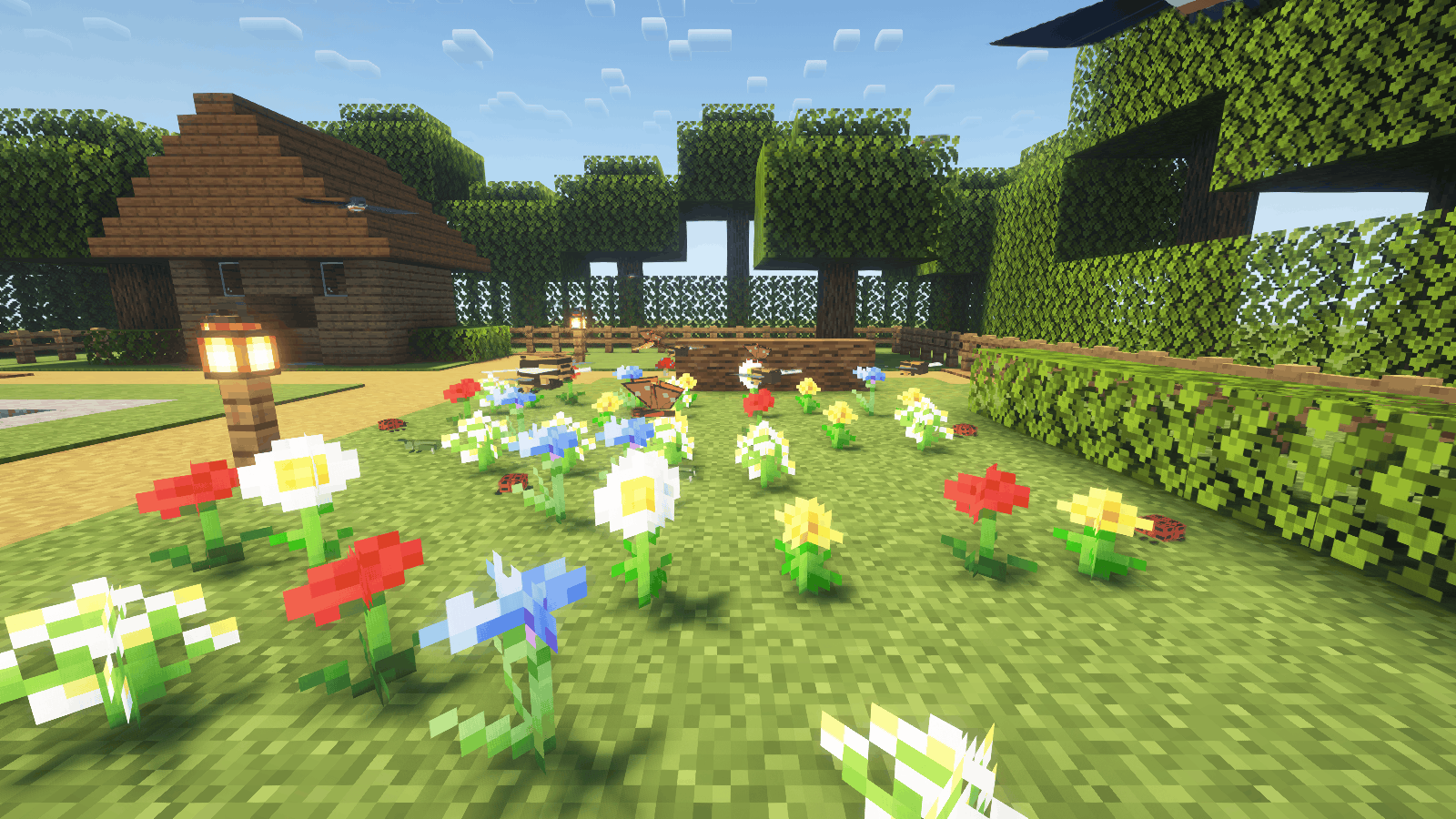
Bumblebees and copper butterflies fly over a sunny flower bed while ladybugs crawl below and swallows pass overhead.
Description
Pocketwild
Little wings, living worlds.
Pocketwild is a client-only Fabric mod that fills Minecraft gardens with twelve species of tiny cosmetic wildlife. Butterflies and bumblebees visit flowers, snails creep across moss, swallows glide over grass and fireflies glow after sunset. Find your favorites and record them in a local field journal.
Living Gardens · version 1.1.0 adds nine species, original models and pixel art, crawling and hopping animations, a field journal and an English/Russian notebook interface.
| Wildlife | Where and when to look |
|---|---|
| Copper butterfly | Small flowers in clear daylight |
| Turquoise dragonfly | Exposed source water in clear daylight |
| Lantern moth | Lanterns and soul lanterns at night |
| Firefly | Grass and water at dusk/night; self-lit, without dynamic world lighting |
| Bumblebee | Small flowers in clear daylight |
| Ladybug | Grass and flower beds during daytime |
| Beetle | Moss and exposed logs during daytime |
| Grasshopper | Grass in clear daylight |
| Cicada | Exposed leaves in clear daylight |
| Snail | Grass and moss in rain or at night |
| Lacewing | Leaves and small flowers at dusk/night |
| Swallow | Open air above grass in clear daylight |
Every species has its own model, texture and notebook icon. Ground creatures crawl or hop; flyers have different rhythms, and swallows alternate wingbeats with gliding. Nearby observations fill a persistent field journal with habitat hints. A species quota leaves room for variety instead of letting one abundant habitat fill the entire population.
Choose Gentle (18), Balanced (36) or Lively (60) populations, adjust the radius, toggle all twelve species individually and enable reduced motion.
These are visual decorations. They have no drops, breeding, damage, hitboxes or server-side AI. Other players do not see your local population. Pocketwild adds no blocks or items, changes no terrain and sends no custom network packets.
Installation
- Create a Fabric profile for your exact Minecraft version.
- Install Fabric Loader 0.20.1 or newer and the matching Fabric API.
- Put one matching Pocketwild JAR in that profile's
modsfolder. - Optionally install the matching Mod Menu release.
| Minecraft | Java minimum | Fabric API minimum (tested) | Mod Menu used in verification |
|---|---|---|---|
| 1.20.1 | 17 | 0.92.12+1.20.1 | 7.2.2 |
| 1.21.1 | 21 | 0.116.17+1.21.1 | 11.0.5 |
| 1.21.11 | 21 | 0.141.6+1.21.11 | 17.0.1 |
| 26.2 | 25 | 0.161.0+26.2 | 20.0.3 |
| 26.3 | 25 | 0.165.2+26.3 | 21.0.0 |
Install Pocketwild on the client. A server does not need it. The five builds are separate files, not a universal JAR. Forge, NeoForge and Bedrock are not supported.
Controls
Use /pocketwild while in a world, or open Mods → Pocketwild → Configure through Mod Menu. Changes apply when you select Save changes; Cancel leaves the active settings alone. Configuration lives in config/pocketwild.json. The field journal lives in config/pocketwild-journal.json, shared across your local worlds. It records species within six blocks with a clear sampled line of sight; opening the journal does not unlock entries. It does not store server addresses or coordinates. Existing 1.0 settings are retained; new species start enabled.
Defaults: wildlife enabled, all twelve species enabled, population cap 36, radius 24 blocks, reduced motion off. Population is bounded to 0–72; radius to 8–48. The population number is a maximum, not a guaranteed number of creatures. Habitats, time, weather and nearby available space affect what appears.
Finding wildlife
Stay near a flower bed, open pond, grassy clearing or mossy log for a few seconds. See the habitat table for each species. Small flowers qualify; tall flowers alone do not. Water needs an exposed source block. Clear space around habitats gives the animation room. Butterflies and dragonflies leave when daytime ends or rain starts; moths leave when day returns. Moving away, changing worlds or disabling wildlife clears the relevant population.
FAQ
Can I use it on a vanilla server? Yes: rendering and simulation happen locally. Follow that server's rules for client modifications.
Can I catch or breed the creatures? No. Pocketwild is ambient decoration, not a creature-collection or farming mod.
Does it require shaders? No. Its own textures, models and animation work with the vanilla renderer. Shader screenshots, where included, name the extra visual software used.
Does it improve FPS? No. It adds rendering work. Reduce the population or disable species if needed. Bounded populations are an implementation choice, not a promise of zero performance cost.
Can I remove it safely? Remove the JAR while Minecraft is closed. No custom blocks, saved entities or world data need conversion. The optional JSON settings and journal files may be removed too.
Can I include it in a modpack? Yes, under the included MIT license. Preserve the copyright and license notice when redistributing covered files.
Support
When reporting a problem, include Minecraft version, Pocketwild version, Fabric Loader/API versions, other rendering mods, reproduction steps and the relevant latest.log excerpt. Review logs for personal information before posting them. Use the comments or issue link on the project page where you downloaded the mod.
Code and original Pocketwild assets are MIT licensed. Minecraft belongs to Mojang/Microsoft; Pocketwild is an unofficial project.
Pocketwild Team