PixelGO - Sell Your Inventory Pixelmon
- By
A sidemod for Pixelmon which allows a player to sell the items within their inventory at shopkeeper rates with a command or a button
Capture d'écran 2026-08-27 154847.png
Capture d'écran 2026-08-27 154825.png

Capture d'écran 2026-08-27 154908.png
Description
PixelGO — Sell Your Inventory
Introduction
Your inventory is full of junk you can sell, but the nearest shopkeeper is three biomes away. Most importantly, you really don't want to walk all the way back to town. Have you ever been in this scenario before? Fear not, your prayers have been answered. Introducing PixelGO, a Pixelmon Sidemod which adds two commands: /pixelsell and /pixelvalue, plus a button left on your inventory screen. By running the /pixelsell command, the item in your hand will be sold as if a shopkeeper was right there with you. Running /pixelsell all empties your entire bag of everything sellable in one go. Alternatively you can view how much something will sell for by using the /pixelvalue command. The source of these prices comes from the same source as the shopkeepers, so it'll remain consistent with datapack changes to prices.
Features
- Allows you to sell the item in your hand to NPC Shopkeepers using one command. This allows for more on-the-go convenience.
- Allows you to sell a chosen amount of that item, or your entire inventory at once, without clicking through a shop menu one stack at a time.
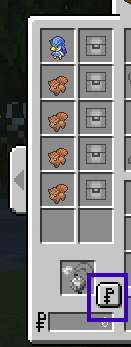
- Adds a button to your Pixelmon inventory screen, just above your money. One click sells everything sellable in your bag.
- Allows you to check the market value of the item in your hand using one command. This allows you to know in advance how much your item will sell for before you sell it.
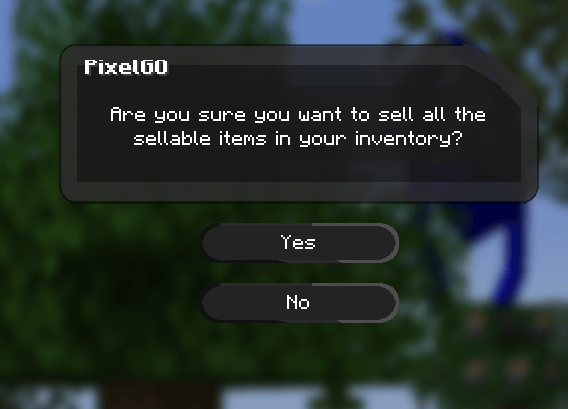
- Every sale asks you to confirm first, so nothing valuable disappears by accident.
Getting Started
- To use this mod, you need to be on at least Pixelmon version 9.4.0, running Minecraft 1.21.1 / NeoForge.
- Place this mod in your mods folder. (Note: Not plugins folder)
- Start up your server/client. This mod can be used on client side (for singleplayer) or server side (for multiplayer). The commands come from the server side; install it on your client too if you want the inventory button.
- Anyone can use the commands, so there are no permissions to set up.
Commands
- /pixelsell: Sells every copy of the current item in your hand at NPC Shopkeeper prices. In the event the item in your hand is not listed as sellable for shopkeepers, the item will not sell.
- /pixelsell <number>: Sells only that many copies of the item in your hand and keeps the rest.
- /pixelsell all: Sells every sellable item in your inventory in one go. Items no shopkeeper buys are simply left alone.
- /pixelvalue: Displays the sell price of the item within your hand as well as its single unit price. In the event the item in your hand is not sellable, you will be notified so.
The Inventory Button
Open your inventory (E) and you will find a small Pokédollars just above your money. Click it to sell your whole bag, confirmation included. Hover over it and it tells you what it does. If it gets in your way, you can move it or turn it off in config/pixelgosell-client.toml.
PixelGO - Sell Your Inventory Pixelmon Team

Owner