Pikup
- By
3.png
1.png

image.png


Description
Pikup
Stop opening your inventory to find out what you just walked over.
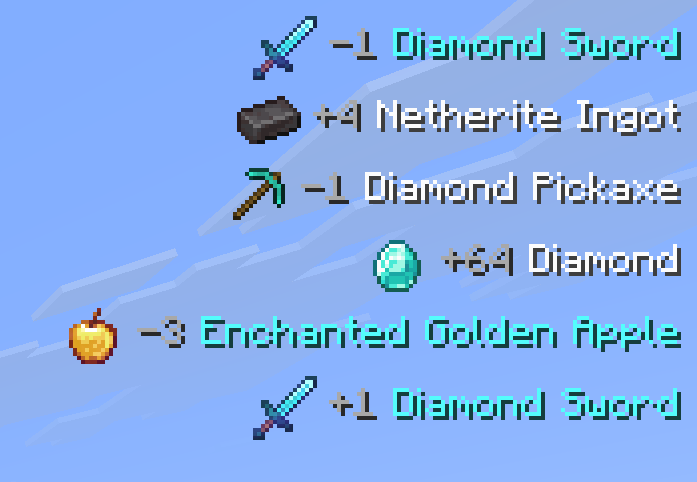
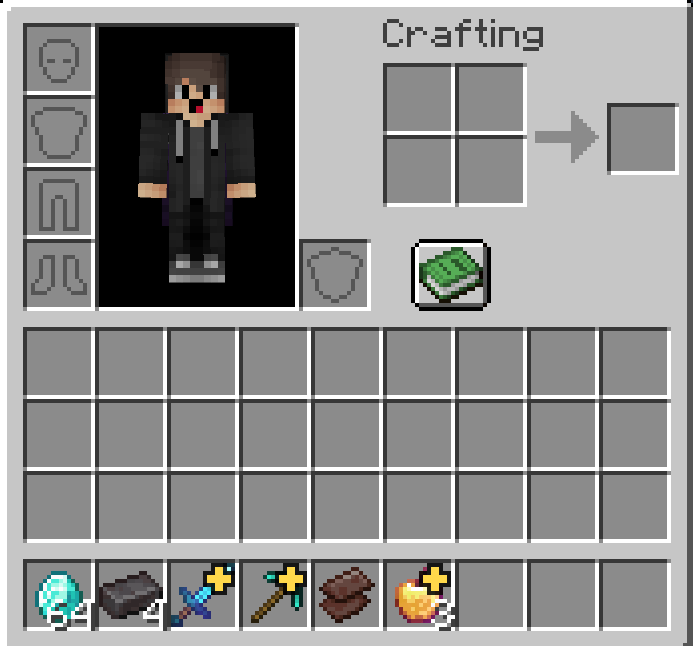
Pikup puts every item you pick up in the corner of your screen — the item's icon, how many you got, and its name coloured by its rarity. Then it drops a small badge on the exact slot the item landed in, so you can go straight to it instead of hunting through four rows of loot.
Built for people who mine, fight and loot fast enough that the chat log isn't good enough.
What you actually see
Pick something up and a line slides into the corner:
| +5 Diamond | white — Common |
| +1 Diamond Sword | yellow — Uncommon |
| +3 Golden Apple | aqua — Rare |
| +2 Enchanted Golden Apple | light purple — Epic |
Same four colours Minecraft uses in tooltips, so the rare drop is obvious at a glance. Pick up seventeen cobblestone in a row and you get one tidy +17 Cobblestone line, not seventeen of them.
At the same time, the slot that received the item gets a gold badge in its corner. It sits there for 30 seconds, pulses gently so it catches your eye, then fades out. You'll see it on your hotbar and inside any inventory or chest screen.
Features
Notifications
- Item icon, count and name on one line
- Rarity colouring — white / yellow / aqua / light purple — or one flat colour of your choosing
- 8 anchor positions: four corners, top and bottom centre, and left/right middle
- Repeated pickups of the same item merge into one line and add up
- Slide-in animation and a smooth fade out
- Optional background box behind each line
- Count layout:
+3 Diamond,Diamond x3, or just the name
Fonts
- Draw pickup lines in any TrueType font installed on your computer
- Searchable dropdown listing fonts by their real names,
Arial Bold, notarialbd.ttf - Reads your Windows Fonts folder, or drop
.ttffiles intopikup-fontsto skip installing them - Size, smoothing and nudge controls to line it up with the rest of your HUD
- Install a font while the game is running, it's in the list next time you open the settings
- Characters the font is missing fall back to Minecraft's font, so item names never turn into boxes
- Switching is instant, no resource reload, no restart
Slot markers
- A badge on the exact slot your new item went into
- Works on the hotbar, the offhand slot, and inside every container screen
- 5 shapes: Star, Dot, Ring, Exclamation, Arrow
- Any of the four slot corners, any colour, or coloured by the item's rarity
- Dark outline so it stays readable on bright items
- Clears itself when you hover the slot or start using the stack
Fully configurable
Every number above is a slider. Open Mod Menu → Pikup and you get five tabs:
| Tab | What's in it |
|---|---|
| General | Master toggle, what to notify about, display time, fade time, max lines, merging, hide while chatting / with F3 |
| Position & Size | Screen corner, X/Y offset, scale (25 %–400 %), line spacing, newest-first ordering |
| Appearance | Rarity colouring, custom colours, text shadow, item icon, count layout, background box, slide animation |
| Slot Marker | Enable, duration (1–600 s), shape, slot corner, size, colour, outline, pulse, fade, hotbar / inventory toggles, clear rules, fine positioning |
| Filters | Blacklist or whitelist by item id, minimum stack size |
Prefer editing files? It's all plain JSON in config/pikup.json.
Optional extras
Off by default, because most people don't want them — but they're one click away:
- Show items leaving your inventory — a
-3line when you drop, use up or store something - Show experience orbs — a line when you collect XP
Requirements
| Cloth Config | required |
| Mod Menu | optional — needed to open the settings screen in game |
Compatibility
Pikup is client-side only. It changes nothing about the game world, so:
- It works on any server, including vanilla ones — nothing to install server-side
- It's allowed on servers that permit cosmetic client mods
- It won't affect your world, your saves, or anyone else's game
| Version | What you get |
|---|---|
| 1.21.9 – 26.2 | Everything, no compromises. Recommended |
| 1.21.6 – 1.21.8 | All features; the slot badge uses a fallback to draw above the item |
| 1.20.5 – 1.21.5 | All features; notifications draw through Minecraft's older HUD hook |
| 1.20 – 1.20.4 | Custom fonts use the older rasteriser, so fewer fonts are listed |
| 1.19 – 1.19.4 | Notifications and slot badges; older render path |
Why it doesn't spam you
A lot of pickup mods just watch your inventory for changes, which means they fire every time you craft something, pull items out of a chest, or a hopper feeds you.
Pikup reads the actual item pickup packet — the same signal that plays the pickup sound, so a line only appears for things you genuinely picked up off the ground. The inventory is still checked once a tick, but only to work out which slot the pickup landed in, so the badges never end up on stacks you moved yourself.
Installation
- Install Fabric API, Cloth Config, and Pikup to your Instance
- Add Mod Menu if you want the in game settings screen
- Launch, and pick something up!
The Pikup Team