


Parcel Locker / Paczkomat
- By
2026-10-18_23.18.43.jpg
2026-10-18_23.18.50.jpg
2026-10-18_23.18.54.jpg
2026-10-18_23.27.42.jpg
2026-10-18_23.18.34.jpg
Description
📦 Parcel Locker / Paczkomat
Author:
dev00k
Minecraft Version:1.21.1(Fabric)
Supported Environments: Client & Dedicated Server (SMP, Survival, RolePlay, Modern Cities)
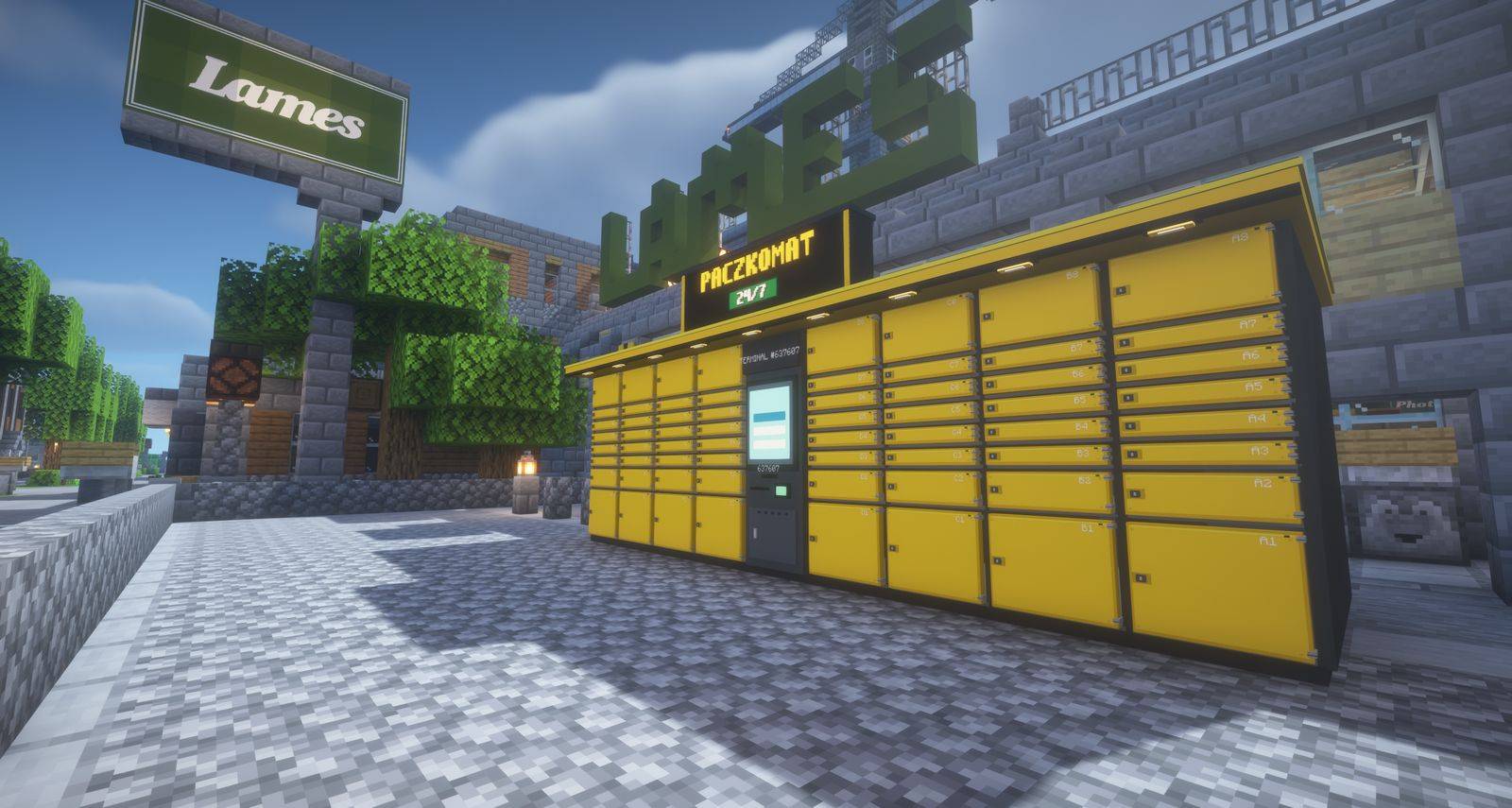
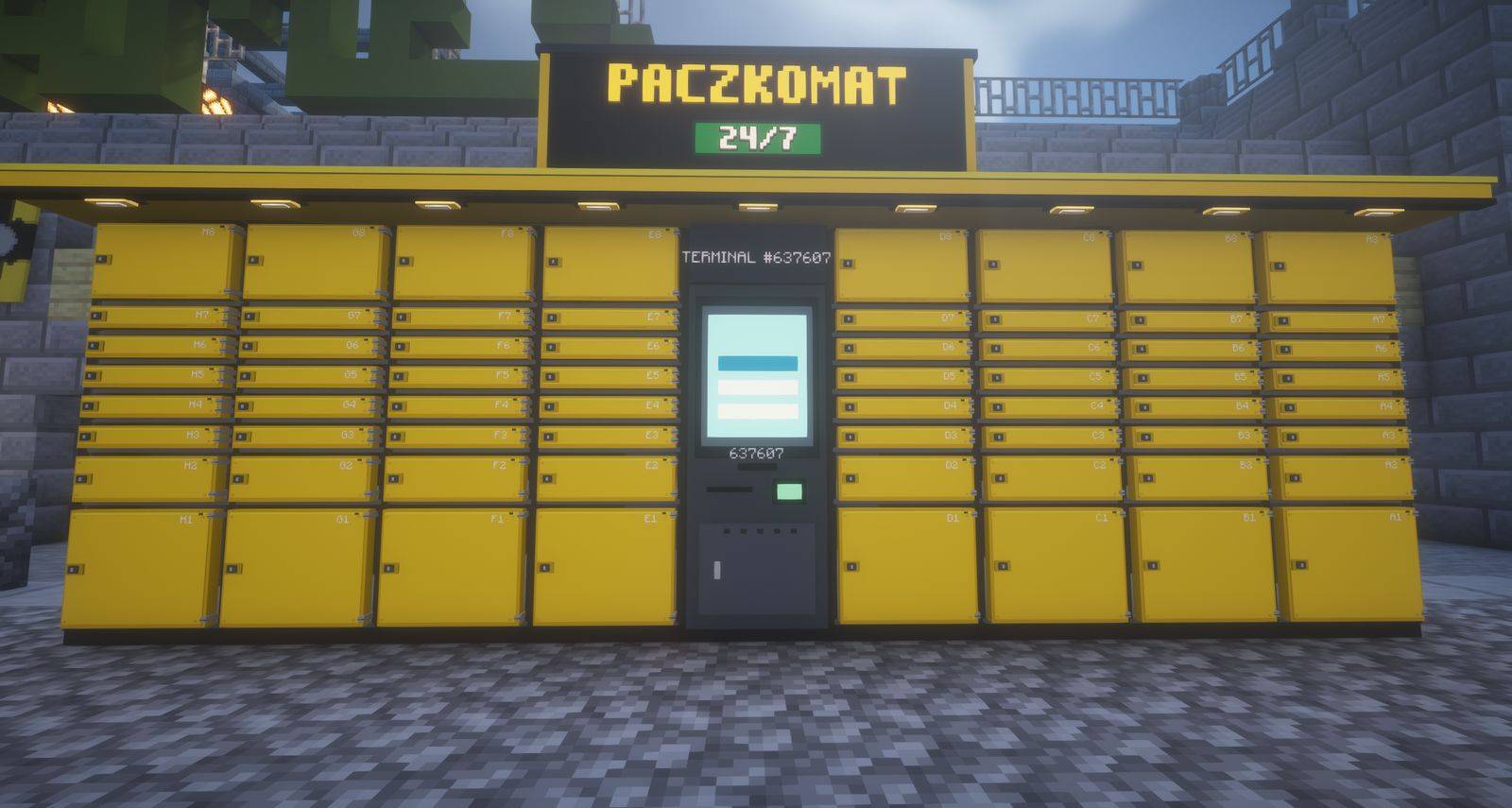
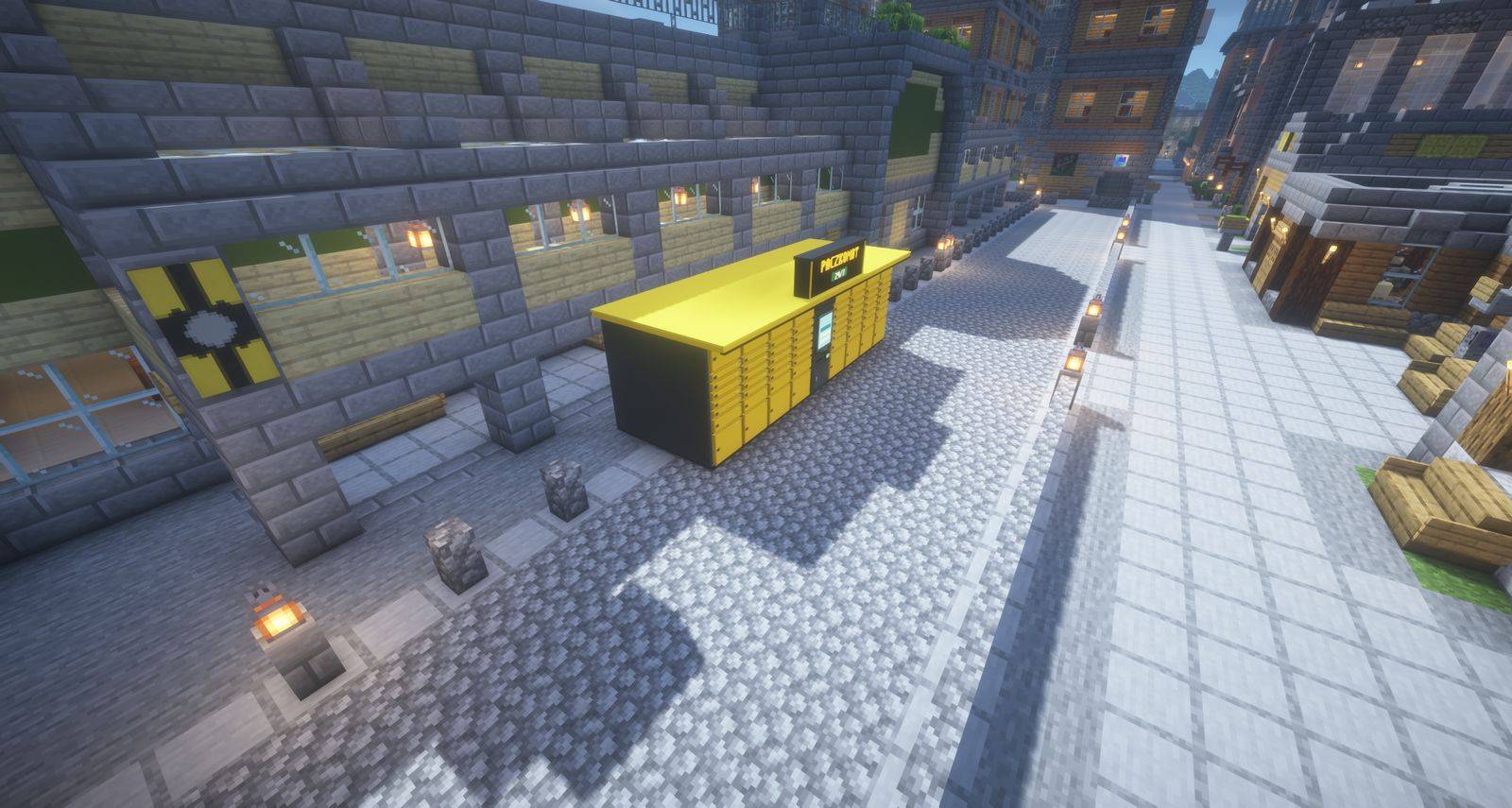
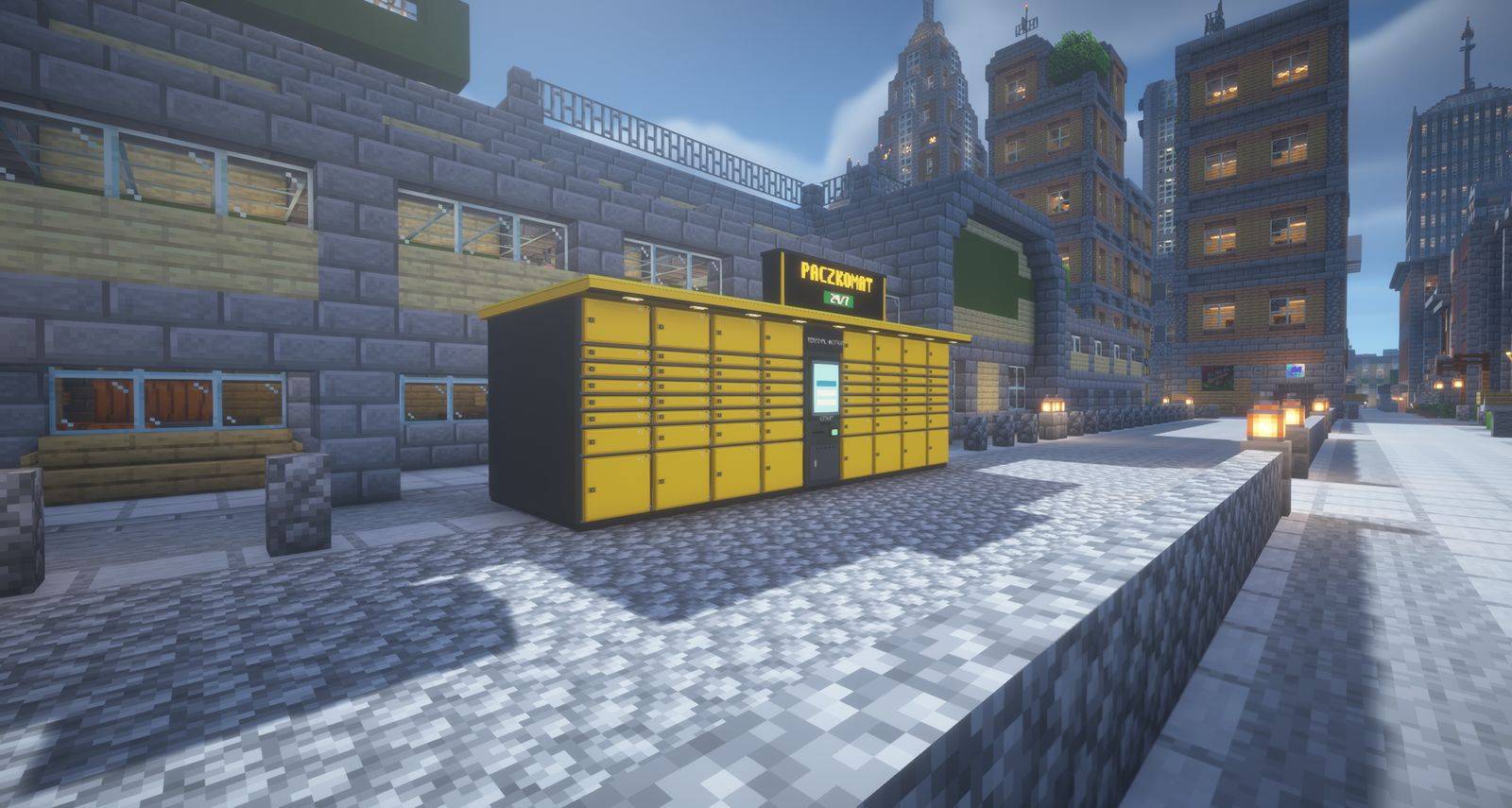
Bring the iconic automated parcel delivery experience straight into Minecraft! Parcel Locker / Paczkomat adds fully functional 9-block parcel locker stations with 72 opening compartments, an interactive touchscreen terminal with PIN authentication, drivable delivery vans, animated NPC couriers, and an ultra-robust logistics engine designed from the ground up for grief-free multiplayer.
🚀 NEW UPDATE: Version 0.5.1 Released!
📅 Release Date: October 20, 2026 | 🎮 Minecraft: 1.21.1 (Fabric) | 🏷️ Type: Official Release
Offline Recipient Delivery is finally here! Players can now receive parcels even when offline — as soon as they log into the server, they will receive an instant in-game SMS in chat with their 4-digit PIN, Locker Station Code, and exact XYZ Coordinates. Plus, daily reminders ensure no parcel is forgotten!
✨ What's New & Changed in v0.5.1:
- 📬 Offline Recipient Support: Send packages to any player, online or offline! The recipient is instantly notified via SMS upon logging into the server (
JOIN). - ⏰ Daily Login Reminders: Sends a periodic reminder upon login (every 24,000 ticks) until the package is picked up.
- 🚚 Multi-Batching Logistics: Delivery vans and couriers unload all arriving parcels and collect all outgoing parcels in a single stop.
⚠️ NOTE: Designed for Multiplayer Servers (No Crafting by Design)
This mod is created specifically as public city & server infrastructure. To prevent players from cluttering the world with personal lockers in random fields, there is intentionally no survival crafting recipe. Locker stations can only be placed by server administrators via command (/parcellocker place or /paczkomat postaw) or taken from the Creative inventory. Regular players use them as intended — as public postal stations to send and pick up deliveries!
✨ Key Features
🏢 1. Realistic 9-Block Parcel Locker Station
- 72 Individual Compartments: Authentic metal latch clicking sound effects and smooth real-time door swinging animations.
- Protective Canopy Roof with Downlights: Built-in warm LED floodlights that illuminate the locker facade and terminal at night.
- Illuminated 3D Brand Header: Integrated lightbox header displaying custom 3D glowing text (default:
PACZKOMAT, fully customizable). - Two Visual Models:
- Modern: Sleek, streamlined contemporary design with curved canopy trim.
- 1:1 (Classic): Authentic real-world proportions true to iconic street parcel lockers.
🚚 2. Smart NPC Courier & Delivery Van (Multi-Batching)
- Efficient Stop Batching: Couriers never drive out for just a single package! Upon arrival at a locker, the courier:
- Unloads and delivers all pending incoming parcels carried in the van cargo.
- Loops through and collects all outgoing parcels deposited by players (up to the van capacity, default: 16 parcels).
- Player-Drivable Vans: Obtain a van ignition key (
/parcellocker key), steer your own delivery van through town roads, honk the horn, and haul cargo on the bed!
⚡ 3. Virtual Async Mode for Large Servers (Zero TPS Lag)
- Running a large public server with 100+ active players and want 0% CPU impact from entity pathfinding?
- Simply switch to virtual delivery mode:
"visualCouriers": false(or via in-game command/parcellocker config couriers false). - In virtual mode, no physical entities are spawned (0 entity physics, zero TPS drops). Parcels are scheduled in background memory (
MailState) and land directly into the recipient's locker after the delivery timer expires!
🛡️ 4. Full Multiplayer & Anti-Grief Protection
- 🛑 Destination Full Validation: The terminal checks available compartments at the destination locker before accepting a parcel. If full, the submission is rejected without taking items or gold.
- ⏰ Automated Expiry & Returns (
parcelExpiryHours): Inactive players won't hoard lockers forever. Uncollected parcels automatically return to the sender after 48h (configurable), freeing the compartment and notifying both players. - 🚷 Anti-Stuck & Anti-Trap Fail-Safe: If players grief or obstruct the courier's path with placed blocks, fences, or entities, an integrated fail-safe (75 ticks) teleports the courier directly to the locker or van. Deliveries are guaranteed to complete.
- 💾 Unloaded Chunks & Crash Resilience: All parcels in transit are permanently saved to the Overworld ledger (
SavedData). Deliveries survive block removal, unloaded chunks, and server restarts.
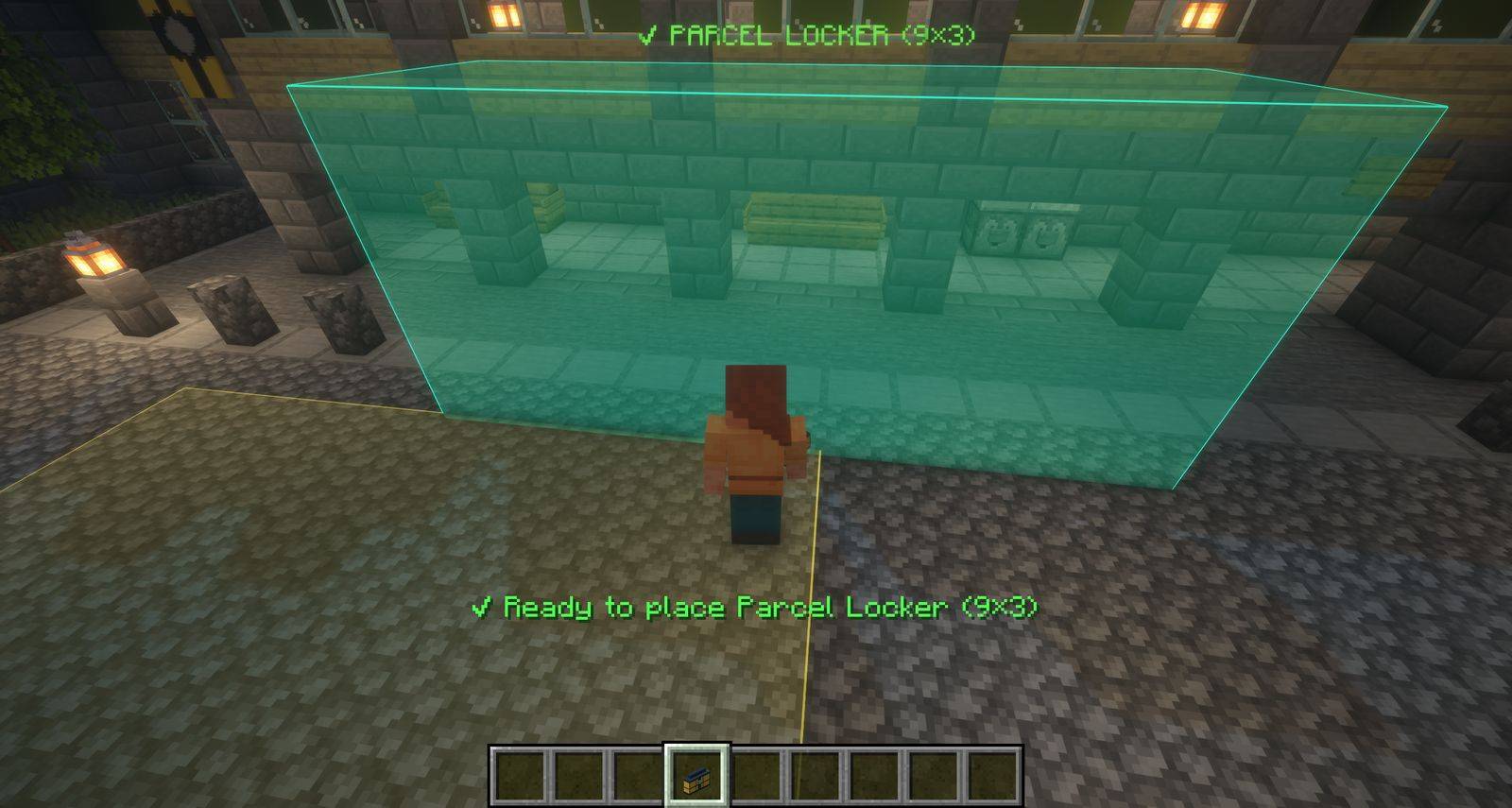
📐 5. Placement Hologram & Obstacle Detector
- Holding a parcel locker in hand displays a real-time 3D glowing placement hologram and parking bay outline.
- Any colliding blocks glow in pulsating RED with 3D "REMOVE" tags and action bar alerts, pinpointing exactly what blocks need clearing before installation!
🎨 HOW TO CUSTOMIZE NAMES & COLORS IN THE CONFIG FILE
You can personalize locker brand names, door colors, delivery delays, and gold economy in the server configuration file:
📁 config/paczkomat.json
{
  "stationStyle": "modern",
  "lockerName": "PACZKOMAT",
  "doorColorHex": "#FFD522",
  "accentColorHex": "#1F2326",
  "smallParcelGold": 1,
  "mediumParcelGold": 2,
  "largeParcelGold": 3,
  "deliverySeconds": 45,
  "vanCargoCapacity": 16,
  "parcelExpiryHours": 48,
  "visualCouriers": true
}
💡 Ready-to-use Style Presets:
- Iconic InPost Yellow (Default):
"lockerName": "INPOST","doorColorHex": "#FFD522","accentColorHex": "#1F2326" - Red Orlen / DPD:
"lockerName": "ORLEN","doorColorHex": "#E2001A","accentColorHex": "#FFFFFF" - Navy Pocztex:
"lockerName": "POCZTEX","doorColorHex": "#003399","accentColorHex": "#FFCC00" - Your Own Server Brand: Set
"lockerName"to your server name and choose any HEX color code!
🎮 How to Play
1. Placing a Parcel Locker (Admin / Creative)
Run the placement command:
/parcellocker placeYou can also specify facing: /parcellocker place north|south|east|west.
2. Sending a Parcel
- Walk up to the central locker screen and right-click it.
- Select Send / Nadaj.
- Place items into the packing slots (available in S, M, or L sizes).
- Select the recipient from the online players list and pay the postage fee in Gold Ingots.
- Click Send! The recipient receives a chat SMS notification with their secret 6-digit pickup PIN.
3. Picking Up a Parcel
- Visit the parcel locker where your package arrived.
- Right-click the terminal and punch in your 6-digit PIN on the keypad.
- The designated locker door pops open with a click!
- Retrieve your cardboard parcel and right-click with it in hand to unpack your items.
⚙️ Commands Reference
👥 Player Commands (Wszyscy gracze)
/parcellocker help(PL:/paczkomat pomoc)
📖 Displays the in-game command help guide./parcellocker list(PL:/paczkomat lista)
📍 Lists all active locker stations in the world./parcellocker pack <player>(PL:/paczkomat zapakuj <gracz>)
📦 Packs held items into a parcel for the designated player.
👑 Admin Commands (OP / Operator lvl 2)
/parcellocker place [north|south|east|west](PL:/paczkomat postaw [kierunek])
🏢 Places a complete 9-block locker station facing the given direction./parcellocker remove(PL:/paczkomat usun)
❌ Safely dismantles the targeted locker station./parcellocker key(PL:/paczkomat kluczyk)
🔑 Spawns an ignition key for the delivery van./parcellocker style <modern|1to1>(PL:/paczkomat styl <modern|1to1>)
🎨 Toggles between Modern and 1:1 visual models./parcellocker config name <text>(PL:/paczkomat config name <tekst>)
🏷️ Changes the illuminated brand header text (e.g.INPOST,ORLEN)./parcellocker config color <#hex>(PL:/paczkomat config color <#hex>)
🎨 Sets locker door color (e.g.#FFD522yellow,#E2001Ared)./parcellocker config accent <#hex>(PL:/paczkomat config accent <#hex>)
✨ Sets canopy roof accent color./parcellocker config couriers <true|false>(PL:/paczkomat config couriers <true|false>)
⚡ Toggles physical delivery vans vs virtual zero-lag delivery mode./parcellocker config capacity <1-64>(PL:/paczkomat config capacity <1-64>)
🚚 Sets maximum parcels carried per delivery van./parcellocker config expiry <hours>(PL:/paczkomat config expiry <godziny>)
⏰ Sets uncollected parcel deadline before returning to sender (default: 48h).
🇵🇱 Opis po polsku
Przenieś kultowe automaty paczkowe prosto do świata Minecrafta! Paczkomat dodaje do gry w pełni funkcjonalne, 9-blokowe stacje paczkomatowe z 72 skrytkami, dotykowy terminal z klawiaturą PIN, animowaną furgonetkę dostawczą, kurierów NPC oraz zaawansowany silnik logistyczny odporny na wszelkie problemy serwerów multiplayer.
Główne cechy:
- 🏢 Realistyczny Paczkomat 9-blokowy: 72 otwierane skrytki z dźwiękami rygla, daszek z nocnym oświetleniem LED, podświetlany kaseton 3D z nazwą.
- 🚚 Inteligentny Kurier (Multi-Batching): Jeden van przyjeżdża, kurier wyładowuje wszystkie paczki na danej stacji, po czym zabiera ze skrytek nadawczych wszystkie oczekujące paczki i odjeżdża.
- ⚡ Tryb Wirtualny dla Dużych Serwerów (Zero Lag): Opcja
"visualCouriers": falsewyłącza fizyczne pojazdy – paczki wędrują asynchronicznie, co pozwala na płynną grę nawet przy 100+ osobach online bez spadku TPS. - 🛡️ Ochrona Multiplayer: Automatyczny zwrot przeterminowanych paczek po 48h, blokada nadania przy braku miejsca w docelowym paczkomacie, teleportacyjny fail-safe dla kuriera w przypadku zablokowania przez graczy.
- 🎨 Łatwa zmiana kolorów i nazwy: W pliku
config/paczkomat.jsonmożesz ustawić dowolną nazwę i kolory HEX (np. InPost#FFD522, Orlen#E2001A, Pocztex#003399).
📄 License & Credits
Created by dev00k. Released under the open-source MIT License.
Parcel Locker / Paczkomat Team
