Pandorical
Client-side enablement bridge for server-driven UI, content, and rendering on Fabric.
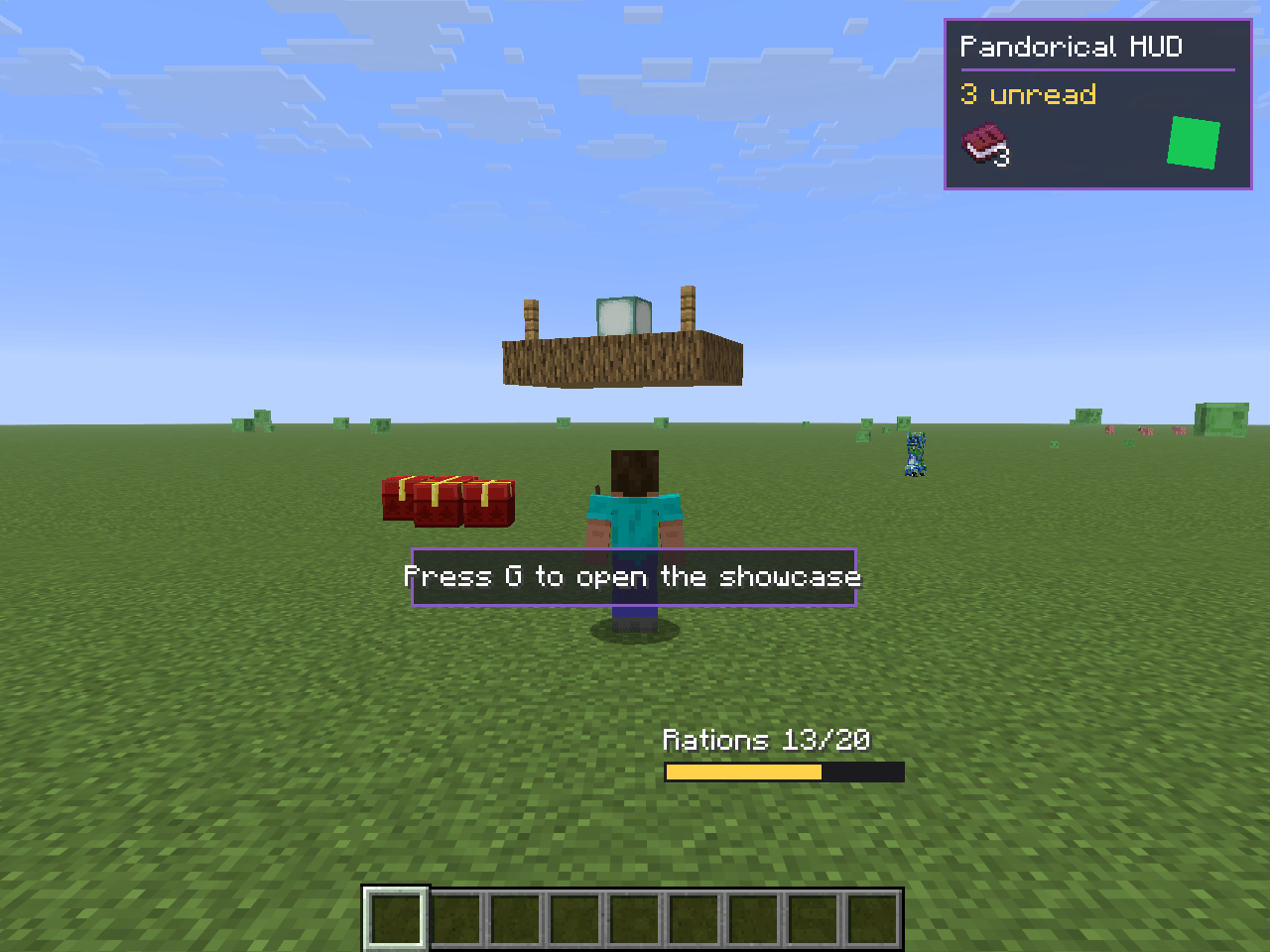
Server mods declare screens, HUD overlays, custom blocks/items, and camera hints. Pandorical handles the protocol, asset sync, and client rendering; vanilla clients join unaffected.
Capabilities
| Capability | What it does |
|---|---|
screens |
Open, update, and close declarative UI screens per-player |
hud |
Show, update, and hide persistent HUD overlays, including animated components (mutable geometry, scale/rotation, and client-side interpolation between updates), and a particle_burst component for lightweight local particle effects |
hud_elements |
Suppress vanilla HUD elements (the hunger bar, say) per player, so a HUD overlay can stand in for one rather than sit beside it |
content |
Sync custom blocks, items, and assets to the client on join, and override the appearance of vanilla items for Pandorical clients only |
camera |
Control camera distance and perspective |
playerInventory |
Register extra inventory slots that appear in the vanilla inventory screen and persist across sessions |
blockTints |
Register biome-color and constant tint mappings for custom blocks |
structures |
Display moving, rotating clusters of blocks (e.g. rideable ships) to Pandorical clients as a single batch-rendered object |
entity_overlays |
Overlay an extra texture layer on a specific living entity's model (per-entity cosmetics), pushed automatically to every player tracking that entity |
keybinds |
Server-declared rebindable keybinds: mods claim slots from a fixed client-side pool (category "Pandorical", slot 1 defaults to G), name them via synced lang, and receive presses server-side; the declaring mod ships zero client code |
| entity rendering | Register simple built-in renderers (thrown_item, invisible) for custom entity types without needing a full client-side model |
Installation
Pandorical goes on the server and on every client that should see what the server declares. It is the one mod in this suite that belongs on both sides. Version targets live in gradle.properties (Minecraft, loader, Fabric API) and fabric.mod.json (Java).
Usage
Add Pandorical as a dependency and interact through PandoricalApi.
// Check before any API call; guards players on vanilla clients
if (!PandoricalApi.isAvailable(player)) return;
// Per-capability guard
if (!PandoricalApi.hasCapability(player, "screens")) return;
Timing: isAvailable(player) and hasCapability(...) return false until the client's capability handshake completes, which lands shortly after the player's JOIN event, not before. Don't push a screen or HUD straight from a JOIN handler; defer it (a tick or two after join, or trigger off the player's own first action) or the push silently no-ops.
Screens
ScreenApi screens = PandoricalApi.screens();
// Open a screen
screens.open(player, new OpenScreenS2C(...));
// Open a screen backed by a server-side container
screens.openContainer(player, screenDef, serverContainer, readOnlySlots);
// Push live updates to an open screen
screens.update(player, screenId, List.of(new ComponentUpdate(...)));
// Close a screen
screens.close(player, screenId);
// Handle actions from the client
screens.onAction("my-screen", "confirm-button", (player, data) -> { ... });
screens.onActionFallback("my-screen", (player, data) -> {
String componentId = data.get("_componentId");
// ...
});
screens.onClose("my-screen", player -> { ... });
screens.onSlotChange("my-screen", (player, slotIndex, stack) -> { ... });
screens.onContainerRemoved("my-screen", player -> { /* return items */ });
HUD
HudApi hud = PandoricalApi.hud();
hud.show(player, new ShowHudS2C(...));
hud.update(player, overlayId, updates);
hud.hide(player, overlayId);
// Stand in for a vanilla element instead of drawing next to it
hud.hideVanillaElements(player, "my-mod", List.of(VanillaHudElement.FOOD_BAR));
hud.restoreVanillaElements(player, "my-mod");
Suppression is keyed by the requesting mod, so two mods hiding different elements do not
clobber each other, and an element stays hidden while any of them still wants it hidden.
Chat, the player list, the sleep overlay and the demo timer are deliberately not
suppressible. Clients without the hud_elements capability keep drawing vanilla's
version, so an overlay meant to replace one needs a layout that still works alongside it
(or should not be pushed to those clients at all).
Content
Register blocks, items, and assets during onInitialize. They are synced to clients in the configuration phase, before Fabric's registry sync.
ContentApi content = PandoricalApi.content();
content.registerBlock("my-mod:my-block", new BlockRegistration(...));
content.registerItem("my-mod:my-item", new ItemRegistration(...));
content.registerAsset("my-mod/models/block/my-block.json", jsonBytes);
content.registerModAssets("my-mod"); // auto-scans classpath assets/
// Override a vanilla item's appearance for Pandorical clients only
content.overrideVanillaItem("minecraft:rabbit_hide", new VanillaItemOverride(...));
Content readiness is tracked per-player; wait for isContentReady before opening screens that depend on synced assets:
if (PandoricalApi.isContentReady(player)) {
screens.open(player, ...);
}
Camera
CameraApi camera = PandoricalApi.camera();
camera.setDistance(player, 6.0f);
camera.setPerspective(player, "third_person_back");
camera.reset(player);
Entity overlays
// Dress one specific entity in an extra texture layer. The texture must follow
// the entity model's own texture layout; transparent pixels are not drawn.
// Broadcast to all current and future trackers of the entity; no player arg.
PandoricalApi.entityOverlays().set(entity,
Identifier.fromNamespaceAndPath("mymod", "textures/entity/my_overlay.png"));
PandoricalApi.entityOverlays().clear(entity);
Overlay state is in-memory only and dropped when the entity unloads: re-call set when your entity loads (e.g. from a tick hook reading your own persisted flag). Ship the texture in your mod jar and register it with content().registerModAssets(...) so Pandorical syncs it to clients.
Keybinds
// Claim a pooled keybind at mod init, before players connect. Key codes use
// the game's own InputConstants table, not GLFW (10 is KEY_G on this
// snapshot generation); the preferred key is honored only if a free pool
// slot has that default (slot 1 is G, the rest start unbound). The display
// name appears in the client's controls screen for this server. Presses
// arrive on the server thread, validated and rate-limited by Pandorical.
PandoricalApi.keybinds().register("mymod:action", 10, "Do The Thing",
player -> doTheThing(player));
The pool is fixed at 8 slots because the options system only accepts keybind registration during client startup; a slot's rebind persists in options.txt like any other key. Unclaimed slots are inert and send nothing.
Other capabilities
structures, playerInventory, blockTints, and custom entity rendering are driven the same way, through PandoricalApi. Their contracts (including the traps: server-wide-unique structure IDs, despawning to avoid state leaks, tint registration timing) live in the javadoc on StructureApi, PlayerInventoryApi, BlockTintApi, and PandoricalApi#registerEntityRenderer: read those before wiring them up.
Components
Screens and HUD overlays are composed from these component types:
panel · scroll_panel · text · button · text_input · sprite · item_slot · item_icon · inventory_grid · map · particle_burst