Paint the Path
- By
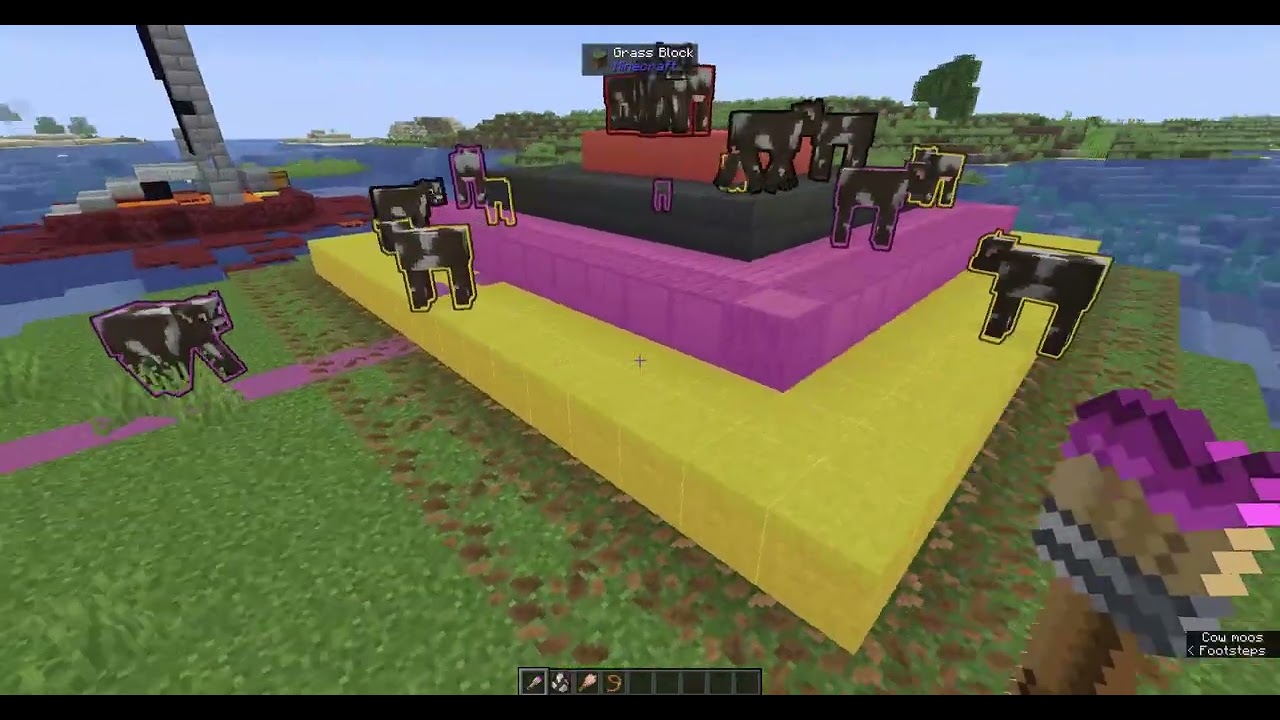
Paint your animals and pastures to keep herds where they belong! PathPaint makes mobs strongly prefer wandering on matching-colored blocks, preventing them from endlessly bunching against fences.
Description
What it does
Minecraft's animals love to wander off and pile up against a fence trying to reach something outside their pen. Paint the Path fixes that!
You colour your animals and colour the ground you want them to stay on, and those animals will prefer to wander only on their matching ground, without messing with their other pathfinding.
The Path Brush
Get one with /give @s pathpaint:path_brush
Hold the Brush and Paint with right-click by sweeping your crosshair over animals and over the ground.
Erase colours by holding Sneak while you right-click
Change colour with the C key for the next colour
(there's also an unbound "previous colour" key you can set in keybinds)
The brush shows its current colour in its name, and the paint on the bristles changes to match.
Colours and herds
- 16 colours to work with, so you can keep several herds apart; blue cows on the blue ground, yellow pigs on the yellow ground, and/or combine by overlapping colours:
- Ground can hold more than one colour at once (up to the four most recent). A block with several colours is shown split into equal parts so you can see the overlap at a glance.
Seeing your work
- While you're holding the Path Brush, painted ground lights up with its colour and painted animals are tinted their colour, so you can see exactly what's assigned. Put the brush away and everything looks normal again.
- How far away this colouring shows is up to you:
see config/pathpaint.json and change revealDistance (default 200 blocks) then restart the game.
Good behaviour
- The colouring is a strong preference, not a cage: scared animals still run, animals still breed, and you can still lead them with food. When nothing else is pulling them, they drift back to their colour.
- Breaking a painted block clears its colour automatically, so animals never get stuck trying to reach ground that's no longer there.
Requirements
- Minecraft 26.2 or 26.3 (a separate build for each), Fabric Loader, and Fabric API.
Inspired By
I got the idea after watching this video, by @mellondoodle: https://www.youtube.com/watch?v=PV3J4hf1vKs
Paint the Path Team