Paged inventory
- By
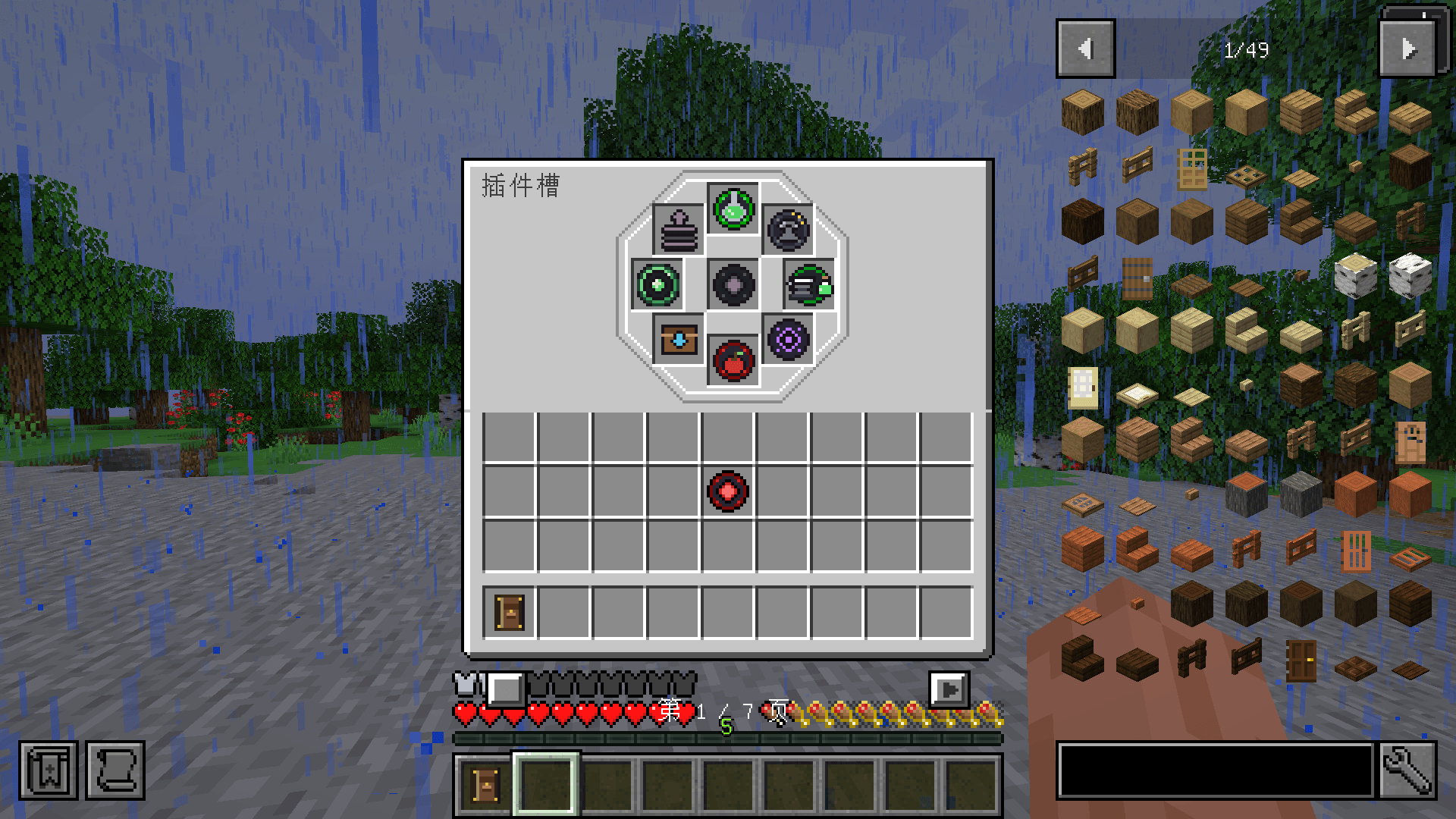
Description
Introduction
Paged Inventory expands the player's inventory into multiple pages. It is not a separate backpack item; it is an expansion of the vanilla inventory, adding a range of plugins that extend the backpack beyond simple storage.
Features
Expanding the Vanilla Inventory
The mod adds a new item, the Backpack Core, which is the foundation of every feature in the mod. Open the plugin slots below the hotbar and insert a Backpack Core into the center socket to unlock paging and plugins. Without a Backpack Core, the inventory behaves like vanilla and plugins do not work.
Use the page buttons below the hotbar or the mouse wheel to turn pages. Press B to open the merged view, which shows items from every backpack page at once.
Plugin Slots
The plugin slots consist of eight regular plugin slots and one core socket.
Core socket:
- Only a Backpack Core can be inserted here. Once it is installed, the other plugins become active, and it also unlocks more backpack pages. Backpack Cores come in basic, copper, iron, gold, diamond and netherite tiers; higher tiers unlock progressively more pages.
Regular plugin slots:
- Stack Upgrade: Copper, iron, gold, diamond and netherite tiers raise the stack limit to 2/3/4/5/6 times normal, up to 384.
- Pickup Core: Unlocks automatic item pickup and adds a pickup blacklist button below the hotbar. It picks up drops within 4 blocks and respects the blacklist.
- Magnet Core: An upgraded Pickup Core. It extends pickup range to 8 blocks and also collects experience orbs.
- Void Core: An upgraded Magnet Core. It extends pickup range to 12 blocks and picks up blacklisted items, but destroys them immediately.
- Storage Core: While a container is open, press V to deposit all backpack pages into the container or network, or G to restock stacks already in the backpack from it.
- Lock Core: Hold Alt and left-click a slot to pin it. Pinned slots show a gold highlight; sorting and deposit (V) skip them, but restock (G) can still fill them. Pinned items cannot be removed. Alt-click again to unpin.
- Potion Core: Adds a potion rack. Once installed, open the potion rack below the hotbar. It has multiple storage slots, each holding up to 10 potions. After storing potions, turn the switch on and the rack automatically drinks any potion whose effect is not already active. Toggling it again while the effect is still active does not consume another potion; potions are only drunk after the effect expires, avoiding waste. Six bottles of the same potion grant a permanent effect that remains active even when the switch is off. It can also hide potion particle effects.
- Repair Core: Press P to toggle automatic repair. It consumes the player's own XP to repair items in the backpack and hotbar at 2 durability per XP.
- XP Core: Press X to open the experience panel. Store or withdraw XP levels and set a kept level. If the player is below the target, the core tops them up; if above, excess XP can be stored in the core. Stored XP is preserved when the core is used as a crafting ingredient.
- Mending Core: Combines the XP Core and Repair Core in one item, with both functions. Repair now spends XP stored in the core first.
- Void Lock Core: Combines the Lock Core and Void Core in one item, providing both pinning and void pickup.
- Feeding Core: Adds automatic feeding. Press O to open its interface and store food in the core. You can set the trigger percentages manually. The player eats from the core first, from left to right. The food slots accept any food, but automatic feeding skips food with effects, golden apples, golden carrots and similar items by default.
- Feeding Potion Core: Combines the Feeding Core and Potion Core in one item, with both functions. Items inside both cores are preserved when crafting.
Notes
- Only one plugin from each family can be installed.
- When a chest, furnace or AE2/RS terminal is open, the vanilla inventory is also replaced by the mod's paged backpack.
- Press R or middle-click to sort all backpack pages; the container's own slots are not sorted. When Quark or Inventory Sorter (IS) is installed alongside this mod, their sorting hotkeys are disabled.
- JEI search locator: type in JEI's search bar and the backpack jumps to the matching page, highlighting it with green frames. Searches match item type and distinguish enchantments/NBT.
- Double-clicking collects matching items across pages, with the limit following the Stack Upgrade instead of vanilla's 64.
- Tested with Forge 47.4.5. Other Forge versions are untested and may break the mod.
- The mod replaces the entire vanilla inventory screen, so buttons added by other mods to that screen may be covered or missing.
- Container-owned slots such as chests and furnaces remain capped at 64; Stack Upgrades only affect backpack pages and the hotbar.
- The creative inventory remains vanilla and is not taken over.
- Third-party hotbars that use their own container instead of the real player hotbar may not follow the stack-limit rules.
You may include it in modpacks as long as the copyright notice is retained.
Paged inventory Team