RavenholmZombie | Pack Gate
Create a server, get 25% off your first month

PackGate
A simple mod that just does one thing: Checks for modpack updates.
NOTICE: This mod is strictly CLIENT-SIDED. This means that it should NOT be run on a server. Doing so may CRASH the server!
Are you enjoying PackGate? If you are, feel free to 
How does it work?
Pack Gate works by calling out to a remotely-hosted file the modpack author created and compares the version in that file with the version specified in Pack Gate's config file.
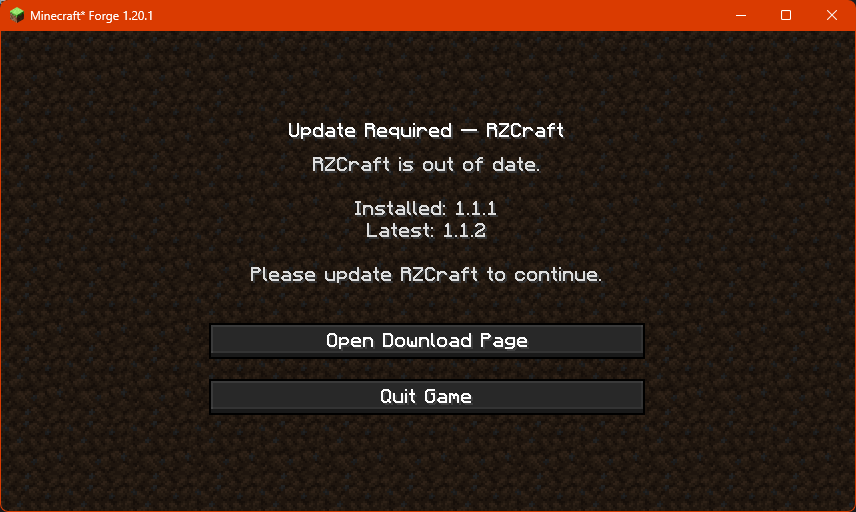
If Pack Gate finds that the remote version is higher than what's been provided in the config, it'll block access to the game and present the user with this screen:
Configuring PackGate
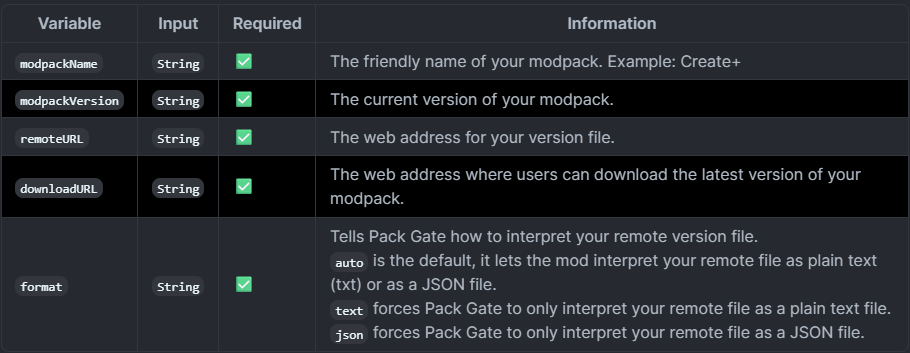
In order to use Pack Gate for your own modpack, you will need to make changes to the mod's config file.
Pack Gate's config is located at config/packgate-client.toml
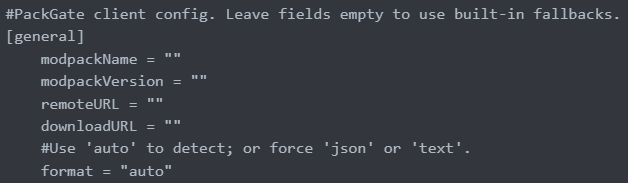
What you'll see when you first open the config:
Definitions
About the remote version file.
In order to utilize Pack Gate in your modpack, you need to have the ability to host either a text file or a JSON file online.
Example Text File:

Example JSON File:

It is important that wherever you host your remote version file has the ability to provide you with a direct URL. This means that file sharing platforms like MediaFire or MEGA won't work.
A working URL would end with the file and its extension, for example: https://example.com/my_awesome_modpack_version.txt
Platforms like Google Drive and Dropbox can work, but you have to modify the URLs they provide in order to get access to the direct, raw file.
If you can't host a file remotely on your own, consider sites like PasteBin or even GitHub. As long as the URL points to the raw text or JSON, Pack Gate will accept it.
A working PasteBin URL like https://pastebin.com/raw/sNBDt7u5 would work.
The Pack Gate Team