Overworlds - Walk Between Worlds
- By
banner.png
linking.gif
page-by-day.png
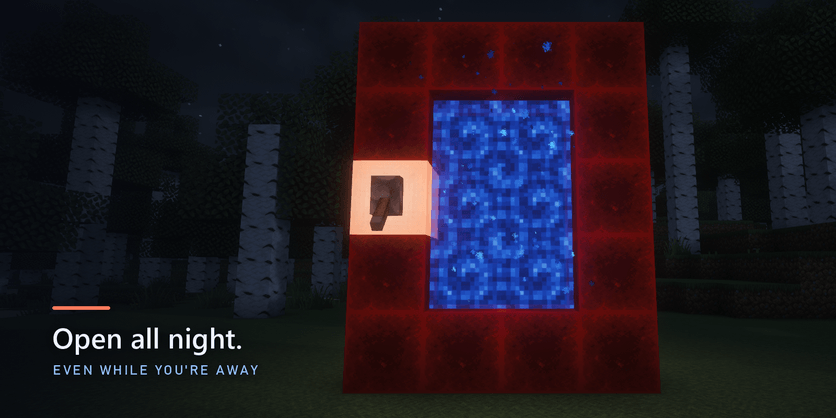
page-at-night.png
Description
The next frontier of your world is everywhere.
Singleplayer used to be where the road ended. Now it's where the roads meet.
Every player has an Overworld. This mod joins them. Build a frame of redstone blocks, flip a lever, and a portal opens into another player's world: a real person, playing right now, somewhere else. And if they've logged off, you can walk into their world anyway. You don't know whose world it will be. Neither do they. Step through with everything you carry.
Before you play: Overworlds works in Survival worlds with cheats off. In Creative, in Hardcore, or in a world made with cheats on, portals won't link.
Not a server. Not co-op. Something new.
- A server is one world that everyone shares, and someone has to run it and pay for it.
- Co-op is inviting friends you already know into your world.
- Overworlds leaves every world what it always was: one player's own singleplayer world, with its own base, its own history, its own rules of survival. It builds the roads between them, and you never know who is at the other end.
One portal is a meeting. A handful is a neighbourhood. And every player who leaves a lever on adds another world to a web that anyone can walk across.
What opens up
Nine things a singleplayer world couldn't do until now.
Meet someone you'd never have met.
Every link is random: any lit portal, anywhere. Worlds that someone is playing right now come first, so when anyone is out there, the other side of your portal is a person, not an empty map.
One portal, as many worlds as you like.
A single portal is all you ever need. Flip its lever off and on and the same portal links again, picked fresh from every lit portal out there. Don't like where you landed? Flip again.
Or keep them all.
Found a world worth keeping? Leave that lever on and build another portal. Every lit portal holds a link of its own, and a world can hold 16 at once. Build a hall of them and your base becomes a crossroads that travellers pass through on their way somewhere else.
Go on an expedition.
Step through, find that world's other portals, and keep going: world after world, each one a different player's, each one a place nobody showed you. The portal you arrived by always takes you home, with everything you picked up on the way.
Run a trade route.
It isn't only you that goes through. Dropped items, experience, animals, villagers with their trades, minecarts and boats with their cargo, the horse you're riding. Lay a rail line from your mine to a neighbour's market. Herd sheep between worlds. Export villagers.
Make allies. Or enemies.
This is anarchy: nothing is protected, on either side. Build an embassy beside a neighbour's portal, or empty their vault and run for the frame. They can do the same to you. And when you've had enough, flip the lever: the road is gone, for both of you.
Walk into worlds whose owners are offline.
A lit portal keeps its world open around the clock. If the player on the other side has logged off, you step through anyway: their base, their farms, their half-finished builds are all there, yours to explore, add to or raid. Everything you do is waiting for them the next time they play. Leave your own lever on when you log off and your world stays open the same way: you come back to whatever your visitors left behind, a gift or a crater.
Even between your own worlds.
Have more than one singleplayer world with a lit portal? A portal of yours can link to another world of your own: a road between two of your saves, to walk through with whatever you carry. Other players always come first, so the more portals are lit out there, the rarer it is.
Bring your friends.
Up to 7 visitors in a world at once. Go through together, or build a portal in the world you're visiting: it links like any other.
How it feels
Like something the game always had.
The frame tells you everything.
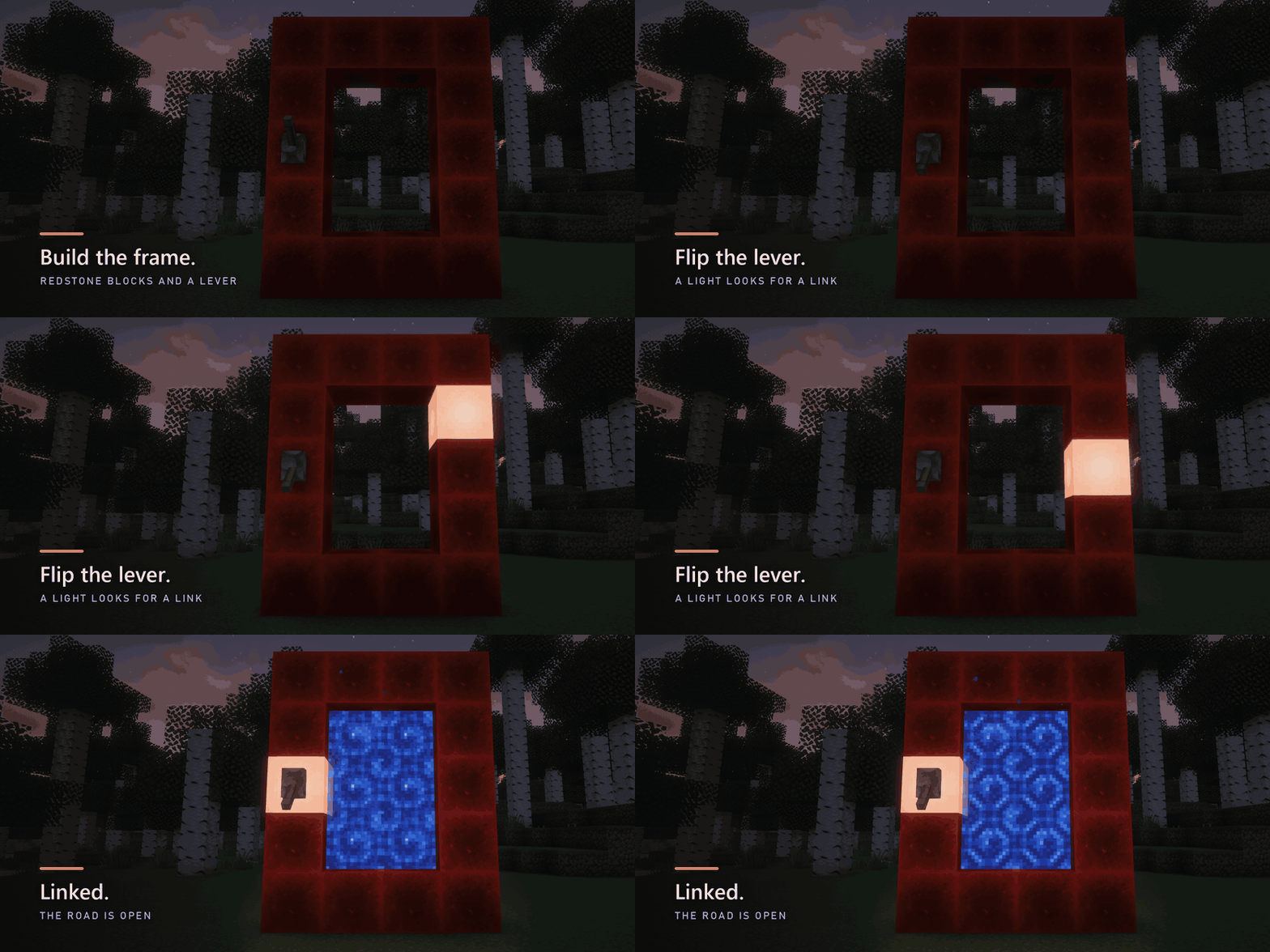
Flip the lever and a light runs round the frame, block by block, while it looks for another portal that's looking too. When they find each other the light comes to rest on the lever's block, a chime rings, and the deep-blue portal opens. No menus, no messages, no settings screen.
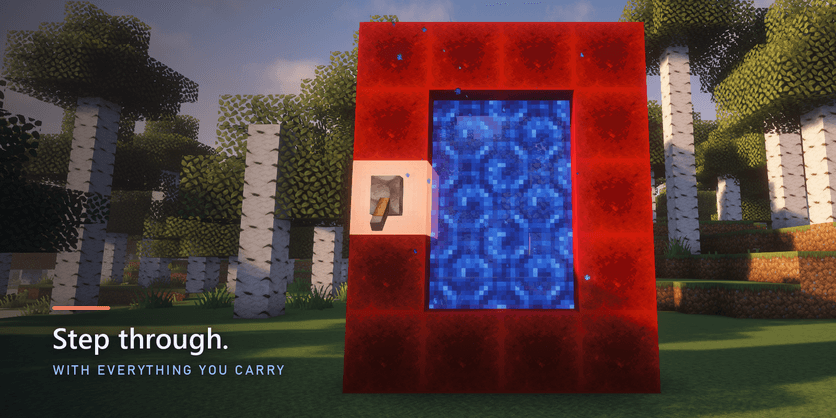
Stepping through is like a Nether portal.
Four seconds in the swirl, and while you stand there your game is already joining the world on the other side. Into a world someone is playing, you arrive a moment later.
Nobody is thrown out when the owner leaves.
If a world's owner logs off while you're visiting, you carry on right where you stand, with no loading screen. When they come back, they're simply there again.
No lag from someone else's computer.
Far from everyone in a big world, your own game runs the land around you and trades only what changes with the owner's game. Walk up to someone and you slip into their game live, right where you stand.
Easy to start, and built to be safe
No servers. No setup. Nothing exposed.
No servers to rent, nothing to forward, nothing to sign up for.
Your normal Minecraft login is all it needs. The worlds run on the players' own games.
Nobody sees your internet address.
Everything travels through relays, never straight from one player to another. The mod never asks your firewall to let anything in.
Real accounts only.
Mojang's sign-in check stops fake accounts, and normal chat reporting works. Don't like who you met? Flip the lever and they're gone.
Fair play.
Survival only, no cheats, no Hardcore. Everything that comes through a portal is checked on arrival, so nothing arrives stronger than Survival allows. Your Ender Chest stays yours.
Works with your other mods.
Mods that only change how the game looks or runs (Sodium, shaders, minimaps) make no difference. Mods that add blocks, items or mobs link you only with players who have the same ones. If nobody with your setup has a portal lit, a short note says so when you flip the lever, and your portal links as soon as someone does.
How to play
Four steps. The first one is redstone.
1. Build a frame of redstone blocks, the same shape as a Nether portal (2x3 to 21x21 inside).
2. Put a lever on any of its blocks and flip it on.
3. A light runs round the frame while it looks for a link, and the frame stays empty. When the light settles on the lever's block and the chime rings, the portal opens: step in. Leave the lever on and it keeps looking for as long as it takes. If the link is ever broken, the portal and the light go out.
4. Step back through the same portal to come home, with everything you picked up.
Want a different world?
Flip the lever off and on. The link is cut, for both sides, and the same portal links again, picked at random from every lit portal out there. You never need more than one portal to keep exploring.
Want several worlds at once?
Leave the levers you like switched on and build more portals. Each lit portal keeps its own link for as long as both players leave their levers on, so one world can have up to 16 roads open at the same time.
Flipping a lever off sends home anyone who came through that portal.
Quick answers
Why won't my portal link?
Portals only link in a Survival world with cheats off: not in Creative, not in Hardcore, not in a world made with cheats on. If your world fits and the light is still running round the frame, it's simply waiting for another player's portal. Leave the lever on.
Is this a server?
No. There's nothing to rent, nothing to join and nothing to keep running. Every world is somebody's singleplayer world, running on the players' own games.
Do I choose who I link with?
No, and that's the point. Every link is picked at random from the portals that are lit. Don't like where you landed? Flip the lever and it picks again.
Can visitors wreck my base?
Yes. Nothing is protected, on either side, so build your portal as near to your valuables as you dare. Flip the lever off and everyone who came through it is sent home.
Do I have to be online for people to visit?
No. Leave your lever on when you log off and your world stays open. Whatever your visitors did is there the next time you play.
Does it cost anything?
No. The mod is free, there's nothing to sign up for and nothing to set up on your router.
Will it work with my other mods?
Mods that only change how the game looks or runs make no difference. Mods that add blocks, items or mobs link you with players who have the same ones.
Requirements
- Minecraft Java 26.3, Fabric Loader 0.20.1 or newer, Fabric API.
- An internet connection and a Minecraft account that can play online.
Good to know
- This mod connects to the internet to find other portals and carry the game between players: a small service on Cloudflare, and Epic Games' relay network. See the privacy note below.
- The download is about 38 MB, nearly all of it Epic's relay library (for Windows, Linux and macOS).
- Accounts with online play turned off (for example by parental controls) never link.
- Only the Overworld travels: portals in the Nether or the End don't reach other worlds.
- The rift has a daily allowance. If a day's allowance ever runs short, portals reach only worlds whose owners are offline for the rest of the day, or go quiet, until midnight (UTC).
- Bosses, command-block and spawner minecarts never go through. Everything that does is checked on arrival, so nothing can come out stronger than Survival allows.
- When you die on a visit, you respawn at your own spawn point at home.
- Overworlds is for singleplayer worlds. It doesn't run on multiplayer servers.
- In a world whose owner is offline, you can go about a kilometre from the portal in any direction. Stepping into one takes a few seconds longer than into a world someone is playing.
- Quitting from the menu while you're in someone else's world takes you to the title screen, as it does anywhere. What you carried is back in your own world the next time you open it.
- A portal keeps leading to the world it linked to. If you have several worlds, a friend's portal to one you played before still leads there: step through and you're in it as a traveller, with what you carry, and the you who lives in that world is as you left them.
- No firewall questions: the mod never asks Windows to let anything in. Everything it does goes outwards, through the relays.
- Far from everyone in someone's world, your own game runs the land around you. Everything you do there still happens in the real world: what you build and break, what's in chests, animals you lead, breed or tame, things you drop, item frames and armor stands. Walk up to a lit portal and you slip into the owner's game to go through it. Wild animals out in new land, and monsters that would vanish anyway, aren't shared.
- If two people change the very same block at the very same moment, the last one counts.
- The pictures on this page were taken with the Complementary Unbound shaders and the Faithful 64x resource pack. Neither is part of the mod: it looks right with them, with others, or with none.
- Overworlds is not an official Minecraft product. It is not approved by or associated with Mojang or Microsoft.
Privacy
When a portal is switched on, the mod talks to the Overworlds service on Cloudflare. It sends and keeps:
- A random ID for each switched-on portal, your Minecraft account ID and name (for the sign-in check) and your game and mod version. Your internet address is never stored or passed on.
- Your world's cloud copy, if your portal stays lit when you log off: the land you changed near the portal and the world's settings. Never your player, inventory or Ender Chest. Copies nobody visits for 30 days are deleted.
- What you change, and roughly where you are, while you roam someone's world far from everyone (blocks, and the animals and things around you): passed straight to that world's owner's game so both stay the same. Never stored by the service. If the owner's game closes just as you change something, your own game keeps those last changes for 10 minutes, in your own world's folder, to put back if you go into that world again.
- Things sent through to a world nobody is playing (items, animals, minecarts and the like), held with its cloud copy until someone next plays it, then handed over and deleted.
- An anonymous sign-in to Epic Online Services. When your game goes online, Epic's relay library (part of the mod) asks Epic for a random ID for your computer. No Epic account, no name and nothing typed: your Minecraft name is not sent to Epic. The library also sends Epic basic usage information of its own, such as that a session started.
Game traffic between players is encrypted and goes through relay servers, Epic's and Cloudflare's, never straight from one player to another: nobody you meet sees your internet address. Like any server you connect to, those relays see it themselves. Epic's part is covered by Epic's privacy policy.
A world whose lever has never been switched on never goes online.
Build the frame. Flip the lever. See who's out there.
Overworlds - Walk Between Worlds Team