


Origins QoL & UI Fixes
- By
A powerful Rule Engine and Quality of Life (QoL) UI overhaul for the Origins (Forge) ecosystem.
Are you a modpack developer or a server owner tired of players choosing lore-breaking or overpowered Origin combinations? Do you wish players could navigate back and forth during the Origin selection screen without needing an Orb of Origin to fix a misclick?
Origins Rule Engine & UI Fixes provides a definitive solution. It seamlessly integrates a much-needed "< Back" button and introduces a dynamic JSON-based Rule Engine to restrict incompatible Origin add-ons.
REQUIRES;

Features
1. The "< Back" Button & Deferred Packet Architecture
In the vanilla Origins mod & addons, players are forced to move strictly forward through layers (Race -> Background -> Class). If they misclick, they must reset their character entirely with orb.
-
Freedom of Choice: Players can freely navigate back and forth between Origin layers before making their final decision.
-
Exploit-Free Architecture (Deferred Packets): This mod intercepts and rewrites Origins' network architecture. No matter how many times a player clicks "Back" or "Next", no packets are sent to the server until the final confirmation. This guarantees zero item/ability duplication exploits and reduces server load.
-
Client-Side: The mod handles all UI rendering and packet delays on the client side, then safely dispatches the final payload to the server. (Note: Still recommended to be installed on the server for rule verification and core Origins network compliance, but not necessary).
2. Universal Compatibility & JSON Rule Engine
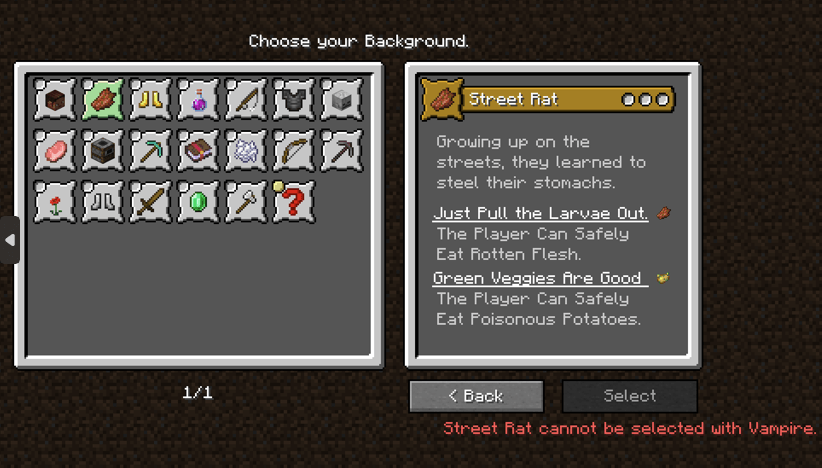
Modpacks often combine multiple Origins add-ons (like Gods & Heroes, Origins: Classes, etc.), leading to combinations that break your world's lore (e.g., A blood-drinking Vampire choosing a "Street Rat" background to eat rotten flesh).
-
Dynamic Blocking: Control exactly what can be selected using the simple
config/origins_compatibility_rules.jsonfile. -
100% Universal Add-on Support: This mod is not hardcoded to any specific add-on. As long as you know the
layer_idandorigin_id of your classes/races/backgrounds in your addons, you can configure restrictions between any two Origins mods & addons in existence. -
Live GUI Feedback: Blocked choices automatically become grayed out (unclickable) in the UI. When a player hovers over or clicks a blocked Origin, they will see a custom error/lore message defined by you!
⚙️ How It Works (JSON Configuration)
Upon launching the game for the first time, a config/origins_compatibility_rules.json file will be generated. You can add logical rules to prevent specific combinations.
Example Scenario (Included in default config):
{
  "rules": [
    {
      "condition": {
        "type": "selected_origin",
        "layer": "origins:origin",
        "value": "godsandheroes:vampire"
      },
      "blocked_layer": "origins:background",
      "blocked_origin": "origins_backgrounds:street_rat",
      "error_message": "Vampires feed only on blood, so they can't be Street Rats!"
    }
  ]
}
What does this do? If a player chooses the "Vampire" race in the first layer (origins:origin), when they proceed to the next layer (origins:background), the "Street Rat" option will be grayed out. If they attempt to select it, they will receive the warning: "Vampires feed only on blood, so they can't be Street Rats!"
🛠️ Technical Requirements
-
Minecraft: 1.20.1
-
Mod Loader: Forge (47.x.x or above)
-
Required Dependency: Origins (Forge Version)
Recommended Integrations (Optional)
-
UI Enhancement: Works flawlessly with Alternate Origin GUI for the best visual experience.
-
Content: Default configurations are tailored for use with Gods & Heroes: RPG Races and Gods & Heroes: RPG Classes, but these are not required to use the mod.
The Origins QoL & UI Fixes Team
