ordinatio_demo.png
Description
Introduction
Ordinatio brings in-game mod configuration screens to Minecraft 1.6.4.
How to use
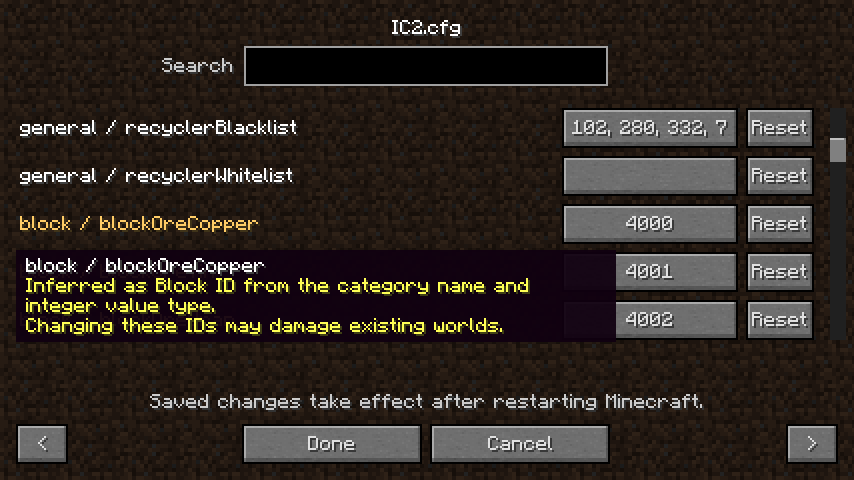
From the main menu, open Mods, select a mod, and click Config. If the mod uses more than one recognized configuration file, select it by its path relative to config/ and its mod ID. Search by category, setting name, or comment. Click a value to edit it and use Reset to restore the default supplied by the mod. Click Done to save the file, then restart Minecraft to apply the changes.
Features
Ordinatio discovers files opened through Forge's Configuration API during mod loading and uses the settings the mod reads from each file. The Config button is available when Ordinatio can associate a local file in config/ with the selected mod. Shared files and Forge's optional global.cfg mode are outside this editor's scope. Detected registry IDs are highlighted. Ordinatio asks for confirmation before saving changes to these IDs, which may damage existing worlds.
Mod authors can register the allowed values on the Property returned by Forge while loading their configuration. Ordinatio displays the choices in registration order. For a list property, the choices apply to each item. Players can enter a custom value and confirm before applying it if it falls outside the registered choices.
import dev.desiderium.ordinatio.api.ConfigOptions;

// general.mode is a string setting. Its default is "fast", and the menu offers "fast" and "safe".
ConfigOptions.setAllowedValues(config.get("general", "mode", "fast"), "fast", "safe");

// general.quality stores Quality constant names such as "HIGH", which is also the default.
ConfigOptions.setEnumValues(config.get("general", "quality", Quality.HIGH.name()), Quality.class);
setEnumValues stores the choices as enum constant names. For other serialized forms, supply the exact strings using setAllowedValues. The mod still reads and validates its configuration through its usual code. For optional integration, call the API only when FML reports the ordinatio mod is loaded.
Showcase
Requirements
- Forge 9.11.1.1345
- Retrospectum Mixin
- Java 7 or 8
Ordinatio Team

Owner