OpenComputers: Driver Addon
- By
Adapter drivers for OpenComputers: Rebooted. Connect machines from Create, TFMG, Crafts & Additions, AE2, Tesseract and more to your computers and control them from Lua.
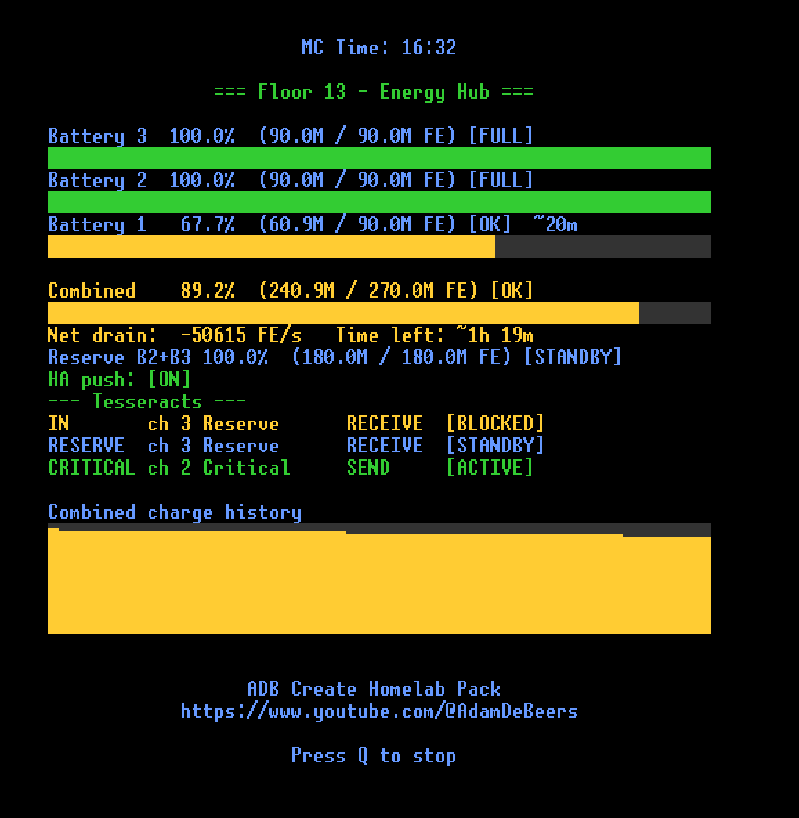
Energy hub dashboard
Description
OpenComputers: Driver Addon (OC:DA)
OpenComputers: Driver Addon connects blocks from other mods to your OpenComputers computers. Place an Adapter next to a supported block and it shows up as a component you can read and control from Lua.
The mod adds no blocks or items of its own. It only contains drivers, so it is safe to add to an existing modpack: every integration is optional and only switches on when the matching mod is installed.
Requirements
- Minecraft 1.21.1
- NeoForge 21.1.266 or newer
- Java 21
- OpenComputers: Rebooted 1.9.4-5 or newer (required)
All other mods listed below are optional.
Supported blocks
| Mod | Block | Component |
|---|---|---|
| The Factory Must Grow: Community Edition (1.3.3a+) | Accumulator | tfmg_accumulator |
| Create: Crafts & Additions (1.6.0+) | Modular Accumulator | cca_accumulator |
| Applied Energistics 2 (19.2.17+) | ME Controller, ME Interface (block) | me_controller, me_interface |
| Tesseract (1.0.38+) | Tesseract | tesseract |
| Create (6.0.10+) | Display Link | create_displaylink |
Fixes for OpenComputers' own drivers
Applied Energistics 2. In OpenComputers: Rebooted 1.9.4-5 the ME Controller
and ME Interface block are missing their network methods. This addon adds them
back: getCpus, getCraftables, getItemsInNetwork, store,
getFluidsInNetwork, getAvgPowerInjection, getAvgPowerUsage,
getIdlePowerUsage, getMaxStoredPower, getStoredPower,
isNetworkPowered, getEnergyDemand.
Create Display Link. In OpenComputers: Rebooted 1.9.4-5 a Display Link linked to an Adapter shows "Not a Display Source", and text written from Lua never reaches the display. This addon registers the "From Computer" display source for the Adapter. If a Display Link lost its source setting, open it and select "From Computer" again once.
The addon also adds line methods to create_displaylink:
| Method | Description |
|---|---|
getLine():number |
Line of the cursor (1-based). |
setLine(line) |
Move the cursor to the start of the line (1-based). |
getMaxLines():number |
Number of lines of the display target. |
Lua API: tfmg_accumulator
Accumulators form a multiblock stack. Only the controller block (see
isController) owns the stored energy, so stored energy, capacity, rate and
length are only meaningful on the controller. getNetworkVoltage works on any
block of the stack.
| Method | Description |
|---|---|
isController():boolean |
Whether this block is the controller of the stack. |
getStoredEnergy():number |
Stored energy, in FE. |
getMaxCapacity():number |
Capacity of the stack, in FE. |
getEnergyDelta():number |
Average change of stored energy over the last second, in FE/t. Positive while charging, negative while discharging. |
getChargingRate():number |
Charging rate over the last second, in FE/t. 0 when not charging. |
isCharging():boolean |
Whether stored energy increased over the last second. |
isDischarging():boolean |
Whether stored energy decreased over the last second. |
getNetworkVoltage():number |
Voltage of the electrical network at this block. |
getLength():number |
Number of blocks in the stack. |
OpenComputers' generic energy driver also adds getEnergyStored,
getMaxEnergyStored, canExtract and canReceive to the same component.
The rate methods return 0 for the first second after the component appears.
Lua API: cca_accumulator
Any block of the multiblock can be used; energy is read from its controller.
| Method | Description |
|---|---|
getEnergyStored():number |
Stored energy, in FE. |
getMaxEnergyStored():number |
Capacity, in FE. |
getEnergyPercent():number |
Charge, in percent (0-100). |
getMaxInsert():number |
Maximum input per side, in FE/t (Crafts & Additions config). |
getMaxExtract():number |
Maximum output per side, in FE/t (Crafts & Additions config). |
getHeight():number |
Height of the multiblock, in blocks. |
getWidth():number |
Width of the multiblock, in blocks. |
OpenComputers' generic energy driver also adds canExtract and canReceive.
Lua API: tesseract
Methods that take a channel type accept "items", "fluid" or "energy".
| Method | Description |
|---|---|
getChannelId(type):number |
Id of the channel set for the type, -1 if none. |
getChannelName(type):string |
Name of the channel set for the type, nil if none. |
getTransferState(type):string |
"SEND", "RECEIVE" or "BOTH". |
cycleTransferState(type) |
Switch the transfer state of the type to the next one. |
getRedstoneState():string |
"DISABLED", "HIGH" or "LOW". |
cycleRedstoneState() |
Switch the redstone mode to the next one. |
canSend(type):boolean |
Whether the type may currently send. |
isBlockedByRedstone():boolean |
Whether the redstone mode currently blocks the Tesseract. |
OpenComputers' generic energy driver also adds getEnergyStored,
getMaxEnergyStored, canExtract and canReceive to the same component.
canReceive is the energy driver's version: it takes no channel type and tells
whether the Tesseract accepts energy on the Adapter's side.
Example
Print the charge of a TFMG accumulator stack every second (connect the Adapter to the controller block):
local component = require("component")
local acc = component.tfmg_accumulator

while true do
  local stored = acc.getStoredEnergy()
  local max = acc.getMaxCapacity()
  print(string.format("%d / %d FE (%.1f FE/t)", stored, max, acc.getEnergyDelta()))
  os.sleep(1)
end
For pack makers
- Server and client both need the mod.
- Every integration is optional; missing mods are simply skipped.
- Required by OpenComputers: Crypto Mining Addon (OC:CMA).
License
MIT
OpenComputers: Driver Addon Team