Open Parties and Claims Chunk Shop
- By
Addon for OPAC open parties and claims for chunk trading and buying additional bonus chunks
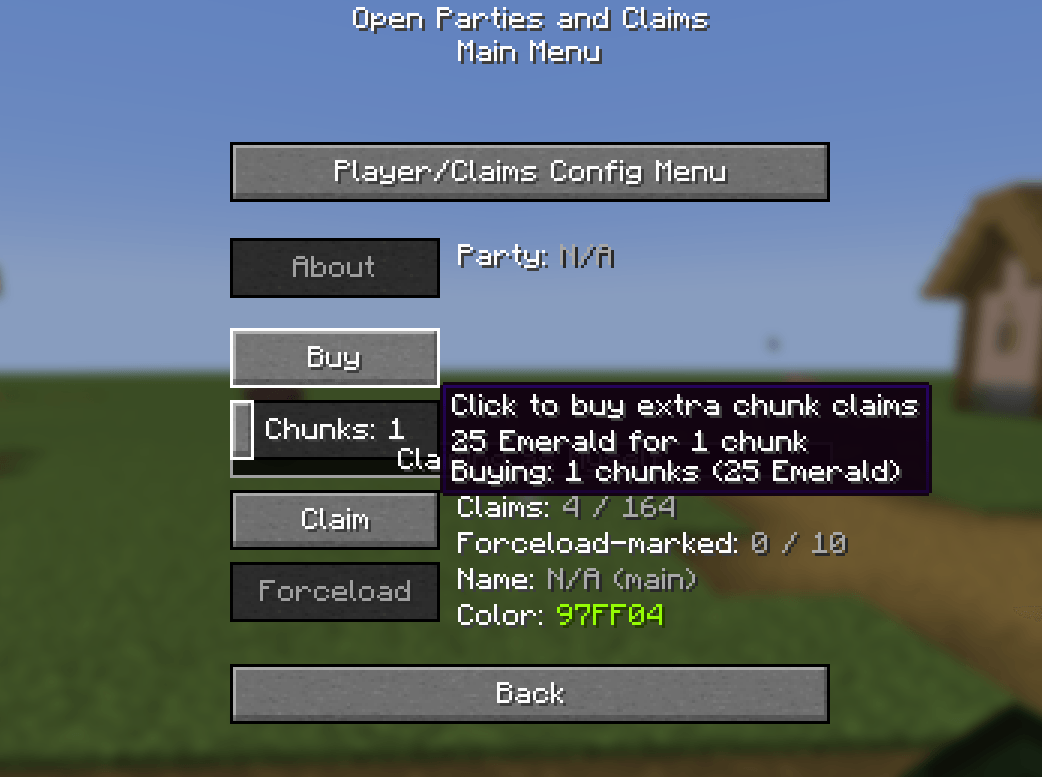
Buying Additional bonus chunks in OPAC menu
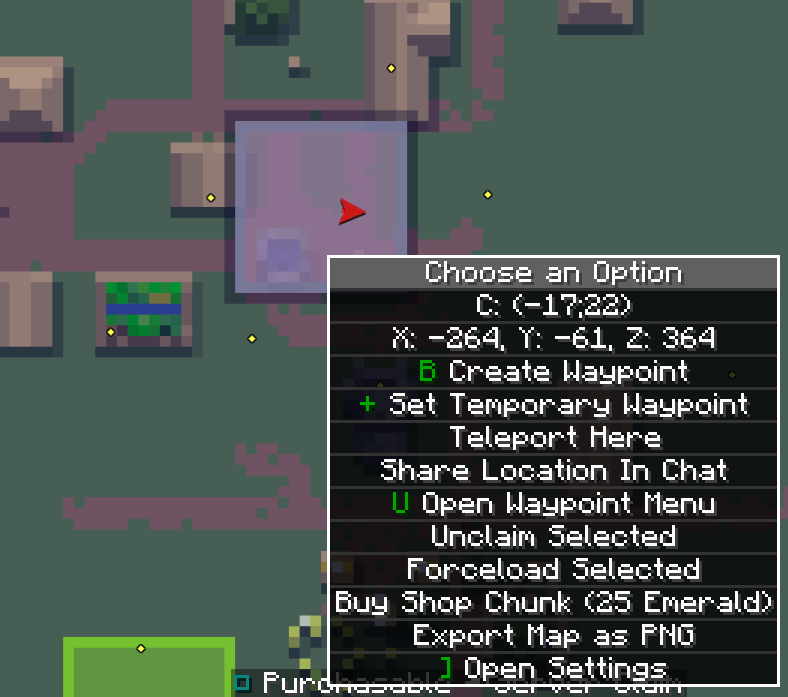
Buying chunks from xareo world map.png
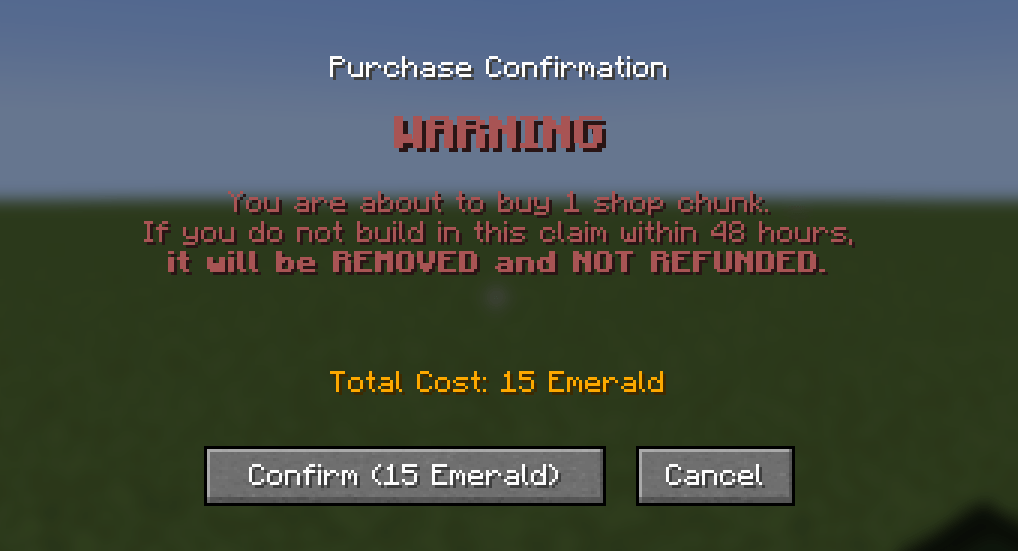
Warning before buying
Description
OPAC Chunk Shop (NeoForge 1.21.1)
Sell server-owned Open Parties and Claims chunks to players for emeralds, custom items, or Create Numismatics coins. Includes admin tools to mark shop areas, audit inactive purchases, and manage player claim limits.
Minecraft: 1.21.1
Loader: NeoForge 21.1.228+
Mod ID: open_parties_claims_chunkshop
Requirements
| Mod | Required | Side |
|---|---|---|
| Open Parties and Claims (0.25+) | Yes | Server + Client |
| Xaero's World Map (1.40+) | Recommended | Client only |
Install this mod on both server and client for map buying, purchase confirmation screens, and the admin player list GUI.
Optional compatibility
| Mod | What it enables |
|---|---|
| Create Numismatics | Spur-based payments with automatic change |
Installation
- Install NeoForge 1.21.1, Open Parties and Claims, and this mod on the server.
- Install the same mods on every client that should use map buying or admin GUIs.
- Start the server once to generate the config file.
- Edit
config/open_parties_claims_chunkshop-common.toml(see Configuration). - Restart the world, or run
/openpac-chunk-shop reloadas an OP.
JAR name: open-parties-claims-chunshop-neoforge-1.21.1.jar
Quick start (server owner)
1. Set up OPAC server claims
Shop chunks are server claims, not personal player claims.
- Open the OPAC claims menu in-game as an admin.
- Switch to server claim mode.
- Select a sub-profile with Claim with [profile name] (for example your shop profile).
- Do not use the main/spawn server profile for shop chunks.
- Claim the area you want to sell, or use
/sellchunkon chunks the server already owns.
2. Mark chunks for sale
Stand in a chunk (with the correct OPAC server sub-profile selected) and run:
/sellchunkOr set a custom price:
/sellchunk 25
/sellchunk 10 20
/sellchunk 10 20 15 25 30
/sellchunk 10 20 15 25 30
From console (uses buyableConfigIndex from config instead of your in-game OPAC selection):
/sellchunk 10 20
/sellchunk 10 20 15
Marked chunks are stored in <world>/chunk_shop_prices.json.
3. Let players buy
Players can buy using:
- Xaero's World Map — select an area of marked chunks, right-click, choose the buy option.
- Command —
/buychunkat their position, or/buychunk <x> <z>, or/buychunk <x1> <z1> <x2> <z2>.
Purchases open a confirmation screen with a configurable warning and countdown timer.
4. Audit inactive builds
If a player does not build within the configured deadline (auditHours), use:
/internalBuyChunk audit
/internalBuyChunk audit 72
Click TP, REMOVE, or IS OKAY in chat to teleport, revoke the claim, or mark it safe.
Player guide
Buying shop chunks
From the map (recommended)
- Open Xaero's World Map.
- Select one or more chunks that are marked for sale.
- Right-click the selection and choose the buy option.
- Read the warning on the confirmation screen and wait for the timer.
- Click Confirm and pay.
From chat
/buychunk
/buychunk 10 20
/buychunk 10 20 15 25
You must carry enough payment items in your inventory. The mod checks your balance before confirming.
Buying extra claim slots
Players can buy bonus OPAC claim slots (separate from shop chunk purchases):
Command
/buybonuschunk 5Amount must be between 1 and 64.
OPAC main menu (if enabled in config)
- Open the OPAC claims main menu.
- Use the chunk slider (1–64).
- Click Buy.
Price per slot is set by spurBonusClaimPrice in config.
Admin guide (OP level 2+)
Mark / unmark shop chunks
| Command | Description |
|---|---|
/sellchunk |
Mark your current chunk at default price |
/sellchunk <price> |
Mark current chunk at custom price |
/sellchunk <x> <z> |
Mark one chunk |
/sellchunk <x> <z> <price> |
Mark one chunk at custom price |
/sellchunk <x1> <z1> <x2> <z2> |
Mark a rectangular region |
/sellchunk <x1> <z1> <x2> <z2> <price> |
Mark a region at one price |
Important: In-game admins must select the correct OPAC server sub-profile before using /sellchunk. The main/spawn server profile is blocked.
Purchase audit
| Command | Description |
|---|---|
/internalBuyChunk audit |
List purchases older than auditHours |
/internalBuyChunk audit <hours> |
List purchases older than custom hours |
/internalBuyChunk adminAction okay <id> |
Remove purchase from audit list (player keeps claim) |
/internalBuyChunk adminAction remove <id> |
Unclaim and return chunks to server shop |
Purchase records are stored in <world>/buy_chunk_records.json.
Chunk shop admin commands
| Command | Description |
|---|---|
/openpac-chunk-shop reload |
Reload config and shop data |
/openpac-chunk-shop chunkadd <player> <amount> |
Add bonus claim slots to a player |
/openpac-chunk-shop chunkrevoke <player> <amount> |
Remove bonus claim slots |
/openpac-chunk-shop chunkrevoke <player> all |
Set player's available bonus slots to 0 |
/openpac-chunk-shop playerchunklist |
Open the player moderation GUI (in-game only) |
Player moderation GUI
Run /openpac-chunk-shop playerchunklist to open a scrollable list showing each player's:
- Claimed chunks
- Available chunks (how many they can still claim)
Use the green + buttons to add bonus slots, red − buttons to revoke, or Revoke All to reset bonus slots to zero. System OPAC entries (Server, Expired) are hidden from this list.
Configuration
Config file path after first launch:
config/open_parties_claims_chunkshop-common.tomlA commented example is included in this repo at config/open_parties_claims_chunkshop-common.toml.
Apply changes by restarting the world or running:
/openpac-chunk-shop reloadShop pricing
| Option | Default | Description |
|---|---|---|
chunkPrice |
12 |
Default price per chunk when /sellchunk has no price argument |
currencyName |
"Emerald" |
Currency name shown in UI and chat |
paymentItem |
"minecraft:emerald" |
Item ID used for payment (ignored when Numismatics Spurs are active) |
useNumismaticsSpurs |
false |
Use Create Numismatics coin values instead of a single item |
spurBonusClaimPrice |
1 |
Price per bonus claim slot (/buybonuschunk and OPAC menu slider) |
Emerald example
chunkPrice = 12
currencyName = "Emerald"
paymentItem = "minecraft:emerald"
useNumismaticsSpurs = false
Numismatics example
chunkPrice = 48
useNumismaticsSpurs = true
spurBonusClaimPrice = 4
When Numismatics is enabled, the mod accepts Spur, Bevel, Sprocket, Cog, Crown, and Sun coins and gives change automatically.
OPAC shop profile
| Option | Default | Description |
|---|---|---|
buyableConfigIndex |
1 |
Server-claim sub-profile index used by console /sellchunk |
Index reference:
| Index | OPAC profile |
|---|---|
0 |
Main / spawn server profile (not allowed for shop chunks in-game) |
1 |
First sub-profile |
2 |
Second sub-profile |
In-game admins ignore this setting and use whichever server sub-profile they have selected in OPAC.
Purchase behaviour
| Option | Default | Description |
|---|---|---|
auditHours |
48.0 |
Build deadline shown in warnings and used by /internalBuyChunk audit |
confirmDelaySeconds |
4 |
Seconds before the Confirm button unlocks on the purchase screen |
clearPlatform |
true |
Clear blocks between Y 71–74 in newly purchased chunks |
grantBonusClaims |
true |
Grant one bonus OPAC claim slot per shop chunk purchased |
minBonusChunkClaims |
-1000000 |
Lowest bonus value admins can set via revoke commands (allows going below OPAC base limit) |
Purchase confirmation screen
| Option | Default |
|---|---|
purchaseScreenTitle |
"Purchase Confirmation" |
warningTitle |
"WARNING" |
warningChunkLabelSingular |
"shop chunk" |
warningChunkLabelPlural |
"shop chunks" |
totalCostLine |
"Total Cost: %cost% %currency%" |
Warning lines (warningLines) support these placeholders:
| Placeholder | Replaced with |
|---|---|
%chunks% |
Number of chunks being bought |
%chunkLabel% |
Singular or plural chunk label from config |
%hours% |
auditHours value |
%cost% |
Total price |
%currency% |
Currency display name |
Example:
auditHours = 72.0
confirmDelaySeconds = 8

warningLines = [
    "You are about to buy %chunks% %chunkLabel%.",
    "You must start building within %hours% hours.",
    "Claims with no progress will be REMOVED with NO REFUND.",
    "Total due: %cost% %currency%."
]

totalCostLine = "Total Cost: %cost% %currency%"
OPAC compatibility toggles
| Option | Default | Description |
|---|---|---|
silenceChunkProtectionWarnings |
true |
Reduce OPAC protection warning spam in chat |
fixWidgetListScreenCrash |
true |
Prevent OPAC list screen crashes on bad page indices |
enableMainMenuSpurBuy |
true |
Show bonus-chunk slider and Buy button in OPAC main menu |
fixAsyncExplosions |
true |
Fix explosion ticks when Async mod is installed |
fixHarvestPermissions |
true |
Respect OPAC claims when Actually Harvest is installed |
World data files
These files are created in your world folder:
| File | Purpose |
|---|---|
chunk_shop_prices.json |
Which chunks are for sale, their prices, and OPAC sub-profile index |
buy_chunk_records.json |
Purchase history used by the audit system |
Back these up before resetting a world.
Command reference (all)
Players
/buychunk
/buychunk <x> <z>
/buychunk <x1> <z1> <x2> <z2>
/buybonuschunk <1-64>
Admin (OP 2+)
/sellchunk [price]
/sellchunk <x> <z> [price]
/sellchunk <x1> <z1> <x2> <z2> [price]

/internalBuyChunk audit [hours]
/internalBuyChunk adminAction okay <id>
/internalBuyChunk adminAction remove <id>

/openpac-chunk-shop reload
/openpac-chunk-shop chunkadd <player> <amount>
/openpac-chunk-shop chunkrevoke <player> <amount>
/openpac-chunk-shop chunkrevoke <player> all
/openpac-chunk-shop playerchunklist
Troubleshooting
/sellchunk says to select a server sub-profile
Open OPAC, switch to server claim mode, and choose Claim with [profile] before marking chunks. The main spawn profile cannot be used.
Map buy option does not appear
- Install this mod and Xaero's World Map on the client.
- Make sure the chunk is marked with
/sellchunk. - The selected map area must match marked shop chunks.
Purchase confirmation never opens
- Client must have this mod installed.
- Chunks must still be marked as buyable on the server.
Player list GUI does not open
/openpac-chunk-shop playerchunklist must be run by a player in-game, not from the console.
Config changes have no effect
Run /openpac-chunk-shop reload or restart the world. Do not use vanilla /reload alone.
Payments fail even with enough items
- Check
paymentItemis a valid item ID likeminecraft:emerald. - If using Numismatics, set
useNumismaticsSpurs = trueand ensure Create Numismatics is installed on the server.
Open Parties and Claims Chunk Shop Team