Only TP
- By
Restricts players to using only TP-related commands, or completely disables all non-TP commands.
🔒 OnlyTP
Minecraft 指令限制模组 | Minecraft Command Restriction Mod
⚠️ WARNING
In versions 2026.8.16 and later, the visual editing interface requires the AvalonBase mod to be installed in order to display. Otherwise, modifications can only be made through the configuration file. If the configuration file items are incomplete, you can delete the configuration file and the game will automatically recreate it. ⚠️
⚠️ 警告
在 2026.8.16 及以后的版本中,可视化编辑界面需要安装 AvalonBase 模组才能显示,否则只能通过配置文件进行修改。若配置文件项目不完全,可删除配置文件,游戏会自动创建。 ⚠️
📖 Features
OnlyTP provides three command restriction modes to help server administrators precisely control player command permissions:
Mode 1: TP Only
Non-OP players can only use /tp and /teleport commands. Other commands are intercepted and executed with elevated privileges. OP players are unrestricted.
Mode 2: Block Non-TP
OP players can only use TP commands. Using other commands will be blocked with a notification. Non-OP players are unrestricted. The F3+F4 game mode switcher is also blocked for OP players.
Mode 3: Both Enabled
Both rules are applied simultaneously. Non-OP players can only use TP commands, and OP players can also only use TP commands.
⚫ Blacklist System
Each mode has an independent blacklist. Blacklisted players are completely exempt from that mode's restrictions and can freely use all commands.
🎨 Dual-Style GUI Configuration
-
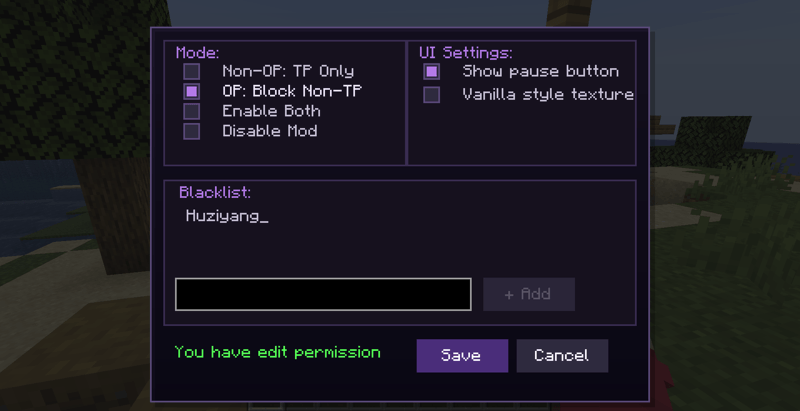
Modern Purple-Black Style: Dark background, purple borders, sharp-cornered design
-
Vanilla Chest Style: Mimics the original Minecraft interface style
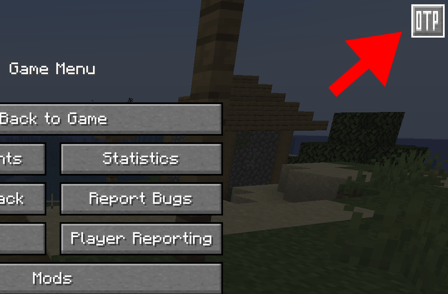
LAN hosts or server administrators can open the configuration panel via the "TP" button in the pause menu or through commands. All changes are instantly synced to all players.
🚀 Usage
-
Place the mod jar file into the
modsfolder -
Launch the game and enter a world or server
-
Press
ESCto open the pause menu, click the "TP" button to enter the configuration interface -
Select the desired mode, configure the blacklist, and click "Save" to apply
⚙️ Configuration Options
| Option | Description |
|---|---|
| Non-OP players TP only | Enable Mode 1 |
| OP players block non-TP | Enable Mode 2 (includes game mode switcher block) |
| Both enabled | Enable Mode 3 |
| Disable mod function | Disable all restrictions |
| Show pause button | Whether to show the "TP" button in the pause menu |
| Vanilla style texture | Switch to vanilla chest-style interface |
👥 Blacklist Management
In the "Blacklist Management" section, enter a player name and click "+ Add" to add them to the blacklist. Blacklisted players are exempt from the current mode's restrictions. Click an entry to remove it.
📖 功能介绍
OnlyTP 提供三种指令运行模式,帮助服务器管理员精确控制玩家的指令使用权限:
模式一:仅允许 TP
非 OP 玩家只能使用 /tp 和 /teleport 指令,其他指令会被自动拦截并提权执行。OP 玩家不受限制,可正常使用所有指令。
模式二:禁止非 TP
OP 玩家只能使用 TP 类指令,使用其他指令会被拦截并提示。非 OP 玩家不受限制。同时禁止 OP 玩家使用 F3+F4 游戏模式切换器。
模式三:同时启用
前两种规则叠加生效。非 OP 玩家只能使用 TP 指令,OP 玩家也只能使用 TP 指令。
⚫ 黑名单系统
每种模式均可独立配置黑名单。被加入黑名单的玩家完全不受该模式规则限制,可自由使用所有指令。
🎨 双风格 GUI 配置界面
-
简约紫黑直角风格:深色背景,紫色边框,直角设计
-
原版箱子风格:仿原版 Minecraft 界面风格
局域网房主或服务器管理员可通过暂停菜单中的 "TP" 按钮或指令打开配置面板,所有修改即时同步至全体玩家。
🚀 使用方法
-
将模组 jar 文件放入
mods文件夹 -
启动游戏,进入世界或服务器
-
按
ESC打开暂停菜单,点击 "TP" 按钮进入配置界面 -
选择所需模式,配置黑名单,点击 "保存" 生效
⚙️ 配置选项
| 选项 | 说明 |
|---|---|
| 非 OP 玩家仅允许 TP 指令 | 启用模式一 |
| OP 玩家禁止非 TP 指令 | 启用模式二(含禁止游戏模式切换器) |
| 同时启用 | 启用模式三 |
| 关闭模组功能 | 禁用所有限制 |
| 显示暂停按钮 | 是否在暂停菜单显示 "TP" 按钮 |
| 原版风格纹理 | 切换为原版箱子风格界面 |
👥 黑名单管理
在 "黑名单管理" 区域输入玩家名称,点击 "+ 添加" 将其加入黑名单。黑名单玩家不受当前模式规则限制。点击条目可删除。
Only TP Team