
OneBlock Evolved
Снимок ÑкÑана_20261121_103650.png
Снимок ÑкÑана_20261121_103406.png
Description
OneBlock Evolved
OneBlock, turned into a full game mode. A dedicated void dimension, 5 locations × 5 levels, a live in-game progression UI, 4 tiers of chainable Auto-Miners, economy, co-op, portals, NPCs, holograms — and JSON configs that let you pull blocks from any mod.
The mod never touches the vanilla Overworld, Nether, or End: every island lives in the dedicated oneblock:islands dimension, so OneBlock Evolved drops safely into an existing world or modpack without breaking anything.
| Info | Details |
|---|---|
| Minecraft / Loader | 26.3 — NeoForge 26.3.0.103+ (Java 25) |
| Side | Client & Server (required on both) |
| Mod ID / Dimension | oneblock · oneblock:islands |
| World Preset | “OneBlock” (oneblock:oneblock) |
| Languages | 🇬🇧 English, 🇷🇺 Russian |
✨ Features & Highlights
🌌 Dedicated Void Dimension & Server Hub
- Every island is generated in its own dimension,
oneblock:islands(VoidChunkGenerator), keeping the vanilla Overworld, Nether, and End untouched. - Includes a built-in Hub system: admins set the point with
/setoneblockhub, and players return via/hub(or/oneblock hub). From the Hub, players reach their island using/oneblock play, a touch portal block, or a Guide NPC. - Ships with an optional “OneBlock” world preset: a void Overworld paired with a normal Nether and End.
- Islands are placed on a deterministic square-spiral grid (
islandSpacing, 1024 blocks by default), preventing any overlap.
🗺️ 5 Hand-Tuned Locations × 5 Levels (25 Stages)
| Location | Blocks per Level (1 → 5) | Unlock Requirement | Chest Every N Blocks |
|---|---|---|---|
🌾 Plains (plains) |
40 / 80 / 140 / 220 / 320 | Unlocked from the start | 24 → 45 |
🌲 Forest (forest) |
50 / 100 / 180 / 280 / 400 | Plains Lv. 2 or 100 total blocks | 28 → 50 |
⛏ Mine (mine) |
60 / 120 / 220 / 340 / 500 | Forest Lv. 2 or 350 total blocks | 30 → 55 |
🔥 Nether (nether) |
80 / 160 / 280 / 420 / 600 | Mine Lv. 2 or 900 total blocks | 36 → 65 |
🌌 The End (end) |
100 / 200 / 340 / 500 / 700 | Nether Lv. 2 or 2000 total blocks | 40 → 70 |
- Every location has custom block weights, mobs (
min_count/max_count/chance), fluids (water/lava), and phase chests with dedicated loot tables. - Fully JSON-driven (
config/oneblock/locations/or datapack) — edit, add, or remove locations without recompiling.
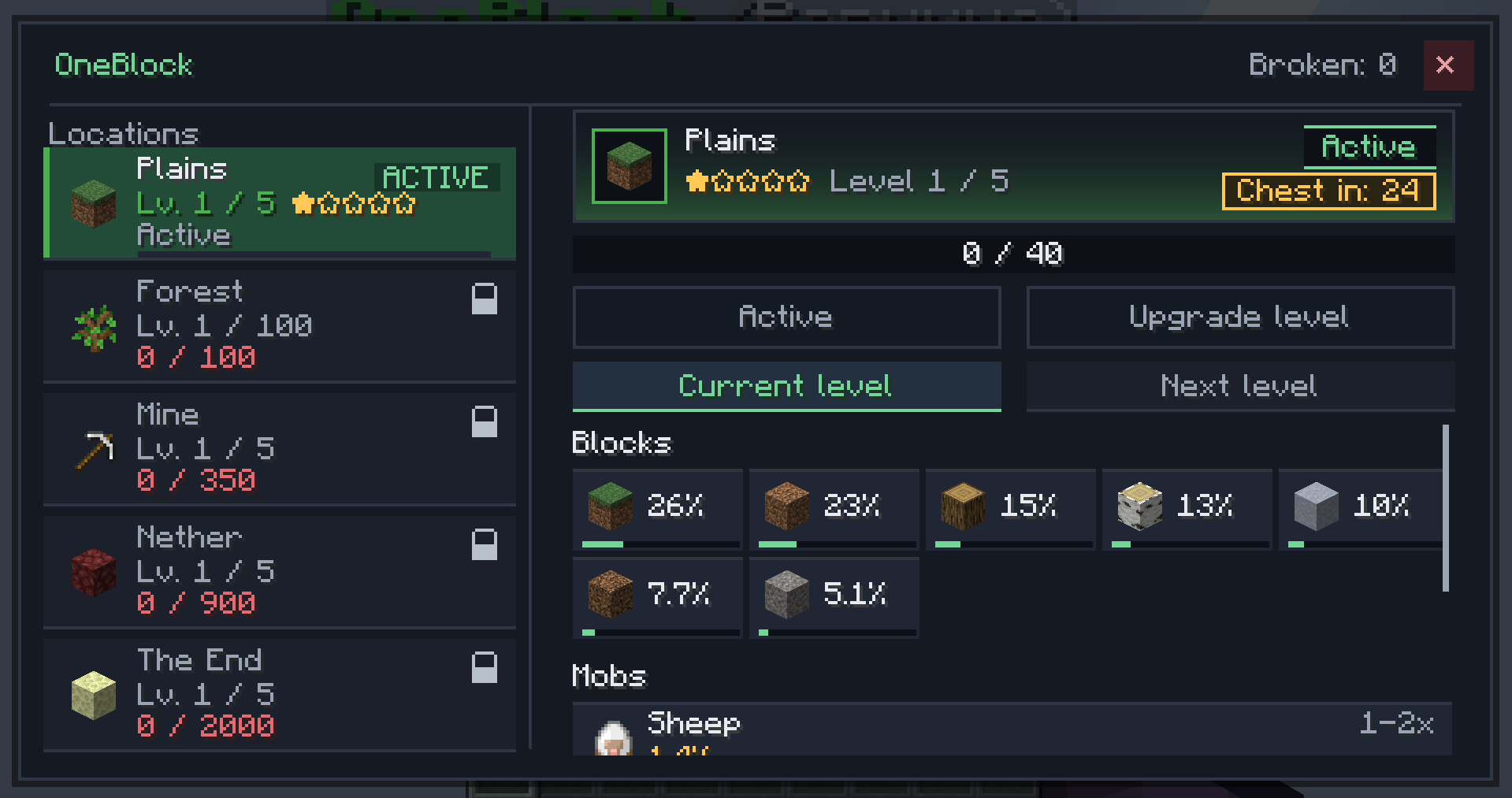
🖥️ Live In-Game Progression UI
- Open with a normal right-click on the Core (empty hand or any item) or via the
Okey (rebindable under Controls → OneBlock). - Live updates: progress, broken-block counters, and the upgrade button refresh every 10 ticks while the screen is open, showing Auto-Miner and co-op progress in real time.
- Location sidebar: status cards (Active / Locked / Ready to upgrade / In progress), unlock hints, mouse-wheel scrolling for 6+ locations, and a scrollbar indicator.
- Current / Next Level tabs: inspect exact block weights, mob spawn chances, and fluid chances.
- Supports per-location colour themes (
theme_color) and custom backgrounds (background_texture).
⚙️ Auto-Miners (4 Tiers, Chaining, Storage & Upgrades)
- 4 speed tiers: 80 / 50 / 30 / 12 ticks per block (4 s / 2.5 s / 1.5 s / 0.6 s) — all configurable.
- Chain docking (
allowMinerStacking): any miner touching the Core or another working miner mines automatically (BFS walk over 6 neighbours, capped byautoMinerMaxChain, 8 by default). - 18-slot built-in storage with a “Take all” button and single-slot extraction; overflow routes to adjacent chests/hoppers, then drops at the Core.
- Automatic phase-chest harvesting: miners unpack the chest loot table, store the loot, clear the chest, and roll the next Core block in the same tick so automated islands never stall.
- 3 upgrade slots: Luck (double-drop chance), Location XP (extra progress points), and Speed (interval reduction). Upgrade items and bonuses are config-driven — modded coins and gems work out of the box.
- Custom miner blocks: turn any block into a miner via
autoMinerCustomBlocks("block_id=tier").
🛡️ Smart OneBlock Physics
- An invisible support plate (
oneblock:core_support) sits beneath the Core: gravel, sand, anvils, and other falling blocks never fall into the void — the fall is intercepted and restored. - Zero-gap regeneration: the next block appears in the exact same tick the previous one breaks, so you never fall through the Core. Non-colliding blocks (flowers, cobwebs, etc.) fall back to stone.
- Auto-pickup straight into your inventory (
autoPickupDrops); overflow drops safely at the Core. - Void Rescue: falling
voidRescueDepthblocks below the Core teleports you back before vanilla void damage, keeping your inventory.
👥 Multiplayer & Co-op
- Shared islands:
/oneblock invite <name>→/oneblock accept. The invited player's empty starter island is automatically deleted to prevent orphan islands. - Manage teams with
/oneblock team,/oneblock kick <name>(owner only), and/oneblock leave(owners cannot leave). - Territory protection (
protectOtherIslands, radius128): outsiders cannot break/place blocks, open containers, or cause explosions near your Core. - Configurable member cap (
maxCoopMembers, 4 by default, excluding the owner).
🌐 Server Features: Economy, Portals, NPCs & Holograms
- 4 built-in economy modes:
NONE,XP_LEVELS,SCOREBOARD,ITEM— plus theEconomyBridgeJava API for external economy mods. Supports per-level currency costs (upgrade_cost) and item costs (upgrade_cost_item, works even witheconomyMode = NONE). - Touch Portal block (
oneblock:portal_block): step on or touch it to travel between the Hub and your island (Shift + right-clickopens the menu). Any block can be assigned viaportalBlockId. - Optional Portal item (compass by default,
enablePortalItem): right-click to open the menu or teleport. - Guide NPCs:
/oneblock spawnnpc <island/hub/menu>spawns a motionless, named villager with client-localized default names (OneBlock Guide / Проводник OneBlock). - Floating Hologram (
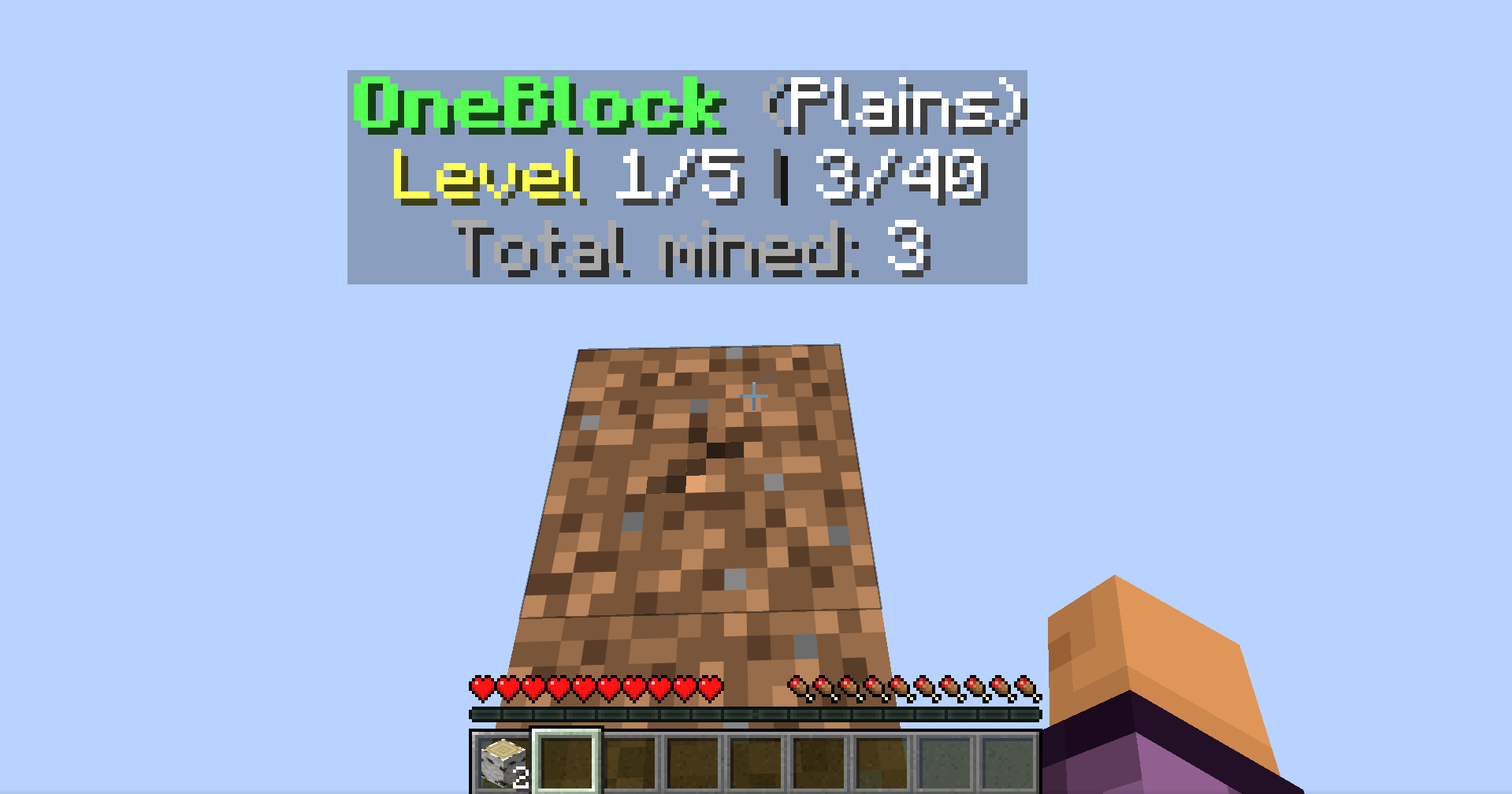
Display.TextDisplay) above the Core supporting{owner},{location},{level},{max_level},{broken},{required},{total},{chest_in}and&colour codes. Automatically translated per client language.
📖 Player Guide
Getting Started & Controls
- Island Start (
startMode = ONEBLOCK, default): a personal island is created on first join and you spawn right on it. - Hub Start (
startMode = HUB): you spawn in the Hub and claim your island with/oneblock play. - Mine the Core (
oneblock:core_block) — it regenerates instantly from your active location's pool.
| Action | Result |
|---|---|
| Right-click the Core (empty hand or any item) | Opens the locations menu (progress, chances, upgrades) |
O key |
Opens the locations menu from anywhere |
Shift + right-click the Core (holding a block) |
Places the block next to the Core to expand your platform |
| Right-click an Auto-Miner | Opens the miner screen (storage, upgrades, progress) |
| Right-click a phase chest | Opens the chest manually |
| Step on a portal block | Teleports between your island and the Hub |
Shift + right-click a portal block |
Opens the locations menu |
💡 A phase chest spawns on the Core every
chest_spawn_intervalblocks. Core regeneration pauses until the chest is looted — or an Auto-Miner harvests it automatically.
Level Progression & Switching Locations
- Every broken block grants 1 progress point to the active location (including Auto-Miners when
autoMinerCountsProgress = true). - Once you reach the required block count, click “Upgrade level” in the UI (or let it auto-upgrade if
requireManualLevelUp = false). - Click any unlocked location in the left sidebar and press “Select location” to switch pools. Every location saves its progress independently.
Auto-Miner Guide & Recipes
<details> <summary>Auto-Miner Recipes, Speeds & Upgrades</summary>Auto-Miner Tier 1 — 8 Iron Ingots + 1 Furnace:
I I I
I F I      I = minecraft:iron_ingot
I I I      F = minecraft:furnace
Auto-Miner Tier 2 — 4 Iron Ingots + 4 Gold Ingots + Tier 1 Miner:
I G I
G M G      I = minecraft:iron_ingot
I G I      G = minecraft:gold_ingot
           M = oneblock:auto_miner_1
Auto-Miner Tier 3 — 4 Diamonds + 4 Gold Ingots + Tier 2 Miner:
D G D
G M G      D = minecraft:diamond
D G D      G = minecraft:gold_ingot
           M = oneblock:auto_miner_2
Auto-Miner Tier 4 — 4 Netherite Ingots + 4 Gold Blocks + Tier 3 Miner:
N G N
G M G      N = minecraft:netherite_ingot
N G N      G = minecraft:gold_block
           M = oneblock:auto_miner_3
Speed Comparison:
| Tier | Base Interval | Blocks / Min (Base) | With 3× Speed Upgrades |
|---|---|---|---|
| Tier 1 | 80 ticks (4.0 s) | ~15 | 16 ticks (0.8 s) |
| Tier 2 | 50 ticks (2.5 s) | ~24 | 10 ticks (0.5 s) |
| Tier 3 | 30 ticks (1.5 s) | ~40 | 6 ticks (0.3 s) |
| Tier 4 | 12 ticks (0.6 s) | ~100 | 4 ticks (0.2 s, hard floor) |
Placing & Chaining:
- Place a miner adjacent to the Core (any of the 6 sides) — it starts mining immediately.
- To build a chain, hold
Shift+ right-click an existing miner with another miner block (up toautoMinerMaxChain, default8). - Miners not connected to the Core show “No contact with the Core” and remain idle.
Upgrade Slots: Click a slot in the miner UI to insert a matching item from your hand or inventory; click again to remove it. All three slots can hold items of the same category.
| Slot | Upgrade | Default Items | Effect |
|---|---|---|---|
| 1 | Luck | Lapis Lazuli +20%, Emerald +45%, Nether Star +100% |
Chance to duplicate drops (100% = guaranteed 2×, 3× Nether Stars = 3× drop) |
| 2 | Location XP | Quartz +1, Amethyst Shard +2, Echo Shard +4 |
Extra location progress points per mined block |
| 3 | Speed | Redstone -20%, Gold Ingot -35%, Diamond -55% |
Reduces mining interval (capped at -80% total) |
Co-op Islands
- The owner invites a friend:
/oneblock invite <name>. - The friend accepts:
/oneblock accept(their empty starter island is automatically removed; if it had other members, ownership transfers to the first member). - Manage members with
/oneblock team,/oneblock kick <name>, or/oneblock leave. Owners delete their island via/oneblock deletefollowed by/oneblock delete confirmwithin 30 seconds.
💻 Commands & Permissions
Player Commands
| Command | Description | Notes |
|---|---|---|
/oneblock play |
Teleports to your island (creates one if needed) | Main command for HUB mode |
/oneblock create |
Creates a new island | Fails if you already have one |
/oneblock home |
Teleports to your island | Uses teleportCooldownSeconds (3 s) |
/oneblock hub · /hub |
Teleports to the server Hub | Same cooldown |
/oneblock ui · /oneblock menu |
Opens the locations UI | Same as the O key |
/oneblock info |
Prints island stats in chat | Owner, location, level, progress, chest state |
/oneblock invite <name> |
Invites an online player | Owner only; capped by maxCoopMembers |
/oneblock accept |
Accepts the latest invite | Removes empty starter island |
/oneblock leave |
Leaves someone else's island | Owner cannot leave |
/oneblock kick <name> |
Removes a member | Owner only |
/oneblock team |
Lists the owner and all members | — |
/oneblock delete |
Requests island deletion | Requires /oneblock delete confirm within 30 s |
Admin Commands (OP / Permission Level 2)
| Command | Description |
|---|---|
/setoneblockhub |
Sets the server Hub to your current dimension, coordinates, and rotation |
/oneblock reload |
Reloads config/oneblock/locations/*.json, re-evaluates unlocks, and refreshes UIs |
/oneblock resetconfigs |
Restores the default location JSON files and reloads them |
/oneblock location set <id> |
Forces the active location (with tab-completion) |
/oneblock miner <1..4> |
Gives an Auto-Miner of the chosen tier |
/oneblock portal |
Gives oneblock:portal_block (uncraftable) |
/oneblock removeportal |
Removes the auto-generated island portal at portalOffsetX/Y/Z |
/oneblock spawnnpc <island/hub/menu> |
Spawns a Guide NPC at your position (island, hub, or menu) |
/oneblock admin delete <name> |
Deletes any player's island and evacuates residents to the Hub |
🛠️ Server & Modpack Configuration
Custom Locations & Modded Blocks (config/oneblock/locations/*.json)
<details>
<summary>How JSON Locations Work (Live Reload & Modpack Safety)</summary>
- On first startup, the mod creates
config/oneblock/locations/with 5 default files:plains.json,forest.json,mine.json,nether.json, andend.json. - Any
*.jsonfile in this folder loads as a location (file name =idunless explicitly set). - Live reload without restarting: run
/oneblock reloadto apply changes, recalculate unlocks, and refresh all online players' UIs while preserving island progress. - Modpack-safe resolution: if a block, mob, item, or fluid from an optional mod is missing, the mod logs
WARN Skipped missing entry '<id>' in location '<id>' (unknown <kind>)and continues loading without crashing. - Tags supported: use
"#minecraft:logs","#c:ores/tin", etc. Tags expand automatically into valid blocks. - Datapack fallback lives at
data/oneblock/oneblock/oneblock_locations/*.json. - Run
/oneblock resetconfigsto restore defaults if needed.
Root Fields:
| Field | Type | Default | Description |
|---|---|---|---|
id |
string | file name | Location ID (used by commands and unlock_requirement) |
order |
int | 0 |
Sort order in the UI sidebar |
name |
string | — | Display name with & codes ("&a&lFactory") or translation key ("oneblock.location.plains"). Aliases: title, display_name |
icon_item |
string | minecraft:stone |
Sidebar card icon (unknown items render as a barrier) |
theme_color |
string | auto | UI theme hex colour without # (e.g. "3FB950") |
background_texture |
string | — | Full texture path ("oneblock:textures/gui/bg/forest.png") |
unlock_requirement |
object | {} |
Unlock conditions (empty = unlocked from start) |
levels |
array | required | List of level definitions |
unlock_requirement Fields:
| Field | Type | Description |
|---|---|---|
mode |
ANY or ALL |
ANY = any single condition unlocks; ALL = every condition required |
total_blocks |
long | Total blocks broken across the entire island |
location_blocks |
object / list | Blocks in a specific location: {"plains": 60}, {"location": "plains", "blocks": 60}, or a list of objects |
previous_location |
string | Required location ID ("plains") |
previous_level |
int | Required level of previous_location (2) |
levels[] Fields:
| Field | Type | Description |
|---|---|---|
level |
int | Level number (1..N); omitted = next sequential number |
blocks_required |
int | Blocks needed to reach the next level |
inherit_previous_blocks |
bool | Inherits the previous level's blocks and fluids |
blocks |
array | Block pool. When inherit_previous_blocks: true, use add_blocks to merge additions/overrides |
add_blocks |
array | Entries merged into the inherited pool |
fluids / add_fluids |
array | Fluids: {"fluid": "minecraft:water", "weight": 3, "chance": 0.02} |
mobs |
array | Mobs: {"entity": "minecraft:cow", "weight": 10, "chance": 0.05, "min_count": 1, "max_count": 2} (aliases min/max) |
chest_spawn_interval |
int | Spawns a phase chest every N blocks (0 disables) |
chest_loot_table |
string | Loot table ID (e.g. oneblock:chests/01_plains) |
chest_items |
array | Extra inline items: {"item": "minecraft:bread", "weight": 10, "min": 1, "max": 3} |
upgrade_cost |
double | Price in active economyMode currency (missing or < 0 uses config fallback) |
upgrade_cost_item |
string | Extra item price: "minecraft:emerald*5" (works even with economyMode = NONE) |
Supported blocks[] formats:
{"block": "minecraft:stone", "weight": 20}{"blocks": "minecraft:stone", "weight": 20}{"blocks": ["minecraft:oak_log", "minecraft:birch_log"], "weight": 10}{"block": "#c:ores/tin", "weight": 5}
Save as config/oneblock/locations/create_factory.json and run /oneblock reload (remove // comments before publishing):
{
  "id": "create_factory",
  "order": 6,
  "name": "&6&lCreate Factory",
  "icon_item": "create:cogwheel",
  "theme_color": "D9A441",
  "background_texture": "oneblock:textures/gui/bg/forest.png",

  "unlock_requirement": {
    "mode": "ANY",
    "total_blocks": 1200,
    "location_blocks": { "mine": 250 },
    "previous_location": "mine",
    "previous_level": 3
  },

  "levels": [
    {
      "level": 1,
      "blocks_required": 120,
      "blocks": [
        { "block": "minecraft:stone", "weight": 20 },
        { "blocks": ["minecraft:oak_log", "minecraft:birch_log"], "weight": 10 },
        { "block": "#c:ores/copper", "weight": 6 },
        { "block": "create:zinc_ore", "weight": 5 }
      ],
      "mobs": [
        { "entity": "minecraft:cow", "weight": 10, "chance": 0.05, "min_count": 1, "max_count": 2 },
        { "entity": "minecraft:zombie", "weight": 6, "chance": 0.03, "min_count": 1, "max_count": 3 }
      ],
      "fluids": [
        { "fluid": "minecraft:water", "weight": 3, "chance": 0.02 },
        { "fluid": "minecraft:lava", "weight": 1, "chance": 0.01 }
      ],
      "chest_spawn_interval": 26,
      "chest_loot_table": "oneblock:chests/02_underground",
      "chest_items": [
        { "item": "minecraft:bread", "weight": 10, "min": 1, "max": 3 },
        { "item": "create:cogwheel", "weight": 6, "min": 4, "max": 8 }
      ],
      "upgrade_cost": 500,
      "upgrade_cost_item": "minecraft:emerald*5"
    },
    {
      "level": 2,
      "blocks_required": 220,
      "inherit_previous_blocks": true,
      "add_blocks": [
        { "block": "minecraft:stone", "weight": 30 },
        { "block": "create:zinc_ore", "weight": 12 },
        { "block": "create:andesite_alloy_block", "weight": 4 }
      ],
      "add_fluids": [
        { "fluid": "minecraft:water", "weight": 2, "chance": 0.03 }
      ],
      "mobs": [
        { "entity": "minecraft:iron_golem", "weight": 2, "chance": 0.01, "min_count": 1, "max_count": 1 }
      ],
      "chest_spawn_interval": 30,
      "chest_loot_table": "oneblock:chests/09_desolate"
    }
  ]
}Complete config/oneblock-synced.toml Reference
<details> <summary>Start, Island Grid & First Join</summary>This config is SYNCED: server settings automatically sync to clients so menus and tooltips always match. Every key also has translated comments in Mods → OneBlock → Config.
| Key | Default | Description |
|---|---|---|
startMode |
ONEBLOCK |
ONEBLOCK = spawn on personal island; HUB = spawn in Hub and claim via /oneblock play |
autoCreateIslandOnFirstJoin |
true |
Auto-create an island on first join (startMode = ONEBLOCK) |
starterPlatform |
SINGLE_BLOCK |
Starter shape: SINGLE_BLOCK or PLATFORM_3X3 |
starterKit |
[] |
One-time starter items (e.g. "minecraft:bread*3", "minecraft:stone_pickaxe") |
startingLocation |
plains |
Starting location ID for new islands |
startingLevel |
1 |
Starting level of that location |
starterBlock |
"" |
Fixed first Core block (e.g. "minecraft:grass_block"); empty = random from pool |
autoUnlockedLocations |
["plains"] |
Locations unlocked immediately on new islands |
islandSpacing |
1024 |
Distance between islands on the spiral grid |
coreY |
64 |
Y coordinate of the Core |
maxIslands |
0 |
Server-wide island cap (0 = unlimited) |
maxCoopMembers |
4 |
Co-op member cap (excluding the owner) |
| Key | Default | Description |
|---|---|---|
showActionBarProgress |
true |
Shows x / y blocks — Location in the action bar |
enablePhaseSounds |
true |
Plays sound & particle burst on level-up |
requireManualLevelUp |
true |
Requires clicking “Upgrade level” (false = auto-upgrade) |
resetLocationBlocksOnUpgrade |
true |
Resets block counter on upgrade (false carries overflow over) |
ignoreWrongToolForCoreDrops |
false |
Drops Core loot even when mined bare-handed or with the wrong tool |
preventBreakingWithWrongTool |
false |
Prevents breaking the Core with an incorrect tool |
applyToolDurabilityOnCore |
true |
Consumes tool durability on Core blocks |
coreBreakExhaustion |
0.005 |
Hunger exhaustion per Core block (0 disables) |
dropXpFromCoreOres |
true |
Awards XP when mining ores at the Core |
coreXpMultiplier |
1.0 |
Multiplier for Core ore XP |
| Key | Default | Description |
|---|---|---|
mobSpawningEnabled |
true |
Enables mob rolls on Core break |
hostileMobsAllowed |
true |
Allows hostile monsters (MobCategory.MONSTER) |
maxMobsNearIsland |
12 |
Entity cap within 24 blocks of the Core (0 = uncapped) |
minMobsPerRoll |
1 |
Global minimum mobs per successful roll |
maxMobsPerRoll |
2 |
Global maximum mobs per roll |
chestsEnabled |
true |
Enables phase chests on the Core |
liquidsEnabled |
true |
Enables fluid rolls from the location pool |
liquidSpawnMode |
BUCKET |
BUCKET = gives filled bucket; REPLACE_CORE = places fluid at the Core |
liquidChanceMultiplier |
1.0 |
Global multiplier for fluid chances |
autoPickupDrops |
true |
Sends Core drops directly to inventory (overflow drops at Core) |
| Key | Default | Description |
|---|---|---|
economyMode |
NONE |
NONE / XP_LEVELS / SCOREBOARD / ITEM |
economyScoreboardObjective |
money |
Scoreboard objective for SCOREBOARD mode |
economyItemId |
minecraft:emerald |
Currency item for ITEM mode (modded coins supported) |
economyCurrencySymbol |
$ |
Currency prefix shown in the UI |
economyDefaultUpgradeCost |
0.0 |
Fallback price when a level omits upgrade_cost |
economyCostPerLevelMultiplier |
1.0 |
Multiplies fallback price by (level - 1) |
Note: upgrade_cost_item works in every mode, including NONE. When all prices are zero, upgrading is free.
| Key | Default | Description |
|---|---|---|
autoMinersEnabled |
true |
Enables Auto-Miners |
allowMinerStacking |
true |
Allows chaining miners touching other miners |
autoMinerMaxChain |
8 |
Maximum miners per chain |
autoMinerTier1Ticks |
80 |
Tier 1 interval in ticks (20 ticks = 1 s) |
autoMinerTier2Ticks |
50 |
Tier 2 interval |
autoMinerTier3Ticks |
30 |
Tier 3 interval |
autoMinerTier4Ticks |
12 |
Tier 4 interval |
autoMinerCountsProgress |
true |
Miner output advances location progress |
autoMinerLuckUpgrades |
["minecraft:lapis_lazuli=0.20", "minecraft:emerald=0.45", "minecraft:nether_star=1.00"] |
Slot 1 (Luck): item_id=double_drop_chance |
autoMinerXpUpgrades |
["minecraft:quartz=1", "minecraft:amethyst_shard=2", "minecraft:echo_shard=4"] |
Slot 2 (XP): item_id=extra_progress_points |
autoMinerSpeedUpgrades |
["minecraft:redstone=0.20", "minecraft:gold_ingot=0.35", "minecraft:diamond=0.55"] |
Slot 3 (Speed): item_id=speed_reduction_ratio (sum capped at 0.80) |
autoMinerCustomBlocks |
[] |
Custom miner blocks: "minecraft:dispenser=1" (block_id=tier) |
| Key | Default | Description |
|---|---|---|
protectCoreFromPistons |
true |
Prevents pistons from moving or breaking the Core |
protectCoreFromExplosions |
true |
Protects Core positions from explosions |
protectOtherIslands |
true |
Protects islands from outsiders (breaking, placing, containers, explosions) |
islandProtectionRadius |
128 |
Protection radius around the Core |
teleportCooldownSeconds |
3 |
Cooldown for /hub and /oneblock home (0 disables) |
enableVoidRescue |
true |
Teleports falling players back before void damage |
voidRescueDepth |
24 |
Blocks below the Core to trigger rescue |
voidRescueKeepInventory |
true |
Keeps inventory on rescue (false drops items at the Core) |
showVoidRescueMessage |
true |
Shows an action-bar message when rescued |
| Key | Default | Description |
|---|---|---|
spawnPortalOnIsland |
false |
Spawns an auto portal pad on new islands |
portalBlockId |
oneblock:portal_block |
Touch portal block ID (any block works; empty disables custom blocks) |
portalOffsetX / Y / Z |
0 / 0 / -3 |
Auto-generated portal offset relative to the Core |
enablePortalItem |
false |
Enables the portal item |
portalItemId |
minecraft:compass |
Portal item ID (right-click = menu/teleport) |
enableNpcInteraction |
true |
Enables OneBlock Guide NPC interactions |
npcDisplayName |
oneblock.npc.default_name |
NPC name: default key = localized per client; any other text supports & codes |
hologramEnabled |
true |
Enables floating text above the Core |
hologramYOffset |
1.75 |
Hologram height above the Core |
hologramLines |
[] |
Empty = localized hologram (oneblock.hologram.line1..3); custom lines still translate {location} |
Setting Up Hub, Portals, NPCs & Holograms
<details> <summary>Step-by-Step Server Setup Guide</summary>- Set the Hub: Stand where players should spawn and run
/setoneblockhub. Dimension, coordinates, and rotation are saved for/huband/oneblock hub. - Place a Touch Portal: Obtain the block with
/oneblock portal(or/give @s oneblock:portal_block):- In
oneblock:islands, stepping on it sends players to the Hub (Shift + right-clickopens the menu). - In any other dimension (including the Hub), stepping on it sends players to their island.
- Any other block can be bound via
portalBlockId(oneblock:portal_blockalways keeps priority).
- In
- Spawn a Guide NPC: Run
/oneblock spawnnpc island,/oneblock spawnnpc hub, or/oneblock spawnnpc menu. NPCs are motionless, silent, and gravity-free. KeepnpcDisplayName = "oneblock.npc.default_name"for automatic client localization (OneBlock Guide/Проводник OneBlock). - Portal Item (Optional): Set
enablePortalItem = true(defaultminecraft:compass). Right-click opens the menu on islands (Shift + right-clickreturns to Hub) or teleports to your island from other worlds. - Custom Hologram Lines: Leave
hologramLines = []for automatic client-side localization, or define custom lines inoneblock-synced.toml:
hologramLines = [
  "&a&lOneBlock &7({location})",
  "&eLevel {level} &8| &f{broken}/{required}",
  "&7Total mined: &b{total}"
]Developer Java API (EconomyBridge)
<details>
<summary>Registering a Custom Economy Provider</summary>
Implement OneBlockEconomyProvider (getBalance, withdraw, format) and register it once (for example, during FMLCommonSetupEvent). Once registered, all location upgrade balance checks and withdrawals route through your provider, bypassing the built-in economyMode.
package com.example.mymod;

import com.example.oneblock.economy.EconomyBridge;
import com.example.oneblock.economy.OneBlockEconomyProvider;
import java.text.DecimalFormat;
import net.minecraft.server.level.ServerPlayer;

public final class MyEconomyIntegration {
    private static final DecimalFormat FORMAT = new DecimalFormat("#,##0.##");

    public static void register() {
        EconomyBridge.registerCustomProvider(new OneBlockEconomyProvider() {
            @Override
            public double getBalance(ServerPlayer player) {
                return MyEconomy.getBalance(player.getUUID());
            }

            @Override
            public boolean withdraw(ServerPlayer player, double amount) {
                // Return true only if the full amount was successfully withdrawn
                return MyEconomy.tryWithdraw(player.getUUID(), amount);
            }

            @Override
            public String format(double amount) {
                return FORMAT.format(amount) + " coins";
            }
        });
    }
}
Unregister with EconomyBridge.registerCustomProvider(null). Use EconomyBridge.isEnabled() to check whether either a custom provider or a built-in economy mode is active.
📦 Installation, Compatibility & Notes
- Installation: Drop
oneblock-1.0.0.jarintomods/on both the client and server (adds blocks, items, and screens — server-only will not work). - Requirements: Minecraft 26.3, NeoForge 26.3.0.103, Java 25.
- Existing Worlds: No world reset required — islands generate inside
oneblock:islands. For a pure void start, select the OneBlock world preset. - Modpacks: Missing modded IDs are skipped gracefully with a
WARNlog entry, never crashing startup. Any modded block, mob, fluid, or item can be referenced directly in location JSONs and miner upgrades. - Performance & Limitations: All heavy logic runs server-side and saves via
SavedData. Block pools require solid blocks (non-colliding blocks fall back to stone).
💬 Feedback & Bug Reports
Found a bug, a strange drop roll, or want help configuring a location for your modpack? Leave a comment with your latest.log and location JSON. Have fun!
OneBlock Evolved Team
