OmniUtils
- By
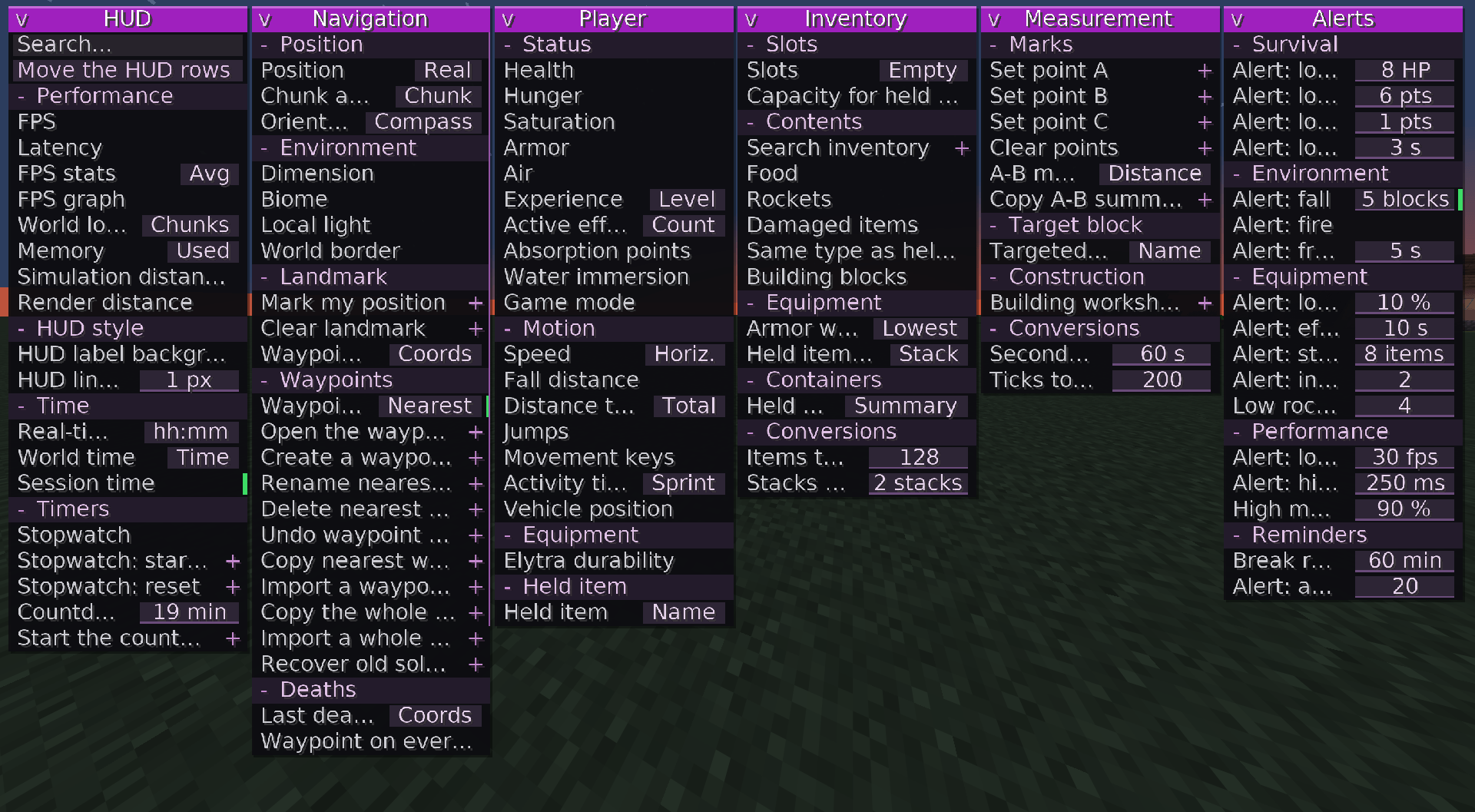
This mod allows you to access a collection of useful features through a single, clean interface (not a cheat), without having to install dozens of different mods.
2026-11-08_12.38.23.png
Description
OMNIUTILS: 105 UTILITIES
Complete reference, organized by category and group, following the menu order.
“Modes” refers to the readings or variants grouped inside a selector button.
“Action” utilities run when clicked in the menu (or by using their shortcut); “screen” utilities open a dedicated window.
HUD (18 utilities)
Performance group
FPS
Modes: None
Purpose: Frames per second measured live by the game.
Latency
Modes: None
Purpose: Network latency to the current server, in milliseconds (multiplayer).
FPS statistics
Modes: Average · Minimum · ms/frame · Maximum · Average ms
Purpose: Minimum, average, and maximum FPS during the current session.
FPS graph
Modes: None
Purpose: Graph showing the last thirty seconds of frames per second.
World load
Modes: Chunks · Entities
Purpose: Chunks and entities loaded around the player.
Memory
Modes: Used · % · Maximum
Purpose: Java memory used by the game, shown in MB or as a percentage.
Simulation distance
Modes: None
Purpose: Chunk distance within which the game continues simulating entities.
Render distance
Modes: None
Purpose: Number of chunks the game renders around the player.
HUD style group
Label backgrounds
Modes: None
Purpose: Draws a dark rectangle behind each HUD line to improve readability.
Line spacing
Modes: Numeric field (px, 0–12)
Purpose: Vertical spacing, in pixels, between automatically displayed HUD lines.
Time group
Real-world time
Modes: hh:mm · hh:mm:ss
Purpose: Your computer’s clock.
World time
Modes: Time · Day
Purpose: Minecraft time of day or the current day number.
Session duration
Modes: None
Purpose: Time spent in the current world since the last time you joined.
Timers group
Stopwatch
Modes: None
Purpose: Stopwatch that can be started and stopped using its own shortcut.
Stopwatch: Start / stop
Type: Action
Purpose: Starts or pauses the stopwatch.
Stopwatch: Reset
Type: Action
Purpose: Resets the stopwatch.
Countdown
Modes: Numeric field (minutes, 1–600)
Purpose: Displays the remaining time after the countdown is started.
Start countdown
Type: Action
Purpose: Starts the countdown configured in the module.
NAVIGATION (28 utilities)
Position group
Position
Modes: Floating · Block · Eyes · Altitude · Y limit · Nether
Purpose: Shows where the player is, including Y-level limits and the Nether portal position.
Chunk and region
Modes: Chunk · Local · Center · Region · Borders · In region
Purpose: Shows chunk coordinates, local position, region information, and its borders.
Environment group
Facing direction
Modes: Word · 8-point compass · Angles
Purpose: Shows where the player is looking, as a compass direction, one of eight directions, or an angle.
Dimension
Modes: None
Purpose: Identifier of the dimension you are playing in.
Biome
Modes: None
Purpose: Identifier of the biome where the player is located.
Local light level
Modes: None
Purpose: Light level at the player’s position, from 0 to 15.
World border
Modes: None
Purpose: Distance between you and the nearest world border.
Marker group
Mark my position
Type: Action
Purpose: Places a temporary marker at your current location. It remains until cleared.
Clear marker
Type: Action
Purpose: Removes the marker placed with “Mark my position”.
Marker information
Modes: Coordinates · Distance · Horizontal · Height · Direction · Guide
Purpose: Displays information about the temporary marker.
Waypoints group (notebook)
Waypoints
Modes: Nearby · Coordinates · Count · Guide · Dimension · Estimate
Purpose: Statistics for the nearest waypoint in the current dimension.
Open waypoint notebook
Type: Screen
Purpose: Searchable list of all waypoints in this world, with search, sorting, renaming, deletion, undo, sharing, and importing.
Create waypoint here
Type: Action
Purpose: Saves a waypoint at the block where you are standing.
Rename nearest waypoint
Type: Screen
Purpose: Small editor for renaming the nearest waypoint.
Delete nearest waypoint
Type: Action
Purpose: Removes the nearest waypoint in the current dimension from the notebook.
Undo waypoint deletion
Type: Action
Purpose: Restores the last waypoint deleted from this notebook.
Copy nearest waypoint
Type: Action
Purpose: Copies shareable text for the nearest waypoint to the clipboard.
Import waypoint from clipboard
Type: Action
Purpose: Converts text from the clipboard into a waypoint in the notebook.
Copy entire notebook
Type: Action
Purpose: Copies all waypoints in this world to the clipboard.
Import entire notebook
Type: Action
Purpose: Merges all waypoints found in the clipboard into the notebook.
Recover old single-player points
Type: Action
Purpose: Imports waypoints saved before the introduction of per-world notebooks.
Deaths group
Last death
Modes: Coordinates · Distance · Direction · Time ago · Count
Purpose: Shows where you died most recently.
Waypoint on every death
Type: Action
Purpose: Automatically saves a waypoint every time you die.
Copy death location
Type: Action
Purpose: Copies the coordinates of your last death to the clipboard.
Copy death history
Type: Action
Purpose: Copies a list of the eight most recent deaths in the session.
Copy group
Copy my coordinates
Type: Action
Purpose: Copies the coordinates of the block you are standing on.
Copy targeted block
Type: Action
Purpose: Copies the position of the block you are looking at.
Copy converted coordinates
Type: Action
Purpose: Converts your position between the Nether and the Overworld, then copies it.
PLAYER (19 utilities)
Status group
Health
Modes: None
Purpose: Current health compared with maximum health.
Hunger
Modes: None
Purpose: Hunger level, from 0 to 20.
Saturation
Modes: None
Purpose: Hidden saturation level maintained by food.
Armor
Modes: None
Purpose: Total armor points currently equipped.
Oxygen
Modes: None
Purpose: Remaining oxygen bubbles while underwater.
Experience
Modes: Level · Progress
Purpose: Experience level or experience bar progress.
Active effects
Modes: Count · Shortest
Purpose: Number of active potion effects or the shortest remaining duration.
Absorption points
Modes: None
Purpose: Golden health points added above the red health bar.
Submersion
Modes: None
Purpose: Shows whether you are underwater, at the surface, or in the air.
Game mode
Modes: None
Purpose: Game mode for the session, as reported by the game.
Movement group
Speed
Modes: Horizontal · Vertical · Total · Maximum · Average
Purpose: Player speed in blocks per second.
Fall distance
Modes: None
Purpose: Height of the current fall, useful before landing.
Distance traveled
Modes: Total · Horizontal · Vertical · On ground · Flying
Purpose: Blocks traveled during this session, overall or along each axis.
Jumps
Modes: None
Purpose: Number of jumps since the start of the session.
Movement keys
Modes: None
Purpose: Keys currently pressed, such as forward, jump, and sprint.
Activity time
Modes: Sprinting · Swimming · Sneaking · Flying
Purpose: Time spent on each activity during this session.
Vehicle position
Modes: None
Purpose: Position, in blocks, of the creature or minecart you are riding.
Equipment and held item group
Elytra durability
Modes: None
Purpose: Remaining durability of the equipped elytra.
Held item
Modes: Name · Count · Durability · Wear · Off-hand
Purpose: Information about the item in your main hand.
INVENTORY (13 utilities)
Slots group
Slots
Modes: Empty · Occupied
Purpose: Empty or occupied slots among the main thirty-six inventory slots.
Space for held item
Modes: None
Purpose: Number of additional items of the currently held item that can still fit.
Contents group
Inventory search
Type: Screen
Purpose: Filters the main inventory by name or type (damaged, block, food, tool, portable, renamed, enchanted). No item stacks are moved.
Food
Modes: None
Purpose: Number of edible items in the inventory.
Rockets
Modes: None
Purpose: Number of rockets available for the elytra.
Damaged items
Modes: None
Purpose: Slots containing an item that has taken damage.
Same type as held item
Modes: None
Purpose: Slots containing the same item as the one currently held.
Building blocks
Modes: None
Purpose: Slots containing stacks of placeable blocks.
Armor wear
Modes: Worst · Average
Purpose: Lowest remaining durability or average durability across all equipped armor pieces.
Held item details
Modes: Stack · Repair · Enchantments
Purpose: Stack size, repair cost, or enchantments of the held item.
Held container
Modes: Summary · Contents
Purpose: Fill level or actual contents of a bundle or barrel held in your hand.
Conversions group
Items → stacks
Modes: Numeric field (items, 0–9999)
Purpose: Converts a number of items into full stacks of the currently held item.
Stacks → items
Modes: Numeric field (stacks, 0–9999)
Purpose: Converts a number of stacks into a total item count.
MEASUREMENTS (10 utilities)
Points and readings group
Set point A
Type: Action
Purpose: Saves the targeted block as point A.
Set point B
Type: Action
Purpose: Saves the targeted block as point B.
Set point C
Type: Action
Purpose: Saves the targeted block as point C (angle measurement).
Clear points
Type: Action
Purpose: Clears all points A, B, and C at once.
A–B measurement
Modes: Distance · Horizontal · Vertical · Manhattan · Size · Center · Perimeter · Area · Volume · Slope · Heading · Inclination · Azimuth · Points A/B/C · Angle · Layers · Stacks · Chunks · Estimate
Purpose: Distance, size, area, angles, and many other readings between points A and B.
Copy A–B summary
Type: Action
Purpose: Copies a complete text summary of the measurement to the clipboard.
Targeted block and workshop group
Targeted block
Modes: Name · Coordinates · Distance
Purpose: Shows the name, coordinates, or distance of the block under the crosshair.
Building workshop
Type: Screen
Purpose: Counts the blocks required to build cylinders, spheres, cones, or pyramids.
Conversions group
Seconds → ticks
Modes: Numeric field (seconds, 0–9999)
Purpose: Converts the entered number of seconds into ticks.
Ticks → seconds
Modes: Numeric field (ticks, 0–9999)
Purpose: Converts the entered number of ticks into seconds.
ALERTS (17 utilities)
Each alert triggers a warning when its condition is met. The threshold is configured in the module’s numeric field.
Low health alert
Default threshold: 8 HP
Condition: Health drops to the selected number of health points.
Low hunger alert
Default threshold: 6 points
Condition: Hunger drops below the selected level.
Low saturation alert
Default threshold: 1 point
Condition: Hidden saturation drops to zero.
Low oxygen alert
Default threshold: 3 seconds
Condition: Oxygen drops below the selected number of seconds while diving.
Fall alert
Default threshold: 5 blocks
Condition: The fall exceeds the selected number of blocks.
Fire alert
Default threshold: None
Condition: Your character catches fire.
Freezing alert
Default threshold: 5 seconds
Condition: Freezing lasts longer than the selected number of seconds (powder snow).
Low durability alert
Default threshold: 10%
Condition: Wear on the held item exceeds the threshold.
Effect expiring alert
Default threshold: 10 seconds
Condition: A potion effect is about to expire.
Nearly empty stack alert
Default threshold: 8 items
Condition: The held stack drops below the selected size.
Nearly full inventory alert
Default threshold: 2 slots
Condition: The number of empty slots drops below the selected number.
Remaining rockets alert
Default threshold: 4 rockets
Condition: The number of rockets drops below the threshold while flying.
Low FPS alert
Default threshold: 30 FPS
Condition: Frames per second drop below the selected value.
High latency alert
Default threshold: 250 ms
Condition: Latency exceeds the selected number of milliseconds.
High memory usage
Default threshold: 90%
Condition: Memory usage exceeds the selected percentage.
Break reminder
Default threshold: 60 minutes
Condition: Reminds you to take a break after the selected amount of play time.
Approaching waypoint alert
Default threshold: 20 blocks
Condition: A waypoint is within the selected distance.
TOTAL: 105 utilities (18 HUD + 28 Navigation + 19 Player + 13 Inventory + 10 Measurements + 17 Alerts), translated into 5 languages and covered by an automatic catalog test on every build.
OmniUtils Team