
NormCraftAI
- By
NormCraftAI is a sophisticated AI companion designed to run autonomously and use a LLM backend either in cloud with an API Key or locally hosted ollama. In can gather, craft, build, farm and more.
NormCraft
NormCraft is a NeoForge mod for Minecraft 26.3 that gives you Norm, an AI companion who plays alongside you like a sensible human player. He follows you, mines, gathers, crafts, builds, farms, fishes, hunts, trades with villagers and looks after your village, and he keeps himself alive: he eats, wears armour, lights his tunnels and backs off when he's hurt.
How it works
- You give orders, Norm works them out. Say "gather iron 16", "build cabin" or "get me a diamond pickaxe". He works out everything that order needs (logs, planks, sticks, a table, the right pickaxe, a furnace and fuel) and does it in order, using his own pack and his chests first.
- His Hearthstone is his home. It is a block you craft and place, and it works as a 27-slot chest. Norm lives by it, stores what he doesn't need there and in the chests around it, and takes his kit from them.
- Auto mode. With nothing to do, he follows his own routine (farm, fish, shear, hunt, care for the village, keep watch at night). He can also ask an AI for the next job: your own AI provider, called through your game with your own settings and keys.
- Duties. He can take on farm and village duties: tending fields, feeding and breeding penned animals, trading for emeralds (which level the villagers), giving jobless villagers a workstation and guarding villagers at night.
- Prospecting. While he follows you, he can sense the ores you tick within 4 to 16 blocks: "I think there's a good vein of iron about 5 blocks east of you, 3 down."
- Ground rules he keeps:
- He never teleports, except home to his Hearthstone after an hour stuck.
- He keeps at least 2 blocks from you.
- He never wrecks your house or chests.
- He takes only adult animals and always leaves two.
- Emeralds and diamonds go to the chest and are never spent.
- Building. He builds from templates: the built-in ones, ones you
drawfrom the world, or imports from Litematica, WorldEdit, Blueprint Strings and vanilla structures. He gathers the materials and clears the site first.
Connecting an AI (LLM)
Norm works without an AI: plain orders and his own Auto routine need none. Connect a large language model and he can also take orders in your own words, and ask it for his next job in Auto.
- It's your AI, through your game. The server writes the request (what Norm can see, carry and do), and your game sends it to your provider with your settings and keys. Only the reply text goes back. Your keys never leave your machine. If you're offline, he falls back to his own routine.
- Set it up in your game's
config/normcraft-local.toml(or the in-game config screen):aiProvider:ollama(a local model, the default),openai,anthropic,gemini,openrouter,azure,groq,mistral,deepseek,together,fireworks,xai,cohere,perplexity,cerebras,sambanova,nvidia,huggingfaceorcustom(any OpenAI-compatible endpoint).- The key and model for that provider, for example
openaiApiKeyandopenaiModel, orollamaUrlandmodelfor Ollama (e.g.qwen3:8b).compatibleUrloverrides the endpoint forcustomand the other OpenAI-style providers. aiToolCalls(on by default): offers Norm's commands to the AI as tools where the provider supports tool calls (Ollama, OpenAI-style, Anthropic). Off, the AI answers in plain text commands.timeoutMsandautoIdleDelaySecondsset how long a request may take and how long he idles before asking in Auto.
- How the AI gives orders. Every request carries a brief of Norm's state and his vocabulary (
norm-api-1): the exact commands he understands. The AI answers with one of those commands, and Norm checks it against his own rules before acting. He won't teleport, spend emeralds or leave a pen with fewer than two animals, whatever the AI says. A reply he can't use is set aside, and he falls back on his own routine. - Talk to him:
/normcraft ask <anything>, for example/normcraft ask we need a better house before winter. Or type in his panel. With/normcraft auto on, he asks the AI whenever he has been idle a while and his routine has nothing to start.
Works with other mods
None of these is required: NormCraft uses each one when it's installed and runs normally without it.
- Sophisticated Backpacks. Give Norm a backpack and he uses it as extra pack space: overflow goes in, and he takes supplies out before making a trip to a chest. A placed backpack counts as storage too: assign it as his chest, and he counts, takes from and stores in it like a chest. The same goes for shulker boxes, bundles and other mods' storage.
- Xaero's Minimap and World Map.
/normcraft whereadds a waypoint for Norm./normcraft deathadds waypoints for where you or Norm died.- Each place he discovers (a village, mineshaft, fortress and so on) comes with a waypoint.
- Xaero's offers to add each waypoint to your map with one click.
- On a dedicated server, install Xaero's on the server as well; otherwise you get the coordinates only.
- MezzConfig. NormCraft's settings show up in MezzConfig's screen, where you can change them in game and they're written back to NormCraft's own config. API keys, URLs and paths are left out of that screen on purpose: set those in
normcraft-local.toml.
Getting started
- Install NeoForge 26.3 and drop the NormCraft jar into your
modsfolder (on the server too, if you play on one). - Craft Norm's Hearthstone (in the Functional Blocks tab once made):
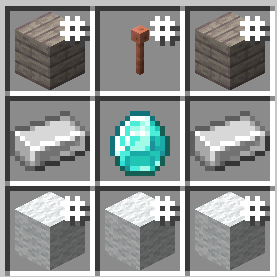
Any planks, any lightning rod (weathered or waxed are fine), and wool of any colour.
- Place the Hearthstone. Norm appears beside it ("Gudmo's Norm", named after you). Put a few chests near it (within 6 blocks) and stock them with tools, food and torches if you like.
- Press
Nto open Norm's panel: his inventory, health and food, what he's doing, and the menus (Follow…, Farm…, Village…, Craft…, templates, Auto). - Give him orders in the panel or with
/normcraft, for example:/normcraft followor/normcraft stay/normcraft gather iron 16,/normcraft craft diamond_pickaxe/normcraft build <template>,/normcraft farm,/normcraft fish,/normcraft village/normcraft auto onto let him find his own work/normcraft prospect onto hear about ores as he follows/normcraft status,/normcraft where,/normcraft stop
- Optional: connect your AI in
config/normcraft-local.toml(see above), then try/normcraft ask what should we do next?. - If he's lost or dead,
/normcraft spawnbrings him back to his Hearthstone. Breaking the Hearthstone drops it with its contents; place it again to give him a new home.
NormCraftAI Team
