


Non Sucking Chest Access
Screenshot 2026-09-30 170811.png
Description
Non Sucking Chest Access
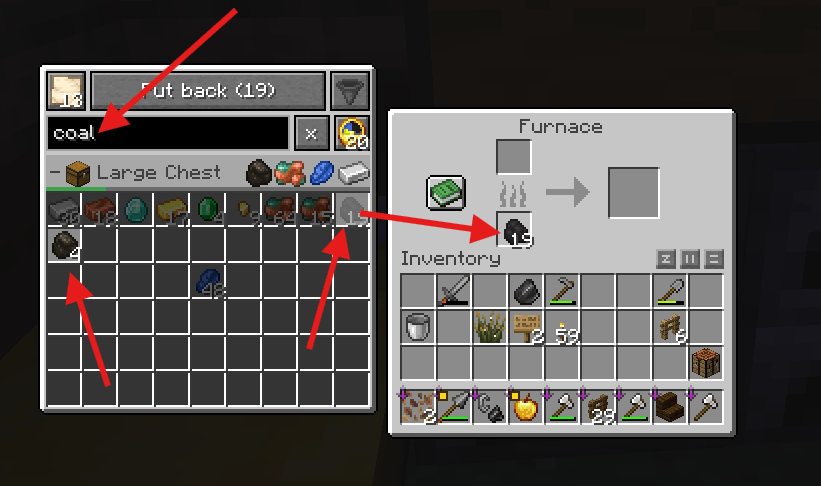
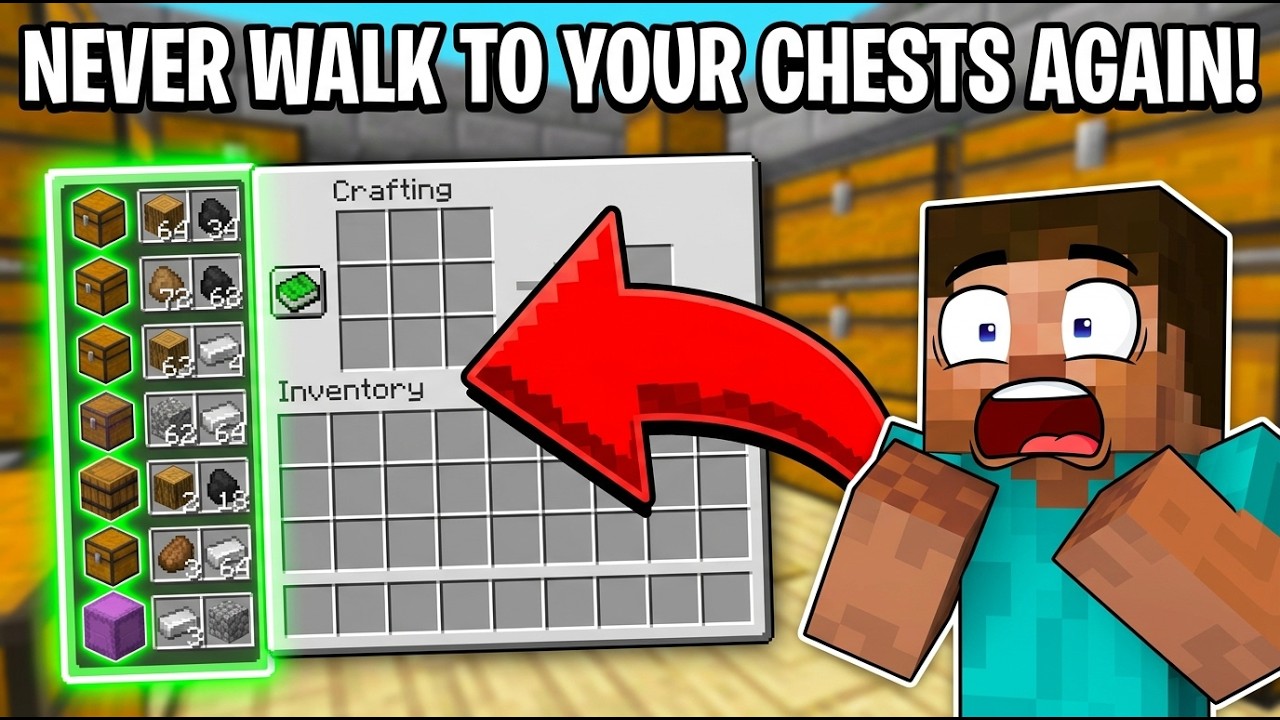
ok, quit running from chest to chest… Open your inventory, a crafting table or any other workstation, and every container around you shows up in a list on the left, when it is in your selected radius.
Search for the name of the item, take what you need, put things back where they belong, and keep crafting.
What it does
Your storage, is next to every window
- Lists chests, trapped chests, copper chests, barrels, placed shulker boxes and your ender chest within your radius (16 blocks by default, up to 90).
- Shows up next to the inventory, creative inventory, crafting table, furnaces, anvil, enchanting table, smithing table, brewing stand, stonecutter, loom, grindstone, cartography table, crafter, beacon, hoppers, dispensers, droppers and the villager trading window.
- Shulker boxes, bundles and an ender chest in your inventory appear at the top. Open them right in the list, without placing them down.
- Every container gets its own row with its name, a preview of what it holds and a bar that shows how full it is. Click a row to open it.
Take and put back just like real slots
- Left click takes a stack, right click half a stack, shift click moves it straight into your inventory.
- With an item on the mouse, click a container header to put it in. Existing stacks are filled first.
- Took something out? The slot keeps a grey placeholder, so you always know where it came from.
- Put back returns everything you took since opening the window, into the exact slots it came from.
- Put back automatically (on by default): leave a workstation and the leftovers go home by themselves. What you crafted stays with you.
A Searchbar that just works
- Finds items and containers by name. In a non-English game, English names work too ("coal" finds "Kohle").
- Matching slots stay bright, everything else is dimmed.
- Your search is kept for a few seconds after closing the window, so you can fill five furnaces with coal without typing "coal" five times.
Sort, rename, favorite
- Sort any container from the list, or with the button in the top right of chest, barrel, ender chest and shulker box windows. Orders: Category, Name, Amount, ID.
- Sort your own inventory (hotbar, armor and off hand stay where they are).
- Optional: sort containers automatically as soon as you open them.
- Rename containers with a right click on their header. Free, no anvil, no experience.
- Star your favorite containers to keep them at the top, and drag them into the order you like. Stars stay with carried shulker boxes wherever you move them.
View from above
- Click the map button to see your base from above, with your radius drawn as a gold circle. Change it with
+and-. - Every container the list can reach is outlined through walls: gold inside the radius, grey just outside of it.
Settings with a live preview
- Gear button next to the search field, or through Mod Menu if you have it.
- List width, which windows show the list, which buttons show, sort order, favorites, hint delay and more, each with a short explanation and a live preview of the list.
- English and German.
Fair play built in
Nobody can loot a dungeon from behind a wall. Loot chests the world generated, and containers inside villages, mineshafts, ancient cities and other structures (also from mods), only appear in the list after a player has opened or placed them. Your own storage is listed right away, including chests you built before installing the mod. Locked containers are never listed, and every player only ever sees their own ender chest.
Installation
- Singleplayer: put the mod and Fabric API into your mods folder. Done.
- Multiplayer: the mod is needed on the server and on every player's client. Players without the mod can still join, they just do not get the list.
- Radius, favorites and "Put back automatically" are saved per player on the server and survive death.
- Server owners can switch off the outlines in the view from above for everyone with
containerOutlinesinconfig/nonsuckingchestaccess.json. - A very large radius makes the server search more chunks while the list is open.
Requires: Fabric Loader, Fabric API. Optional: Mod Menu.
Good to know
- The list always sits on the left of the window. On small screens or with a big GUI scale it gets narrower; a notice offers the GUI scale that gives it room again.
- tested together with JEI
Non Sucking Chest Access Team
