New Currencies
- By
Coins and banknotes for Minecraft: 1€ and 2€ coins, 5€ to 500€ notes, with shapeless recipes to combine and split denominations. Lightweight, no config.


💶 New Currencies
Euro coins and banknotes for Minecraft, with an ATM that connects them to your server's economy.
Withdraw money from your account as physical coins and banknotes, trade them, stash them, and deposit them back at any ATM. Works with economy mods on Fabric and NeoForge.

✨ Features
- 🪙 Coins and banknotes: 1€ and 2€ coins, 5€, 10€, 20€, 50€, 100€, 200€ and 500€ banknotes, each with its own texture.
- 🏧 ATM: a two-block-tall machine. Right-click it to see your balance, withdraw any coin or banknote (shift-click for 10) and deposit them back.
- 🔌 Works with economy mods: the ATM reads and changes your real balance, so what you carry always matches your account.
- 🔁 Exchange recipes: combine and split denominations in a crafting grid, with the same total value.
- 🛡️ Safe transactions: a deposit is credited first and the items are only taken if it worked, so a failed transaction never costs you money.
- 🌍 Languages: English and Italian.
🏧 The ATM
Craft it with iron ingots, a glass pane and a diamond:
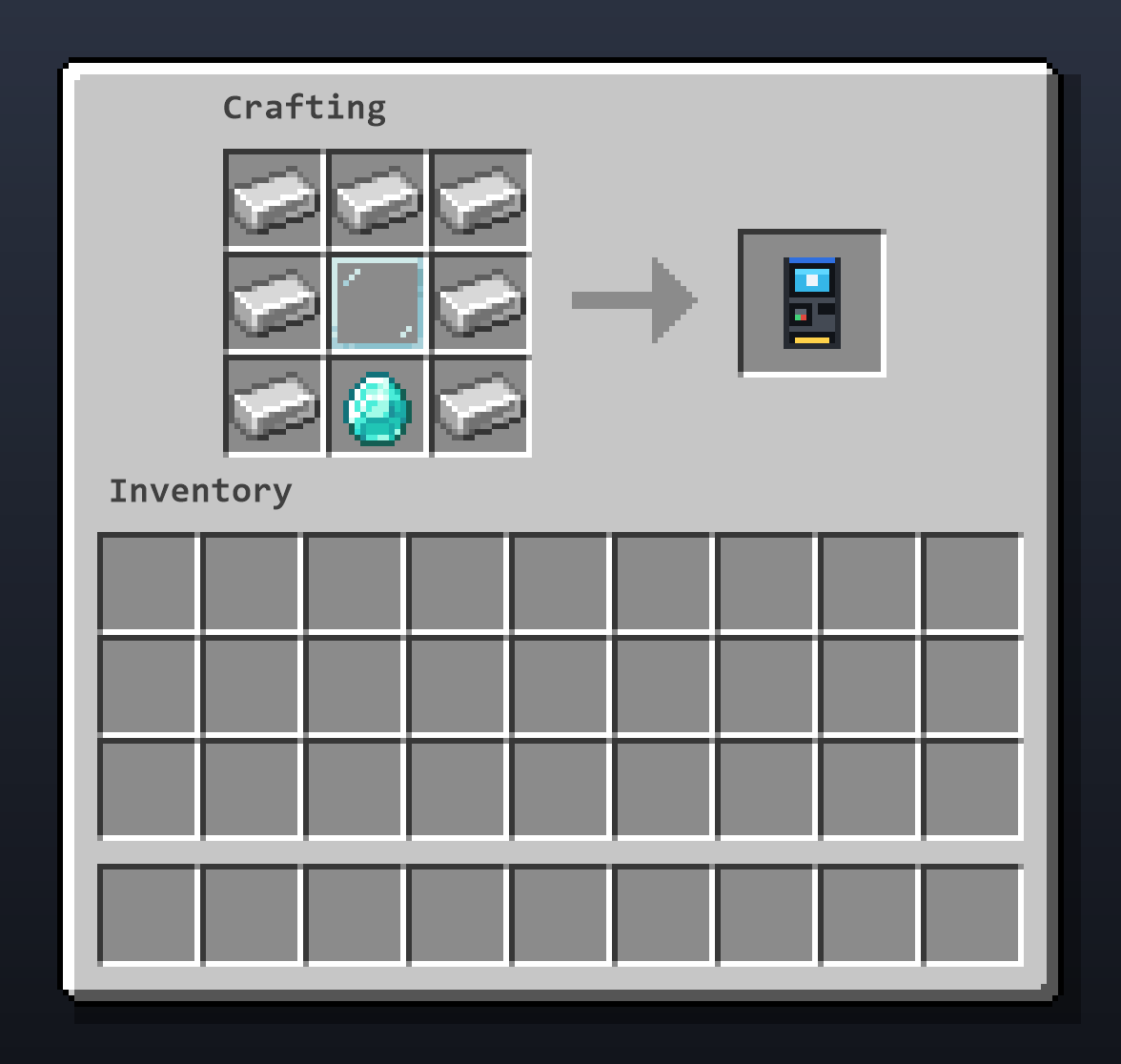
Place it, right-click it, and use the menu:
- 💰 Balance: shown at the top.
- ➖ Withdraw: click a coin or banknote to take one out of your account (shift-click for 10).
- ➕ Deposit: click a coin or banknote in your inventory to deposit that stack (right-click for one), or use Deposit all.
The ATM needs an economy mod. Without one it just tells you so.
🔌 Supported economy mods
- Fabric: any mod that implements the Common Economy API, for example Savs Common Economy. The API is bundled, so there is nothing else to install.
- Fabric and NeoForge: EconomyCraft (requires Architectury API).
One euro is one unit of the economy's currency. Settings are in config/newcurrencies.json:
provider: which economy to use (common_economy_apioreconomycraft). Empty uses the first one available.currency: which currency to use when the economy has several (for examplemod_id:dollar). Empty uses the first one.
🔁 Recipes
All recipes are shapeless and keep the total value.
Combine
- 1€ + 1€ → 2€ 🪙
- 1€ + 2€ + 2€ → 5€ 💶
- 5€ + 5€ → 10€ 💶
- 10€ + 10€ → 20€ 💶
- 10€ + 20€ + 20€ → 50€ 💶
- 50€ + 50€ → 100€ 💶
- 100€ + 100€ → 200€ 💶
- 100€ + 200€ + 200€ → 500€ 💶
Split
- 2€ 🪙 → 2 × 1€ 🪙
- 5€ 💶 → 5 × 1€ 🪙
- 10€ 💶 → 2 × 5€ 💶
- 20€ 💶 → 2 × 10€ 💶
- 50€ 💶 → 5 × 10€ 💶
- 100€ 💶 → 2 × 50€ 💶
- 200€ 💶 → 2 × 100€ 💶
- 500€ 💶 → 5 × 100€ 💶
📋 Requirements
- 🎮 Minecraft: 26.1, 26.1.1, 26.1.2, 26.2, 26.3
- ☕ Java: 25 or newer
- 🔌 Fabric: Fabric Loader 0.19 or newer and Fabric API
- 🔌 NeoForge: NeoForge for your Minecraft version (26.3 is still in beta)
- 🖥️ Environment: client and server. Install it on both for multiplayer.
🛠️ Installation
- 📥 Download the
.jarthat matches your Minecraft version and your loader (Fabric or NeoForge). - 📂 Drop it in your
mods/folder (with Fabric API on Fabric). - 💱 Install an economy mod from the list above.
- 🔄 Start the game. Get an ATM with
/give @s newcurrencies:atm, or craft it.
📄 License
Licensed under the All Rights Reserved terms. You can find the full license here.
🔗 Links
New Currencies Team

Owner