
NetStorage
- By
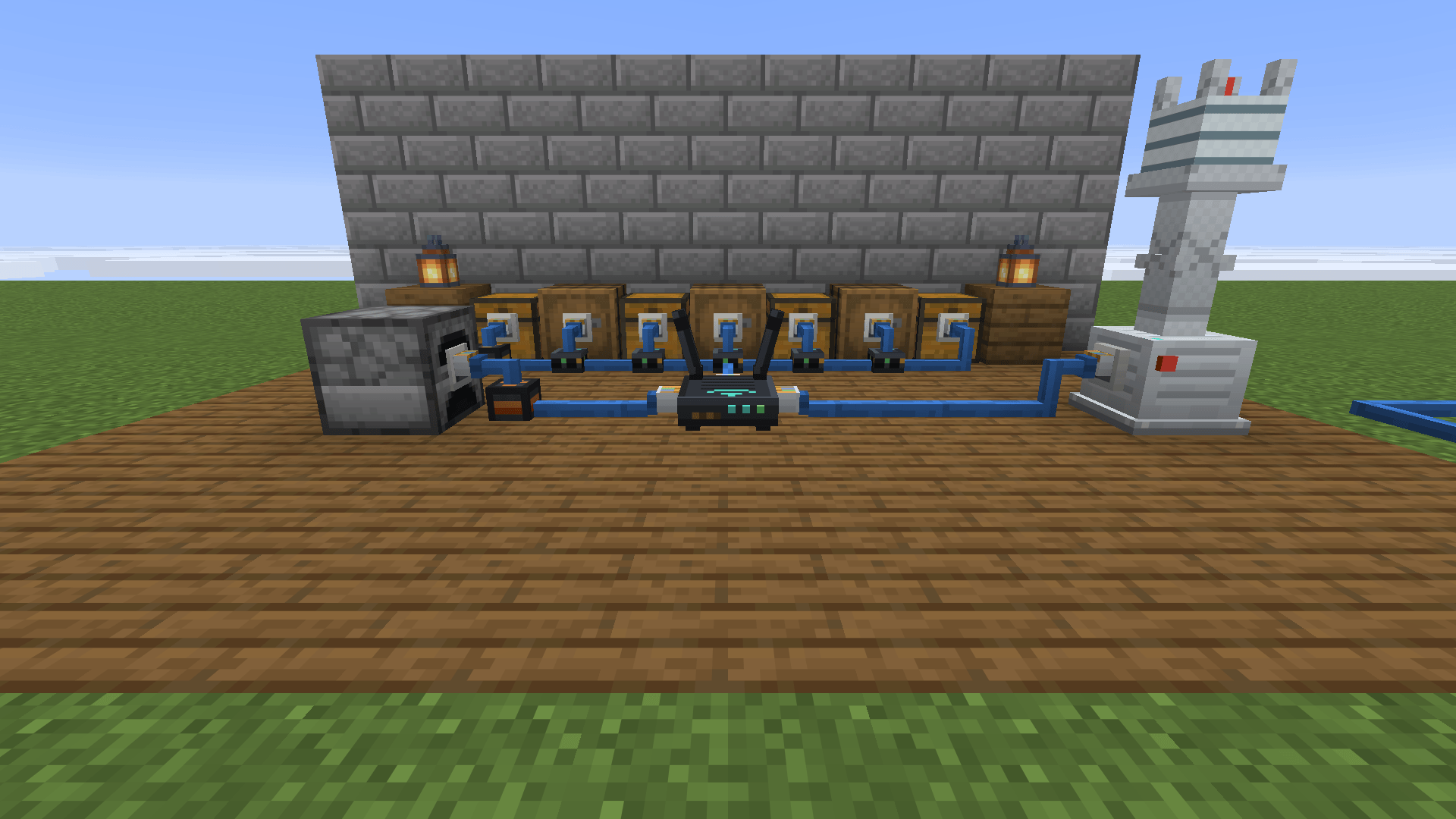
Chests and barrels plugged into the router with network cable. An export cable feeds the furnace and a 5G antenna carries the signal.
Description
NetStorage
Networked storage with an internet theme. Wire your chests to a router with network cable, then reach every item from one screen – or from anywhere with your phone, over Wi-Fi, 2G, 4G, 5G or satellite antennas.
Inspired by Simple Storage Network, rebuilt around a real home network.
Features
- One screen for everything – search, take, store and craft straight from the network. Sort by name, amount or mod, and pin favourites to the top (middle-click or Alt+click).
- Network cable – lies flat on the ground, climbs where it has to, and plugs into chests with a little RJ45 connector. Dye it any colour or stripe it with two dyes – colour is purely cosmetic.
- Wire cutters – cut or restore a single connection, like Create's wrench, to keep neighbouring networks apart or stop a cable from grabbing a chest beside it.
- Filter cable – choose what each chest takes: "only these" or "everything but these", with a priority. Copy a chest's contents into the list in one click.
- Import and export cables – pull items out of furnaces and machines, or feed them. The side matters, just like a hopper.
- Phone – pair it with a router and open your network from anywhere in range.
- Antennas (2G, 4G, 5G, satellite) – carry the signal further. A stability module lets the phone work from the Nether and the End and keeps the base loaded.
- Join bases – link a router to another network with its password and share all storage.
- JEI support – the "+" of a recipe lays it out on the bench; missing ingredients show as ghosts, and a small "+" crafts them from what the network has.
Getting started
- Craft a router, some network cable and a phone.
- Place the router and run cable from it to your chests (a chest touching the router is not connected – use cable).
- Right-click the router to see and craft with everything in your chests.
- Use the phone on the router to pair it, then right-click with it anywhere in range.
Everything also has a short "?" guide inside the router screen.
Requirements
- Minecraft 1.21.11, NeoForge
- Install on both client and server
- Optional: JEI for recipe transfer
Modpacks
Yes – you may include NetStorage in any modpack. Licensed under MIT.
NetStorage (Português)
Armazenamento em rede com tema de internet. Ligue seus baús a um roteador com cabo de rede e acesse todos os itens numa tela só – ou de qualquer lugar pelo celular, via Wi-Fi ou antenas 2G, 4G, 5G e satélite.
Inspirado no Simple Storage Network, refeito em volta de uma rede de internet de verdade.
Recursos
- Uma tela para tudo – busque, pegue, guarde e fabrique direto da rede. Ordene por nome, quantidade ou mod, e fixe favoritos no topo (clique do meio ou Alt+clique).
- Cabo de rede – fica deitado no chão, sobe onde precisa e encaixa nos baús com um conector RJ45. Pinte de qualquer cor ou deixe listrado com dois corantes – a cor é só visual.
- Alicate – corta ou refaz uma ligação, como a chave do Create, para separar redes vizinhas ou impedir que um cabo puxe um baú encostado.
- Cabo com filtro – escolha o que cada baú aceita: "só estes" ou "tudo menos estes", com prioridade. Copie o conteúdo de um baú para a lista com um clique.
- Cabos de importação e exportação – puxam itens de fornalhas e máquinas, ou alimentam elas. O lado importa, como num funil.
- Celular – pareie no roteador e abra a rede de qualquer lugar ao alcance.
- Antenas (2G, 4G, 5G, satélite) – levam o sinal mais longe. O módulo de estabilidade faz o celular funcionar no Nether e no End e mantém a base carregada.
- Juntar bases – ligue um roteador a outra rede com a senha dela e compartilhe todo o armazenamento.
- Suporte ao JEI – o "+" de uma receita leva ela para a grade; o que falta aparece como fantasma, e um "+" pequeno fabrica com o que a rede tem.
Como começar
- Fabrique um roteador, cabo de rede e um celular.
- Coloque o roteador e puxe cabo até seus baús (baú encostado no roteador não conecta – use cabo).
- Clique direito no roteador para ver e fabricar com tudo o que tem nos baús.
- Use o celular no roteador para parear e depois clique direito com ele de qualquer lugar ao alcance.
Dentro da tela do roteador há um guia rápido no botão "?".
Requisitos
- Minecraft 1.21.11, NeoForge
- Instalar no cliente e no servidor
- Opcional: JEI para transferir receitas
Modpacks
Pode incluir o NetStorage em qualquer modpack. Licença MIT.
NetStorage Team
