NeoPoculus
- By
NeOculus Fork with updated compatibility for new mods, shaders, optimization and a new compatibility layer for Sodium-Embeddium cross mod. Making some mod that require Sodium compatibile with Embeddium.
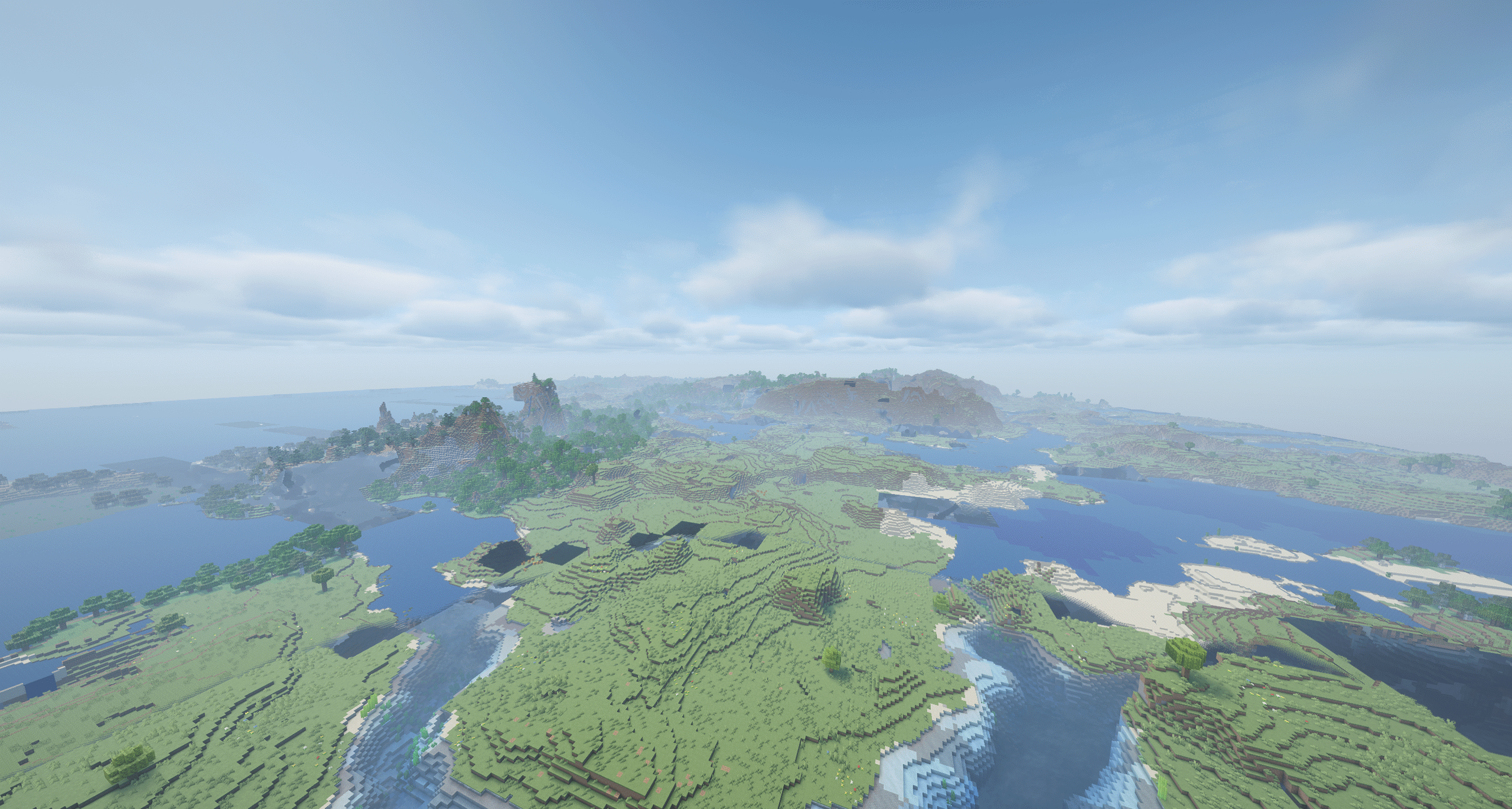
Shader LOD rendering example. With various optimization settings enabled (1).png
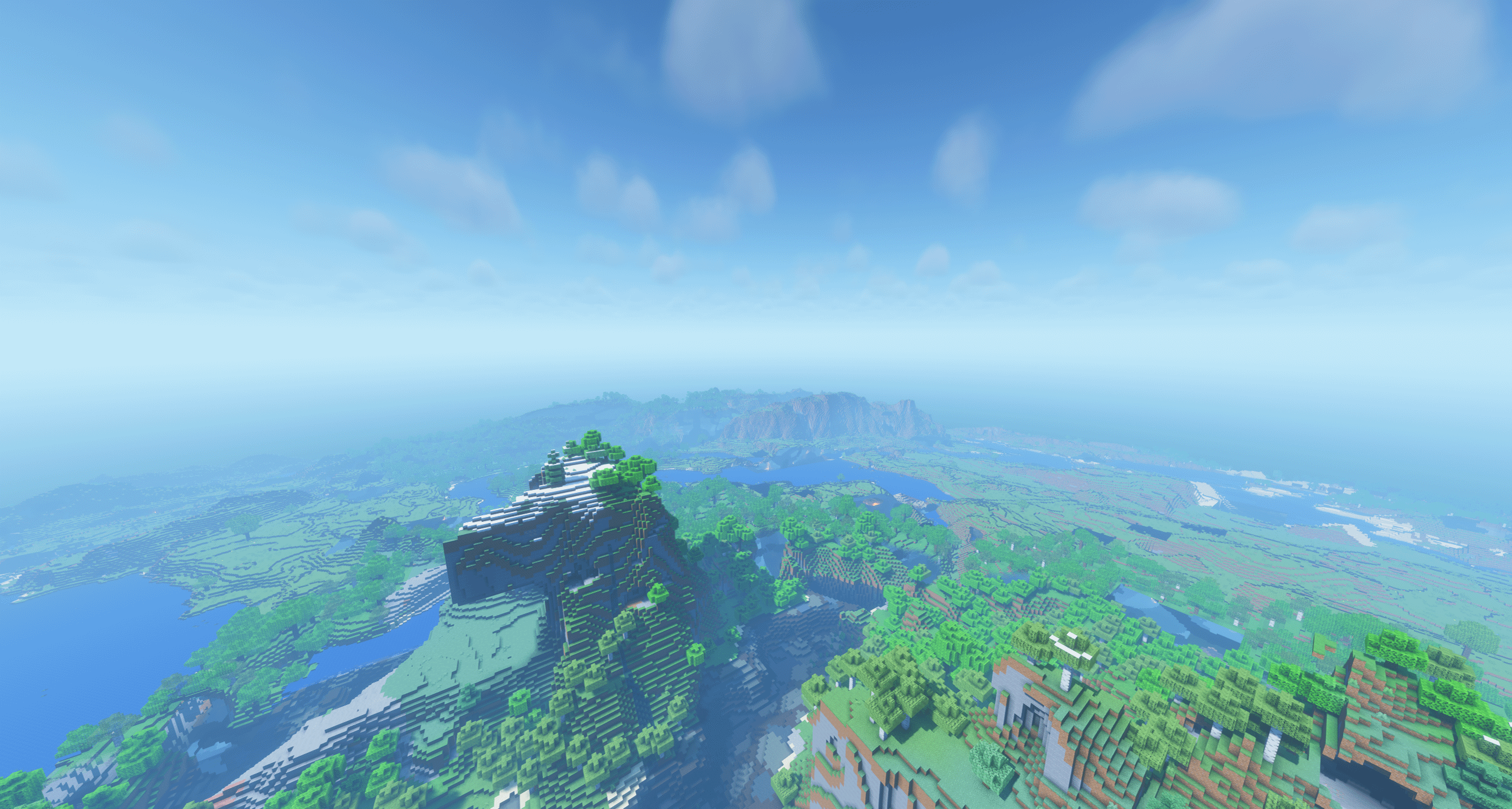
Shader LOD rendering example. With various optimization settings enabled (2).png
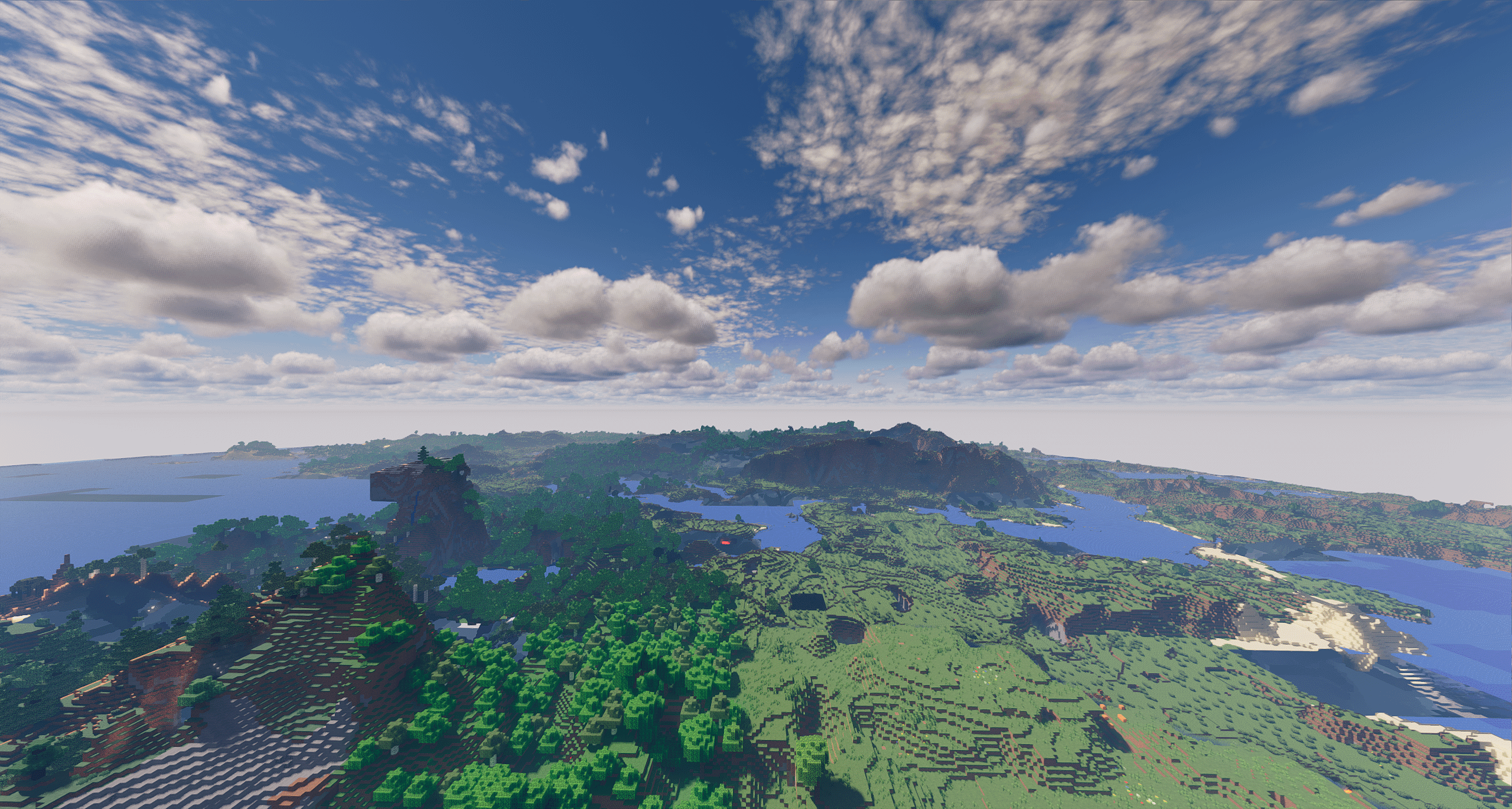
Shader LOD rendering example. With various optimization settings enabled (3).png
Description
NeOPoculus





Shaders for NeoForge, with a world that keeps going past your render distance.
NeOPoculus is a fork of NeOculus, which forks Oculus, which ports Iris to Forge-family loaders. Everything those projects do — loading OptiFine/ShadersMod shader packs, the in-game shader options screen, Embeddium integration — is theirs, and it all still works here.
What this fork adds is Horizon: a built-in extended-distance terrain system, plus a set of compatibility fixes for mods and platforms that previously crashed or rendered nothing.
Discord · Source · Report a bug
Horizon — terrain beyond the view distance
Horizon records the terrain you explore, saves it per world and dimension, and draws it far past the server's view distance. It needs no server mod and no extra downloads: everything is captured from chunks your own client already receives, so it works on vanilla servers, realms and singleplayer alike. Explored terrain is written to disk, so a world keeps its panorama between sessions.
Detail falls away with distance in five steps, so distant ground stays cheap. The ring closest to you is drawn at full block resolution and deliberately overlaps your loaded chunks, which is what makes the join invisible — and it backfills chunks that are still loading, so the world stops popping in at the edge of your render distance.
On by default, and turned off with a single tick box.
Two engines
| Classic (default) | Voxel (experimental) | |
|---|---|---|
| Stores | surface height, water height, one colour per column | real blocks, biome and light per cell |
| Caves, overhangs, interiors | not represented | represented |
| Textures | flat colour per column | real block textures |
| Block shapes | full cubes | slabs, snow, carpets, fences, plants keep their shape |
| Water | opaque surface | genuinely translucent |
The Classic engine is a heightmap and is what you get out of the box: lighter, older, and proven. The Voxel engine is the newer one and is where the work has gone — switch it on under Voxel Engine (Experimental) if you want caves, textures and real block shapes at distance. It is marked experimental honestly: it is the newer of the two and has had less time in the wild.
Shader pack support
Distant terrain is drawn through your shader pack, so it gets the pack's own lighting, fog and shadows instead of looking like a flat cut-out pasted onto the horizon.
There are two ways this happens. A pack that supports Distant Horizons has a dh_terrain
program, and Horizon feeds its terrain through it. A pack with no such program is drawn
through its ordinary gbuffers_terrain instead — which every pack has, and which is also the
only path that shows real block textures.
Of 16 packs tested, 11 render shaded distant terrain:
- Through
dh_terrain— Bliss, BSL, Complementary Reimagined, Complementary Unbound, Sildur's Vibrant Shaders, Solas - Through
gbuffers_terrain— ARTShade, Aurora's Shaders, Kappa, Lux, The Better Default
Five packs do not currently load at all in this mod: iterationT, Noble, PaintBound, photon
and Reverie. These fail during shader compilation in the Embeddium/Iris layer, with errors
like undefined variable "iris_FogColor". That is a defect in the shader stack and has
nothing to do with Horizon — those packs do not work here whether distant terrain is on or
off. It is a known issue, not a supported configuration.
Packs not on this list are untested rather than unsupported.
Multiplayer and pre-generated terrain
A server operator can generate distant terrain ahead of time instead of waiting for players to walk it, and stream it to players as they join — so a new player sees the whole landscape immediately rather than a wall of fog that slowly retreats.
The /horizon lod commands generate terrain for a zone, a radius or the whole world, and are
restricted to permission level 4 (server owner). Terrain arriving from a server is treated
as untrusted: block and biome ids are translated into the client's own numbering rather than
adopted, lengths and ids are range-checked, and a disk budget caps how much a session will
accept. The worst a misbehaving server achieves is odd-looking distant scenery.
Generating LOD from the command requires the Voxel engine on a singleplayer world.
Disk use
Distant terrain is cached on disk and the cache is capped. When the cap is reached you are told, rather than left wondering why the horizon stopped filling in. Optional auto-clean frees space by deleting the regions farthest from you first — the ground you actually live on is kept, the far edge of an old expedition goes first. A purge button clears the cache entirely, behind a confirmation tick.
Settings
All settings live under Video Settings → Horizon LOD (Embeddium's screen, or the vanilla one) and are editable in game.
| Setting | Default | What it does |
|---|---|---|
| Horizon LOD | on | Master switch. |
| Voxel Engine | off | The newer engine: caves, textures, real block shapes. |
| Render with shaders | on | Draw distant terrain through your shader pack. |
| LOD distance | 256 chunks | How far distant terrain reaches (16–4096). |
| Distant vegetation | 33% | How much distant grass and flowers to draw. Usually the largest single performance gain. |
| Per-cell LOD textures | on | Block textures at true size under shaders; costs geometry. |
| Textured LOD under shaders | off | Force the textured path even on packs that support Distant Horizons. |
| LOD memory budget | 256 MB | Memory the Voxel engine may hold terrain in before writing it back to disk. |
| Auto-clean / purge | off | Disk cache management. |
Plus detail-ring, upload-rate, worker-thread and save-interval controls for tuning.
Every option is also written to config/neoculus-horizon.properties.
If distant terrain costs you too much: lower Distant vegetation first — plants are many small see-through quads, which cost far more per pixel than solid ground. Then reduce LOD distance, then turn off Per-cell LOD textures.
Compatibility fixes
These are fixes to things that were broken before, not new features.
Mods built against Sodium's API
A great many rendering mods are written against Sodium's public API. On a NeoForge setup
that runs Embeddium instead, those classes do not exist, and such a mod dies at load with
NoClassDefFoundError before you ever reach the main menu.
This fork ships a stand-in for that API — colour and normal helpers, matrix and memory intrinsics, sprite utilities, and the common vertex formats and attributes — so those mods load and run. They render through the ordinary path rather than Sodium's fast one, which is the correct outcome on this stack: the fast path politely reports "not available" and a well-behaved mod falls back on its own.
Two honest caveats. A mod that demands the fast path instead of asking for it will still refuse to run — the API is designed with both a "try" and a "must have" entry point, and only the first can degrade gracefully. And only Flerovium has been verified end to end; other Sodium-API mods are likely to work but are untested. If one does not, a report on Discord or the issue tracker is genuinely useful.
LittleTiles
LittleTiles renders correctly under Embeddium, translucent tiles included — glass structures show properly instead of disappearing or rendering opaque — and faces are re-culled correctly when you edit a structure, so tiles do not leave holes or stale surfaces behind after a change.
Platforms and drivers
- macOS — the bundled AcceleratedRendering used to crash the game natively while loading a world on hardware with no OpenGL compute support, which includes every Mac. It is now detected and switched off transparently, falling back to vanilla rendering.
- Sinytra Connector — no longer crashes during Initializing game when Connector is installed.
- Stricter OpenGL drivers — the game no longer refuses to launch on drivers reporting a GL 3.2 core context while exposing 4.x through extensions.
- Entity flicker — entities, block entities, your held item and your arm no longer blink out while moving.
AcceleratedRendering is also updated from 1.0.0 to 1.0.8.
Requirements
- Minecraft 1.21.1
- NeoForge 21.1.0 or newer
- Embeddium — required
Not compatible with OptiFine. Do not install alongside Oculus, Iris or NeOculus — this replaces them.
Known limitations
- No performance numbers are claimed. Horizon draws more of the world, so it costs more than not drawing it. Whether that is worth it depends on your hardware, and the settings above exist to let you decide.
- Five of the sixteen tested shader packs do not load, for a reason unrelated to distant terrain (see above).
- Distant terrain is currently drawn two-sided; single-sided drawing is planned and will make it cheaper.
- Underground terrain you cannot see is still drawn. Culling it is planned.
- The Classic engine cannot show caves or overhangs — that is what the Voxel engine is for.
Support and bug reports
- Discord — questions, help, shader pack reports
- GitHub issues — bugs and crashes
- Source code
Reporting a rendering problem is far more useful with the shader pack name and version,
your latest.log, and whether the problem still happens with Horizon LOD turned off —
that last one alone separates a Horizon bug from a shader-stack bug.
Credits and licence
This mod stands on other people's work:
- Iris — the shader pipeline everything here is built on, by coderbot, IMS and contributors
- Oculus — the Forge port
- NeOculus — the NeoForge fork this one is based on
- Embeddium — required rendering engine
- AcceleratedRendering — bundled
- Swaying Garden — bundled
Horizon is inspired by Distant Horizons and Voxy, and shares no code with either.
Licensed under LGPL-3.0, as inherited from Iris.
The NeoPoculus Team


Owner