NeoLogin
- By

4f0b502bc8ecd95ce95d9f9ee4afdae129758da2.png
8489a53f9fe69436b0aee9215eb09c08173f5e39.png
Description
NeoLogin is a lightweight, high-performance, and secure authorization mod for Minecraft servers running on NeoForge 1.21.1. The mod protects player accounts on offline-mode (cracked) servers by requiring authentication upon joining.
It is designed with a focus on stability under load, enterprise-grade password security, console privacy, and ease of administration.
Key Features:
- Flexible Database Storage: Out-of-the-box support for local SQLite storage (does not require any configuration) and remote MySQL database support for multi-server networks.
- Enhanced Password Security (PBKDF2): Passwords are protected using PBKDF2 with HMAC-SHA256 (120,000 iterations and cryptographic salt). Existing legacy SHA-256 hashes are automatically upgraded to PBKDF2 upon the player's next successful login.
- Pre-auth Player Locking: Unauthenticated players are temporarily switched to Spectator mode and their movement is fully restricted. They cannot move, send chat messages, execute commands, interact with the world, or take damage.
- Automatic and Manual Backups: Built-in commands to export and import player databases in JSON format. The database is also automatically backed up whenever the server starts.
- Console Log Security: Automatic filtering of player passwords in console logs. During authentication or registration commands, passwords in console outputs are replaced with a secure mask (***).
- Offline Player Management and Audit: Administrators can reset passwords, unregister accounts, or view the player's last known IP address and login time even when the target player is not currently online.
- Admin Performance Monitor: Built-in real-time monitor displaying server TPS and player Ping on the action bar.
- Multi-Language and Branding: Built-in support for English and Russian, along with customizable branding for all in-game messages.
- Automatic Config Migrator: Internal version tracking automatically updates the structure of the configuration file upon mod updates, preventing broken configurations and duplicate parameter bugs.
Mod Commands:
Player Commands:
- /register <password> <confirm_password> (or /reg) - Register a new account.
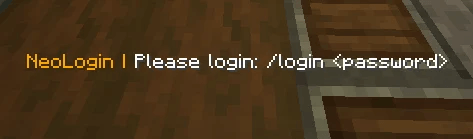
- /login <password> (or /l) - Authenticate upon joining the server.
- /changepassword <old_password> <new_password> <confirm_password> (or /changepass) - Change your current account password.
Admin Commands (Requires permission neologin.admin or OP Level 2):
- /neologin resetpassword <player> - Generate a secure temporary password for a player.
- /neologin setpassword <player> <new_password> - Forcefully set a new password for a player.
- /neologin unregister <player> - Delete a player account, resetting their registration status (works offline).
- /neologin logininfo <player> - Show the last known IP address and login date/time for a player.
- /neologin forcelogin <player> - Instantly authenticate an online player.
- /neologin monitor - Toggle real-time TPS and Ping display on the action bar.
- /neologin backup - Export the entire player database to a JSON backup file.
- /neologin backups - List all available backup files on the server.
- /neologin restore "filename" - Import player accounts from a selected backup file.
- /neologin setbrand <name> - Change the brand name displayed in auth messages.
- /neologin setlang <en or ru> - Switch mod language between English and Russian.
Database Configuration:
The configuration file is located at config/neologin-server.toml. You can configure the database type and connection parameters in the database block:
[Database]
# Type of database to use: 'sqlite' or 'mysql'
databaseType = "sqlite"
# Connection parameters (only used when databaseType is 'mysql')
mysqlHost = "localhost"
mysqlPort = 3306
mysqlDatabase = "neologin"
mysqlUsername = "root"
mysqlPassword = "password"
--------------------------------------------------------------------------------
NeoLogin — это легковесный, высокопроизводительный и безопасный мод авторизации для серверов Minecraft на базе NeoForge 1.21.1. Мод защищает аккаунты игроков на серверах в режиме offline-mode (пиратских), требуя прохождения аутентификации при входе.
Он спроектирован с упором на стабильность при нагрузках, надежную защиту паролей, конфиденциальность консоли и простоту администрирования.
Ключевые особенности:
- Гибкое хранение данных: Поддержка локальной базы SQLite из коробки (не требует настройки) и удаленной базы MySQL для сетей из нескольких серверов.
- Улучшенная защита паролей (PBKDF2): Пароли защищены с использованием алгоритма PBKDF2 с HMAC-SHA256 (120 000 итераций и криптографическая соль). Старые хеши SHA-256 автоматически обновляются до PBKDF2 при следующем успешном входе игрока.
- Блокировка до авторизации: Неавторизованные игроки временно переводятся в режим наблюдателя с полным ограничением перемещения. Они не могут двигаться, писать в чат, выполнять команды, взаимодействовать с миром или получать урон.
- Автоматические и ручные бэкапы: Встроенные команды для экспорта и импорта базы данных игроков в формате JSON. Также бэкап базы данных автоматически создается при каждом запуске сервера.
- Безопасность логов консоли: Автоматическая фильтрация паролей игроков в логах. При выполнении команд входа и регистрации пароли в консоли заменяются на защитную маску (***).
- Управление оффлайн-игроками и аудит: Администраторы могут сбрасывать пароли, удалять аккаунты и просматривать последний IP-адрес и время входа игрока, даже если он сейчас не в сети.
- Монитор производительности для администрации: Встроенный монитор реального времени, отображающий TPS сервера и пинг игрока в строке action bar.
- Мультиязычность и брендирование: Встроенная поддержка английского и русского языков, а также возможность настроить название проекта во всех внутриигровых сообщениях.
- Автоматический мигратор конфигурации: Внутреннее отслеживание версии конфига автоматически обновляет структуру файла при выходе новых версий, предотвращая ошибки и дублирование параметров.
Команды мода:
Команды игроков:
- /register <пароль> <подтверждение_пароля> (или /reg) - Зарегистрировать новый аккаунт.
- /login <пароль> (или /l) - Войти на сервер при подключении.
- /changepassword <старый_пароль> <новый_пароль> <подтверждение_пароля> (или /changepass) - Сменить текущий пароль аккаунта.
Команды администратора (требуется право neologin.admin или OP 2 уровня):
- /neologin resetpassword <игрок> - Сгенерировать надежный временный пароль для игрока.
- /neologin setpassword <игрок> <новый_пароль> - Принудительно установить новый пароль игроку.
- /neologin unregister <игрок> - Удалить аккаунт игрока и сбросить статус регистрации (работает оффлайн).
- /neologin logininfo <игрок> - Показать последний известный IP-адрес и дату/время входа игрока.
- /neologin forcelogin <игрок> - Мгновенно авторизовать игрока, находящегося в сети.
- /neologin monitor - Включить/выключить отображение TPS и пинга в action bar.
- /neologin backup - Экспортировать всю базу данных игроков в JSON-файл бэкапа.
- /neologin backups - Показать список всех доступных файлов бэкапов на сервере.
- /neologin restore "имя_файла" - Восстановить аккаунты игроков из выбранного файла бэкапа.
- /neologin setbrand <название> - Изменить название бренда, отображаемое в сообщениях мода.
- /neologin setlang <en или ru> - Переключить язык мода между английским и русским.
Конфигурация базы данных:
Файл конфигурации находится по пути config/neologin-server.toml. Настроить тип базы данных и параметры подключения можно в блоке database:
[Database]
# Тип используемой базы данных: 'sqlite' или 'mysql'
databaseType = "sqlite"
# Параметры подключения (используются только если databaseType = 'mysql')
mysqlHost = "localhost"
mysqlPort = 3306
mysqlDatabase = "neologin"
mysqlUsername = "root"
mysqlPassword = "password"
NeoLogin Team