


MWCmark
- By
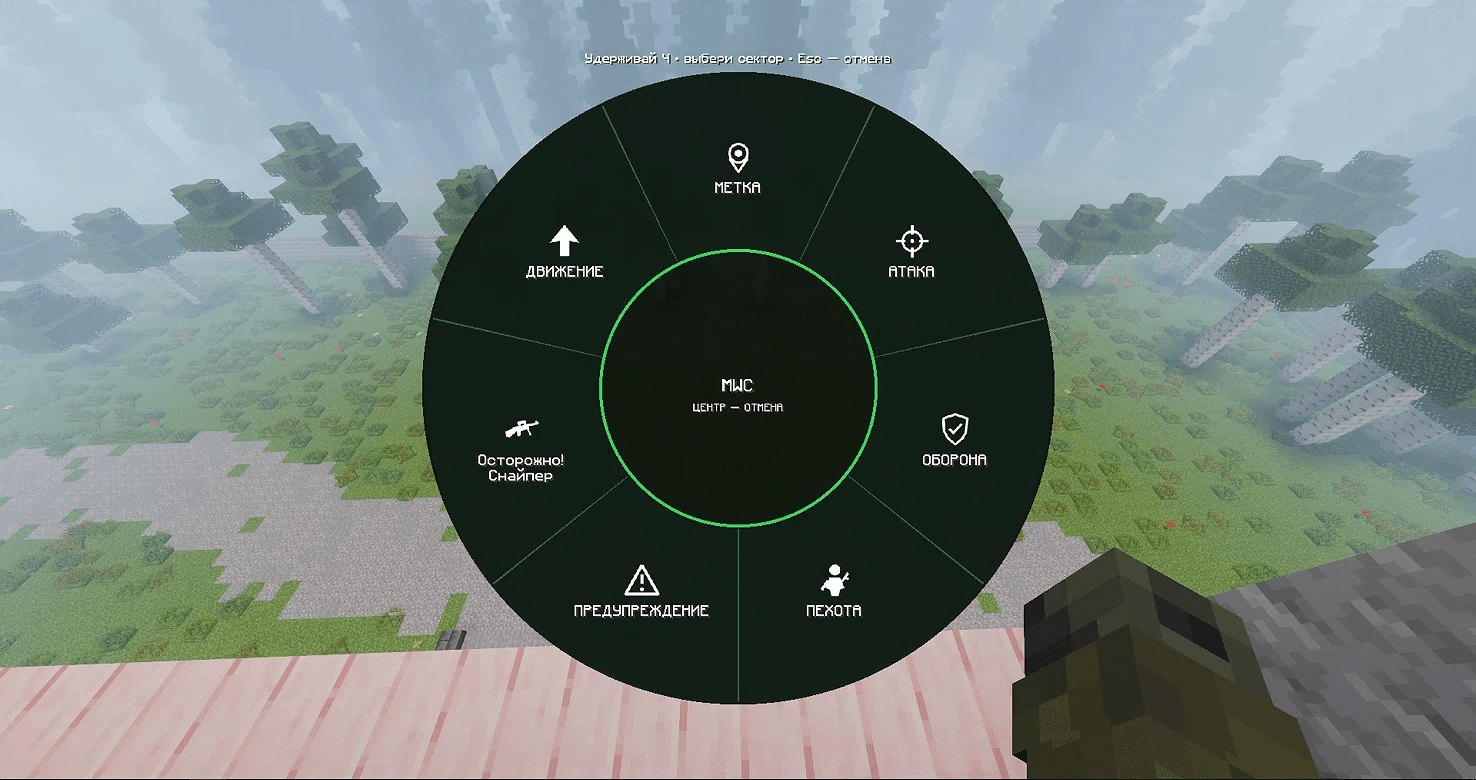
image.png
Description
MWCmark is an indispensable tool for team play that turns chaotic voice chat into clear and structured information transfer. Forget about typing in chat during a fight — just open the ping wheel and select the desired sector!
What does this mod do?
The mod adds an intuitive radial menu that can be opened with a customizable hotkey. When activated, you are presented with a stylish dark green interface divided into 7 sectors. Each sector is responsible for a specific type of tactical information.
The interface is made in a minimalist style with clear white icons and text, making it as fast and convenient to use even in the heat of battle.
Vanilla Team System Integration (/team)
This is the key feature of the mod! MWCmark is fully synchronized with the standard Minecraft team system (/team).
- The mod uses vanilla Scoreboard and Teams data — no third-party plugins are required.
- If you are in a team (e.g., team1), your ping will only be seen by team1 members.
- Players from team2 (or players without a team) will not see your ping.
- This ensures fair and covert tactical communication on servers, in clan wars, and PvP modes.
- Setup is simple: distribute players using /team add and /team join, and the mod will automatically determine who should see the signals.
Menu Sectors
When opening the wheel, the following options are available:
- MARK — quick indication of a specific point or object on the terrain.
- ATTACK — a call to advance or an indication of a target to attack.
- DEFEND — a signal for allies to take defensive positions.
- INFANTRY — a warning about enemy infantry or an indication of their movement.
- WARNING — a universal danger signal (ambush, trap, etc.).
- Caution! Sniper — a critically important warning about a sniper in position.
- MOVE — an indication of the direction for the squad.
- MISS (Center) — clicking the center of the wheel or pressing Esc cancels the selection and closes the menu.
Features and Benefits
- Privacy: Enemies do not see the pings — only allies in the /team.
- User-friendly interface: The semi-transparent dark wheel with bright icons does not block the view and is easy to read on any background.
- Fast response: The menu does not require a long study — icons and labels are intuitive.
- Key settings: The menu hotkey is fully customizable in the standard Minecraft controls menu.
- Visual feedback: When selecting a sector, the action name appears in the center, confirming your choice.
How it works
- Hold the menu hotkey.
- Move the mouse towards the desired sector. The cursor automatically snaps to the icons.
- Left-click (or release the key) to confirm.
- The ping instantly goes only to the players of your /team.
Installation
- Install Minecraft Forge version 1.20.1.
- Download the mod .jar file.
- Place it in the mods folder.
- Enjoy coordinated gameplay!
The MWCmark mod is perfect for military servers and just for playing with friends. Communicate effectively and covertly!
MWCmark Team
