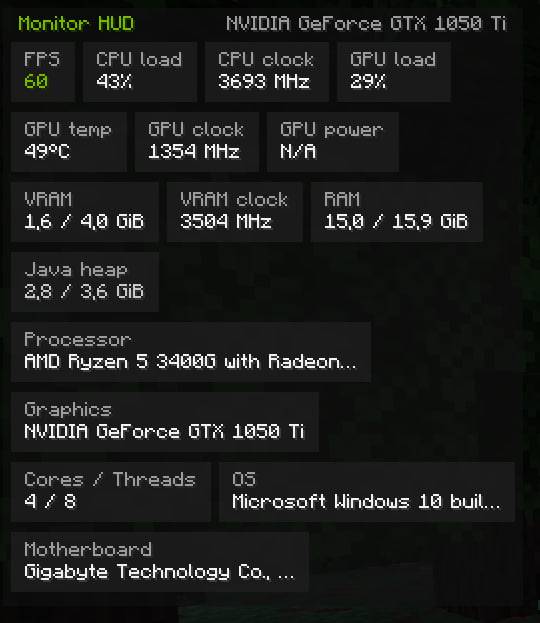
MonitorHub turns Minecraft into its own performance dashboard. One compact dark panel in the NVIDIA App style shows everything that matters in real time: FPS, CPU load and clock, GPU load, GPU temperature and clocks, VRAM, RAM, Java heap and full hardware info. Toggle it with one key, configure everything in-game.
No more alt-tabbing to Afterburner — your PC stats live right in the game.
🎯 Why You'll Want This HUD
NVIDIA App style. Dark cards, small grey labels, large white values, green accents — the clean look of the NVIDIA App performance page, right inside Minecraft.
Everything in one panel. FPS, CPU, GPU, memory and hardware sections flow as compact wrap-around cards that fit any corner of the screen.
Lightweight by design. Sensor polling runs on a background thread; the overlay never blocks rendering. Cards and layout are rebuilt only when values actually change — a frame only draws, nothing ticks per-frame.
Fully configurable in-game. Rebindable keys, toggle/hold activation, position, scale, opacity, update interval and per-section toggles — all in one settings screen.
Honest N/A. If your hardware or driver refuses a sensor, the card shows N/A instead of fake numbers — and every failing read is logged once, not spammed.
💡 How It Works
- Drop the jar into your
mods folder (Fabric API required) and launch the game.
- Press H to show / hide the overlay.
- Press O to open settings: rebind keys, activation mode, position, scale, opacity, update interval, sections.
- The background poller reads sensors every interval and publishes a snapshot; the HUD draws the latest snapshot every frame without ever blocking the game.
Sections
| Section |
What it shows |
| 📊 FPS |
Live frames per second |
| 🧠 CPU |
Load %, clock |
| 🎮 GPU |
Load %, temperature, core clock, power draw |
| 🖼️ VRAM |
Used / total, memory clock |
| 💾 RAM |
Used / total, Java heap |
| 🔧 Hardware |
CPU model, GPU model, cores / threads, OS, motherboard |
Default keys (both rebindable in-game)
| Key |
Action |
| H |
Show / hide the overlay |
| O |
Open the settings screen |
⚙️ Technical Advantages
Fabric-first. Minecraft 26.3, Fabric Loader + Fabric API, Java 25. Client-side only — works on vanilla servers, Realms and LAN, no server install needed.
Safe sensor access. GPU telemetry via NVIDIA NVML, RAM via the Windows API, CPU via oshi. No kernel drivers of our own, every native call is guarded — a failing sensor becomes N/A, never a crash.
No mixins. Nothing patched, nothing to conflict with other mods.
Sensor availability note. Some readings depend on your hardware and drivers — if a card shows N/A, that's your PC, not the mod:
- GPU power shows N/A — the problem is in your GPU drivers, not in the mod. Some driver builds (especially for older cards) simply do not report power draw — even NVIDIA's own
nvidia-smi shows N/A on such systems. Update your driver or roll back to a different version to restore the reading.
Everything else (FPS, CPU/GPU load, GPU temperature, clocks, VRAM, RAM, heap, hardware info) works everywhere out of the box.
📦 Perfect For
- Players who want Afterburner-style telemetry without leaving the game.
- Streamers — a clean dark overlay your viewers can actually read.
- Troubleshooting: watch clocks, VRAM and heap while changing video settings.
- Shader testing on modest GPUs — keep an eye on VRAM in real time.
Install MonitorHub and see what your PC is really doing in Minecraft!
Chat, requests to add versions, bugs — discord
Support the author: donate