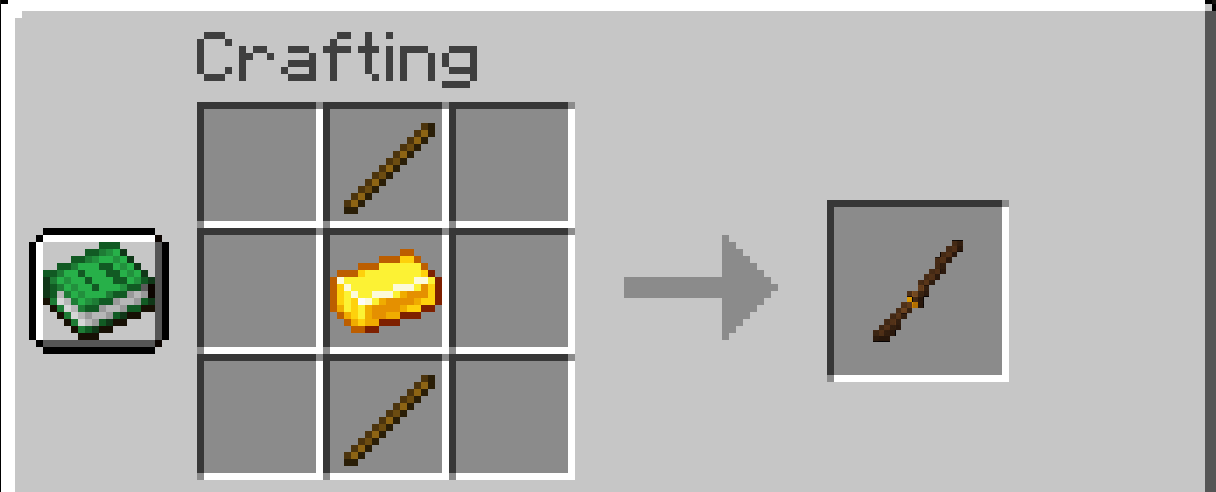
crafting_recipe.png
Description
Mine Arena
A Forge mod for: Java Edition 1.21.1** that enables voice-controlled spell casting (like in Mage Arena) and lets you create custom spells using natural-language prompts.
🎥 Demo Video
📋 Requirements
Essential
Java Edition 1.21.1 with Forge installed Compatible Web Browser with Speech Recognition API support:
- ✅ Google Chrome (recommended)
- ✅ Microsoft Edge
- ✅ Safari
- ❌ Firefox (not supported)
Optional (for Creating Custom Spells)
- OpenRouter Account — Free to create, and free to use as long as you use models in this free models list.
- Meshy AI Subscription — Paid subscription required for 3D model generation API access.
Note: The mod ships with 5 default spells that work immediately without any API keys. You only need OpenRouter and Meshy if you want to create your own custom spells.
✨ Core Features
🎤 Voice-Controlled Spell Casting
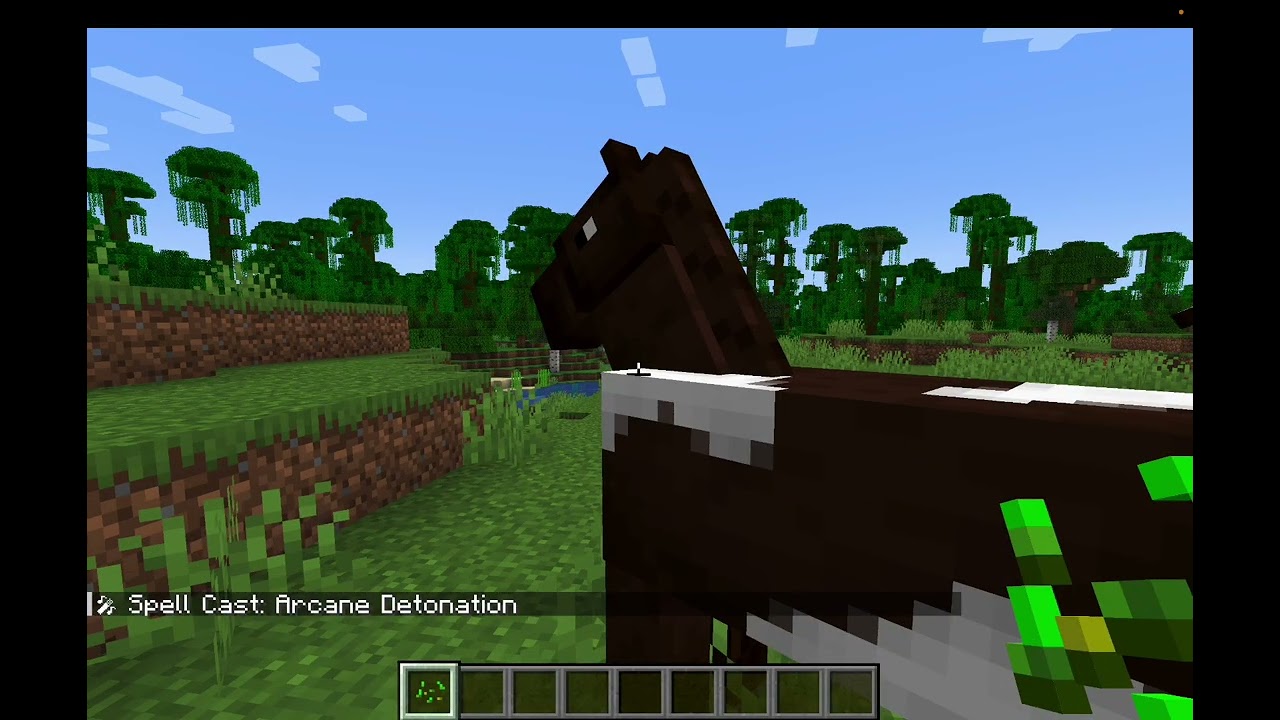
Voice recognition automatically activates when you join a world by opening a new prompt in supported browsers and requesting microphone permission.
🔮 Default Spells
The mod includes five ready-to-use spells (no API keys required):
- Infernal Blast (say “Fireball”) — Explosive fireball with area damage and ignite effect
- Gale Force (say “Wind”) — Wind blast that knocks back enemies
- Glacial Prison (say “Ice cube”) — Ice burst that freezes targets and places ice blocks
- Arcane Detonation (say “Bomb”) — High-speed explosive bomb with block destruction
- Ethereal Ascension (say “Levitate”) — Self-cast levitation spell
🧙 AI-Powered Custom Spell Creation
Create your own custom spells with natural language:
- Right-click with the Wand item (craftable in-game).
- Describe your spell idea (e.g., “A lightning bolt that stuns enemies”).
- Set a cast phrase to trigger it (e.g., “Thunder Strike”).
- The AI generates the spell’s behavior, effects, and visual appearance.
- Cast it by speaking your custom phrase!
🛠️ How to Install / Compile
Install: Copy mine_arena-1.0.0.jar into the mods folder of your MC directory.
Build from Source: From the project root, run:
./gradlew build⚙️ Optional Custom Spell Setup & Configuration
Note: Not needed for default spells — only for custom spell creation.
Required API Keys
1) OpenRouter API Key
- Sign up at OpenRouter
- Copy your API key
- Open
config/mine_arena-common.tomlin your MC directory - Paste your OpenRouter API key into the config
2) OpenRouter Model ID
- Find a free model in this list
- Copy the model ID
- Open
config/mine_arena-common.toml - Paste your OpenRouter model ID into the config
3) Meshy AI API Key
- Create an account at Meshy API Page
- Purchase a subscription to get API access
- Copy your API key
- Paste your Meshy API key into
config/mine_arena-common.toml
Example Configuration
# OpenRouter API Key
openrouterApiKey = "sk-or-*****"

# OpenRouter model name for chat
openrouterModel = "deepseek/deepseek-chat-v3.1:free"

# Meshy API Key
meshyApiKey = "msy_****"
🧪 Examples of Custom Spell Prompts
Try ideas like:
- “A healing aura around me”
- “Summon wolves to fight for me”
- “A meteor that destroys terrain”
- “Poison gas cloud”
🪄 Wand Crafting Recipe
🧰 Troubleshooting
Voice Recognition Not Working
- Keep the browser tab (that opens automatically) open in the background
- Check that your browser has microphone permissions
- Try Chrome or Edge (best compatibility)
- Speak clearly and use simple, distinct cast phrases
Spell Generation Fails
- Verify both API keys are set in
config/mine_arena-common.toml - Check that you have credits in your OpenRouter and Meshy accounts
- Try simplifying your spell description
- Wait a moment and try again (API rate limits may apply)
Spells Not Casting
- Ensure voice recognition is active (browser tab open)
- Confirm your spell was created (open the Wand interface to see your spell list)
- Try speaking the cast phrase more clearly or slowly
- Make sure the cast phrase doesn’t conflict with other spells
📝 License
This project is open source. Feel free to modify and use it for your own projects.
MineArena Team