Mikasa Mob Health Bar
- By
A minimalist client-side HUD that displays the target's name, a red health bar, and exact Current/Max HP at the top center of your screen when looking at any mob.
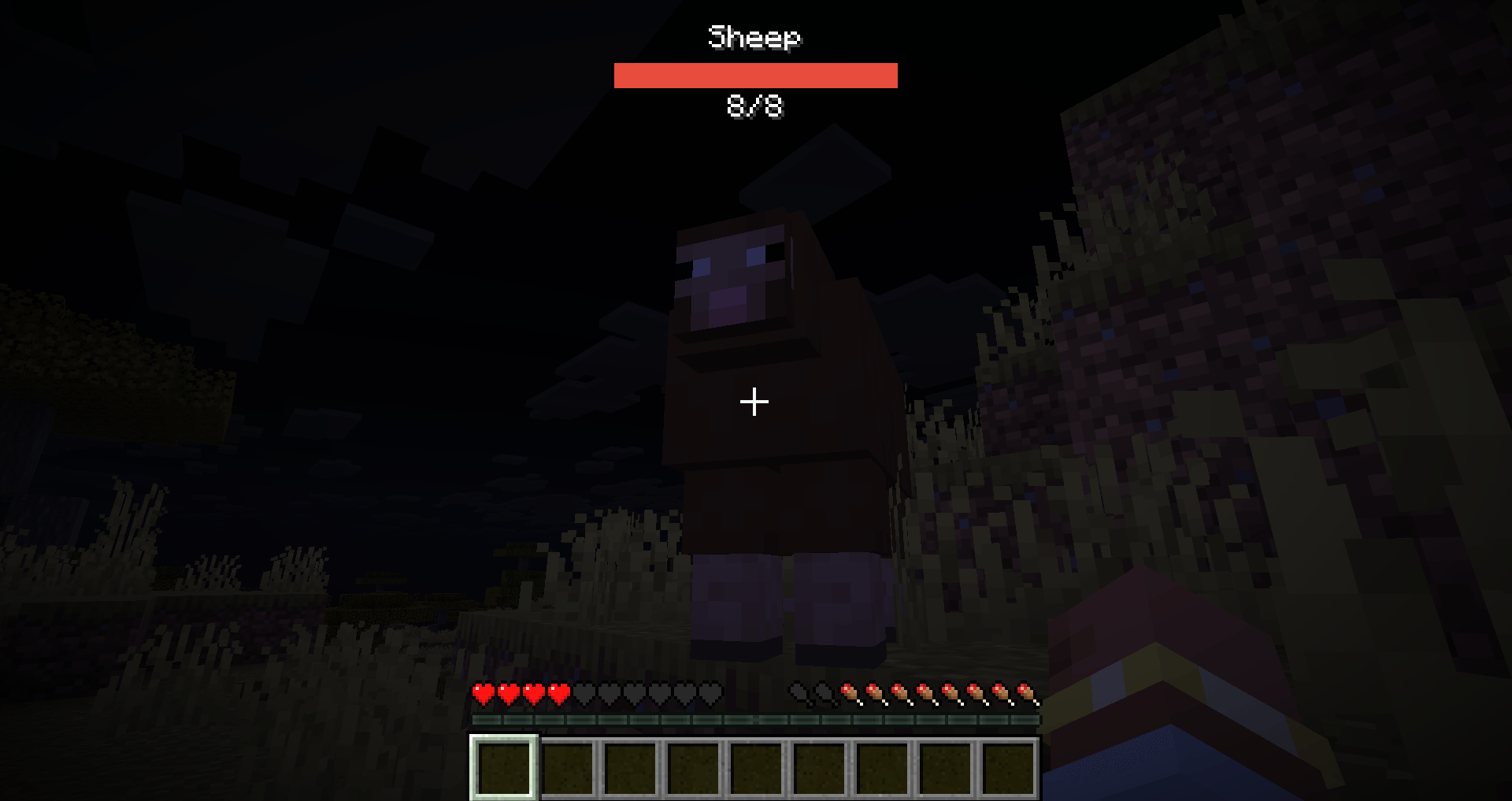
bar.png
Description
📊 Mikasa-bars — Minimalist Top-Center Target HUD
Mikasa-bars is a sleek, high-performance client-side HUD utility for Fabric. It provides a clean, static overlay at the top center of your screen whenever you look at a living entity, giving you vital combat information without cluttering your world view.
Unlike traditional nameplate mods that float awkwardly above mobs, Mikasa-bars stays fixed at the top of your screen and only appears when you actually need it.
✨ Key Features
- Target-Only Display: The HUD only activates when you place a living entity (player, mob, NPC, or monster) in your crosshair. Looking away immediately hides it.
- Static Top-Center HUD: Keeps your world clean. The health bar stays fixed at the top center of the screen, not floating in the 3D world.
- Comprehensive Info: Displays the entity's name, a clean red health bar, and exact numeric values (
CurrentHP/MaxHP). - Extended Range: The targeting detection range is 2× further than the vanilla entity interaction range.
- Localization Support: Fully respects your client's language settings for translated mob and NPC names.
- Immersive Friendly: Automatically hides when you toggle off the vanilla GUI using the F1 key.
🛠 Feature Overview
| Element | Purpose |
|---|---|
| Entity Name | Shows the localized display name of the targeted living entity. |
| Health Bar | A vibrant red progress bar that scales dynamically based on current vs max health. |
| CurrentHP/MaxHP | Precise numeric health readout positioned cleanly underneath the bar. |
| Targeting System | Activates instantly when looking at a living entity within the extended range. |
Note: This mod has no commands and works completely automatically.
📦 Compatibility & Dependencies
Required:
- Minecraft: 26.3
- Fabric Loader:
0.19.5or later (IMPORTANT: older loader versions like 0.19.3 are NOT supported!). - Fabric API: Required for Minecraft 26.3.
- Java: Version 25+.
⚙️ Configuration
Mikasa-bars has no config files. It is designed to work perfectly out of the box with zero setup. No files are generated on launch, and no manual editing is required!
🚀 Installation Guide
- Install Fabric Loader (
0.19.5+) for Minecraft 26.3 on your client. - Drop this mod jar and the official Fabric API into your client's
modsfolder. - Launch your game, find any mob, and look at it to see the new HUD in action!
Note: This is a client-side HUD mod. Players must install it on their own clients. It is completely optional (not required) on dedicated servers.
📄 License & Credits
- License: MIT
- Author: Mikasa
📄 Source
The Mikasa Mob Health Bar Team