Description
This mod requires Issun's Paintbox to function
NOTE: MacOS devices appear to have some issues with loading the triggers.csv file fully, I am working on a fix for this but unfortunatly I cannot say how long that will take
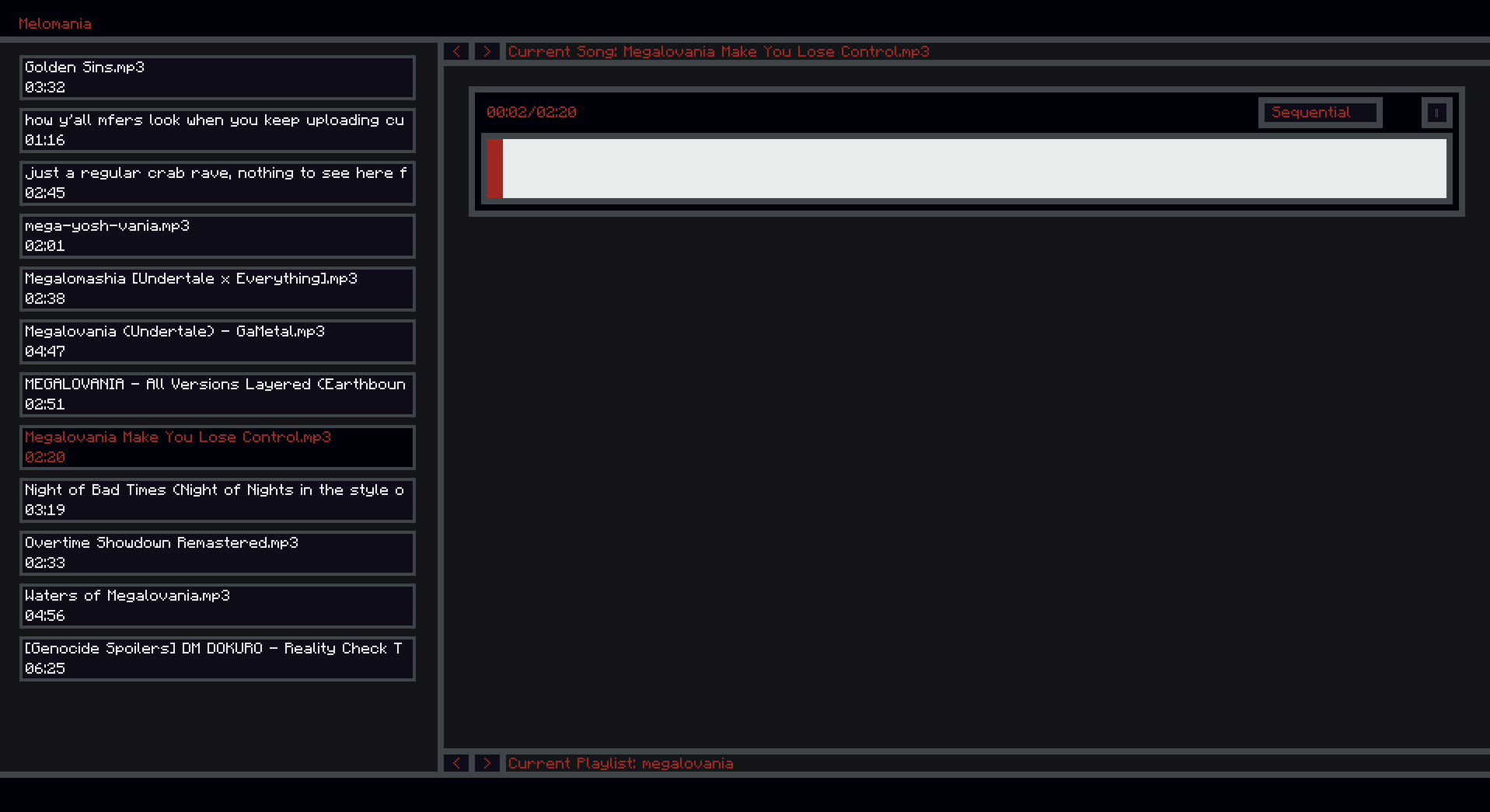
adds a client side .mp3 and .wav player that functions as both a basic music player or a dynamic music player that plays music based off the player's current surroundings
the mod's main GUI can be accessed in game via a keybind (default p) and music playback can be paused via another keybind (default k)
an instruction file is generated when the user first loads the mod that contains infomation on how to use all the mod's features (latest version located below for ease of reference)
Instruction file for Melomania version number 1.0.1
This file contains instructions on how to create and manage playlists and songs with this mod.
BASIC OVERVIEW
There are three main systems to populate when using this mod.
Playlists, a collection of song files and a single trigger file.
Song Files, the individual songs to be played.
The Trigger File (triggers.csv), a comma separated values file that contains info on when songs should play in dynamic and ambient mode.
The mod has 4 playback modes.
Sequential, playing a playlists' songs in order.
Shuffle, playing songs in a playlist at random.
Dynamic, playing songs according to song triggers, switching songs when a song's trigger becomes false.
Ambient, playing songs according to song triggers, switching songs only when a song ends.
PLAYLISTS
Song files need to be within a folder within the \config\melomania\ (e.g. \config\melomania\playlist\songfile.mp3) folder in order to be detected by the mod, this allows songs to be seperated into distinct playlists.
Each playlist can have a triggers file, but it is not needed for a playlist to be detected.
TRIGGERS SYSTEM
Triggers are stored in a triggers.csv file in each playlist folder, each row in the triggers file is a trigger group, where the first entry is the song the trigger group relates to and each entry in teh same row after is a trigger.
A trigger can be inverted by prefixing the trigger with a '!' symbol, causing it to return true if the condition is not met.
Each trigger in a trigger group is ANDed together to decide if a trigger group passes or fails.
A song can have multiple trigger groups attached to it by having it be referenced by name on multiple rows, the result of multiple trigger groups is ORed together to decide if a song should play.
TRIGGERS LIST
day : Triggers during day
night : Triggers during night
void : Triggers if the player is in the void (y-0 and lower)
dead : Triggers if the player is dead
bed : Triggers if the player is in a bed
swimming : Triggers if the player is in water
undercover : Triggers if the player cannot see the sky
exposed_to_sky : Triggers if the player is exposed to the sky
fishing : Triggers if the player is using a fishing rod
biome?[BIOME_NAME] : Triggers if the player is in specified biome
biome_type?[BIOME_TYPE_NAME] : Triggers if the player is in specified biome type
gamemode?[GAMEMODE_NUMBER] : Triggers if the player has specified gamemode
health_above?[VALUE] : Triggers if the player is above specified health level
health_below?[VALUE] : Triggers if the player is below specified health level
hunger_above?[VALUE] : Triggers if the player is above specified hunger level
hunger_below?[VALUE] : Triggers if the player is below specified hunger level
riding?[ENTITYNAME] : Triggers if the player is riding specified entity
weather?[WEATHERVALUE] : Triggers if the weather is the specified one
below_y?[VALUE] : Triggers if the player is below specified y level
above_y?[VALUE] : Triggers if the player is above specified y level
dimension?[DIMENSIONID] : Triggers if the player is in the specified dimension
moonphase?[PHASENUMBER] : Triggers if the moon is in specified phase
time_before?[VALUE] : Triggers if the time of day is before the specified value
time_after?[VALUE] : Triggers if the time of day is after the specified value
combat?[RESOURCENAME] : Triggers if player is near the specified entity
boss?[BOSSNAME] : Triggers if the player is close to a boss with this name
EXAMPLE TRIGGER FILE
song_file_1.mp3,biome?plains,!health_above?5,!weather?thunder
song_file_1.mp3,moonphase?0
song_file_2.mp3,fishing
The Melomania (Music Player Mod) Team