OQ31A{DSRE`W([`O]}CB248.png
Description
🌍 English / 中文
MC ↔ QQ Bot
✨ Connects QQ with a Minecraft server ✨








⬇️ Modrinth · 🐛 Report an issue
Introduction
MC ↔ QQ Bot is a Minecraft server Mod / Plugin that connects QQ with a Minecraft server through the official QQ Bot API v2.
The project uses qqbot-java-sdk to access the QQ Open Platform. QQ groups, channel text sub-channels and direct messages are all supported, and the message direction can be configured separately for each target.
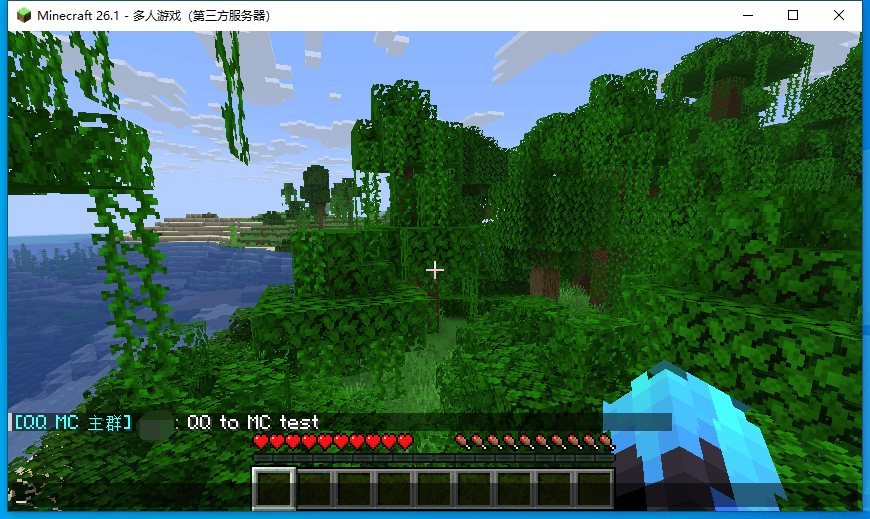
QQ → Minecraft
- QQ chat events
- Group member join / leave events
- Attachment count notices
- Separate configuration for groups, channel text sub-channels and direct messages
Messages can be customised with templates, for example:
§b[QQ Main Group]§r Username§7:§r Hello
Minecraft → QQ
The following Minecraft server events are supported:
- Player chat events
- Player join events
- Player quit events
- Player death events
Different groups or channels can be configured to receive different event types.
QQ → Minecraft commands
Minecraft server commands can be executed from QQ.
Command execution is disabled by default and requires an explicit permission configuration. Commands are sent to the server over RCON and the result is returned to QQ.
Supported platforms
| Platform | Minecraft version | Installation |
|---|---|---|
| Fabric | 26.1 - 26.2 | mods/, requires Fabric API |
| NeoForge | 26.1 - 26.2 | mods/ |
| Forge | 26.1 - 26.2 | mods/ |
| Forge | 1.20.1 - 1.20.2 | mods/ |
| Paper / Folia / Purpur | 1.20.1 - 26.2 | plugins/ |
| Spigot / CraftBukkit | 1.20.1 - 26.2 | plugins/ |
The Bukkit family uses a single JAR covering Minecraft 1.20.1 through 26.x.
Choose the Paper or Spigot build for the corresponding platform. If the platform does not match, the plugin explains the reason in the log and disables itself.
Quick start
Download the build for your platform from Modrinth or CurseForge:
- Put the Mod into
mods/ - Put the Plugin into
plugins/
Go to the QQ Open Platform to create a bot, then copy its AppID and AppSecret.
After the server starts for the first time, the configuration file is generated automatically:
config/mcqq/config.yml
Paper-based platforms use:
plugins/mcqq/config.yml
Fill in the bot information and the targets to bind:
bots:
  - id: main
    app-id: "your AppID"
    secret: "your AppSecret"
    groups:
      - group-openid: "the group's openid"
        label: MC Main Group
After changing the configuration, run:
/qq reload
Then use:
/qq test
to send a test message to the configured targets.
Automatic binding
There is no need to fill in group-openid by hand.
For first-time setup, leave groups: empty. After the bot starts, mention it once in the target group, then run:
/qq bind
The plugin finds the matching target from the most recently received messages, writes the group information into the configuration and reloads automatically.
Sub-channels are bound in the same way, and the corresponding guild-id is saved as well.
/qq bind only accepts targets the bot has actually received messages from, so a typing mistake cannot bind a stranger's group or channel.
Configuration
The main configuration file is config.yml; the fully annotated example is config.example.yml.
During an upgrade, if the configuration file is missing newly added entries, the plugin first creates a .bak backup, then fills in the missing configuration and records the added entries in the log.
AppSecret can be written directly into the configuration:
secret: "your AppSecret"
An environment variable can also be used:
secret-env: QQ_BOT_SECRET
Do not publish a config.yml containing a real AppSecret to an issue, a group chat or a public repository. Use config.example.yml when sharing configuration.
The message direction can be configured independently for each target:
- group-openid: "xxxxxxxx"
  label: MC Main Group
  receive-from-qq: true
  send-to-qq: [chat, join, quit, death]
send-to-qq: [] means QQ messages are received but no Minecraft events are sent to that target.
debug: true records detailed information about message handling and forwarding. Enable it when a message is not forwarded successfully, to see why.
Commands
Requires OP level 2 or the
mcqqpermission.
View bot status, its own ID, bound targets, message directions and current configuration problems.
/qq statusReload the configuration and reinitialise the running bots.
/qq reloadBind the group or sub-channel the bot most recently received messages from. The first few characters of the target ID can be used to match.
/qq bind [first few characters of the id]View the message templates currently in effect and the available placeholders.
/qq templatesSend a test message to all configured targets.
/qq testExecute a Minecraft server command over RCON and return the result.
/qq run <command>View all available sub-commands.
/qq help
Message templates
Message formats are configured under templates::
templates:
  qq-chat: "§b[QQ {group}]§r {user}§7:§r {text}"
  mc-chat: "[MC] {player}: {text}"
  mc-join: "[MC] {player} joined the game"
  mc-death: "[MC] {player} died (killed by {killer})"
Available placeholders:
| Placeholder | Meaning |
|---|---|
{group} |
QQ group or channel name |
{user} |
QQ user name |
{text} |
Message content |
{count} |
Attachment or member count |
{member} |
Member name |
{player} |
Minecraft player name |
{killer} |
Killer name |
{platform} |
Source platform |
{time} |
Time |
Unrecognised placeholders are kept as-is, which makes configuration mistakes easy to spot.
Template configuration precedence:
group-level > global > built-in default
A group-level configuration only needs the entries it overrides.
Setting a template to an empty string disables the message for that event.
Runtime notes
Sending messages to QQ uses the platform's proactive message capability, so it may be affected by platform rate limits or review. A failed send is only logged and does not affect event handling on the Minecraft side.
Command output prefers a passive reply, to reduce proactive message quota usage. When a passive reply is not possible, the plugin falls back to a proactive message.
Development
The project keeps the logic that does not depend on Minecraft in core/, which can be compiled and tested independently.
There are currently 103 core test cases, all of which run offline.
Related documentation:
- Version support: what to handle when adding a Minecraft version
- Multi-platform implementation: platform structure, build setup and multi-version support
- Commands and permissions: fields and limits on both the QQ and Minecraft sides, and the command execution mechanism
- Message templates: templates, placeholders and configuration precedence
- Release process: project release and CI process
- Third-party components: bundled components and their licences
Build every platform (core + fabric / neoforge / forge ×2 / paper / spigot):
./gradlew build
Usage notice
This project only provides message and event forwarding between Minecraft and QQ. Users must comply with applicable laws and regulations as well as the rules of the QQ Open Platform, and are responsible for the content sent through this project and for how they use it.
License
This project is licensed under MIT.
The project artefacts contain third-party components, including the official QQ SDK, OkHttp, Gson, SnakeYAML and Kotlin. Each component follows its own open-source licence.
See THIRD-PARTY.md for the complete list and licence texts.
MCQQ Team