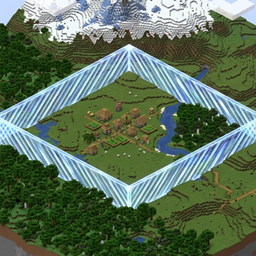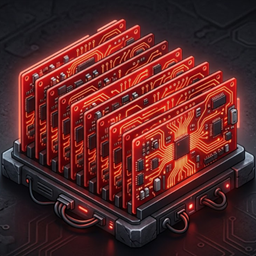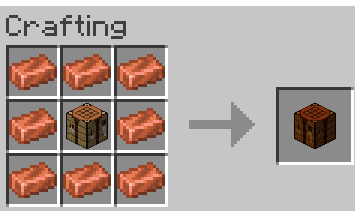
2026-09-10_15-39.png
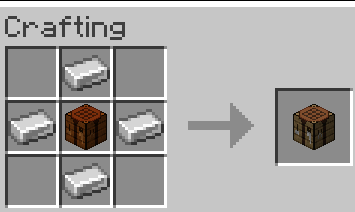
2026-09-10_15-40.png
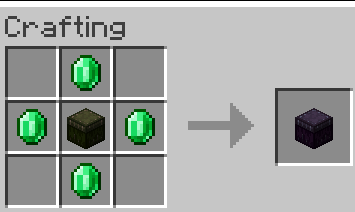
2026-09-10_01-28.png
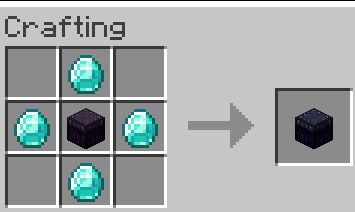
2026-09-10_01-28_1.png
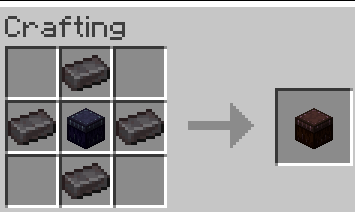
2026-09-10_01-29.png
Description
MC Storage Area Network
Turn every chest, barrel and container around you into one shared, searchable item network — then craft with it.
Have you ever filled a chunk with chests? Now you can — and access, search, sort, and craft with everything inside them from a single block. MC Storage Area Network is a suite of five mods for Minecraft 1.21.1 on Fabric and NeoForge — install them all from one all-in-one jar, or pick only the mods you want:
| Mod | What it adds |
|---|---|
| Storage Network | Storage Terminal — browse, search, take and deposit from every nearby container from one interface. Plus the Output Terminal for collecting crafted output. |
| Crafting Network | Crafting / Smelting / Blasting / Smoking / Brewing Terminals — upgradable machines that craft, cook and brew using items pulled from the network. |
| Network Routing | Routing Terminal and Routing Linker — label containers with item filters so matching containers win routing priority; the terminal can also sort, defrag and trim the network. |
| Remote Access Terminal | Dye-coloured terminals you name and travel between, optionally keeping a base chunk-loaded. With Network Routing installed, a held Routing Linker becomes a one-way trip home. |
| MC Storage Area Network | The shared library/API that scans storage, powers the mods above, and links vanilla Crafters to the network. Required by all; other mods can hook into it. |
The four gameplay mods
Four blocks, one item network — each is detailed below. A * marks something that needs a companion
mod: install the all-in-one jar (or the matching bundle) and nothing is missing.
Storage Network
One searchable interface for every container around you.
- Storage Terminal — browse, search and sort the whole network from one grid (search by name or id; sort by name, type, tag, mod or equipment).
- Left-click to take a stack, shift-click to take more.
- Shift-click your own items to deposit them back.
- Sources dropdown — scope the terminal to all storage, your inventory, or a single container.
- Tiers 0–5 — Copper 1×1 → Iron 3×3 → Gold 5×5 → Emerald 7×7 → Diamond 9×9 → Netherite 11×11 chunks (see Recipes).
- Recipe: 8× Copper Ingot around a Chest.
- Output Terminal — a collection-only sink that receives crafted output and keeps it out of normal listings (recipe: 4× Chest around a Storage Terminal); crouch + right-click toggles whether its contents appear in the network.
- Shulkers first — a per-terminal checkbox that fills shulker boxes before other containers.
- Shulker flattening — shulker-box contents, and boxes inside boxes, appear as ordinary items you can craft with.
Crafting Network
Upgradable machines that craft, cook and brew straight from the network.
- Crafting Terminal — the vanilla 3×3 grid plus the full recipe book, crafting from the network and your inventory.
- The result slot shows how many you can make; click to craft one, shift-click to craft a stack.
- Tiers 0–5 as Storage, and higher tiers work faster. Recipe: 8× Copper Ingot around a Crafting Table.
- Crafted output can be collected automatically by an Output Terminal
**. - Other craftable terminals — 8× Copper Ingot around a …:
- Smelting (Furnace) • Blasting (Blast Furnace) • Smoking (Smoker) — pull inputs and fuel from the network and process automatically; crouch + right-click collects the experience they earn.
- Brewing (Brewing Stand) — pick a target potion, and it pulls water bottles, blaze powder and ingredients to brew one batch (3 potions).
- Inventory first — send crafted output straight to your inventory.
- Shulkers first — the same per-machine toggle as Storage.
- Vanilla Crafters — link the vanilla Crafter to the network and it keeps itself stocked and crafting; no companion machine needed. Crouch + right-click a Crafter to link or unlink it.
- It remembers the recipe you set, pulls missing ingredients from the network, crafts every cycle, and sends the output (plus any recipe remainders) back through the network.
- Pauses, never ruins a grid — if an ingredient is missing it pauses and resumes once restocked, and it will not disturb a slot you have filled with something else.
- Needs a Storage Terminal within 2 chunks; without one in range it stays paused. Linking respects build permissions, and there is no command — it is in-world only.
- With each mod: the API alone is enough to link one; add Storage Network for it to draw from and return to the network; add Crafting Network and its output follows the same routing as the machine terminals (Output Terminal first, then a container already holding that item, then the nearest, then you); add Network Routing and your container filters decide where its output lands. Remote Access Terminal does not change it.
Network Routing
Label containers with item filters so the ones you care about win.
- Routing Terminal — label containers with item filters using the Routing Linker, so matching containers win routing priority.
- Inherits its range from the Storage Terminal it connects to (it shows Connected to Storage Terminal (Tier N)).
- Sort, defragment and trim the network from the terminal — each is a one-shot button or a standing toggle that repeats every couple of seconds:
- Sort moves each stack to its nearest matching labeled container. With no filters nothing has priority, so sorting leaves the network as it is.
- Defrag merges partial stacks of the same item inside each container to free up slots. It works with or without filters.
- Trim cleans labeled containers only: stacks that do not match a container's filter are moved out to the nearest unlabeled container, or failing that to an Output Terminal anywhere in the network, and it stops if there is nowhere to put them. Containers without a filter are never touched.
- Filter autocomplete — the filter box suggests items you could actually obtain as you type, matching anywhere in the name or id (
ingotfindsgold_ingot), and offering item tags as#namespace:path. Suggestions already covered by the container's current filters are skipped, so the list stays useful. - Distinct look — the terminal is a copper-and-steel console with a green readout, and the handheld Routing Linker matches it.
- Requires Storage Network — Network Routing does not run without it, which is why
mcsan-bundle-routingcontains both.
Remote Access Terminal
A travel block: 16 dye-coloured terminals you name and link, so you can hop between bases (or between dimensions) without walking. It needs only the API — the Routing Linker trip described above is a bonus when Network Routing is installed.
- Place one and give it a name — the naming popup is skippable, and you can rename it later.
- Right-click a terminal to open its destination list: every terminal of that colour you may use, in any dimension, and click one to travel there. Colour is how destinations are grouped — and the settings screen can recolour a terminal, so one block can stand in for any colour's list.
- Settings (the button in the destination list): rename, change colour (each colour shows a running count), sort order, Open / private, the owner's invite list, unlink, and the chunk-loader toggle.
- Chunk loader — switch a terminal into loader mode and it keeps its own chunk ticking plus the eight neighbours loaded (3×3), so machines and processors keep running while you are away. Each lease lasts 60 minutes by default and then frees the slot; up to 2 chunk loaders per player and 2 per server may run at once, and a request made while they are full waits in a queue (oldest first, with your position shown in the settings screen) until a slot frees up. Every limit is configurable, and the config file warns when they are raised.
/remoteaccess—invite,uninvite,list,name,global on|off,unlink,unlinkall,assign,gotoandadmin …, for everything the UI does.- Routing Linker trips — with Network Routing installed, using the Routing Linker while you are outside every routing terminal's inherited scan range opens the same terminal list as a one-way trip back: a way home, not an escape.
All five together
- One network for all your storage — chests, barrels, hoppers, shulker boxes and any modded inventory-bearing block within range.
- No redstone, no item filters — one terminal replaces hopper chains, sorters and filter systems.
- Craft even when your inventory is full — output goes into the network, or straight back to you with Inventory first.
- Smart output routing — crafted items go to an Output Terminal first, then a container already holding that item, then the nearest container, then your inventory.
- Travel as well as storage — dye-coloured Remote Access Terminals give you a named teleport network, and one can keep a base chunk-loaded while you are away ***.
- Vanilla crafters too — link a Crafter to the network and it keeps itself stocked and producing; no separate machine required.
- Ownership & privacy — worldgen storage is visible to everyone; player-placed storage only to the terminal's owner (and optionally their scoreboard team). Terminals are openable by anyone, but breakable only by their owner; a Remote Access Terminal starts public and its owner can privatise it and invite players.
- Configurable — every option can be tuned per server (see Configuration).
*needs its companion mod — with the all-in-one jar (or the matching bundle) nothing is missing.**collecting crafted output in an Output Terminal needs Storage Network.***the Routing Linker trip needs Network Routing installed; the terminals themselves need only the API.
Recipes
| Result | Recipe |
|---|---|
| Storage Terminal | 3×3: 8× Copper Ingot around a Chest |
| Output Terminal | 3×3: 4× Chest around a Storage Terminal |
| Crafting Terminal | 3×3: 8× Copper Ingot around a Crafting Table |
| Smelting Terminal | 3×3: 8× Copper Ingot around a Furnace |
| Blasting Terminal | 3×3: 8× Copper Ingot around a Blast Furnace |
| Smoking Terminal | 3×3: 8× Copper Ingot around a Smoker |
| Brewing Terminal | 3×3: 8× Copper Ingot around a Brewing Stand |
| Remote Access Terminal | Shapeless: 1× Obsidian + 1× Emerald + 1 dye (bone meal / ink sac / cocoa beans / lapis lazuli count as the white / black / brown / blue dye) |
Tier upgrades — place the previous terminal in the center of a 3×3 crafting grid and surround it with four of the tier material:
| Tier | Name | Material | Scan radius |
|---|---|---|---|
| 0 | Copper | — (base terminal) | 1×1 chunks |
| 1 | Iron | 4× Iron Ingot | 3×3 chunks |
| 2 | Gold | 4× Gold Ingot | 5×5 chunks |
| 3 | Emerald | 4× Emerald | 7×7 chunks |
| 4 | Diamond | 4× Diamond | 9×9 chunks |
| 5 | Netherite | 4× Netherite Ingot | 11×11 chunks |
Higher tiers also make processor terminals work faster.
Requirements
| Minecraft | 1.21.1 |
| Loaders | Fabric (Loaders + Fabric API) or NeoForge 21.1.235+ |
| Java | 21 |
| Side | Client & Server |
MC Storage Area Network (
mc_storage_area_network) is required by every gameplay mod. It is bundled in the all-in-one jar; when installing the mods individually, install the API jar too.
Installation
Every jar below is universal — the same file works on both Fabric and NeoForge (it holds the loader-specific builds inside and each loader loads only its own copy).
It is best to use the bundle. mcsan-bundle-all-<version>-universal.jar is the whole suite in one
file — drop it in mods/ and you are done. Want only part of it? mcsan-bundle-storage,
mcsan-bundle-crafting, mcsan-bundle-routing and mcsan-bundle-access are the same
idea for one gameplay mod each, and they always bring the API along.
But if you want separate mods, here are the correct combinations:
| You want | Install these jars |
|---|---|
| Storage only | mcsan-mc_storage_area_network + mcsan-storage_network |
| Crafting only | mcsan-mc_storage_area_network + mcsan-crafting_network |
| Remote Access Terminal only | mcsan-mc_storage_area_network + mcsan-remote_access_terminal |
| Storage + Crafting | mcsan-mc_storage_area_network + mcsan-storage_network + mcsan-crafting_network |
| Storage + Routing | mcsan-mc_storage_area_network + mcsan-storage_network + mcsan-network_routing |
| Everything | mcsan-bundle-all (or all five jars) |
- Every gameplay mod needs the API jar (
mcsan-mc_storage_area_network-<version>-universal.jar). - Network Routing does not run without Storage Network — installing the routing jar on its own
will not load. That is why
mcsan-bundle-routingcontains both. - Remote Access Terminal needs only the API — its Routing Linker trip appears when Network Routing is installed, but the terminals work without it.
- Never mix a bundle with individual jars — the same mods would load twice.
Install Fabric Loader + Fabric API, or NeoForge 21.1.235+, for Minecraft 1.21.1 first.
The universal jars are on CurseForge/Modrinth. If you want a single-loader build (fabric-* /
neoforge-*), grab it from GitHub Releases.
Each mod is versioned on its own: a release only bumps the mod that changed, so Storage Network, Crafting Network, Network Routing, Remote Access Terminal and the API can be updated independently. Every GitHub release lists all current jars together, so you can always grab a matching set from one place.
Configuration
- Fabric:
config/<mod>.json— NeoForge:config/<mod>-server.toml
| Mod | Key | Default | Description |
|---|---|---|---|
mc_storage_area_network |
flattenDepth |
1 |
How many shulker-box levels to flatten (1 = boxes in containers, 2 = boxes in boxes). |
mc_storage_area_network |
boxRowHidden |
false |
Hide raw shulker-box stacks so only their contents show. |
mc_storage_area_network |
sameTypeFirst |
true |
Prefer inserting into boxes that already hold the same item. |
mc_storage_area_network |
ownershipEnabled |
true |
Terminals show only global + owner-placed storage. |
mc_storage_area_network |
teamSharing |
true |
Scoreboard-team members share their placed storage. |
storage_network |
maxTier |
5 |
Highest upgrade tier allowed (0–5). |
crafting_network |
maxTier |
5 |
Highest upgrade tier allowed (0–5). |
remote_access_terminal |
maxTerminals |
80 |
Total terminals allowed across every colour and dimension; each colour shows its own running count. |
remote_access_terminal |
maxChunkloaderTerminals |
2 |
Chunk loaders allowed across the whole server. |
remote_access_terminal |
maxChunkloadersPerPlayer |
2 |
Chunk-loader leases one player may hold at once. |
remote_access_terminal |
chunkLoaderTimeoutMinutes |
60 |
How long a chunk-loader lease lasts before the slot is freed (0 = never expires). |
remote_access_terminal |
chunkLoaderQueue |
true |
When true a request blocked by the caps waits in a queue instead of being refused. |
remote_access_terminal |
lazyChunkRing |
1 |
Neighbour chunks kept loaded (not ticked) around a chunk-loader terminal: 0 = off, 1 = 3×3. |
remote_access_terminal |
invitePermissionLevel |
0 |
Permission level needed for /remoteaccess invite, uninvite and list. |
Crafter automation has no configuration — it is always active, checks every 10 ticks, and looks up to 2 chunks for a Storage Terminal. Linking is stored per block and respects build permissions.
Compatibility
- Works with any container that exposes a standard inventory — vanilla and most modded storage.
- No JEI/REI required; crafting uses the vanilla recipe book.
- Client & server: install on both for full functionality.
License
This project's own source code is licensed under Apache-2.0.
Credits & third-party notices
- Not an official Minecraft product. Not approved by or associated with Mojang or Microsoft. Built on Fabric Loader / Fabric API (Apache-2.0) and NeoForge (LGPL-2.1); the official Mojang mappings are used for development and are not redistributed.
See NOTICE for the full third-party notices.
Author
Retired Roca
MC Storage Area Network Team