2026-11-22_13.32.37.png
Description
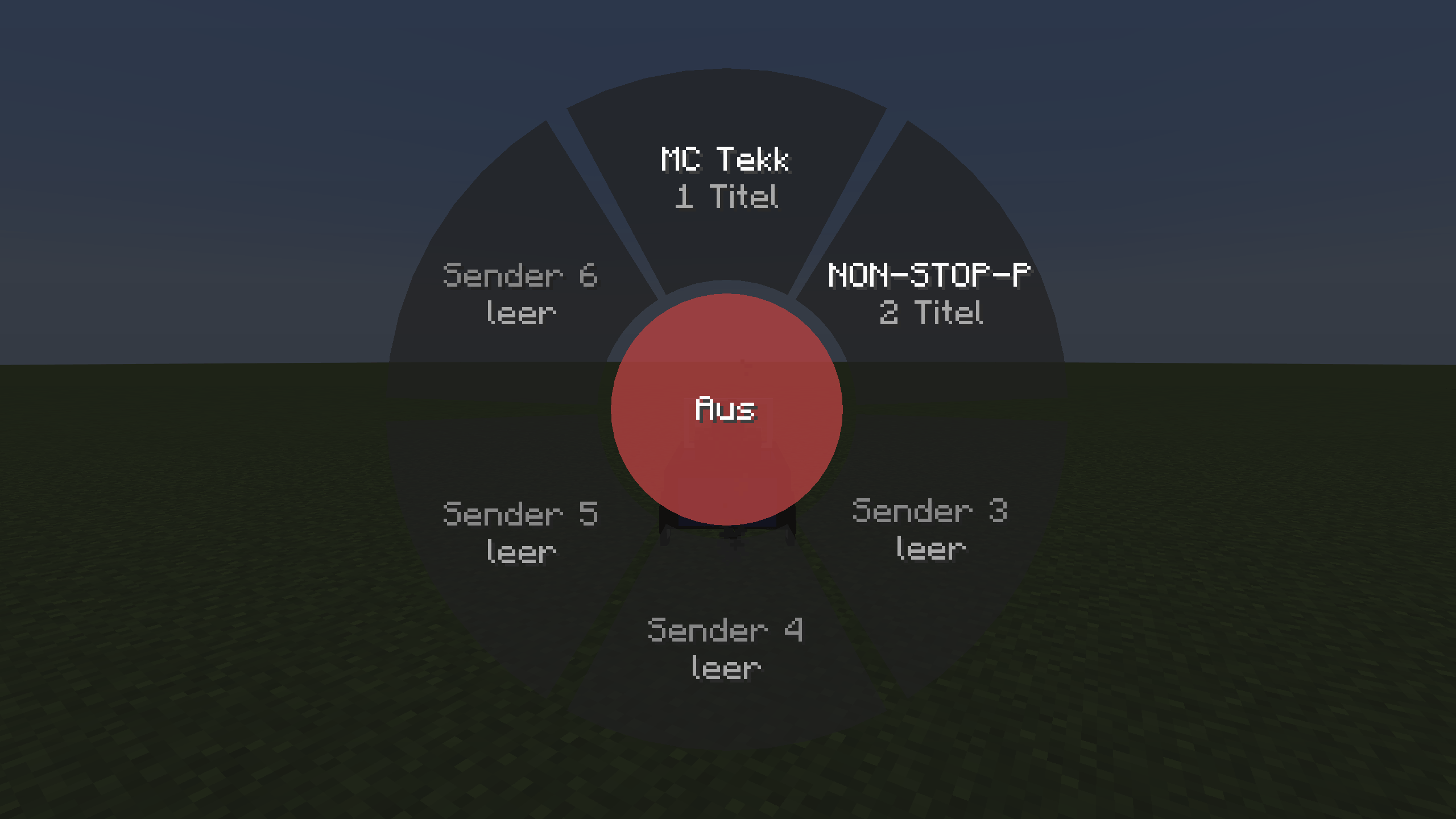
Turn any vehicle into a car with a radio. While you ride a vehicle, press TAB to open a radial menu with 6 radio stations. Each station plays your own MP3 files. It works with any rideable entity except horses and pigs.
This mod is client-side only. You don't need it on the server, and everyone hears their own radio.
Features
- Radial station menu with 6 stations, opened with TAB while riding a vehicle
- Station names come from folder names, so you can name them anything you like
- Plays your own MP3 files in order, from 1 to 50, then starts again at 1
- Hold TAB, move the mouse towards a station and release to select it, or just click a station
- The center of the menu turns the radio off
- The radio stops automatically when you leave the vehicle
- Volume follows your Minecraft Master and Jukebox/Note Blocks volume sliders
- Works on servers without the mod installed
Requirements
- Minecraft 1.20.1
- Minecraft Forge 47.x
- Optional but recommended: a vehicle mod such as Immersive Vehicles
Installation
- Install Minecraft Forge for 1.20.1.
- Put
carradio-1.0.0.jarinto yourmodsfolder. - Start the game once. The mod creates a
radiofolder in your game directory (next tomods) with six sub-folders:Sender 1toSender 6. - Close the game (or keep it open) and set up your stations (see below).
Setting up your stations
- Open the
radiofolder in your game directory. - Rename the six folders to whatever you want your stations to be called, for example
Rock,ChillorClassics. The folder name is the station name shown in the menu. - Put MP3 files into the folders and rename them with numbers:
1.mp3,2.mp3,3.mp3... up to50.mp3. - The files are played in numerical order. Missing numbers are skipped. After the last file the station starts again at 1.
Notes:
- The order of the stations in the menu is alphabetical by folder name. To set your own order, put numbers in front of the names, like
1 Rock,2 Chill. - Only the first six folders are used.
- Only
.mp3files named with a number from 1 to 50 are played. - Please only use music you have the rights to use.
How to use
- Get into a vehicle.
- Hold TAB. The radio menu opens (the player list is hidden while you ride).
- Move the mouse towards a station and release TAB, or click the station.
- Click the center to turn the radio off.
Troubleshooting
- Nothing plays: Check that your files are real MP3 files and named exactly
1.mp3,2.mp3and so on. - The
radiofolder doesn't exist: Make sure the mod is in themodsfolder of the game instance you are launching, then start the game once. - Menu doesn't open: Make sure you are actually seated in a vehicle (not on a horse or pig). If another mod uses TAB, it may conflict.
- Bug reports: please include your
latest.log.
FAQ
Does it need to be installed on the server?
No, it is client-side only.
Can I use other formats like OGG, WAV or MP4?
No, only MP3 for now.
Does it work with Immersive Vehicles?
It is made for it, since it detects riding any entity that isn't a horse or pig.
MC Radio Team